03. Strings and f-strings
View code on GitHub Download slides (PDF) Get the Video Course
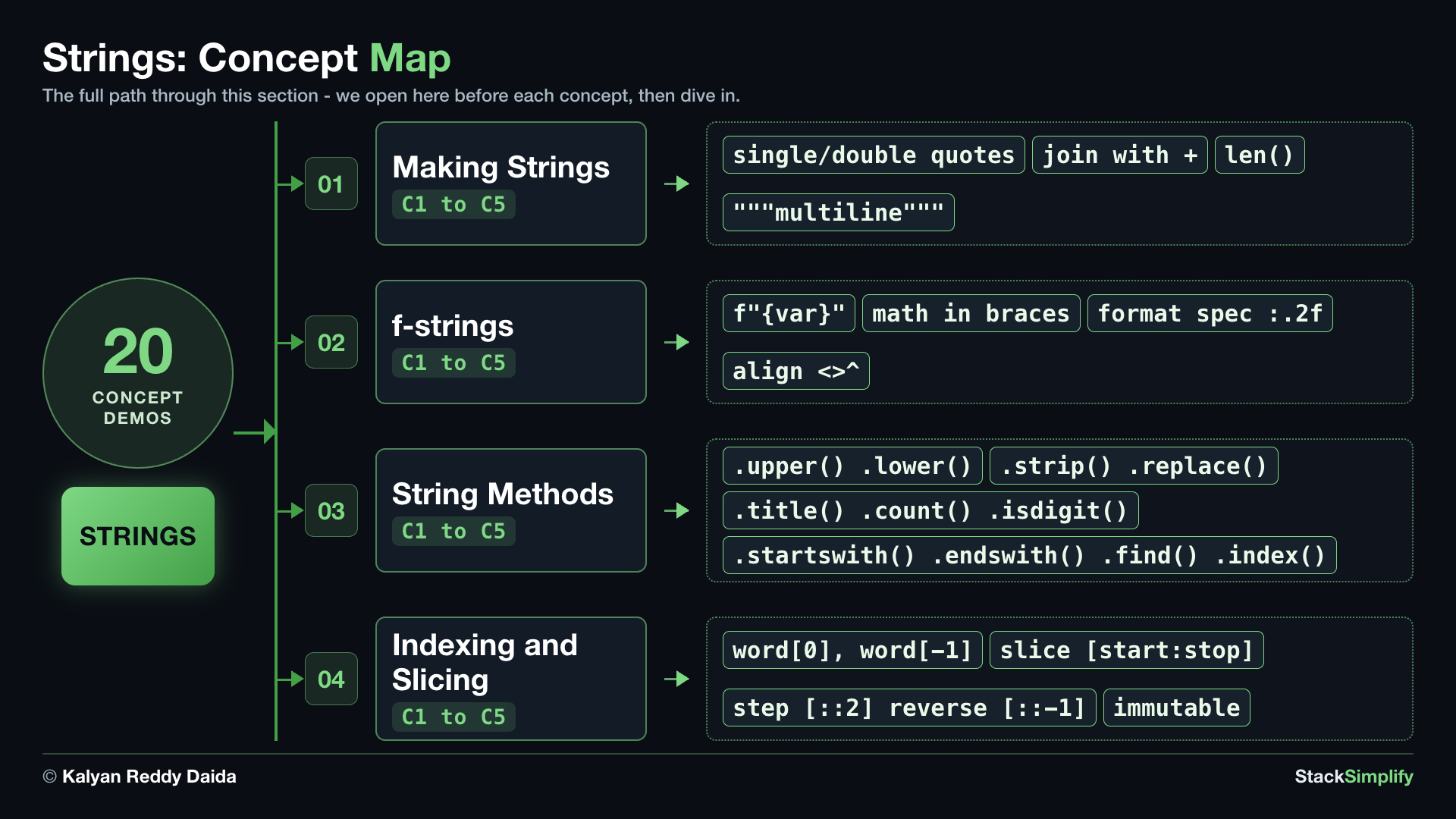
You already met str (text in quotes). Text is everywhere in real programs, so this section goes deeper: how to make strings, how to drop values into text with f-strings, the most useful string methods, and how to pick out characters with indexing and slicing.
Practice as you go
Each concept below has matching exercises. When you finish a step, head to the Practice problems for this section, then try the optional Workshop. Every problem includes a solution you can expand.
Step-00: What You Will Learn
In this section you will learn how to:
- Make strings with single or double quotes, join them, and write multiline text with triple quotes.
- Use f-strings to put values inside text, and format numbers neatly.
- Use common string methods:
upper,lower,strip,replace,title,count,isdigit,startswith/endswith,find/index. - Pick out characters with indexing and ranges with slicing (including a step and reverse), and know that strings are immutable.
Step-01: Making Strings
File: s03_step01_making_strings.py
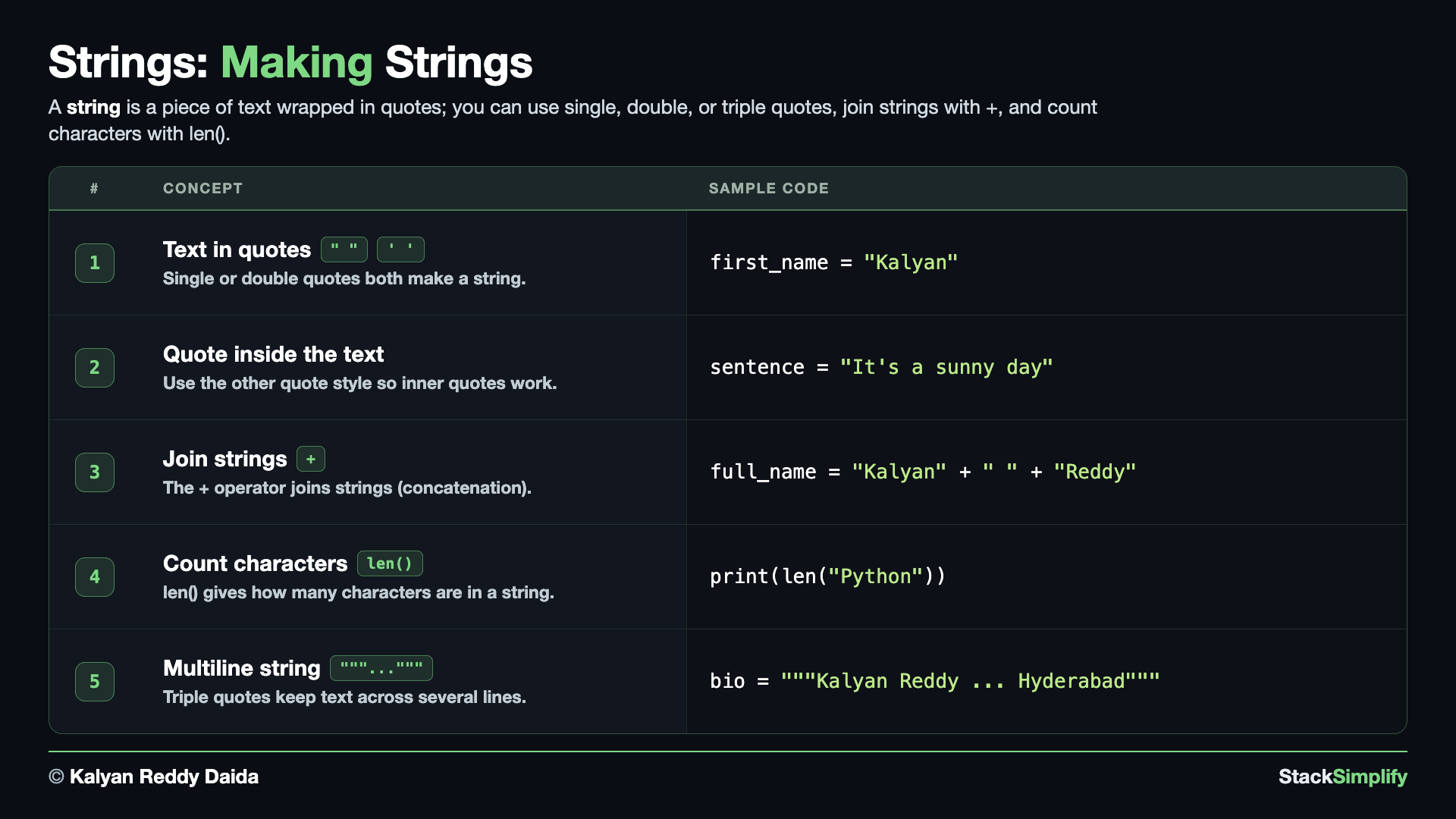
A string is text, and it is the data you will handle most. Create s03_step01_making_strings.py in python-learn and build it up one concept at a time.
Concept 1: A string is text
A string is simply text, and you write it inside quotes. Both single quotes '...' and double quotes "..." work the same way, so you can pick whichever you like. Storing text in a variable lets you reuse it and print it whenever you need.
# Concept-01: A string is text; use single quotes or double quotes (both work)
# Question: How do we store a person's name like "Kalyan" (or a greeting 'Hello') so we can print it later? (single or double quotes both work)
first_name = "Kalyan"
greeting = 'Hello'
print(first_name)
print(greeting)
Concept 2: Quotes inside text
What if your text itself contains a quote mark? The trick is to wrap it in the OTHER quote style. Use double quotes outside when your text has an apostrophe (') inside, and single quotes outside when your text has a " inside. That way Python knows exactly where the string starts and ends.
# Concept-02: Use the other quote style when your text itself contains a quote
# Question: How do we write text that contains quotes inside it, like "It's a sunny day" or 'She said "hi"', without breaking the code?
# Double quotes outside, so the ' inside is fine
sentence = "It's a sunny day"
# Single quotes outside, so the " inside is fine
quote = 'She said "hi"'
print(sentence)
print(quote)
Concept 3: Join strings with +
You can glue strings together end to end with the + operator. This is called concatenation. It is handy for building one piece of text out of several smaller ones, like joining a first name and a last name with a space in between.
# Concept-03: Join strings together with + (this is called concatenation)
# Question: How do we build a full name from first and last names like "Kalyan" + " " + "Reddy" stored in separate variables?
full_name = "Kalyan" + " " + "Reddy"
print(full_name)
Concept 4: Count characters with len()
len() tells you how many characters a string contains, counting every letter, space, and symbol. It is one of the most-used built-ins, so it is worth knowing early. Here it counts the word Python (6), then the joined full_name Kalyan Reddy (12 - the space counts too).
# Concept-04: len() tells you how many characters are in a string
# Question: How do we count the characters in a name or sentence, like "Python" or "Kalyan Reddy"? (len(text))
print(len("Python"))
full_name = "Kalyan" + " " + "Reddy"
print(len(full_name))
Concept 5: Multiline text with triple quotes
When your text needs to span several lines, wrap it in triple quotes """...""". Everything between them, including the line breaks, is kept exactly as you typed it. This is the easy way to store a block of text like a short bio or a message in a single variable.
# Concept-05: Triple quotes """...""" make a multiline string; real text kept across several lines
# Question: How do we store a block of text that spans several lines, like the short bio "Kalyan Reddy / Python Teacher / Hyderabad", in one variable? (wrap it in triple quotes)
bio = """Kalyan Reddy
Python Teacher
Hyderabad"""
print(bio)
print(len(bio))
len() counts the line breaks too
len(bio) is 37, not 35. The three lines hold 12 + 14 + 9 = 35 visible characters, plus the 2 newline characters (the line breaks between the lines) that the triple-quoted string keeps. There is no line break after the last line, so it is 35 + 2 = 37.
Pick the quote that is not inside your text
Single and double quotes both make strings, so choose the one your text does NOT contain. For It's a sunny day, wrap it in double quotes; for She said "hi", wrap it in single quotes. No extra escaping needed.
Pages for this step: Concept | Practice | Workshop
Python Files for this step: Concept | Practice | Practice Solutions | Workshop | Workshop Solutions
Step-02: f-strings
File: s03_step02_fstrings.py
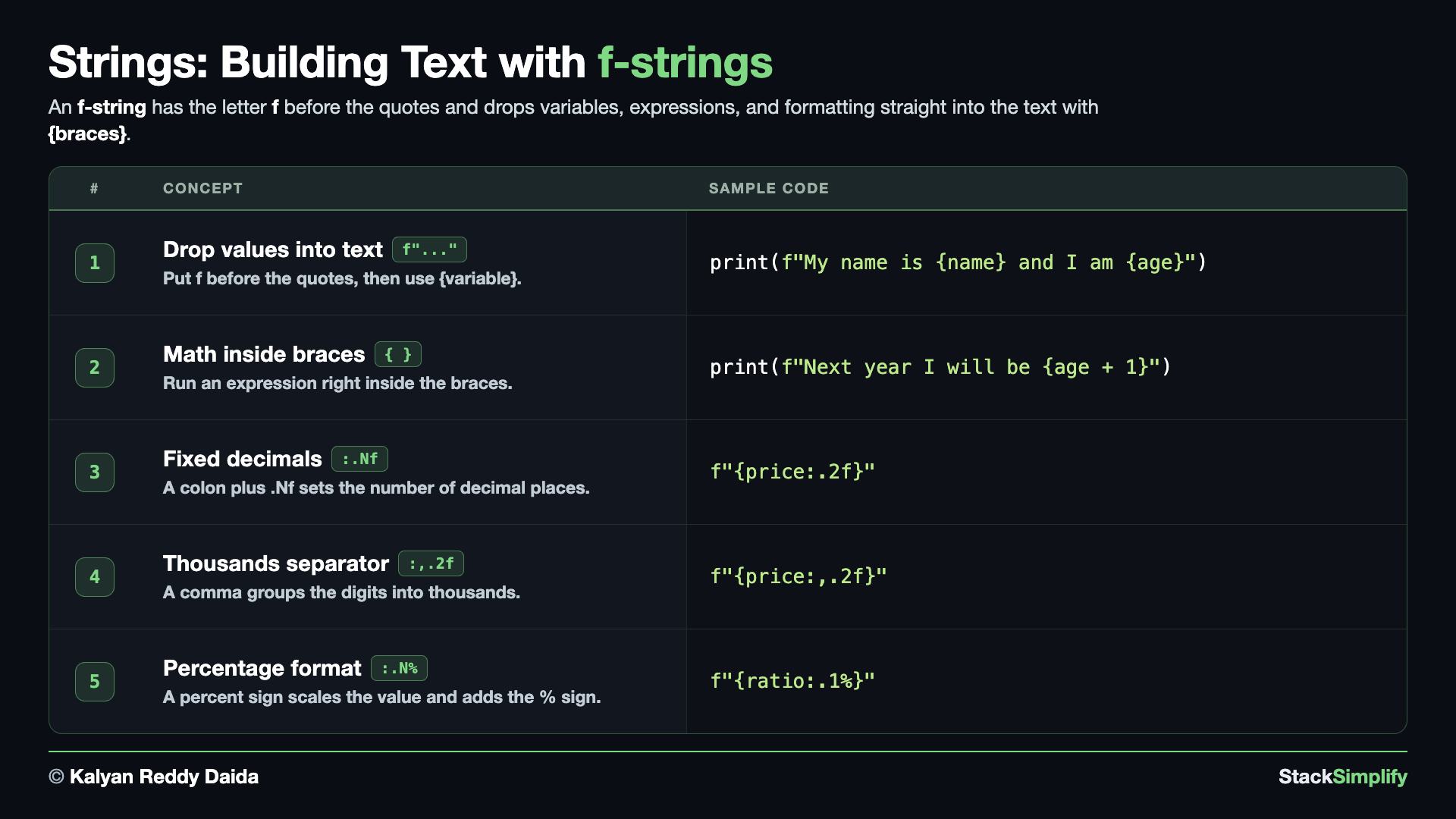
An f-string is the easiest way to put values inside text. Create s03_step02_fstrings.py and build it concept by concept.
Concept 1: Drop values into text
An f-string lets you put values straight into a piece of text. Write an f just before the opening quote, then put any variable inside curly braces {...}. Python replaces each {variable} with its value, so the sentence reads naturally. The two runs below print the SAME sentence: Run 1 builds it the old way (glue with + and convert with str()); Run 2 does it in one shorter, clearer f-string.
# Concept-01: An f-string drops values into text; put f before the quotes, then {variable}
# Question: How do we drop a name "Kalyan" and age 30 into a sentence so it reads naturally? (f"...{name}...{age}")
name = "Kalyan"
age = 30
# Run 1 - without f-string: glue the pieces with + and convert age with str()
print("My name is " + name + " and I am " + str(age))
# Run 2 - with f-string: drop {name} and {age} straight in
print(f"My name is {name} and I am {age}")

"""
Observation:
1. Without an f-string you glue the pieces together with +, which is fiddly and easy to get wrong.
2. You must convert non-text values yourself, like str(age), or Python raises a TypeError.
3. The f-string is shorter and reads like the final sentence: drop {name} and {age} straight in - no + and no str().
"""
Concept 2: Math inside the braces
The braces are not limited to plain variables - you can put a small calculation inside them too. Python works out the expression first, then drops the result into the text. So {age + 1} shows next year's age without needing a separate line of math. Both runs print the SAME sentence: Run 1 passes the value the plain way (a comma in print adds it with a space); Run 2 keeps the calculation right inside the f-string.
# Concept-02: You can do math inside the braces too
# Question: How do we show a value like next year's age (age = 30, so {age + 1} gives 31) without a separate line of math? (put the math inside the braces: {age + 1})
age = 30
# Run 1 - without f-string: pass the math as a second print argument (comma)
print("Next year I will be", age + 1)
# Run 2 - with f-string: do the math inside the braces {age + 1}
print(f"Next year I will be {age + 1}")
Concept 3: Set decimal places with .Nf
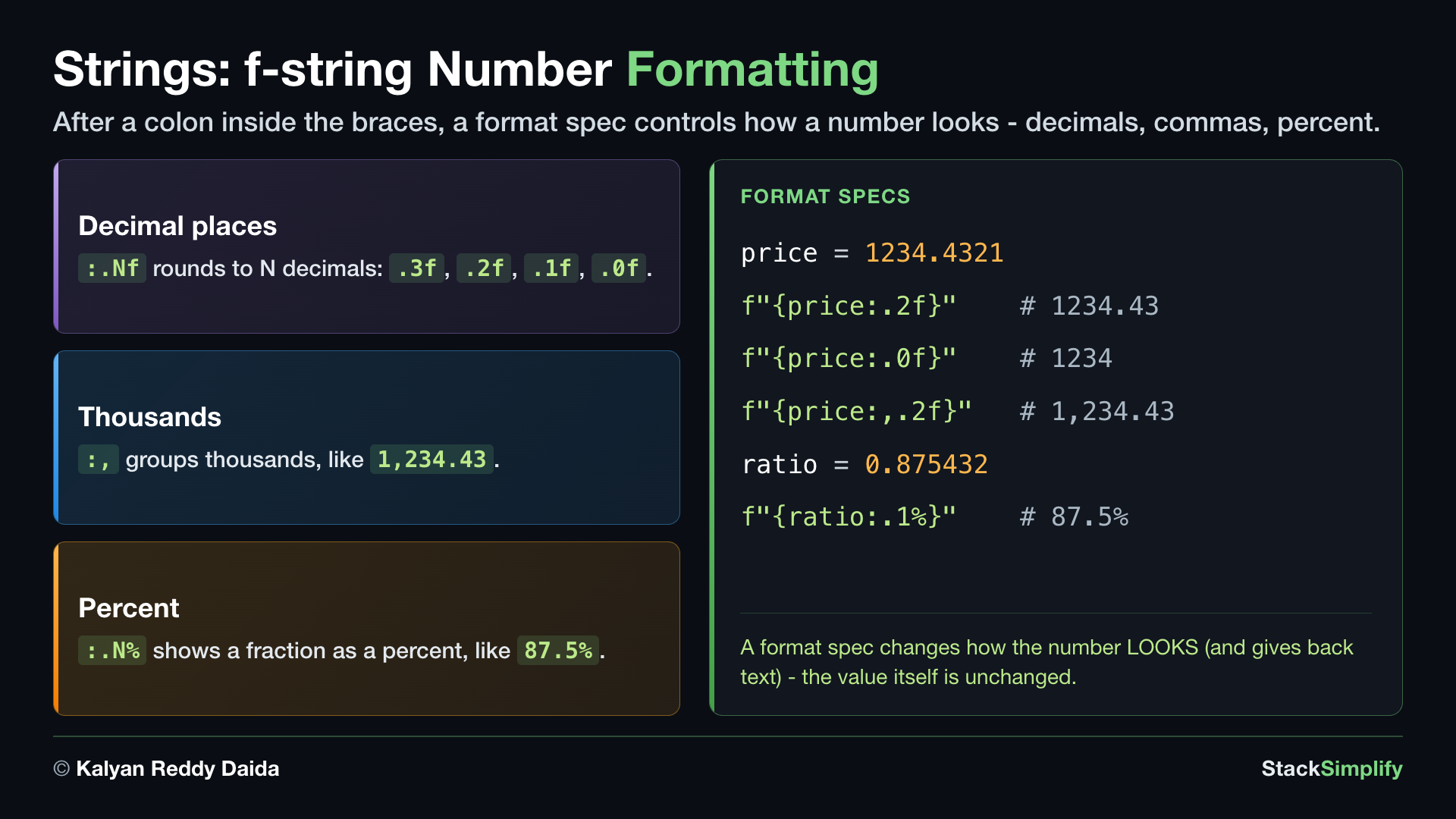
After a colon inside the braces you add a format spec. .Nf rounds a number to N decimal places - .3f gives three, .2f two, .1f one, and .0f none (a whole number). The result is text (a str), ready to print.
# Concept-03: A format spec after a colon sets the number of decimal places: {value:.Nf}
# Question: How do we show a price like 1234.4321 with a fixed number of decimal places - 3, 2, 1, or 0? (a format spec after a colon, like {price:.2f})
price = 1234.4321
p1 = f"{price:.3f}"
print(p1)
print(type(p1))
p2 = f"{price:.2f}"
print(p2)
p3 = f"{price:.1f}"
print(p3)
p4 = f"{price:.0f}"
print(p4)
Concept 4: Group thousands with ,
Add a comma to the spec, before the decimals, and the number prints with thousands separators - so 1234.43 reads as 1,234.43. Handy for prices and big counts.
# Concept-04: A comma in the format spec groups thousands with commas: {value:,.2f}
# Question: How do we show a big number like 1234.4321 with thousands separators, like 1,234.43? (add a comma before the decimals: {price:,.2f})
price = 1234.4321
t1 = f"{price:,.2f}"
print(t1)
Concept 5: Show a percent with .N%
A % in the spec multiplies the value by 100 and adds a % sign, so a fraction like 0.875 shows as 87.5%. The number before the % sets the decimals: .1%, .2%, .3%.
# Concept-05: A percent sign in the spec shows a fraction as a percentage: {value:.N%}
# Question: How do we show a fraction like 0.875432 as a percentage with N decimals? ({ratio:.1%} gives 87.5%)
ratio = 0.875432
percentage = f"{ratio:.1%}"
print(percentage)
percentage = f"{ratio:.2%}"
print(percentage)
percentage = f"{ratio:.3%}"
print(percentage)
Reach for f-strings
An f-string (the f before the quotes) is the simplest way to drop values into text, like f"Hi {name}". You will use it in almost every program from here on.
Pages for this step: Concept | Practice | Workshop
Python Files for this step: Concept | Practice | Practice Solutions | Workshop | Workshop Solutions
Step-03: String Methods
File: s03_step03_string_methods.py
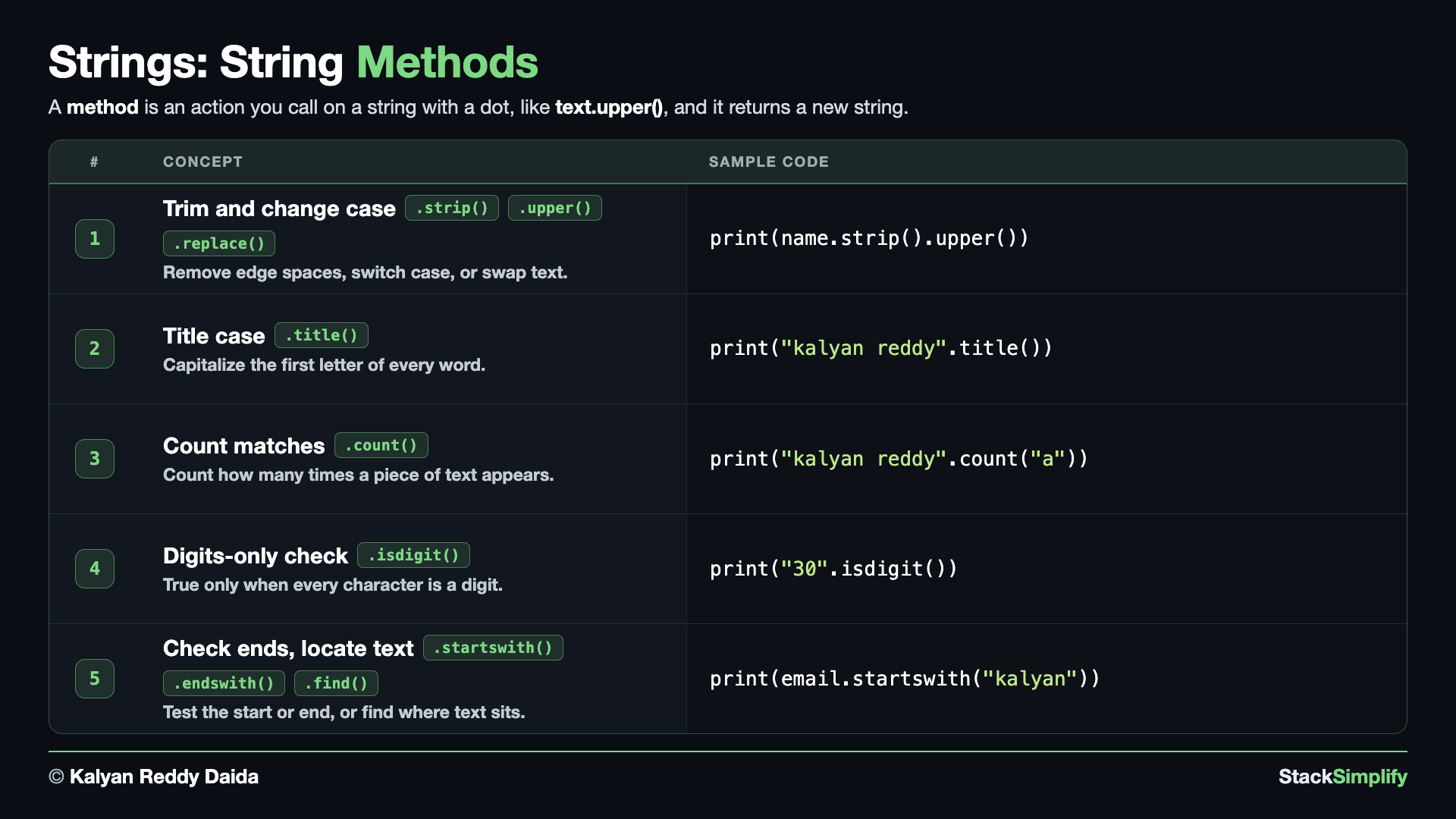
A method is an action you call on a value using a dot, like value.method(). Strings come with many handy ones. Create s03_step03_string_methods.py and build it concept by concept.
Concept 1: Change case and trim spaces
A method is an action you run on a value by writing a dot and the method name, like name.upper(). Here we tidy Kalyan's messy name text: strip() removes spaces from both ends, upper() / lower() change the case, and replace() swaps one piece of text for another. Methods can chain (name.strip().upper()), and each one hands you a NEW string, leaving the original unchanged.
# Concept-01: A method is an action you call on a value with a dot: value.method()
# Question-1: How do we trim the stray spaces around "  kalyan reddy  " and fix its case to upper or lower? (.strip(), .upper(), .lower())
# Question-2: How do we swap one piece of text for another, like turning "kalyan reddy" into "kalyan r"? (.replace("reddy", "r"))
name = "  kalyan reddy  "
print(name.strip())                          # kalyan reddy (spaces at both ends removed)
print(name.strip().upper())                  # KALYAN REDDY (chain: strip then UPPER)
print("KALYAN".lower())                      # kalyan
print("kalyan reddy".replace("reddy", "r"))  # kalyan r (swap one piece of text for another)
Concept 2: Title-case each word
title() capitalizes the first letter of every word and lowercases the rest. It is the quick way to turn Kalyan's lowercase kalyan reddy into a tidy Kalyan Reddy, which is useful for names and titles.
# Concept-02: title() makes the first letter of each word a capital
# Question: How do we turn Kalyan's lowercase name into a nicely capitalized "Kalyan Reddy"? (text.title())
print("kalyan reddy".title())  # Kalyan Reddy
Concept 3: Count occurrences with count()
count() tells you how many times a smaller piece of text appears inside a string. Pass it the text to look for, and it returns the number of matches. Here it tallies the letter a in Kalyan's name - handy any time you need to count a letter or a word.
# Concept-03: count() tells how many times a piece of text appears
# Question: How many times does the letter "a" appear in Kalyan's name? (text.count("a"))
print("kalyan reddy".count("a"))  # 2 (the letter a appears twice)
Concept 4: Check digits with isdigit()
isdigit() returns True only when EVERY character in the string is a digit. It is a quick way to check a typed value before you trust it as a number - here Kalyan's age "30" passes, while text with letters gives False and so does empty text. You will use this to guard input before converting it.
# Concept-04: isdigit() tells if text is all digits; handy to check input before turning it into a number
# Question: How do we check that Kalyan's typed age "30" is a whole number before we trust it? (text.isdigit())
print("30".isdigit())     # True (all characters are digits)
print("30yrs".isdigit())  # False (has letters)
print("".isdigit())       # False (empty text is not a number)
Concept 5: Check ends and find text inside
startswith() and endswith() test whether a string begins or ends with a given piece of text - perfect for checking Kalyan's email. find() returns the position of the first match (or -1 if it is missing), and index() does the same but raises an error when the text is not there.
# Concept-05: startswith() / endswith() check the ends; find() / index() locate text inside
# Question-1: How do we check if the email "kalyan@example.com" starts with "kalyan" or ends with ".com"? (.startswith, .endswith)
# Question-2: How do we find where the "@" sits in "kalyan@example.com"? (.find, .index)
email = "kalyan@example.com"
print(email.startswith("kalyan"))  # True (begins with this text)
print(email.endswith(".com"))      # True (ends with this text)
print(email.find("@"))             # 6: position of the first match (-1 if not found)
print(email.index("@"))            # 6: like find(), but errors if the text is missing
String methods return a new string
upper, lower, strip, replace, and title never change the original - they hand back a brand new string, because strings are immutable (you confirm this in the next step). If you want to keep the result, store it: name = name.upper().
Prefer find() over index() when text may be missing
find() returns -1 when the text is not there, but index() raises a ValueError and stops the program. Reach for find() when a match is not guaranteed, so a missing value does not crash your code.
Pages for this step: Concept | Practice | Workshop
Python Files for this step: Concept | Practice | Practice Solutions | Workshop | Workshop Solutions
Step-04: Indexing and Slicing
File: s03_step04_indexing_slicing.py
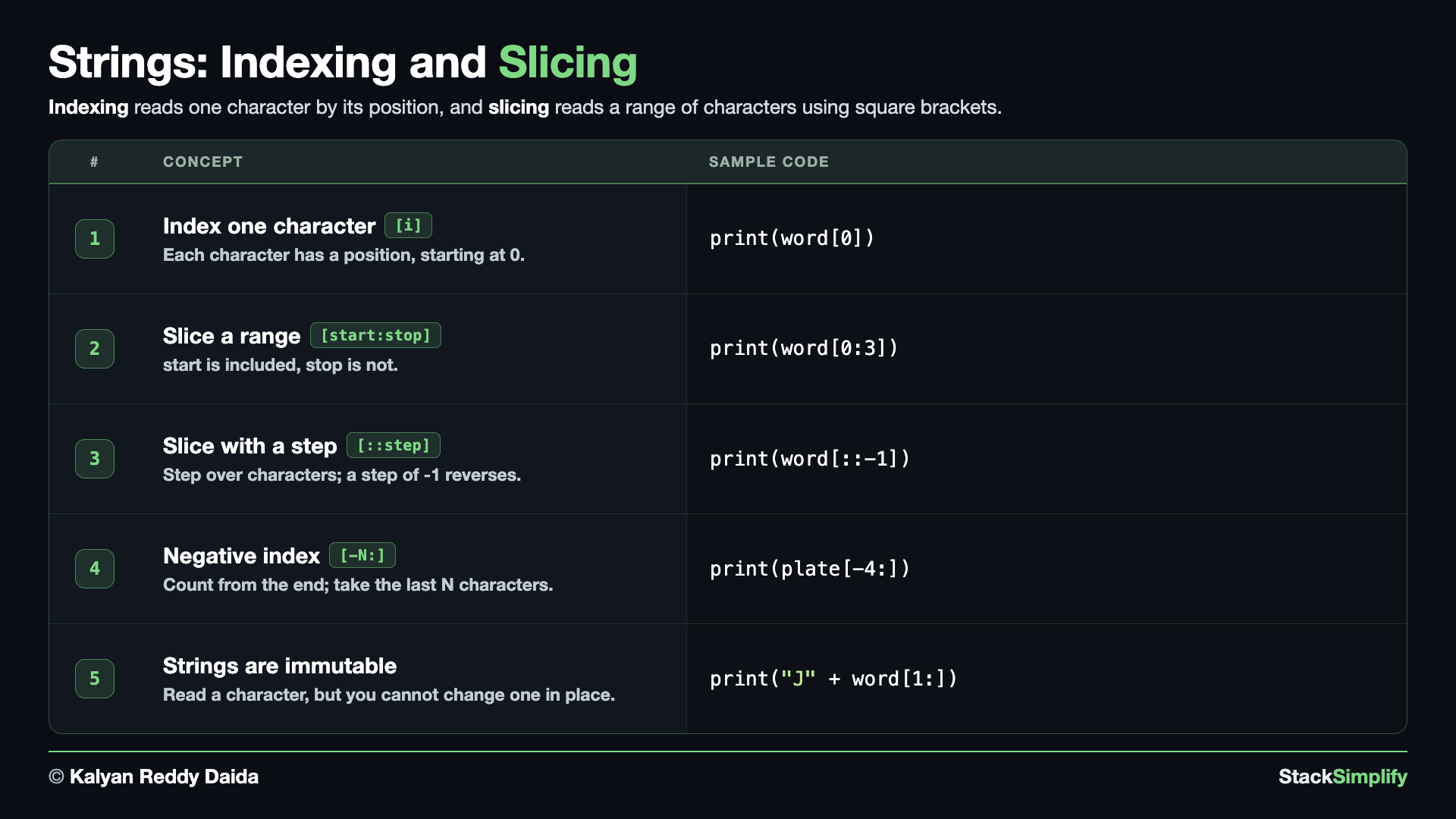
A string is a sequence of characters, and each character has a position called an index, starting at 0. Create s03_step04_indexing_slicing.py and build it concept by concept.
Concept 1: Get one character by index
Each character in a string sits at a numbered position, and counting starts at 0. So word[0] is the first character and word[1] is the second. A negative index counts from the end, so word[-1] is the last character - a neat shortcut when you do not know the length.
# Concept-01: A string is a sequence; each character has a position (index), starting at 0
# Question: How do we get a single character from a word like "Python", like the first letter (word[0]) or the last letter (word[-1])?
word = "Python"

print(word[0])  # P: first character (index 0)
print(word[1])  # y (second character)
print(word[-1])  # n: last character (a negative index counts from the end)
Concept 2: Take a range with a slice
A slice pulls out a range of characters using word[start:stop]. The start index is included, but the stop index is NOT - it stops just before it. Leave a side blank to mean "from the very start" or "all the way to the end", so word[3:] runs to the end and word[:2] runs from the start.
# Concept-02: A slice takes a range: word[start:stop]; start is included, stop is not
# Question: How do we pull out a chunk of a word like "Python", like the first three letters (word[0:3]) or from the middle to the end (word[3:])?
word = "Python"
print(word[0:3])  # Pyt: characters 0, 1, 2
print(word[3:])  # hon (from index 3 to the end)
print(word[:2])  # Py: from the start up to (not including) index 2
Concept 3: Slice with a step, and reverse with [::-1]
A slice can take a third number, the step, written word[start:stop:step]. A step of 2 keeps every second character, so word[::2] gives Pto. A step of -1 walks backwards, which is the classic one-line trick to reverse a string: word[::-1].
# Concept-03: A slice can take a step, written word[start:stop:step]; a step of -1 reverses
# Question-1: How do we take every second character of a word like "Python" in one line? (word[::2] steps by 2)
# Question-2: How do we reverse a whole word like "Python" in one line? (word[::-1] reverses)
word = "Python"
print(word[::2])  # Pto (every 2nd letter: index 0, 2, 4)
print(word[::-1])  # nohtyP (the whole word reversed)
Why word[::2] is Pto
Python is P(0) y(1) t(2) h(3) o(4) n(5). A step of 2 starts at index 0 and jumps +2, landing on 0, 2, 4 (P, t, o) and skipping 1, 3, 5 (y, h, n) - so word[::2] is Pto.
Concept 4: Count from the end with negative indexes
A negative index counts from the end of the string: -1 is the last character, -2 the second-last, and so on. A slice like word[-4:] grabs the last N characters. This is handy when the part you want sits at the end - like a vehicle plate, where the first two letters are the state code and the last four are the number.
# Concept-04: A negative index counts from the END (-1 = last); word[-N:] takes the last N characters
# Question: How do we read the end of a string like the plate "ka05ab1234", like its last 4 digits? (word[-1] last char, word[-4:] last 4)
plate = "ka05ab1234"
print(plate[-1])  # 4 (the last character)
print(plate[-4:])  # 1234 (the last 4 characters - the plate number)
print(plate[:2].upper())  # KA (the first two characters - the state code)
Concept 5: Strings are immutable
A string is immutable, which means you cannot change one of its characters in place. The two runs show what you CAN and cannot do. Run 1 reads a character (word[0]) - allowed. Changing one in place (word[0] = "J", left commented) would raise an error. Run 2 shows the real way to "change" a string: build a NEW one by joining "J" with a slice of the rest - and the original variable stays exactly as it was.
# Concept-05: A string is immutable; you can READ a character but you cannot change one in place
# Question: Can we change one letter of a string by assigning to its index, like word[0] = "J"? (no, strings are immutable)
word = "Python"
# Run 1 - READ a character (allowed): indexing to read is fine
print(word[0])  # P
# word[0] = "J"  # ERROR: 'str' object does not support item assignment (cannot change in place)
# Run 2 - build a NEW string (the way to "change" one): the original stays the same
print("J" + word[1:])  # Jython (a brand new string)
print(word)  # Python (the original is unchanged)
You cannot change a character in place
A string is immutable, so word[0] = "J" raises TypeError: 'str' object does not support item assignment. To change text, build a new string instead, like "J" + word[1:].
Counting starts at 0
The first character is at index 0, and a slice text[start:stop] includes start but stops just before stop. Lists in Collections are indexed and sliced exactly the same way.
Pages for this step: Concept | Practice | Workshop
Python Files for this step: Concept | Practice | Practice Solutions | Workshop | Workshop Solutions
Practice and Workshop
Every step has a matching practice problem - try it yourself, then expand the solution to check. Some practices end with a short input() "Write a Program" problem. Every step also has an optional workshop problem (the same idea in a car scenario). The numbers line up with the steps, so if you get stuck on practice-03, re-read Concept Step-03.
| Step | Concept Name | Concept | Practice | Workshop |
|---|---|---|---|---|
| 01 | making strings | concept | practice | workshop |
| 02 | fstrings | concept | practice | workshop |
| 03 | string methods | concept | practice | workshop |
| 04 | indexing slicing | concept | practice | workshop |
Open the full Practice page and Workshop page for this section - each problem has its statement, expected output, an optional hint, and an expandable solution.
What You Learned
- Make strings with either quote style; join them with
+; count withlen(); write multiline text with triple quotes. - f-strings put values in text; format specs (
.2f,,,.1%) make output readable. - String methods:
upper,lower,strip,replace,title,count,isdigit,startswith/endswith,find/index. - Indexing picks one character; slicing picks a range (with an optional step, and
[::-1]reverses). Strings are immutable, so build a new string to change one.
Next
Section 04: Operators, Booleans, and Conditionals. Do math and ask true-or-false questions, the building blocks of decisions in code.
Prefer to learn by watching?
The full video course teaches every concept on screen and builds the projects with you, step by step.
Section 02: Variables and Data Types Next: Section 04: Operators, Booleans, and Conditionals