04. Operators, Booleans, and Conditionals
View code on GitHub Download slides (PDF) Get the Video Course
Now you make Python do things with values: math with operators, true-or-false questions with comparisons and booleans, and then decisions with if / elif / else. This is where programs start to think.
Practice as you go
Each concept below has matching exercises. When you finish a step, head to the Practice problems for this section, then try the optional Workshop. Every problem includes a solution you can expand.
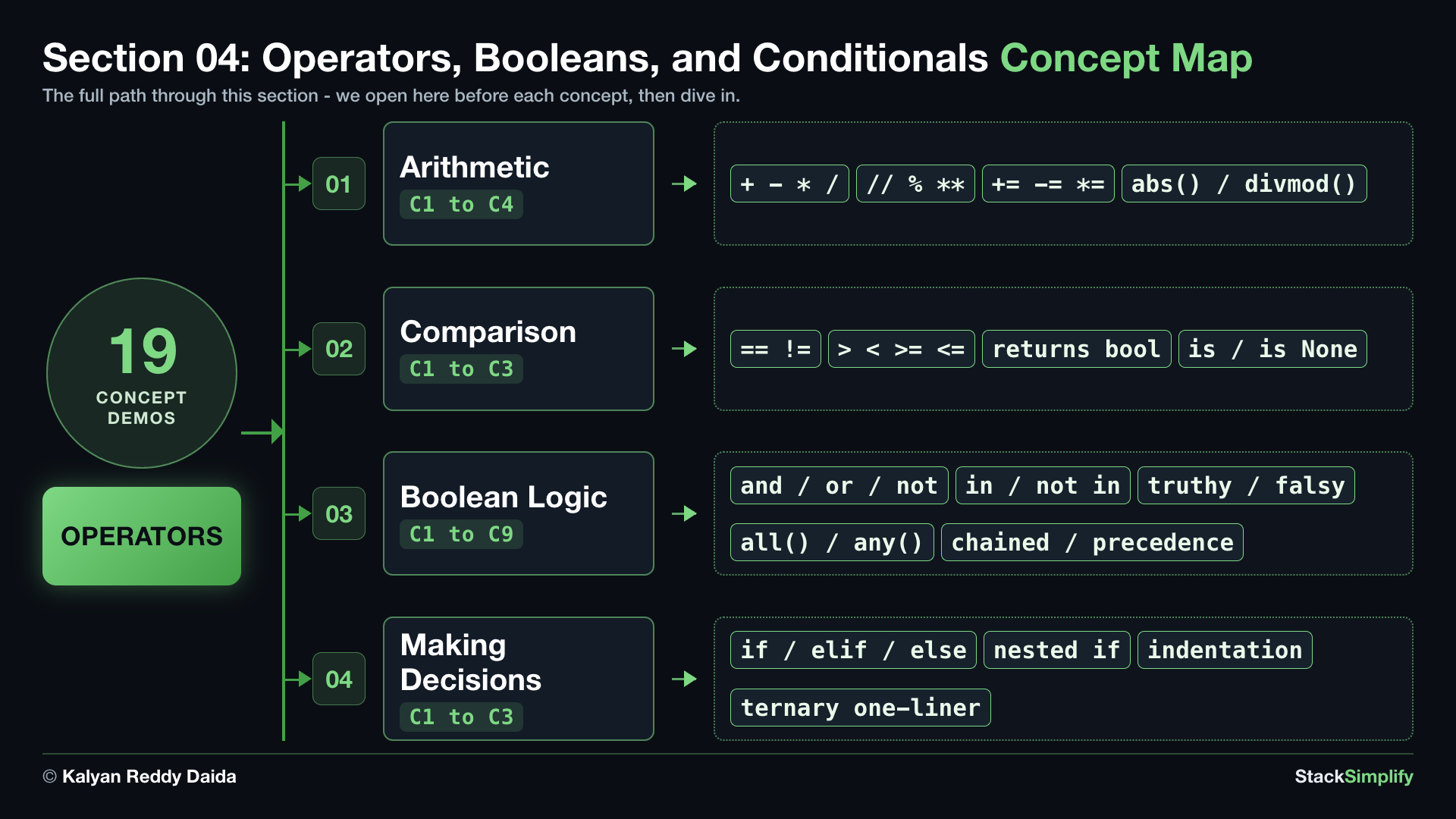
Step-00: What You Will Learn
By the end of this section you will be able to:
- Do math with arithmetic operators.
- Ask true-or-false questions with comparison operators, and test for
Nonewithis. - Combine answers with boolean operators (
and,or,not), check membership within/not in, chain comparisons (0 <= x <= 100), and mind operator precedence. - Make decisions with
if,elif,else, and a nestedif.
Keywords in This Section
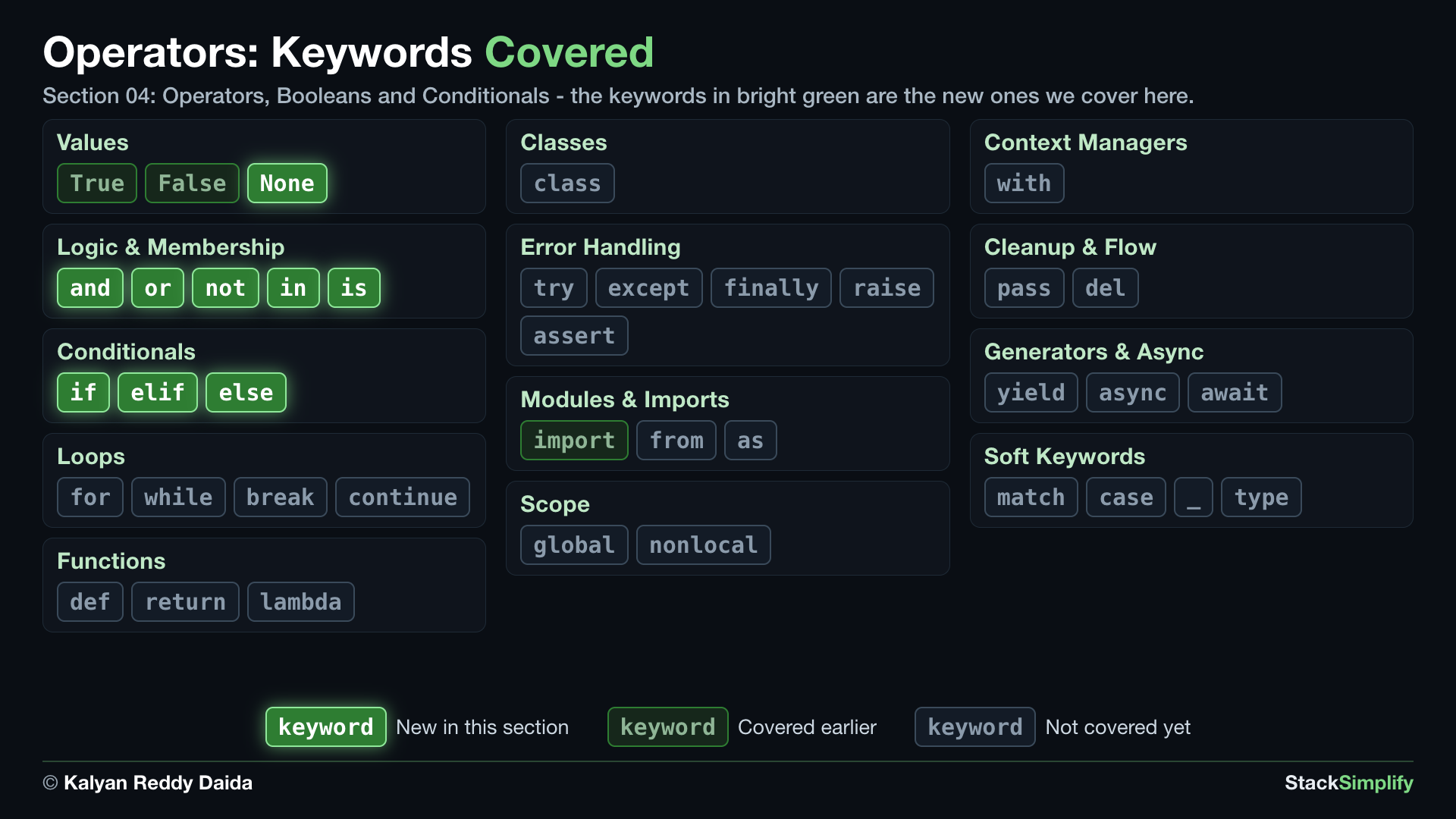
In the map, bright green marks the keywords this section introduces. Dim green marks keywords you already covered in earlier sections, and gray marks the ones still ahead.
Step-01: Arithmetic
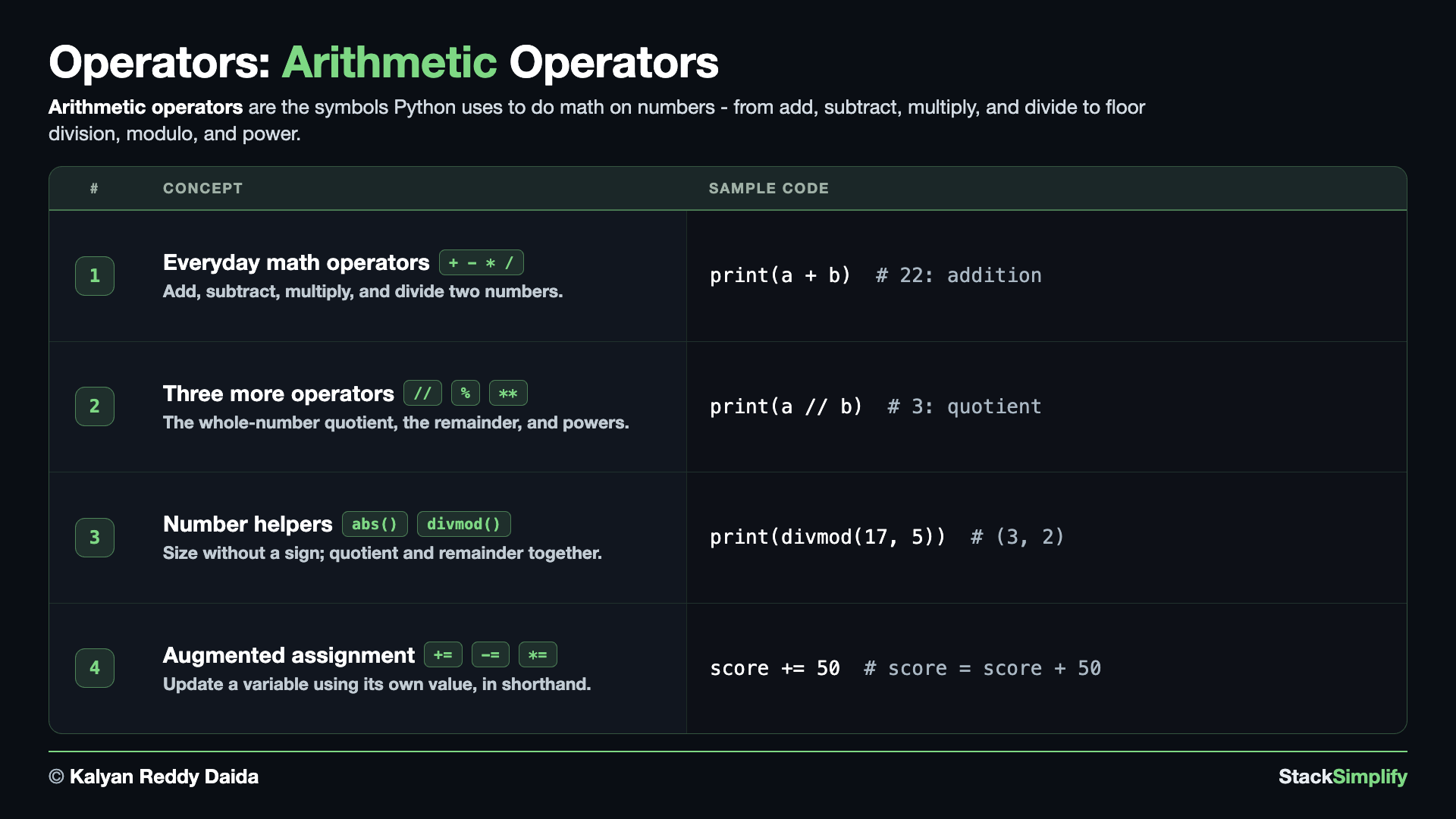
File: s04_step01_arithmetic.py
Create s04_step01_arithmetic.py in python-learn and build it up one concept at a time.
Concept 1: The everyday math operators (+ - * /)
These are the four operators you already know from a calculator: add, subtract, multiply, and divide. The one surprise is division: / always hands back a decimal (a float), even when the numbers divide evenly, so 10 / 2 is 5.0 and not 5. Keep that in mind whenever a result needs to stay a whole number.
# Concept-01: The everyday math operators: + - * /
# Question: How do we add, subtract, multiply, and divide two numbers like 17 and 5 with + - * / ?
a = 17
b = 5

print(a + b)  # 22: addition
print(a - b)  # 12: subtraction
print(a * b)  # 85: multiplication
print(a / b)  # 3.4: division always gives a float (decimal)
Concept 2: Floor division, modulo, and power (// % **)
Three more operators you will reach for often. // (floor division) keeps just the whole part of a division and drops the remainder; % (modulo) does the opposite and gives you only the remainder; ** raises a number to a power. Together, // and % answer the everyday question "how many fit, and what is left over?".
# Concept-02: Three more, // floor division, % modulo (remainder), ** power
# Question-1: How do we get just the whole-number part of dividing 17 by 5 with // ?
# Question-2: How do we find the remainder of dividing 17 by 5 with % ?
a = 17
b = 5
print(a // b)  # 3 (floor division: the whole-number part, i.e. the quotient)
print(a % b)  # 2 (modulo: the remainder)
print(a ** 2)  # 289: power, a to the power 2
Concept 3: Two handy number helpers (abs and divmod)
Python ships with small built-in helpers so you do not have to write the logic yourself. abs() gives a number's size without its sign, which is what you want for a distance or the gap between two values. divmod(a, b) hands back the floor-division result and the remainder together as a pair, (a // b, a % b), in a single call.
# Concept-03: Two handy number helpers, abs() for size without a sign, divmod() for quotient and remainder together
# Question-1: How do we get the size of a number ignoring its sign with abs(), like abs(-7) or abs(7)?
# Question-2: How do we get the quotient and remainder of 17 divided by 5 together in one step with divmod(17, 5)?
print(abs(-7))  # 7 (absolute value: distance from zero, never negative)
print(abs(7))  # 7
print(divmod(17, 5))  # (3, 2): the // and % answers together (quotient, remainder)
Concept 4: Augmented assignment (+= -= *= ...)
When you want to update a variable using its own current value, augmented assignment is the short way to write it. score += 50 means exactly score = score + 50 (and there is -=, *=, //=, and more). The two runs show the two everyday patterns: Run 1 a running total that goes up with += then down with -=; Run 2 the tiny count += 1 counter you will lean on constantly once you reach loops.
# Concept-04: Augmented assignment, update a variable using itself, in shorthand (+= -= *= and more)
# Question: How do we change a variable in place, like a running total or a counter? (x += 1 means x = x + 1)
# Run 1 - running total: += adds and -= subtracts, both on the same variable
score = 100
score += 50  # same as score = score + 50
print(score)  # 150
score -= 30  # same as score = score - 30
print(score)  # 120
# Run 2 - counter: += 1 each time (the pattern you will use in loops)
count = 0
count += 1
count += 1
print(count)  # 2
Dividing by zero crashes
10 / 0, 10 // 0, and 10 % 0 all stop the program with a ZeroDivisionError. If a divisor might be zero, check it first - you will learn to catch this cleanly with try / except in Error Handling.
Pages for this step: Concept | Practice | Workshop
Python Files for this step: Concept | Practice | Practice Solutions | Workshop | Workshop Solutions
Step-02: Comparison
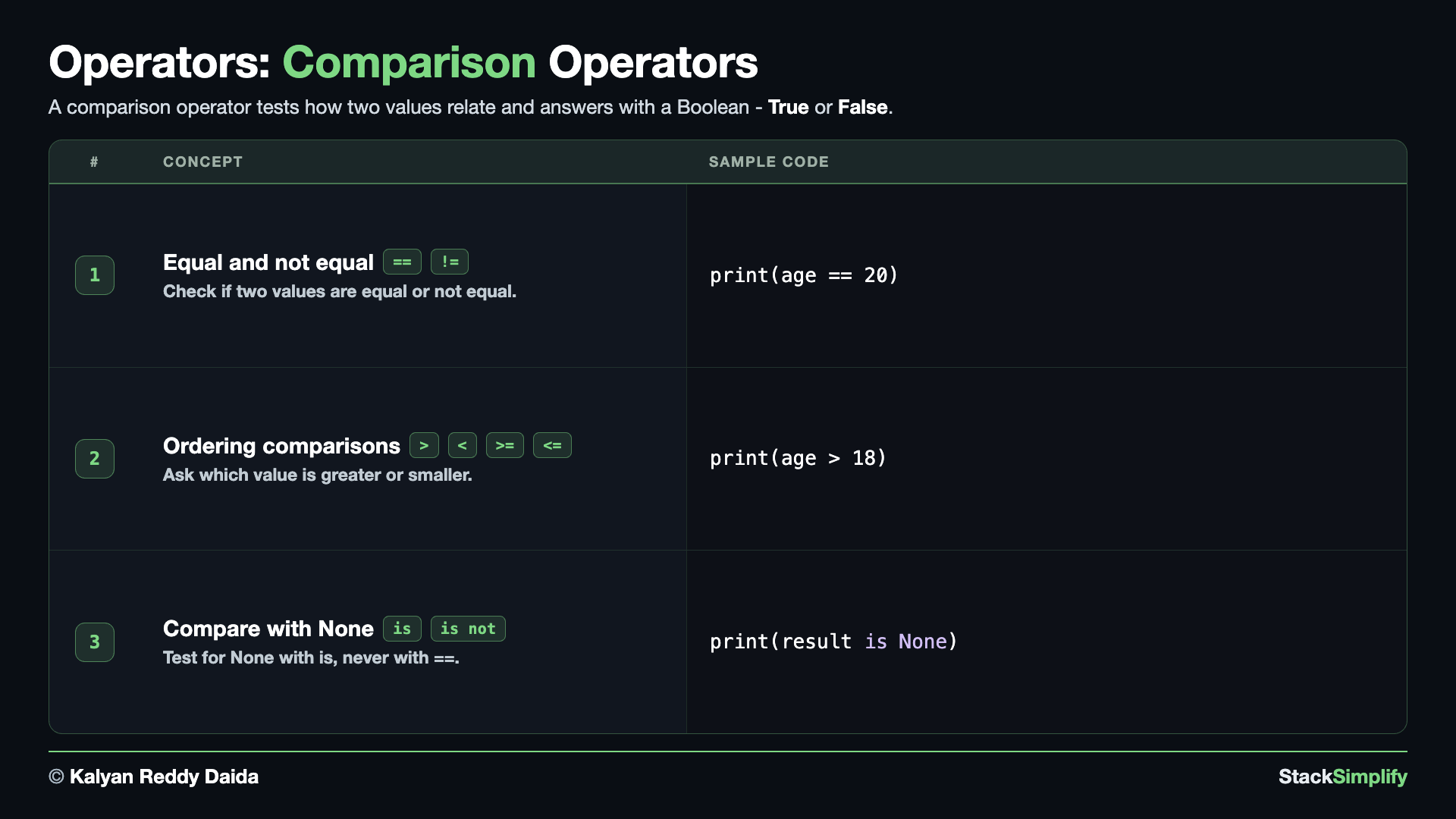
File: s04_step02_comparison.py
A comparison asks a question and answers True or False. The result is always a bool. Create s04_step02_comparison.py and build it concept by concept.
Concept 1: Equal and not equal (== and !=)
A comparison asks a yes/no question and answers with a bool - True or False. == checks whether two values are equal, and != checks whether they are not. Watch the doubled sign: == compares, while a single = assigns a value, which is a completely different thing.
# Concept-01: Comparison operators ask a question and answer True or False
# Question-1: How do we check if age (20) is exactly equal to 20 with == ?
# Question-2: How do we check if age (20) is not equal to 18 with != ?
age = 20

print(age == 20)  # True: equal to (note: two equals signs)
print(age != 18)  # True: not equal to
Concept 2: The ordering comparisons (> < >= <=)
These four compare size or order: greater than, less than, and the "or equal to" versions of each. Like every comparison, they answer True or False, and that boolean is exactly what you will feed into a decision in the next step.
# Concept-02: The ordering comparisons: > < >= <=
# Question: How do we ask which of two values is larger or smaller, and the "or equal to" versions, for age = 20 with > < >= <= ?
age = 20
print(age > 18)  # True: greater than
print(age < 18)  # False: less than
print(age >= 20)  # True: greater than or equal to
print(age <= 19)  # False: less than or equal to
Concept 3: Use is / is not only with None
is looks like ==, but it asks a different question: are these two names the very same object, not just equal in value? In everyday code you only need it for one job - testing against None (and True / False). For comparing real values like numbers or text, always use ==.
# Concept-03: Use is / is not only to compare with None (and True / False)
# Question: How do we check whether a value is empty/missing, set to None? (use is None, not == None)
result = None
print(result is None)  # True: is checks identity; the right test for None
print(result is not None)  # False
# Rule of thumb: use == for values (numbers, text); use is only with None / True / False.
You will see is None again in Section 07.
== compares, = assigns
Use two equals signs == to test whether two values are equal; a single = assigns a value to a variable. Mixing them up is the most common beginner bug.
Pages for this step: Concept | Practice | Workshop
Python Files for this step: Concept | Practice | Practice Solutions | Workshop | Workshop Solutions
Step-03: Boolean Logic
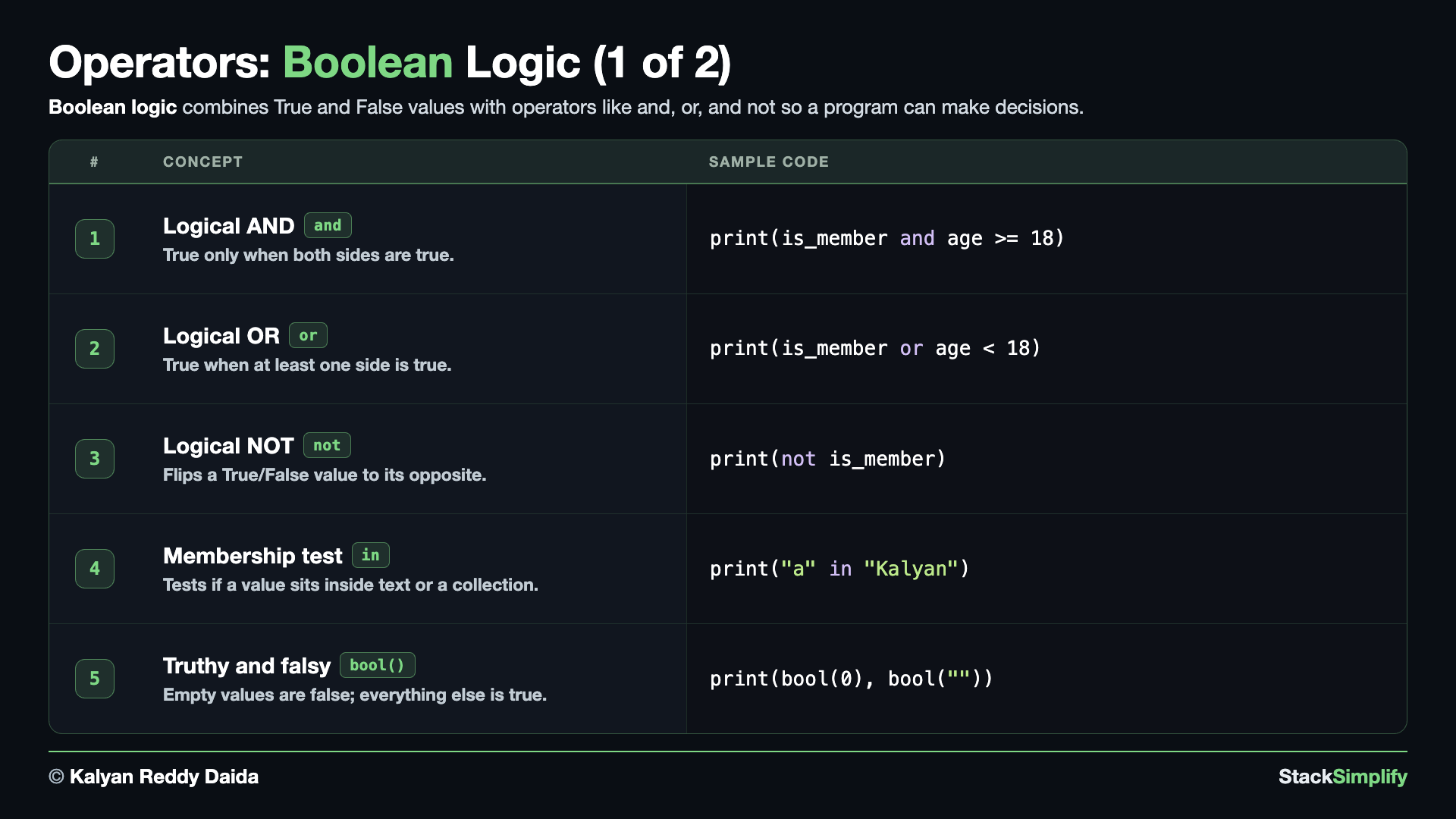
File: s04_step03_boolean_logic.py
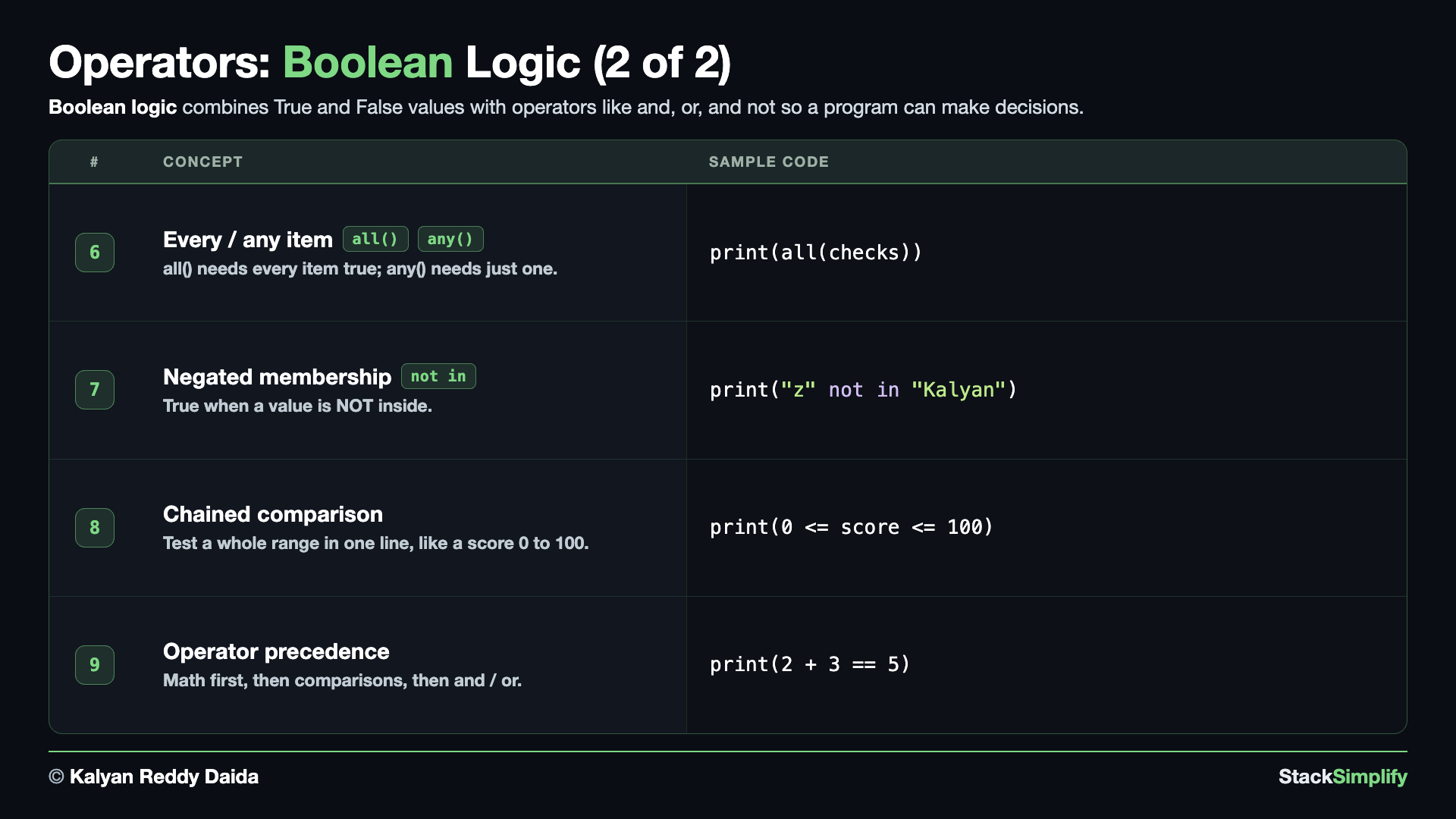
Booleans get powerful when you combine them. Create s04_step03_boolean_logic.py and work through each operator.
Concept 1: Both sides true with and
and combines two true/false checks and is True only when BOTH sides are true. Reach for it when something has to pass more than one test at once - for example, being a member AND being old enough.
# Concept-01: and -> True only if BOTH sides are True
# Question: How do we check if someone is BOTH a member AND old enough (need both conditions true)?
is_member = True
age = 20
print(is_member and age >= 18)  # True
Concept 2: Either side true with or
or is the easy-going partner of and: it is True when AT LEAST ONE side is true. Use it when any single one of several conditions is good enough to proceed.
# Concept-02: or -> True if EITHER side is True
# Question: How do we check if someone EITHER is a member OR is under 18 (need at least one true)?
is_member = True
age = 20
print(is_member or age < 18)  # True
Concept 3: Flip a value with not
not simply flips a boolean: True becomes False, and False becomes True. It lets you read a condition the opposite way, like checking for "not a member".
# Concept-03: not -> flips True to False and False to True
# Question: How do we flip a True/False answer to the opposite, test not a member?
is_member = True
print(not is_member)  # False
Concept 4: Membership with in
in checks whether one value sits inside a larger one - here, whether a letter appears inside a piece of text. It works on lists and other collections too (which you meet in the next section), and it always answers True or False.
# Concept-04: in -> is a value inside some text (or a collection)?
# Question: How do we check if a letter like "a" sits inside the text "Kalyan" with the in operator?
print("a" in "Kalyan")  # True: the letter a is in the text
print("z" in "Kalyan")  # False
Concept 5: Truthy and falsy (empty things are falsy)
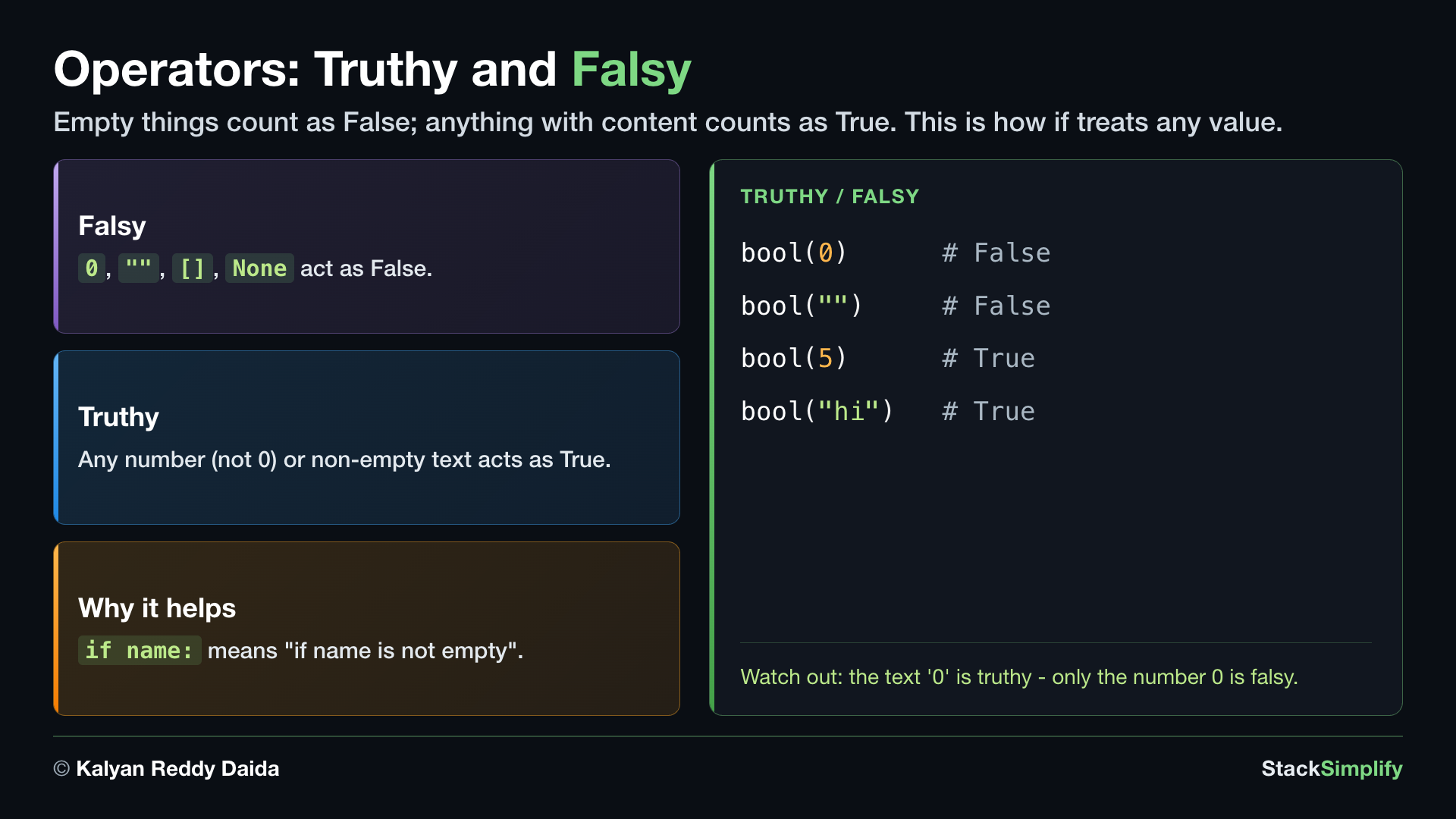
Python can treat any value as true or false on its own. The two runs split them up: Run 1 shows the falsy values - 0 and "" (empty things behave like False); Run 2 shows truthy values - 5 and "hi" (anything with content behaves like True). This is why an if can test a value directly, and it matters in the very next step.
# Concept-05: Truthy / falsy, empty things are falsy, everything else is truthy
# Question: How do we know when Python treats something as nothing/false (empty) versus true (has stuff)?
# Run 1 - FALSY: zero and empty values count as False
print(bool(0), bool(""))  # False False
# Run 2 - TRUTHY: non-zero numbers and non-empty text count as True
print(bool(5), bool("hi"))  # True True
Concept 6: Test a whole collection with all() and any()
When you have many true/false checks at once, these two summarize them in a single call. all(items) is True only if every item is truthy; any(items) is True if at least one item is.
# Concept-06: all() is True only if EVERY item is true; any() is True if AT LEAST ONE is true
# Question-1: How do we check if EVERY item in the list [True, True, False] is true with all()?
# Question-2: How do we check if AT LEAST ONE item in the list [True, True, False] is true with any()?
checks = [True, True, False]
print(all(checks))  # False: not every item is True
print(any(checks))  # True: at least one item is True
Concept 7: Check a value is not present with not in
not in is the mirror of in: it is True exactly when a value is NOT inside. It often reads more naturally than putting not in front of a whole in check.
# Concept-07: not in -> the mirror of in; True when a value is NOT inside
# Question: How do we check that a letter like "z" is NOT inside the text "Kalyan" with the not in operator?
print("z" not in "Kalyan")  # True: z is not in the text
print("a" not in "Kalyan")  # False: a IS in the text, so "not in" is False
Concept 8: Chained comparison (0 <= x <= 100)
Python lets you chain a range check the way you would write it in math: 0 <= score <= 100. It means the same as score >= 0 and score <= 100, just shorter and closer to how you say it out loud. Chaining is neat for a simple range, but for anything more involved, and / or stay clearer.
# Concept-08: Chained comparison, Python lets you write 0 <= x <= 100; and is often clearer
# Question: How do we check a value sits inside a range, like a percentage 0 to 100? (chain it, or use and)
score = 72
print(0 <= score <= 100)  # True, reads like math: 0 <= score AND score <= 100
print(score >= 0 and score <= 100)  # True: the SAME check written with and
# Chaining is neat for a simple range, but it can get hard to read; for anything more,
# and / or are clearer and can express checks that chaining cannot.
Concept 9: Operator precedence
When an expression mixes kinds of operators, Python follows a fixed order: it works out the math first, then the comparisons, then and / or. When that order is not obvious at a glance, add parentheses to make your intent clear - they cost nothing and prevent surprises.
# Concept-09: Operator precedence, math runs first, then comparisons, then and / or; use ( ) to be clear
# Question: In a mixed expression, what does Python work out first? (math, then comparison, then and/or)
print(2 + 3 == 5)  # True: 2 + 3 is computed first, then ==
print(5 > 3 and 2 > 1)  # True: each comparison first, then and
print((5 > 3) and (2 > 1))  # True: same result; the parentheses just make the order obvious
Let truthiness do the work
Because empty values are falsy, you can write if items: instead of if len(items) > 0, and if name: instead of if name != "". It is shorter and the Pythonic way to ask "is there something here?".
Pages for this step: Concept | Practice | Workshop
Python Files for this step: Concept | Practice | Practice Solutions | Workshop | Workshop Solutions
Step-04: Making Decisions
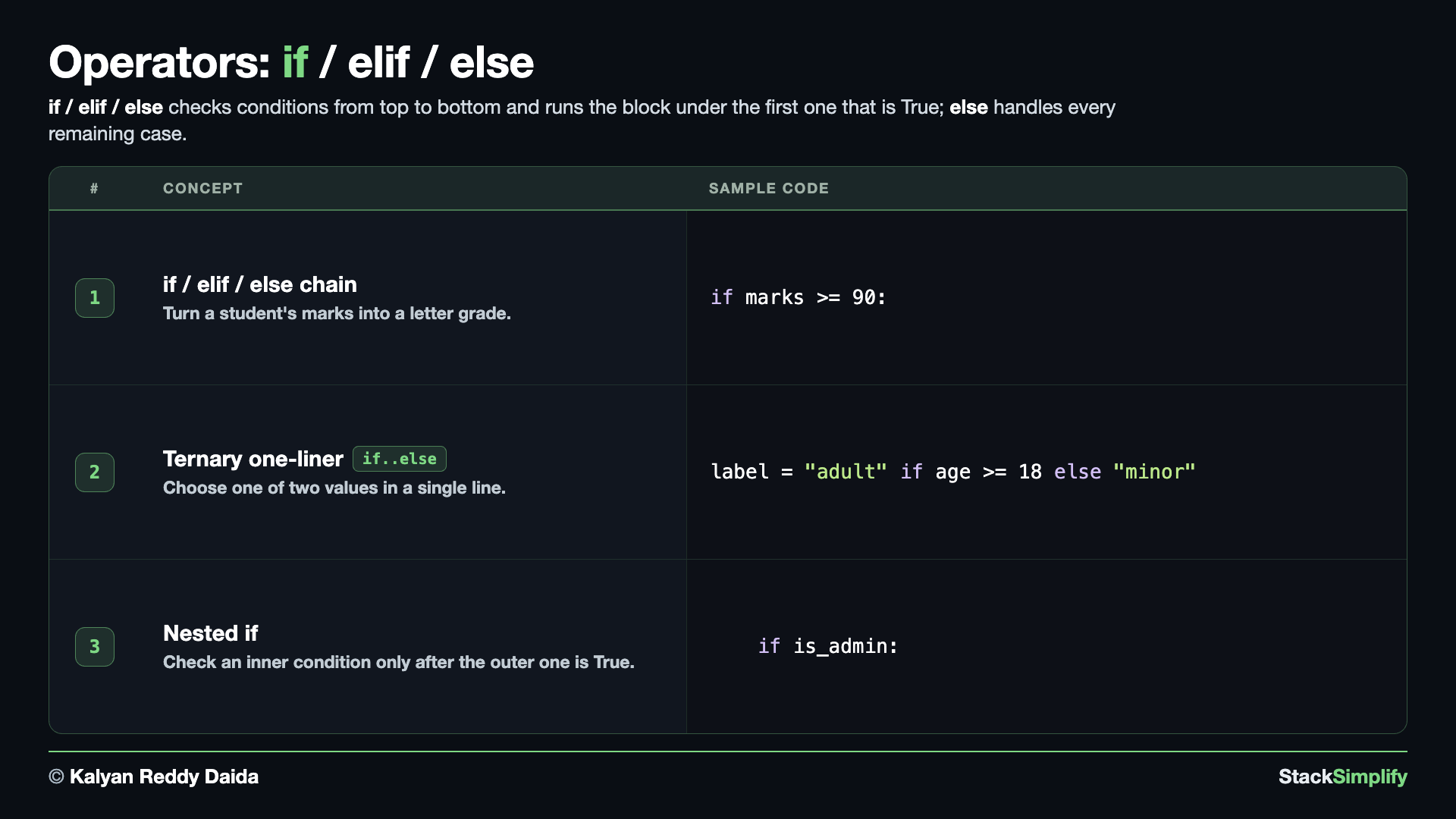
File: s04_step04_if_elif_else.py
if / elif / else runs different code depending on a true-or-false question. Create s04_step04_if_elif_else.py and build the three concepts.
Concept 1: Branch with if / elif / else
if lets your program take a different path depending on a true/false question. We build it in three small steps.
E1 is an if on its own. marks is 85, so the condition marks >= 90 is False and nothing inside the block runs - no output at all from those two print lines. The program does not stop, though: it carries straight on to print("program finished"). That is the whole point of E1.
E2 adds an else, so there is always a second path. marks is 35, the condition is False, and the else branch runs instead.
E3 adds elif for the cases in between. Python checks the branches from top to bottom and runs the first one whose condition is True, then skips the rest. marks is 95, so it takes Grade: A and never even looks at the other three.
# Concept-01: if / elif / else, run a branch based on True/False conditions
# Question-1: What happens when an if condition is False and there is no else? (nothing in the block runs; the program carries on)
# Question-2: How do we give a second path for when the condition is False? (add an else branch)
# Question-3: How do we choose between MORE than two paths, like a letter grade? (elif, checked top to bottom)
# E1: an if on its own; the block runs ONLY when the condition is True
marks = 85
if marks >= 90:
    print("Excellent")
    print("Good Marks")
# Rest of the program
print("program finished")

# E2: if / else; exactly one of the two branches always runs
marks = 35
if marks >= 50:
    print("Result: pass")
else:
    print("Result: Fail")
# Rest of the program
print("program finished")

# E3: if / elif / else; many paths, and the FIRST True one wins
marks = 95
if marks >= 90:
    print("Grade: A")
elif marks >= 75:
    print("Grade: B")
elif marks >= 50:
    print("Grade: C")
else:
    print("Grade: F")
# Rest of the program
print("program finished")

# Python checks top to bottom and runs the FIRST branch whose condition is True.
# The indented lines under a branch run only when that condition is True.
Concept 2: The ternary (a one-line either/or)
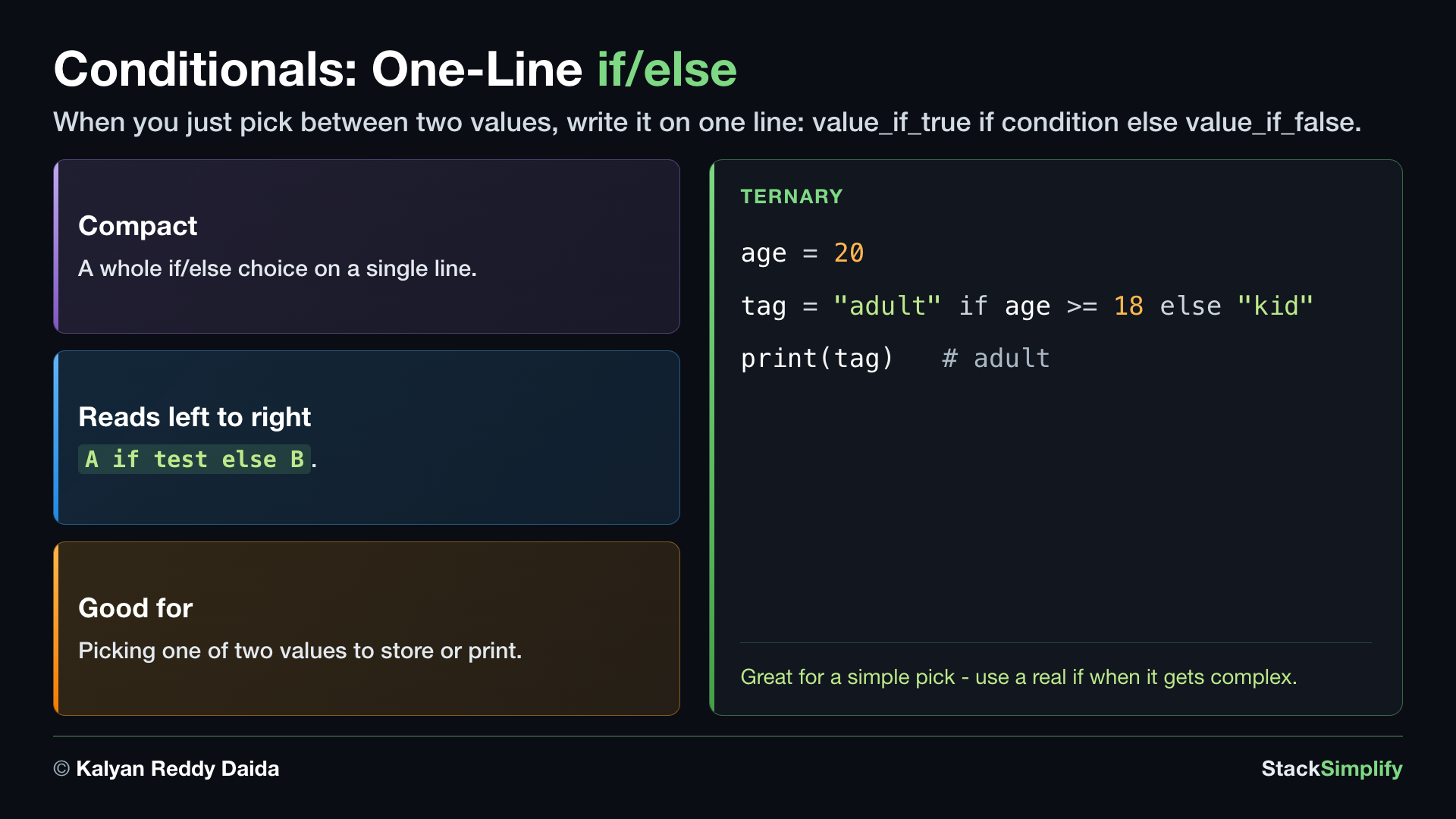
When a choice has just two outcomes, you can write it on a single line: value_if_true if condition else value_if_false. It keeps simple either/or decisions short and easy to read. Reach for a full if / elif / else when there are several outcomes instead of two.
# Concept-02: The ternary, a short one-line either/or choice
# Question: How do we decide adult or minor from a person's age, in one line? (18 or older -> adult, else minor)
age = 20
label = "adult" if age >= 18 else "minor"
print(label)

# Question: How do we decide hot or cold from the temperature, in one line? (over 30 -> hot, else cold)
temperature = 32
weather = "hot" if temperature > 30 else "cold"
print(weather)
Concept 3: A nested if
You can put an if inside another if. The inner check only runs when the outer one is True - for example, confirm a user is logged in first, and only then check whether they are an admin. Deep nesting quickly gets hard to read, so a single if with and is often the cleaner choice.
# Concept-03: A nested if, an if inside another if; the inner check runs only if the outer is True
# Question: How do we first check a user is logged in, and ONLY then check if they are an admin?
is_logged_in = True
is_admin = False

if is_logged_in:
    print("Welcome back!")
    if is_admin:
        print("You have admin access")
    else:
        print("You have standard access")
else:
    print("Please log in")

# Tip: deep nesting gets hard to read; a single if with and is often clearer,
# for example: if is_logged_in and is_admin: ...
Indentation defines the branch
The 4-space indentation under an if, elif, or else is not decoration - it is how Python knows which lines belong to that branch. Mis-indenting changes the meaning or raises an IndentationError.
Decisions power loops too
The same if / elif / else tests drive the loops you meet next in Loops and Comprehensions, where a condition decides when to stop or skip.
Pages for this step: Concept | Practice | Workshop
Python Files for this step: Concept | Practice | Practice Solutions | Workshop | Workshop Solutions
Practice and Workshop
Every step has a matching practice problem - try it yourself, then expand the solution to check. Some practices end with a short input() "Write a Program" problem. Every step also has an optional workshop problem (the same idea in a car scenario). The numbers line up with the steps, so if you get stuck on practice-03, re-read Concept Step-03.
| Step | Concept Name | Concept | Practice | Workshop |
|---|---|---|---|---|
| 01 | arithmetic | concept | practice | workshop |
| 02 | comparison | concept | practice | workshop |
| 03 | boolean logic | concept | practice | workshop |
| 04 | if elif else | concept | practice | workshop |
Open the full Practice page and Workshop page for this section - each problem has its statement, expected output, an optional hint, and an expandable solution.
What You Learned
- Arithmetic:
+ - * /, plus//,%,**, and helpersabs()/divmod(). - Comparisons (
==,!=,<,>,<=,>=) always give abool; useis/is notonly withNone/True/False. - Combine booleans with
and,or,not; check membership within/not in; chain comparisons (0 <= x <= 100, thoughandis often clearer); mind precedence (use parentheses); test a whole collection withall()/any(); empty values are falsy. - Make decisions with
if / elif / else, a nestedif, and the one-line ternary for simple choices.
Next
Section 05: Collections. Store many values together with lists, tuples, dictionaries, and sets.
Prefer to learn by watching?
The full video course teaches every concept on screen and builds the projects with you, step by step.
Section 03: Strings and f-strings Next: Section 05: Collections