05. Collections
View code on GitHub Download slides (PDF) Get the Video Course
So far each variable held one value. Collections hold many values together. Python has four you will use constantly: lists, tuples, dictionaries, and sets. These are the shapes real data comes in, so this section matters a lot for the data and machine learning work later.
Practice as you go
Each concept below has matching exercises. When you finish a step, head to the Practice problems for this section, then try the optional Workshop. Every problem includes a solution you can expand.
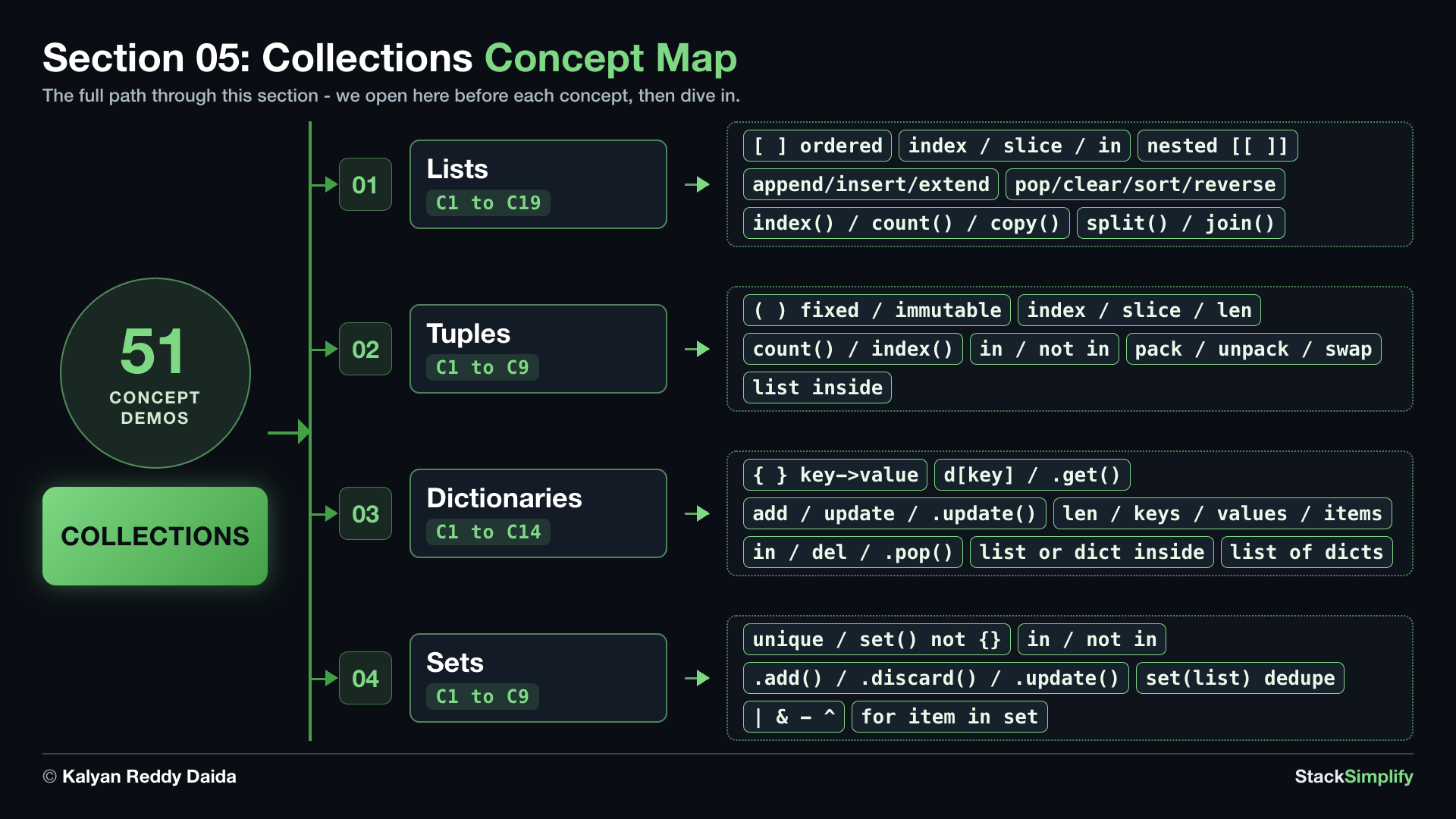
Step-00: What You Will Learn
In this section you will practice how to:
- Use lists to hold values in order, and change them with
append/insert/extend/pop/clear/remove/sort/reverse, find items withindex/count, copy withcopy, slice or test membership within/not in, and nest a list inside a list. - Turn a string into a list with
split(), and a list back into a string withjoin(). - Use tuples for a fixed group of values that should not change.
- Use dictionaries to store values by a name (key), check a key with
in, and hold records in a list of dictionaries. - Use sets to keep only unique values, add / discard members with
.add/.discard/.update, test within/not in, and combine them with union / intersection / difference / symmetric difference.
Step-01: Lists
File: s05_step01_lists.py
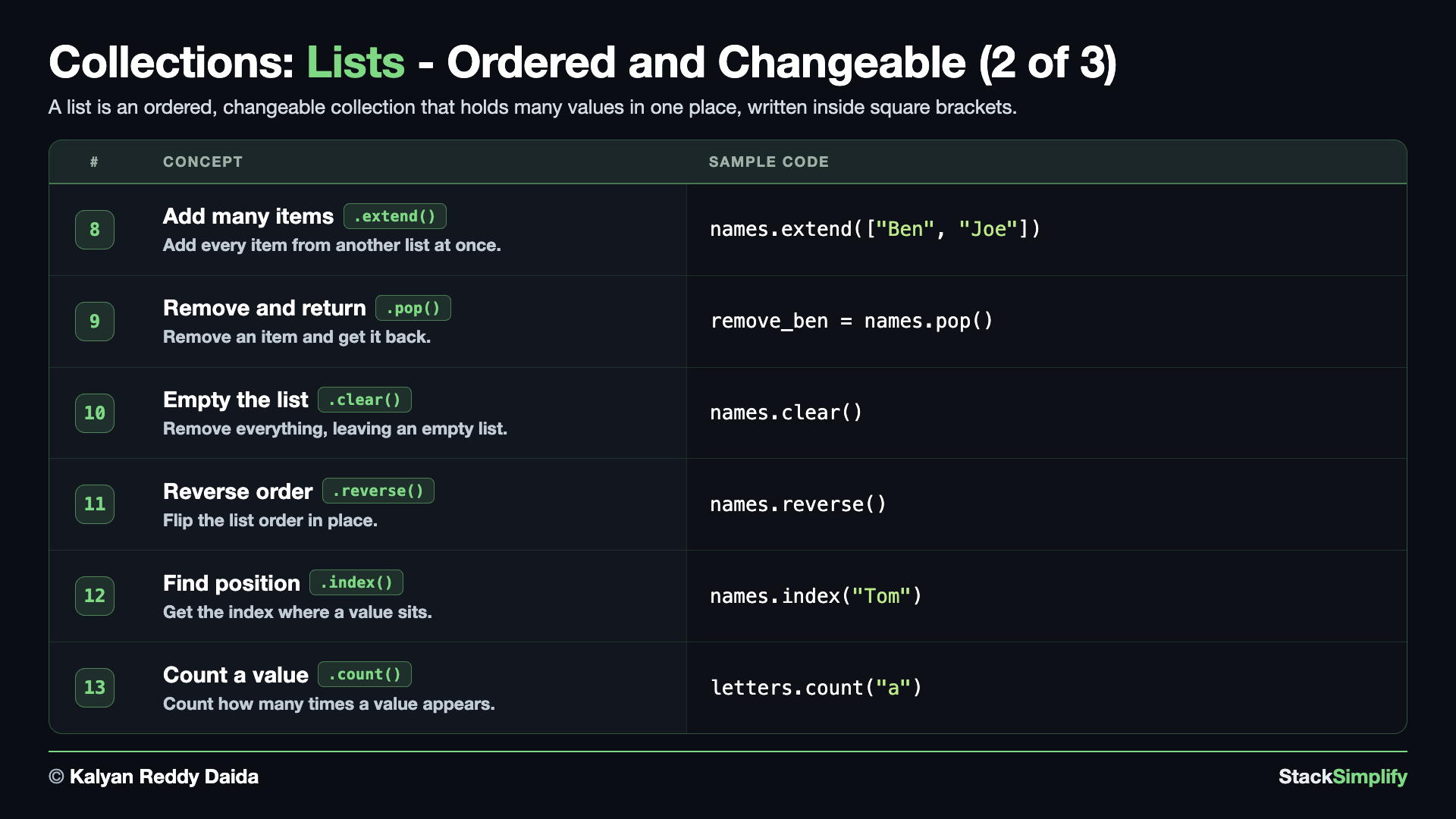
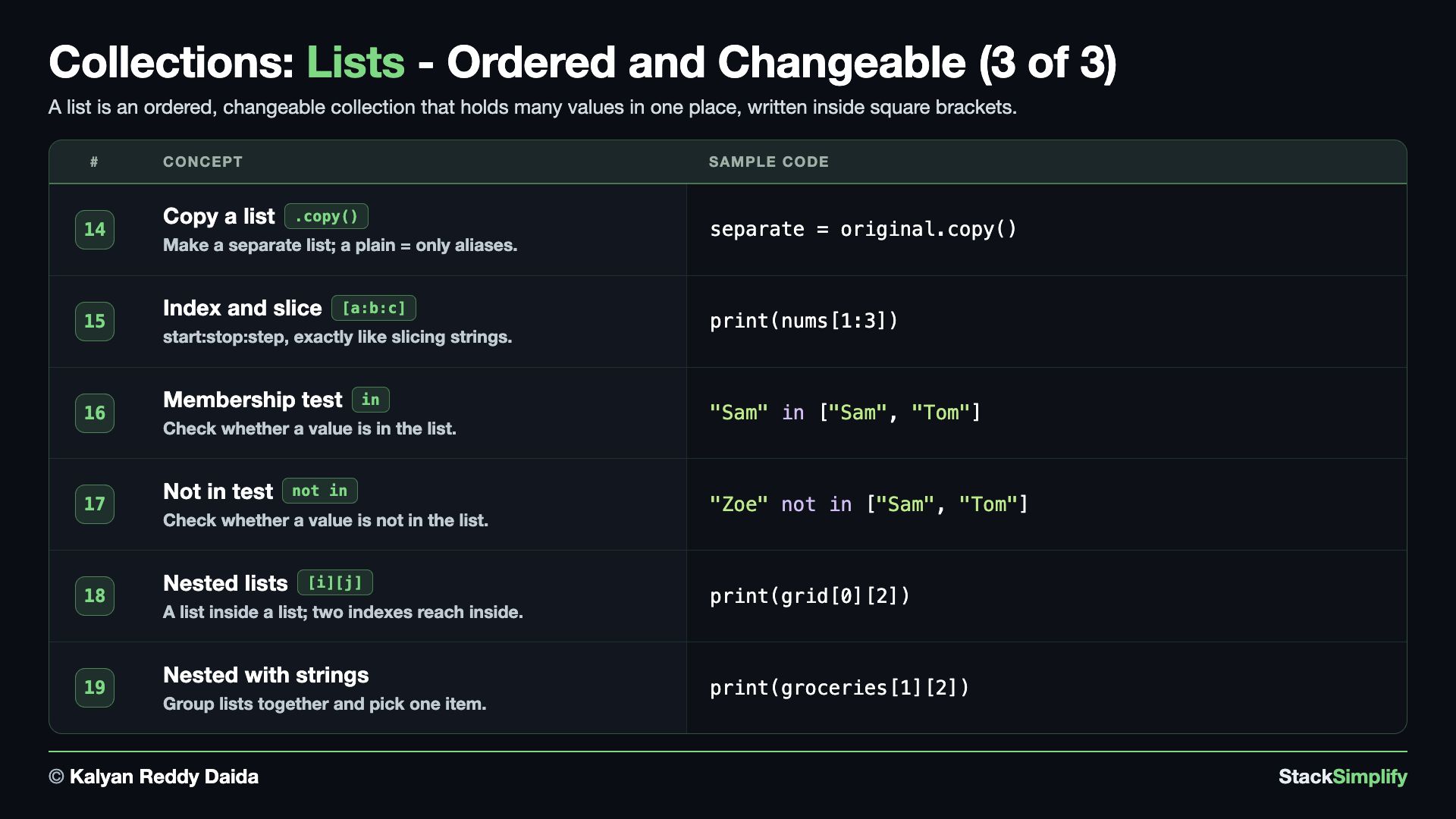
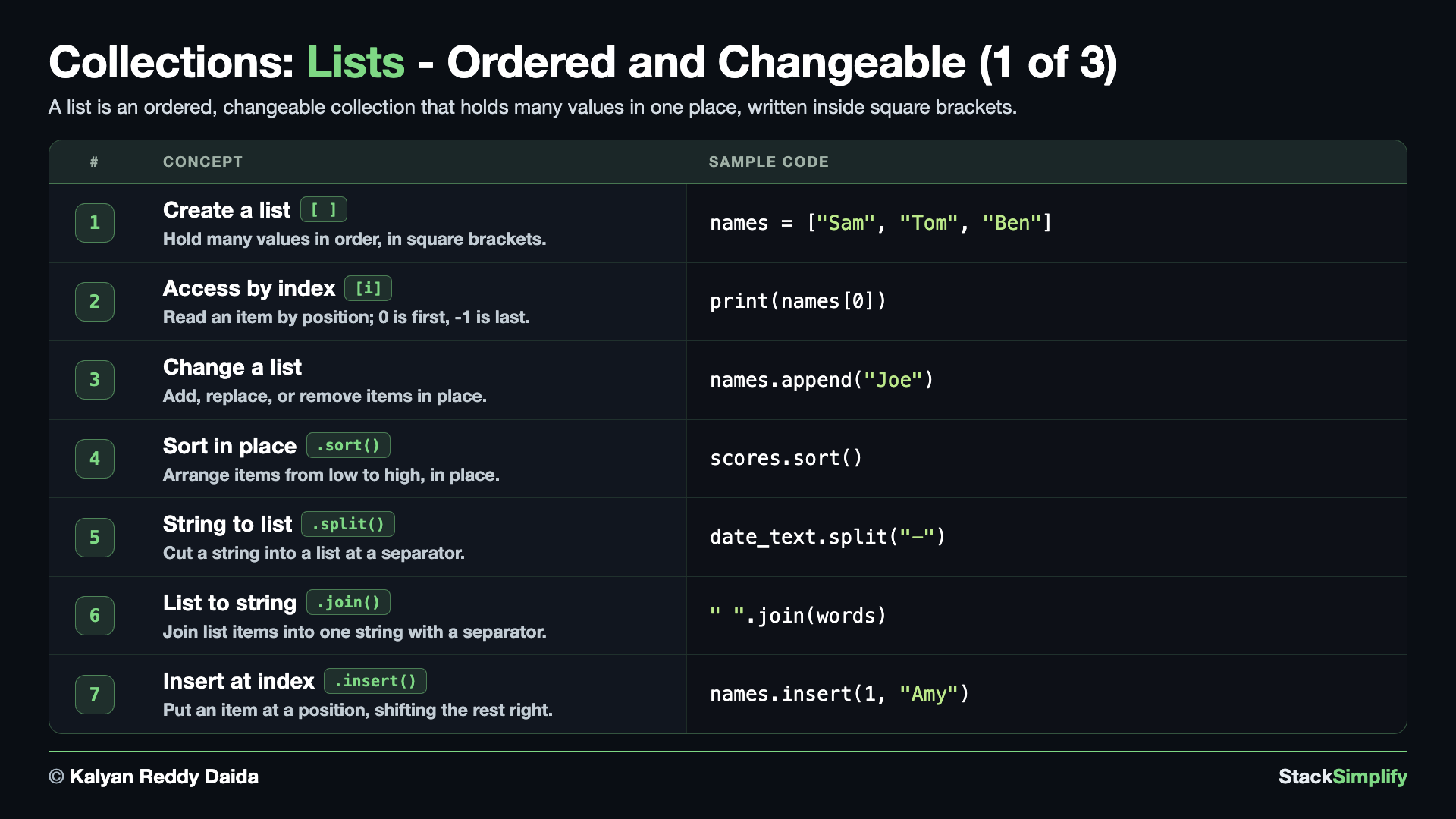
A list holds many values in order, inside square brackets [ ]. Create s05_step01_lists.py in python-learn and build it up one concept at a time.
Concept 1: A list holds many values in order
A list lets you keep several values together under one name, written inside square brackets [ ] and separated by commas. Instead of a separate variable for each name, you put them all in one list and work with the group. len() tells you how many items are inside.
# Concept-01: A list holds many values in order, inside square brackets
# Question: How do we store several names like Sam, Tom, Ben in one place, without a separate variable for each?
names = ["Sam", "Tom", "Ben"]
print(names)
print(len(names))  # 3: how many items
Concept 2: Access items by position (index)
Each item in a list has a position, called its index, and counting starts at 0, not 1. So names[0] is the first item, names[1] the second, and so on. A negative index counts from the end, so names[-1] is the last item (and names[-2] the second-to-last) - a handy shortcut when you do not want to work out the length first.
# Concept-02: Access items by position (index), starting at 0
# Question: How do we get a name from a list ["Sam", "Tom", "Ben"] by its position - from the front (0, 1, 2) or from the back (-1, -2, -3)?
names = ["Sam", "Tom", "Ben"]
print(names[0])  # Sam: first
print(names[1])
print(names[2])
print(names[-1])  # Ben: last
print(names[-2])
print(names[-3])
Concept 3: Lists can be changed (add, replace, remove)
Unlike a string, a list is mutable - you can change it after you make it. append() adds a new item to the end, assigning to names[i] replaces the item at that position, and remove() deletes the first item that matches a value. These three cover most everyday edits you will make to a list.
# Concept-03: Lists can be changed (add, replace, remove)
# Question-1: How do we add a new name "Joe" to the end of the list ["Sam", "Tom", "Ben"]?
# Question-2: How do we replace the item at index 1 with "Amy"?
# Question-3: How do we remove the name "Ben" from the list by value?
# Add a name to the end
names = ["Sam", "Tom", "Ben"]
names.append("Joe")
print(names)

# Replace the item at index 1
names[1] = "Amy"
print(names)

# Remove a name by value
names.remove("Ben")
print(names)
Concept 4: Sort a list in place
When a list holds values of the same kind, sort() rearranges them in order, smallest to largest, right inside the list itself. Passing reverse=True flips it to largest first. Because sort() changes the list in place, it does not return a new list - the original list is the one that gets reordered.
# Concept-04: A list of numbers can be sorted in place
# Question: How do we arrange test scores [70, 95, 60, 88] from lowest to highest in one operation?
scores = [70, 95, 60, 88]
scores.sort()
print(scores)  # [60, 70, 88, 95]
scores.sort(reverse=True)
print(scores)  # [95, 88, 70, 60]
Do not write scores = scores.sort()
.sort() sorts the list in place and returns None. Call it as a statement - scores.sort() - then print scores. If you write scores = scores.sort(), you overwrite scores with None and lose the list.
Concept 5: Turn a string into a list with split()
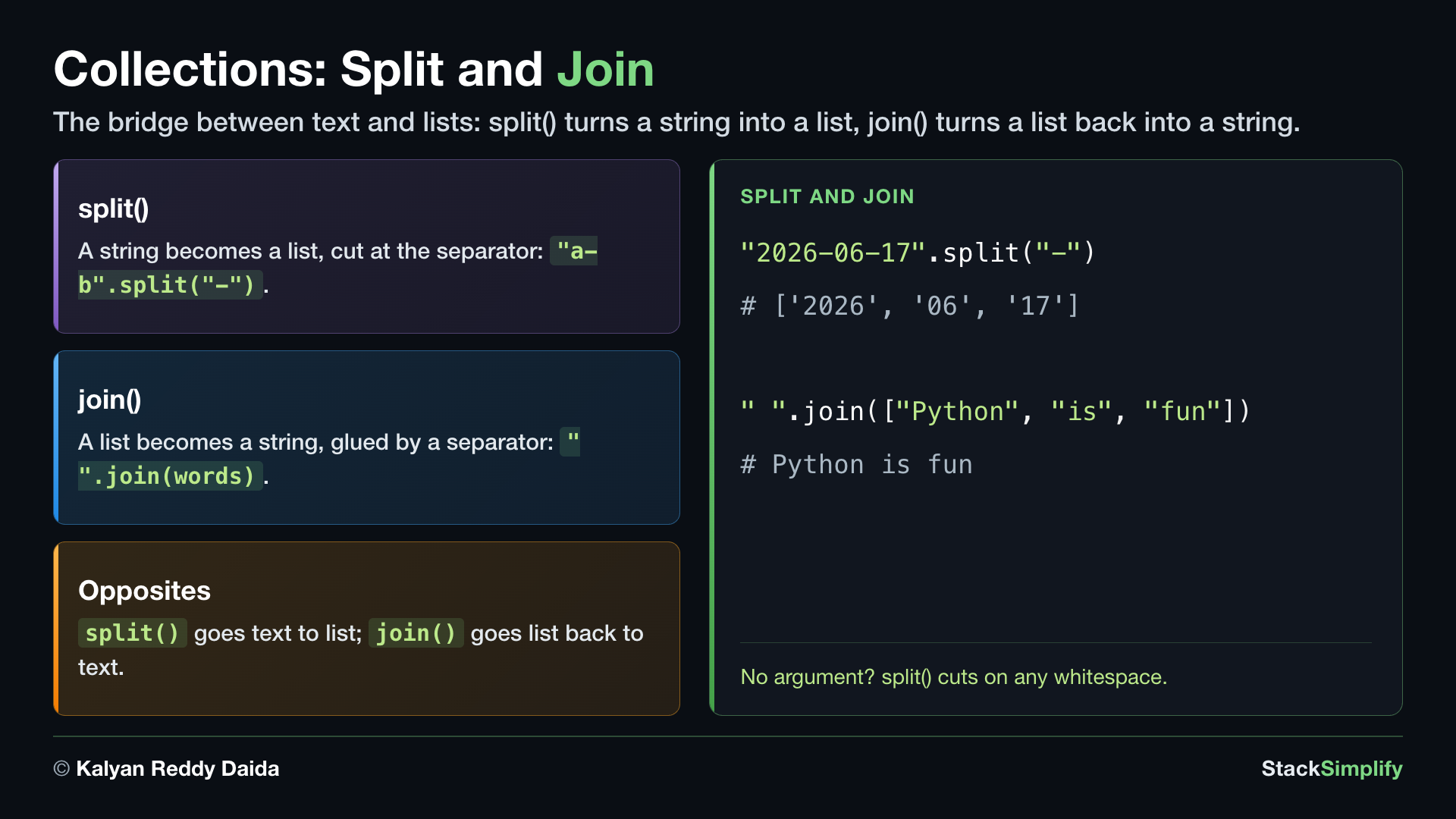
split() cuts a string into pieces wherever it finds the separator you give, and hands back the pieces as a list. Here a date string is split at each -, giving you the year, month, and day as separate items. This is how you pull apart text that has a clear separator, like CSV fields or dates.
# Concept-05: split() turns a STRING into a list, cutting at the separator you give
# Question: How do we break a date string like '2026-06-17' into separate year, month, and day parts?
date_text = "2026-06-17"
date_parts = date_text.split("-")
print(date_parts)     # ['2026', '06', '17']
print(date_parts[0])  # 2026: year
print(date_parts[1])  # 06: month
print(date_parts[2])  # 17: day
.split() returns a NEW list (the string is unchanged)
The opposite of .sort(): .split() does not change the string - it returns a new list, so you must capture it in a variable. That is why the result goes into a new name, date_parts, not back into date_text; date_text stays the original string "2026-06-17".
Concept 6: Join a list back into a string with join()
join() is the mirror of split(): it takes a list of strings and glues them into one string, placing the separator you call it on between each item. Notice the separator comes first (" ".join(words)), then the list. Use it to build a sentence, a path, or any line of text from separate pieces.
# Concept-06: join() turns a LIST of strings back into one string, with a separator between
# Question: How do we join separate words ["Python", "is", "fun"] back into one string, choosing the separator (a space, a hyphen, ...)?
words = ["Python", "is", "fun"]
sentence = " ".join(words)  # join with a space
print(sentence)  # Python is fun
sentence = "-".join(words)  # join with a hyphen
print(sentence)  # Python-is-fun
Concept 7: Insert at a position with insert()
append() always adds to the end, but insert(i, value) drops a new item in at the position i you choose and shifts everything from there to the right. Here "Amy" lands at index 1, so "Tom" and "Ben" slide along to make room.
# Concept-07: insert() puts an item at a position, shifting the rest right
# Question: How do we add a name "Amy" at index 1 in ["Sam", "Tom", "Ben"], not just the end?
names = ["Sam", "Tom", "Ben"]
names.insert(1, "Amy")  # put "Amy" at index 1, shifting the rest right
print(names)  # ['Sam', 'Amy', 'Tom', 'Ben']
Concept 8: Grow a list with extend(), and how append() differs
extend() adds each item from the other list individually, so they become part of the original list. append() adds the entire list as one item, creating a nested list inside your list. Same starting list, same argument, two different results - E1 and E2 below show them side by side.
# Concept-08: extend() adds each item from another list; append() adds the whole list as ONE item
# Question-1: How do we add several items ["Ben", "Joe"] at once to ["Sam", "Tom"], instead of appending one at a time? (extend)
# Question-2: What do we get if we append() that same list instead? (the whole list lands as one nested item)
# E1: extend() - every item from the other list joins the original list separately
names = ["Sam", "Tom"]
names.extend(["Ben", "Joe"])  # add every item from the other list
print(names)  # ['Sam', 'Tom', 'Ben', 'Joe']

# E2: append() - the entire list goes in as ONE item, creating a nested list
names2 = ["Sam", "Tom"]
names2.append(["Ben", "Joe"])  # add the other list as a single item
print(names2)  # ['Sam', 'Tom', ['Ben', 'Joe']]
Concept 9: Remove and keep an item with pop()
pop() does two jobs at once: it removes an item AND hands it back, so you can use what you took out. With no argument it removes the last item; with an index, pop(i), it removes the one at that position. (Compare remove(value) from earlier, which deletes by value and gives nothing back.)
# Concept-09: pop() removes an item and hands it back (the last one, or one by position)
# Question: How do we remove an item from ["Sam", "Amy", "Tom", "Ben"] and keep what was removed - the last one, or the one at index 1?
names = ["Sam", "Amy", "Tom", "Ben"]
remove_ben = names.pop()  # pop() removes and returns the LAST item
print(remove_ben)  # Ben
print(names)  # ['Sam', 'Amy', 'Tom']
remove_amy = names.pop(1)  # pop(i) removes and returns the item at index i
print(remove_amy)  # Amy
print(names)  # ['Sam', 'Tom']
Concept 10: Empty a list with clear()
clear() removes every item at once, leaving you with an empty list []. Handy when you want to reuse the same list variable for a fresh start.
# Concept-10: clear() removes every item, leaving an empty list
# Question: How do we empty a list ["Sam", "Tom", "Ben"] completely in one step?
names = ["Sam", "Tom", "Ben"]
names.clear()  # remove everything
print(names)  # []: the list is now empty
Concept 11: Flip the order with reverse()
reverse() turns the list back-to-front in place: the last item becomes first and the first becomes last. It only flips the current order - unlike sort(), it does not arrange items in any sorted order. (Like sort(), it changes the list in place and returns None.)
# Concept-11: reverse() flips the list order in place
# Question: How do we flip a list ["Sam", "Tom", "Ben"] so the last item comes first?
names = ["Sam", "Tom", "Ben"]
names.reverse()  # flip the order in place
print(names)  # ['Ben', 'Tom', 'Sam']
Concept 12: Find a position with index()
When you have a value and want to know where it sits, index(value) gives you its position. Here "Tom" is at index 2. (If the value is not in the list, index() raises a ValueError.)
# Concept-12: index() finds the position where a value sits
# Question: In a name list Sam, Amy, Tom, Ben, how do we find WHICH position 'Tom' sits at? (index() returns its position)
names = ["Sam", "Amy", "Tom", "Ben"]
print(names.index("Tom"))  # 2: the position where "Tom" sits
Concept 13: Count how many times a value appears with count()
count(value) tells you how many times a value appears in the list. Here "a" shows up three times, so you get 3.
# Concept-13: count() counts how many times a value appears
# Question: How do we count how many copies of "a" the list ["a", "b", "a", "c", "a"] holds?
letters = ["a", "b", "a", "c", "a"]
print(letters.count("a"))  # 3: how many times "a" appears
Concept 14: Make a real copy with copy()
Assigning a list to a new name does NOT make a copy. The two runs show the difference on the SAME starting list. Run 1 uses a plain same = original (an alias): both names point to the SAME list, so appending through same also changes original. Run 2 uses original.copy() (independent): appending through separate leaves original untouched. Note both runs print ['Sam', 'Tom', 'Ben'] for original - Run 1 because the alias changed it, Run 2 because the copy did not.
# Concept-14: copy() makes a separate list; a plain = does NOT
# Question: How do we make a real copy of a list, so changing one does not change the other?
original = ["Sam", "Tom"]
# Run 1 - plain = (alias): both names point to the SAME list, so the change shows in original
same = original
same.append("Ben")
print(original)  # ['Sam', 'Tom', 'Ben']: changing same changed original too
# Run 2 - .copy() (independent): the copy is its own list, so original is untouched
separate = original.copy()
separate.append("Amy")
print(original)  # ['Sam', 'Tom', 'Ben']: the copy did NOT touch original
print(separate)  # ['Sam', 'Tom', 'Ben', 'Amy']
Two names, one list
Assigning a list to another name does NOT copy it: b = a makes both names point to the SAME list, so changing one changes the other. Use a.copy() when you want a separate list.
Concept 15: Index and slice a list like a string, [start:stop:step]
A list is a sequence, just like a string, so everything you learned about indexing and slicing text works here unchanged - including the full three-slot form [start:stop:step]. start is included, stop is not, and step is how far to jump. Leave a slot empty and Python fills in the sensible default: no start means from the beginning, no stop means to the end, no step means one at a time. A negative number counts from the back, so nums[-1] is the last item and nums[::-1] walks the whole list backwards.
# Concept-15: A list is a sequence too, so indexing and slicing work just like on strings, including [start:stop:step]
# Question-1: How do we take a slice [1:3] of nums, from index 1 up to but NOT including index 3? (same [start:stop] as strings)
# Question-2: How do we grab the LAST item without knowing how long the list is? (index -1 counts from the back)
# Question-3: How do we take the last four items in one go? (nums[-4:] - a negative start, and no stop means "to the end")
# Question-4: How do we take the first three items? (nums[:3] - no start means "from the beginning")
# Question-5: How do we take every second item? (nums[::2] - the third slot is the step)
# Question-6: How do we reverse the whole list in one line? (nums[::-1] - a step of -1 walks backwards)
nums = [10, 20, 30, 40, 50, 60, 70, 80, 90, 100]
print(nums[1:3])   # [20, 30]: start at index 1, stop BEFORE index 3
print(nums[-1])    # 100: the last item, counting from the back
print(nums[-4:])   # [70, 80, 90, 100]: from the 4th-from-last to the end
print(nums[:3])    # [10, 20, 30]: from the beginning, up to but not including index 3
print(nums[::2])   # [10, 30, 50, 70, 90]: every 2nd item (the third slot is the step)
print(nums[::-1])  # [100, 90, 80, 70, 60, 50, 40, 30, 20, 10]: a step of -1 reverses the list
[20, 30]
100
[70, 80, 90, 100]
[10, 20, 30]
[10, 30, 50, 70, 90]
[100, 90, 80, 70, 60, 50, 40, 30, 20, 10]
Concept 16: Test membership with in
in checks whether a value is somewhere in the list and answers with a bool. Here "Sam" is in the list, so you get True.
# Concept-16: in tests membership - is a value in the list?
# Question: How do we check whether "Sam" is in a list ["Sam", "Tom"]?
print("Sam" in ["Sam", "Tom"])  # True: in tests membership
Concept 17: Check a value is not in a list with not in
not in is the mirror of in: it is True when the value is not in the list. Here "Zoe" is not in the list, so you get True.
# Concept-17: not in is the mirror of in
# Question: How do we check whether "Zoe" is NOT in a list ["Sam", "Tom"]?
print("Zoe" not in ["Sam", "Tom"])  # True: not in is the mirror
Concept 18: Lists inside lists (nested lists)
A list can hold other lists. This is a nested list, and it is how you store a grid or table - each inner list is one row. To reach a single item you index twice: the first [ ] picks a row (an inner list), and the second [ ] picks an item inside that row.
# Concept-18: A list can hold other lists (a nested list); use two indexes to reach inside
# Question: How do we store a grid [[10, 20, 30], [40, 50, 60], [70, 80, 90]], and read one item by row then column (like grid[0][2] -> 30)?
grid = [[10, 20, 30], [40, 50, 60], [70, 80, 90]]
print(grid[0])     # [10, 20, 30]: the whole first row (an inner list)
print(grid[0][2])  # 30: row 0, then the item at index 2
print(grid[2][1])  # 80: row 2, then the item at index 1
Concept 19: Nested lists of strings (veggies and fruits)
Nesting is not just for numbers. Here the outer list holds two inner lists - one of veggies, one of fruits. The same two-index rule applies: the first [ ] picks which inner list, the second [ ] picks an item inside it.
# Concept-19: Nested lists work with strings too (here, a list of veggies and a list of fruits)
# Question: How do we keep two groups [["carrot", "onion", "potato"], ["apple", "banana", "mango"]] in one list, and pick a single item (like [1][2] -> mango)?
groceries = [["carrot", "onion", "potato"], ["apple", "banana", "mango"]]
print(groceries[0])     # ['carrot', 'onion', 'potato']: the veggies list
print(groceries[1][2])  # mango: list 1 (fruits), item at index 2
print(groceries[0][1])  # onion: list 0 (veggies), item at index 1
split() and join() are the bridge between text and lists
split() turns a string into a list and join() turns a list back into a string. Together they let you take text apart, work on the pieces, and put it back together - you will reach for this pair constantly when reading real data.
Pages for this step: Concept | Practice | Workshop
Python Files for this step: Concept | Practice | Practice Solutions | Workshop | Workshop Solutions
Step-02: Tuples
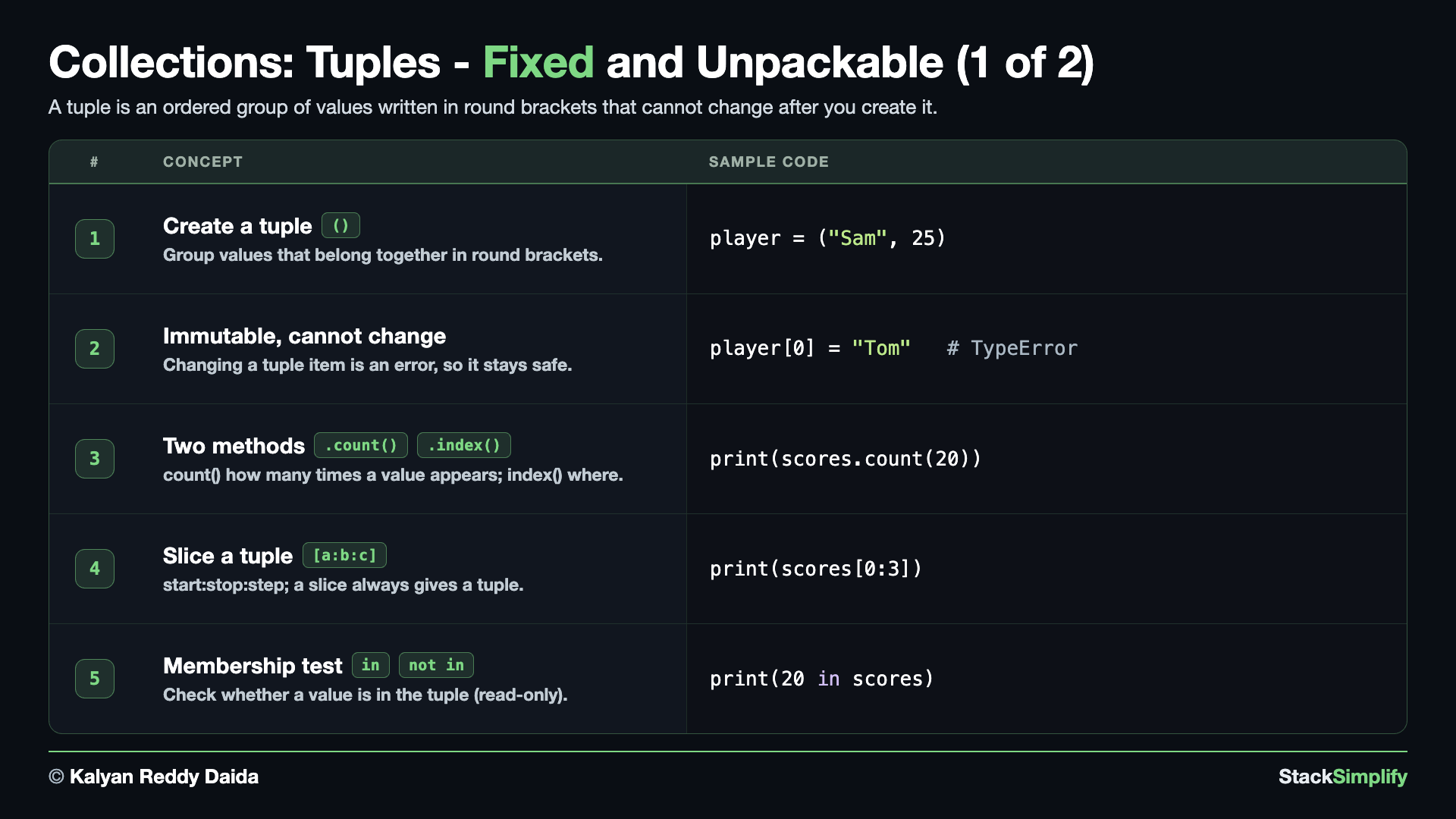
File: s05_step02_tuples.py
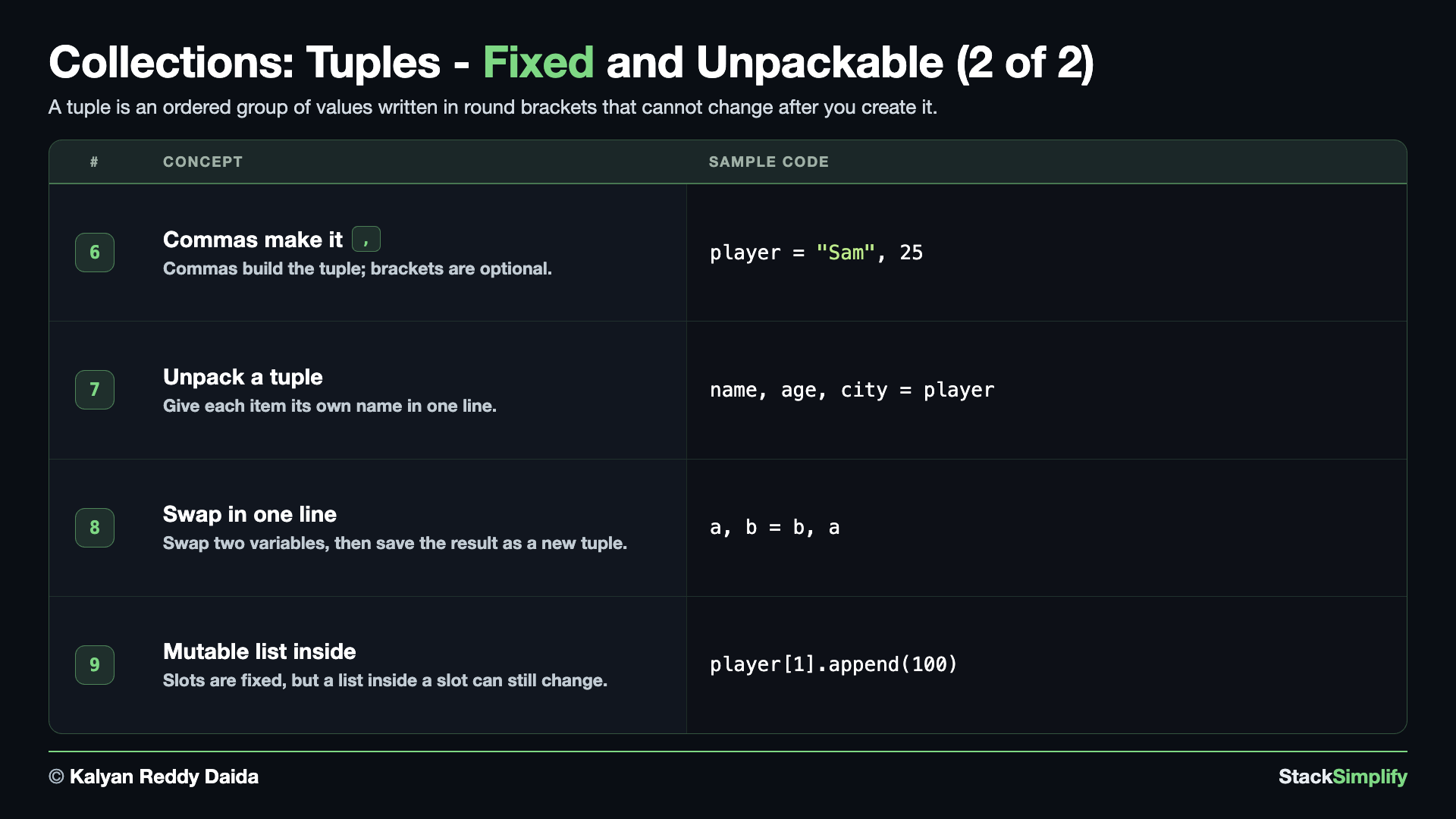
A tuple is like a list, but it cannot be changed after you make it. Use round brackets ( ). Create s05_step02_tuples.py and build it concept by concept.
Concept 1: A tuple is a fixed record, in round brackets
A tuple groups values that belong together, written in round brackets ( ). For reading it works like a list - index from the front ([0]) or the back ([-1]), and len() counts the items - but a tuple is meant to stay fixed. Here it holds Sam's record: a name and an age.
# Concept-01: a tuple groups values that belong together and must not change; round brackets
# Question: How do we store Sam's fixed record ("Sam", 25) - name and age - as one value?
player = ("Sam", 25)
print(player)       # ('Sam', 25)
print(player[0])    # Sam: first item, by index (starts at 0)
print(player[-1])   # 25: last item, negative index counts from the end
print(len(player))  # 2: how many items
Concept 2: Changing a tuple raises an error (it is immutable)
A tuple is immutable - once you make it, you cannot change it. The two runs make the difference clear on the same ("Sam", 25) data. Run 1 does it to a LIST: player_list[0] = "Tom" works, so the list becomes ['Tom', 25]. Run 2 tries the same on a TUPLE: the assignment (left commented) would raise a TypeError, so the tuple stays ('Sam', 25). That is not a limitation; it is the point - a tuple protects a record from accidental edits.
# Concept-02: a tuple is IMMUTABLE - trying to change it is an error (that is why we use one)
# Question: A list lets you change an item - what happens if we try the same on a tuple? (a tuple cannot be changed)
# Run 1 - a LIST is mutable: changing an item works
player_list = ["Sam", 25]
player_list[0] = "Tom"
print(player_list)  # ['Tom', 25]: the list changed
# Run 2 - a TUPLE is immutable: the same change is an error, so the tuple stays safe
player = ("Sam", 25)
# player[0] = "Tom"  # TypeError: 'tuple' object does not support item assignment
print(player)  # ('Sam', 25): unchanged, safe from accidental edits
Concept 3: Count and find items with .count() and .index()
Because a tuple cannot change, it has exactly two methods: count(value) tells you how many times a value appears, and index(value) tells you where the first one sits. Here are Sam's nine game scores - notice 20 shows up twice.
# Concept-03: the only two tuple methods - count() how many times a value appears, index() where it is
# Question-1: In Sam's game scores (10, 20, 30, 40, 50, 60, 70, 80, 20), how many times did he score 20?
# Question-2: In Sam's game scores (10, 20, 30, 40, 50, 60, 70, 80, 20), where is the first 20?
scores = (10, 20, 30, 40, 50, 60, 70, 80, 20)
print(scores.count(20))  # 2: how many times 20 appears (it is at index 1 and index 8)
print(scores.index(20))  # 1: the position of the FIRST 20
Concept 4: Slice a tuple with [start:stop:step] (a slice always gives a tuple)
A tuple is a sequence, so all three slice slots you already know from lists and strings work here unchanged - [start:stop:step]. start is included, stop is not, and step is how far to jump, so scores[::2] takes every second score and scores[::-1] reverses the whole tuple. Slicing only READS, so it is safe on an immutable tuple - it hands you a brand new tuple and leaves the original alone. One thing to watch, and it is the real lesson here: a slice always gives a tuple (even scores[-1:], a one-item tuple), while a single index gives the item itself.
# Concept-04: slicing a tuple gives a tuple, and [start:stop:step] works just like on lists and strings
# Question-1: How do we take plain [start:stop] slices of Sam's scores (10, 20, 30, 40, 50, 60, 70, 80, 20)? (start is included, stop is not)
# Question-2: Does the third slot work on a tuple too - every second score, and the whole tuple reversed? (scores[::2] steps by 2, scores[::-1] reverses)
# Question-3: Why does scores[-1:] give a tuple but scores[-1] a plain number? (a slice ALWAYS returns a tuple; an index returns the item)
scores = (10, 20, 30, 40, 50, 60, 70, 80, 20)

# [start:stop] - start is included, stop is not
print(scores[0:3])   # (10, 20, 30): items at index 0, 1, 2 (stop 3 is not included)
print(scores[1:3])   # (20, 30): items at index 1 and 2
print(scores[1:])    # (20, 30, 40, 50, 60, 70, 80, 20): from index 1 to the end

# [start:stop:step] - the third slot is how far to jump
print(scores[::2])   # (10, 30, 50, 70, 20): every second item, starting from the beginning
print(scores[1::2])  # (20, 40, 60, 80): every second item, starting at index 1
print(scores[::-1])  # (20, 80, 70, 60, 50, 40, 30, 20, 10): a step of -1 reverses the tuple

# a slice gives a TUPLE; a single index gives the ITEM
print(scores[-1:])   # (20,): a slice ALWAYS gives a tuple - here a one-item tuple
print(scores[-1])    # 20: a single index gives the item itself, not a tuple
(10, 20, 30)
(20, 30)
(20, 30, 40, 50, 60, 70, 80, 20)
(10, 30, 50, 70, 20)
(20, 40, 60, 80)
(20, 80, 70, 60, 50, 40, 30, 20, 10)
(20,)
20
Concept 5: Test membership with in and not in
The in test tells you whether a value is somewhere in the tuple, and not in is its mirror. Both only read, so they are safe on an immutable tuple. We check against the same scores.
# Concept-05: in tests membership on a tuple, and not in is its mirror (both read-only)
# Question: How do we check whether a score is in Sam's scores (10, 20, 30, 40, 50, 60, 70, 80, 20), or not in them (like 20 in, 99 not in)?
scores = (10, 20, 30, 40, 50, 60, 70, 80, 20)
print(20 in scores)      # True: 20 is in the tuple
print(99 not in scores)  # True: 99 is not in the tuple
print(100 in scores)     # False: 100 is not in the tuple
print(50 not in scores)  # False: 50 IS in the tuple, so not in is False
Concept 6: Build a tuple without brackets, and the one-item trap
It is really the commas that make a tuple, not the brackets - player = "Sam", 25 is a tuple. That leads to one classic trap: a one-item tuple needs a trailing comma, (90,). Without the comma, (90) is just the number 90.
# Concept-06: the COMMAS make a tuple (brackets optional); a one-item tuple NEEDS a trailing comma
# Question-1: How do we build Sam's record "Sam", 25 without brackets (the commas make the tuple)?
# Question-2: How do we write a one-item tuple like (90,) correctly (the trailing comma is required)?
player = "Sam", 25        # commas make the tuple, even with no brackets
print(player)             # ('Sam', 25)
one_score = (90,)         # a 1-item tuple - the comma is required
not_a_tuple = (90)        # no comma, so this is just the int 90, not a tuple
print(type(one_score).__name__, type(not_a_tuple).__name__)  # tuple int
Concept 7: Unpack a tuple: one name per value
Unpacking hands each item of a tuple to its own variable in a single line: name, age, city = player. Python matches the names on the left to the items on the right, in order (the counts must match). Each variable holds the real value with its own type - name is a str, age is an int - not a mini-tuple.
# Concept-07: unpacking gives each item its own name in one line (counts must match)
# Question-1: How do we split Sam's full record "Sam", 25, "Delhi" into three variables name, age, city?
# Question-2: How do we check the types of the unpacked name and age (type(name), type(age))?
player = "Sam", 25, "Delhi"
name, age, city = player   # one name per item, left-to-right by position
print(name, "is", age, "from", city)  # Sam is 25 from Delhi
print(type(name), type(age))          # <class 'str'> <class 'int'>
Concept 8: Swap two variables, then save the swap as a new tuple
Swapping two variables in one line, a, b = b, a, works because of tuples: Python packs the right side (b, a) into a tuple, then unpacks it back into the names - swapped, with no temporary variable. Since a tuple cannot change, if you want to KEEP the swapped result you build a new tuple, new_pair = (a, b) - the original pair stays exactly as it was.
# Concept-08: swap two variables in one line, then save the result as a NEW tuple (the old one cannot change)
# Question-1: How do we swap two variables a, b (from pair (10, 20)) in one line with a, b = b, a?
# Question-2: Since a tuple cannot change, how do we keep the swapped result as a NEW tuple new_pair = (a, b) -> (20, 10)?
pair = (10, 20)
a, b = pair          # unpack the pair tuple into two variables
print(a, b)          # 10 20
a, b = b, a          # swap in one line: pack (b, a) into a tuple, then unpack it back into a, b
print(a, b)          # 20 10
new_pair = (a, b)    # save the swapped values as a NEW tuple (we cannot edit the old one)
print(new_pair)      # (20, 10)
print(pair)          # (10, 20): the original tuple is unchanged
Concept 9: A tuple is locked, but a list inside it can still change
A tuple's slots are fixed - you cannot replace what a slot points to (player[1] = ... raises a TypeError). But if a slot holds a list, that list is still mutable, so you can append, clear, and rebuild it - in fact every list method from Step-01 works on it. The tuple keeps its shape; only the inner list changes. (This builds on lists-inside-lists from Step-01.)
# Concept-09: a tuple's slots are fixed (you cannot replace one), but a LIST inside a slot can still change
# Question: If Sam's record is a fixed tuple, how can the scores list inside still change (append, clear, rebuild)? And why does replacing the whole slot still fail?
player = ("Sam", [90, 85])    # a tuple: a name and a LIST of scores
print(player)                 # ('Sam', [90, 85])
player[1].append(100)         # the list is mutable, so it can grow
print(player)                 # ('Sam', [90, 85, 100]): the list changed, the tuple did not
# player[1] = [10, 20]        # TypeError: cannot REPLACE a tuple slot, only change what is inside
player[1].clear()             # empty the list (any list method from Step-01 works)
print(player)                 # ('Sam', [])
player[1].append(10)
player[1].append(20)          # rebuild it - append, clear, sort ... all work on the inner list
print(player)                 # ('Sam', [10, 20])
Why a tuple? Fixed means safe (and usable as a dict key)
A tuple cannot change, which signals that a group of values belongs together and should stay fixed - safer code, and a tuple can even be used as a dictionary key (a list cannot). You will also see functions return several values as a tuple in the Functions section.
Pages for this step: Concept | Practice | Workshop
Python Files for this step: Concept | Practice | Practice Solutions | Workshop | Workshop Solutions
Step-03: Dictionaries
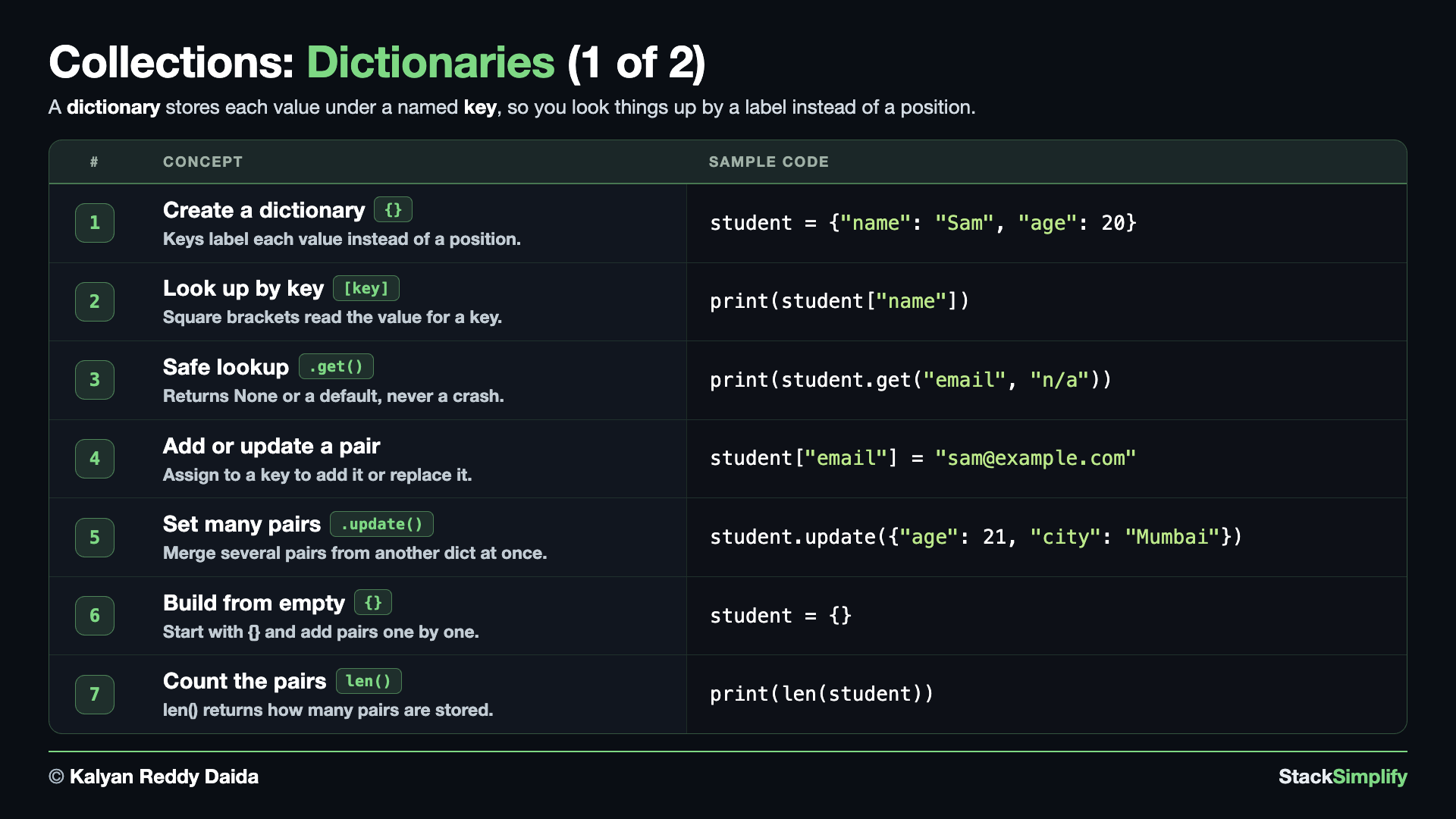
File: s05_step03_dictionaries.py
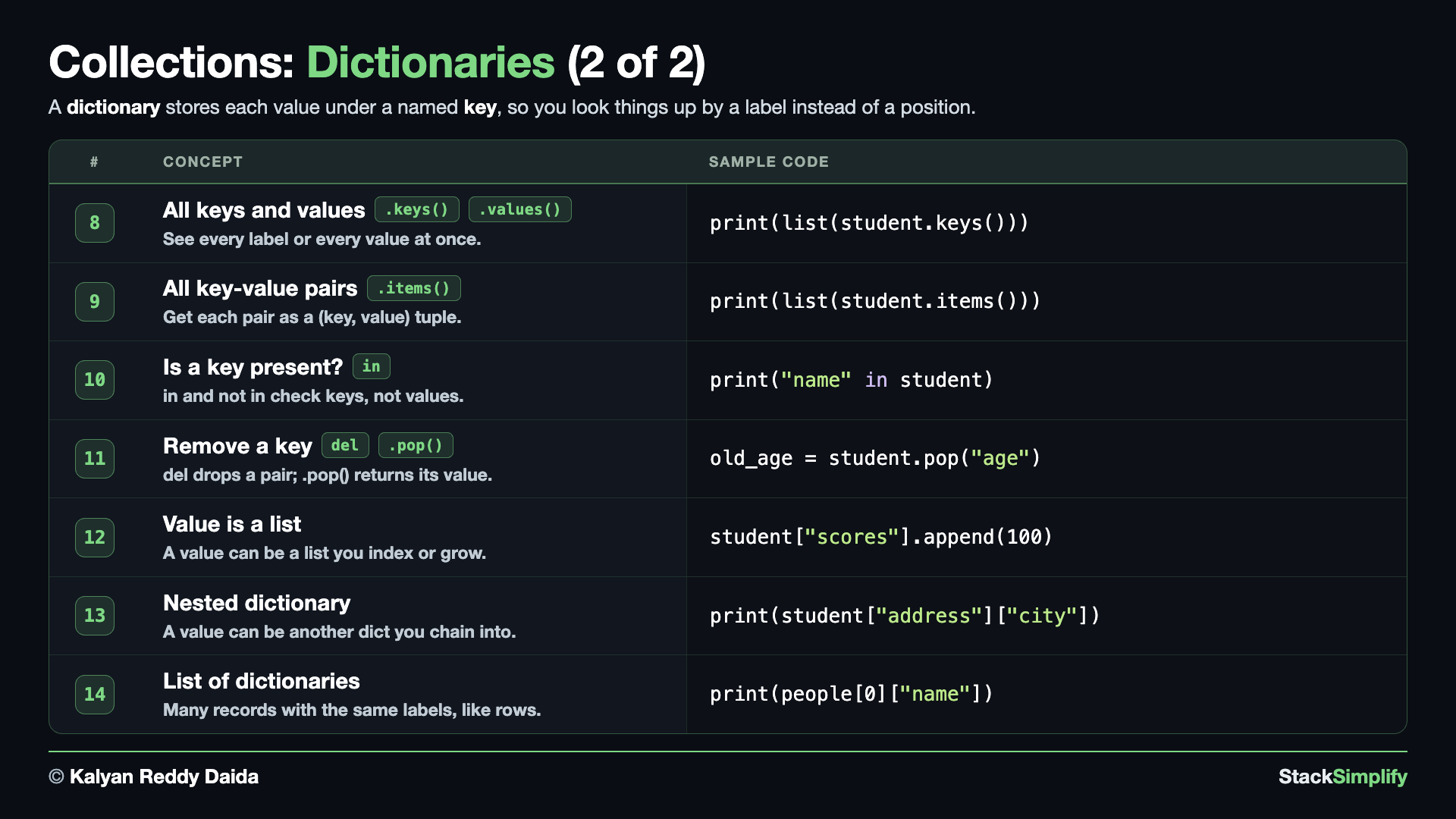
A dictionary stores values by a key (a name) instead of a position. Use curly brackets { }. Create s05_step03_dictionaries.py and build it concept by concept.
Concept 1: A dictionary stores values by a key
A dictionary pairs each value with a key - a label - so you find things by name instead of by position. You write key: value pairs inside curly brackets { }. It is perfect for a record where each piece of data has a natural name, like a student's name, age, and city.
# Concept-01: A dictionary stores values by a KEY instead of a position (curly brackets)
# Question: How do we store Sam's student record {"name": "Sam", "age": 20, "city": "Delhi"} using labels instead of positions?
student = {"name": "Sam", "age": 20, "city": "Delhi"}
print(student)
Concept 2: Look up a value by its key
To read a value, put its key in square brackets: student["name"]. You ask for data by its label and Python hands back the matching value - almost like asking a question in plain English.
# Concept-02: look up a value by its key with square brackets
# Question: How do we read one field from Sam's record {"name": "Sam", "age": 20, "city": "Delhi"}, like his name, by its key (student["name"] -> Sam)?
student = {"name": "Sam", "age": 20, "city": "Delhi"}
print(student["name"])  # Sam: the value stored under the key "name"
Concept 3: Safe lookup with .get() (and the KeyError it avoids)
Looking up a missing key with [ ] crashes the program with a KeyError (the commented line shows the crash). .get() is the safe alternative, and the two runs show its two forms. Run 1 calls .get("email") with no default: a missing key returns None (no crash). Run 2 calls .get("email", "n/a"): a missing key returns your own fallback instead. Reach for .get() whenever a key might not be there.
# Concept-03: .get() is a safe lookup that returns None (or a default) instead of a KeyError
# Question: How do we ask for a key that might be missing, like "email", from {"name": "Sam", "age": 20, "city": "Delhi"} without crashing - .get("email") -> None, or .get("email", "n/a") -> n/a?
student = {"name": "Sam", "age": 20, "city": "Delhi"}
# print(student["email"])  # KeyError: 'email' - a missing key with [] would crash
# Run 1 - .get() with NO default: a missing key returns None (no crash)
print(student.get("email"))         # None: safe, no crash
# Run 2 - .get() WITH a default: a missing key returns your own fallback instead
print(student.get("email", "n/a"))  # n/a: our own default when the key is missing
Concept 4: Add or update a value by key
Assigning to a key does both jobs: if the key already exists its value is replaced (update), and if it does not a brand-new pair is added. So student["age"] = 21 updates an existing key, while student["email"] = ... adds a new one.
# Concept-04: add a new pair, or update an existing one, by assigning to a key
# Question: How do we change Sam's age to 21 and add a new "email" field "sam@example.com" to his record {"name": "Sam", "age": 20, "city": "Delhi"}?
student = {"name": "Sam", "age": 20, "city": "Delhi"}
student["age"] = 21                   # update: the key exists, so its value is replaced
student["email"] = "sam@example.com"  # add: the key is new, so a new pair is created
print(student)
Concept 5: Set several pairs at once with .update()
.update() merges another dictionary's pairs in one call - handy when you want to change several fields together instead of one line each. Existing keys are overwritten and new keys are added, exactly like single-key assignment.
# Concept-05: .update() sets several pairs at once from another dictionary
# Question: How do we change many of Sam's fields in one line with student.update({"age": 21, "city": "Mumbai", "email": "sam@example.com"}) instead of one at a time?
student = {"name": "Sam", "age": 20, "city": "Delhi"}
student.update({"age": 21, "city": "Mumbai", "email": "sam@example.com"})
print(student)
Concept 6: Start empty and fill it pair by pair
You do not need all the data up front. Start with an empty dictionary {} and add pairs one at a time by assigning to new keys - the same pattern as starting with an empty list and appending to it.
# Concept-06: start with an empty dictionary {} and fill it one pair at a time
# Question: How do we build Sam's record from scratch - start with {} then add student["name"] = "Sam" and student["age"] = 20 - when we do not have the values up front?
student = {}              # an empty dictionary
student["name"] = "Sam"   # add the first pair
student["age"] = 20       # add another
print(student)
Concept 7: Count the pairs with len()
len() works on a dictionary just like on a string or a list: it tells you how many key-value pairs it holds. Sam's record has three fields, so len(student) is 3.
# Concept-07: len() counts how many key-value pairs a dictionary has
# Question: How many fields does Sam's record {"name": "Sam", "age": 20, "city": "Delhi"} have? (len(student) -> 3 counts the pairs)
student = {"name": "Sam", "age": 20, "city": "Delhi"}
print(len(student))  # 3: number of key-value pairs
Concept 8: See all keys and values (wrap the views in list())
.keys() gives every key and .values() gives every value - but each one comes back as a special view object (dict_keys / dict_values), not a plain list. Wrapping it in list() turns it into a normal list that prints cleanly and that you can index or slice. Printing the view first, then the list() version, shows exactly what list() does for you.
# Concept-08: .keys() and .values() return view objects - wrap them in list() for a clean list
# Question-1: How do we see all of Sam's labels from {"name": "Sam", "age": 20, "city": "Delhi"} with list(student.keys()) -> ['name', 'age', 'city']?
# Question-2: How do we see all of Sam's values with list(student.values()) -> ['Sam', 20, 'Delhi']?
student = {"name": "Sam", "age": 20, "city": "Delhi"}
print(student.keys())          # dict_keys(['name', 'age', 'city']): a special view object, not a plain list
print(student.values())        # dict_values(['Sam', 20, 'Delhi']): a special view object
print(list(student.keys()))    # ['name', 'age', 'city']: list() gives a clean list of the labels
print(list(student.values()))  # ['Sam', 20, 'Delhi']: a clean list of the values
dict_keys(['name', 'age', 'city'])
dict_values(['Sam', 20, 'Delhi'])
['name', 'age', 'city']
['Sam', 20, 'Delhi']
Why wrap the view in list()?
.keys() and .values() return view objects (dict_keys, dict_values) - live windows onto the dictionary, not plain lists. They read fine on screen, but list() gives you a normal list you can print cleanly, index (list(student.keys())[0]), or slice. You will also walk over these views directly with a for loop in the next section, Loops.
Concept 9: Each pair as a (key, value) tuple with .items()
.items() gives every pair together as a view object (dict_items), and each pair is a (key, value) tuple - the same tuples you met in Step-02. Printing the view first, then list(student.items()), shows how list() turns it into a clean list of tuples.
# Concept-09: .items() returns a view of (key, value) tuples - wrap it in list() for a clean list
# Question: How do we get Sam's record {"name": "Sam", "age": 20, "city": "Delhi"} as a list of (label, value) pairs with list(student.items())? (each pair is a tuple, like Step-02)
student = {"name": "Sam", "age": 20, "city": "Delhi"}
print(student.items())        # dict_items([('name', 'Sam'), ('age', 20), ('city', 'Delhi')]): a view object
print(list(student.items()))  # [('name', 'Sam'), ('age', 20), ('city', 'Delhi')]: a clean list of (key, value) tuples
dict_items([('name', 'Sam'), ('age', 20), ('city', 'Delhi')])
[('name', 'Sam'), ('age', 20), ('city', 'Delhi')]
.items() is a view too
Like .keys() and .values(), .items() returns a view object (dict_items). list() turns it into a real list of (key, value) tuples - the same tuples from Step-02. In the next section, Loops, you will walk over .items() to read each key and its value together.
Concept 10: Test for a key with in / not in
in and not in check the keys of a dictionary, never the values. So "name" in student asks "does this dictionary have a key called name?". It is the clean way to check a key is present before you use it, and it pairs well with .get().
# Concept-10: in / not in test whether a KEY is present (not a value)
# Question: How do we check whether Sam's record {"name": "Sam", "age": 20} has a "name" label or does not have an "email" label before we use it? (key in dict)
student = {"name": "Sam", "age": 20}
print("name" in student)       # True: "name" is a key
print("email" not in student)  # True: "email" is not a key
print(20 in student)           # False: in checks KEYS, not values
Concept 11: Remove a key with del and .pop()
Two ways to remove a pair: del student["city"] simply discards it, while student.pop("age") removes it AND hands back the value so you can keep or print it. Printing the record after each removal shows the pair disappear step by step. Use del when you just want it gone, .pop() when you still need the value.
# Concept-11: remove a key with del (discard it) or .pop() (remove it AND return its value)
# Question-1: How do we drop Sam's "city" from {"name": "Sam", "age": 20, "city": "Delhi"} with del student["city"]?
# Question-2: How do we remove his "age" while keeping the value we removed with student.pop("age") -> 20?
student = {"name": "Sam", "age": 20, "city": "Delhi"}
print(student)                # {'name': 'Sam', 'age': 20, 'city': 'Delhi'}: the full record to start
del student["city"]           # remove the "city" pair, returns nothing
print(student)                # {'name': 'Sam', 'age': 20}: "city" is gone
old_age = student.pop("age")  # remove the "age" pair AND hand back its value
print(student)                # {'name': 'Sam'}: "age" is gone too
print(old_age)                # 20: the value .pop() returned
Concept 12: A value that is a list - index it and grow it
A dictionary value can be any type, including a list. Look the list up by its key, then use everything from Step-01: index into it with [0], or .append() to grow it in place. student["scores"][0] reads the first score.
# Concept-12: a value can be a LIST - look it up, then index or append into it
# Question-1: If Sam's record is {"name": "Sam", "scores": [90, 85]}, how do we read the first score with student["scores"][0] -> 90?
# Question-2: How do we add a new score 100 with student["scores"].append(100) -> [90, 85, 100]?
student = {"name": "Sam", "scores": [90, 85]}
print(student["scores"][0])    # 90: first score (index into the list value)
student["scores"].append(100)  # the inner list grows in place
print(student["scores"])       # [90, 85, 100]
Concept 13: A value that is another dictionary (nested)
A value can even be another dictionary - a record inside a record. Read it with a chained lookup: the first key gets the inner dictionary, and the second key reads a field from it, so student["address"]["city"] walks two levels in. You can also chain .get() calls - student.get("address").get("pin") - which lets you supply a default (like "Not Applicable") for a missing inner key instead of crashing.
# Concept-13: a value can be another DICT (a nested record) - read it with a chained lookup
# Question-1: If a student record is {"name": "Sam", "address": {"city": "Delhi", "pin": "110001"}}, how do we read Sam's city from inside it with student["address"]["city"] -> Delhi?
# Question-2: How do we read "pin" with student.get("address").get("pin") -> 110001, or fall back for a missing key with student.get("address").get("flatno", "Not Applicable")?
student = {"name": "Sam", "address": {"city": "Delhi", "pin": "110001"}}
print(student["address"]["city"])  # Delhi: first key gets the inner dict, second key reads from it
print(student.get("address").get("pin"))  # 110001: chained .get() reaches into the inner dict
print(student.get("address").get("flatno", "Not Applicable"))  # Not Applicable: .get() default for a missing inner key
Concept 14: A list of dictionaries (many records)
Putting dictionaries inside a list gives you many records that share the same labels - exactly like rows in a table. Reach into one record by first picking it with a list index, then a field with its key: people[0]["name"]. This is the shape real JSON data takes, which you will meet again when working with files.
# Concept-14: a list of dictionaries stores many records, like rows in a table
# Question: How do we store Sam, Tom, and Ben as a small table [{"name": "Sam", "age": 21}, {"name": "Tom", "age": 25}, {"name": "Ben", "age": 22}], each with the same labels?
people = [
    {"name": "Sam", "age": 21},
    {"name": "Tom", "age": 25},
    {"name": "Ben", "age": 22},
]
print(people[0]["name"])  # Sam: first record, its name
print(people[1]["age"])   # 25: second record, its age
Use .get() to avoid a KeyError
student.get("email") returns None for a missing key instead of crashing. You loop over these collections next in Loops and Comprehensions.
Pages for this step: Concept | Practice | Workshop
Python Files for this step: Concept | Practice | Practice Solutions | Workshop | Workshop Solutions
Step-04: Sets
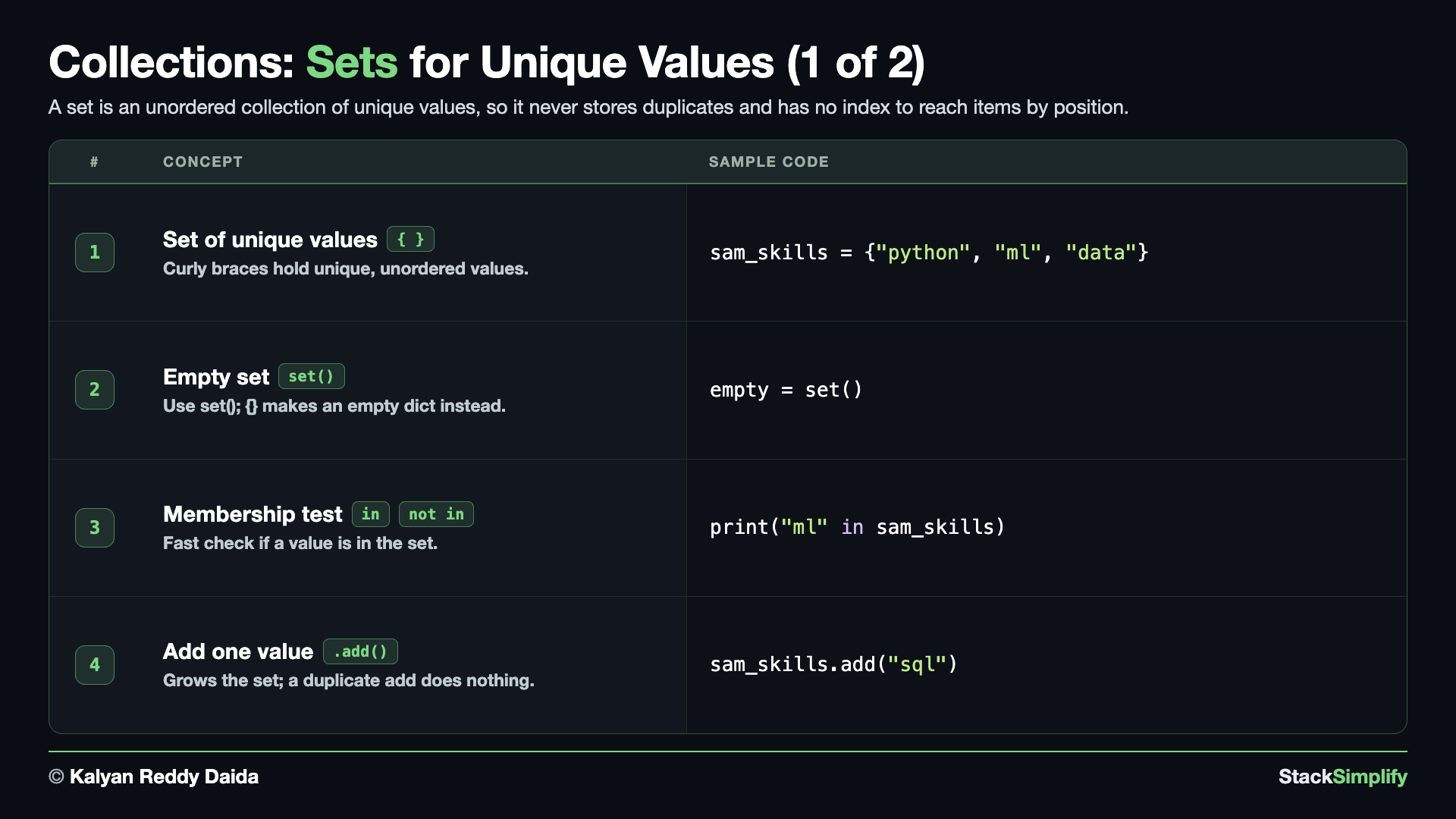
File: s05_step04_sets.py
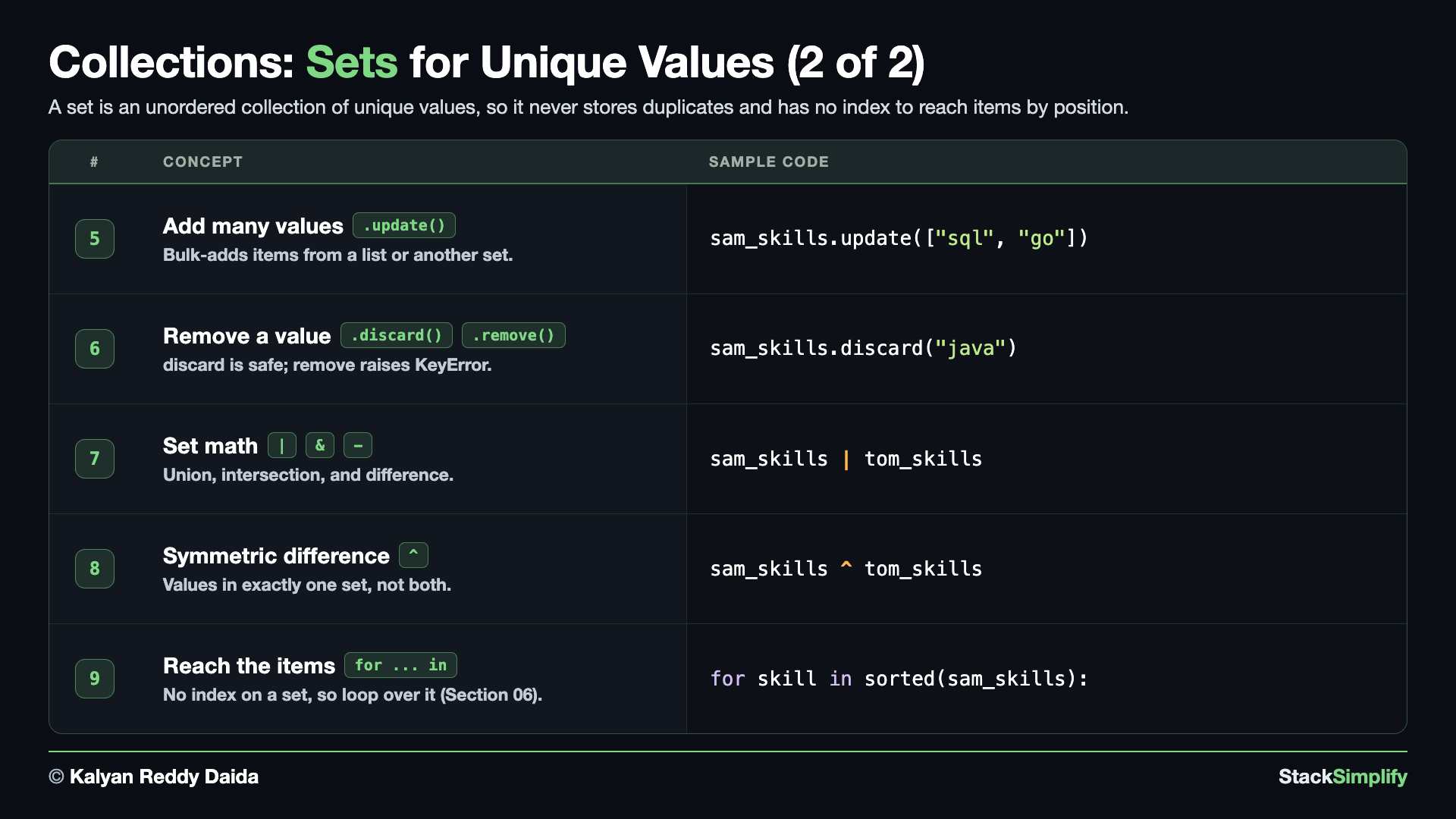
A set keeps only unique values, in no fixed order. Curly brackets, but no keys. Create s05_step04_sets.py and build it concept by concept.
Concept 1: A set holds only unique values (and sorted() gives you a list back)
A set stores only UNIQUE values inside curly brackets { } (like a dictionary, but keys only, no values). It has no order and no index, which is the part that surprises people, so this concept builds it up in three steps.
E1 creates a set with "ml" written twice and shows that the duplicate never makes it in. E2 shows the fix for the missing order: sorted() reads the set and returns a NEW list, so the output is identical on every run and positions like [0] work again. E3 is the everyday use you will actually reach for - drop the repeats from a real list with set(), then sorted() your way back to an ordered list.
Your output will not match this page exactly, and that is the lesson
Python shuffles the order of a set on every run, so the two lines that print a set raw (print(sam_skills) and print(unique_skills)) come out in a different order each time - on this page, on Kalyan's screen, and on your machine. Run the file two or three times and watch it change. Every other line below is identical every run, because it goes through sorted().
# Concept-01: a set holds only UNIQUE values in curly brackets, with NO order and NO index; sorted() hands back a list
# Question-1: How do we write Sam's skills as a set {"python", "ml", "data", "ml"}, and what happens to the second "ml"? (a set drops duplicates by itself)
# Question-2: A set has no order, so how do we get the SAME output every run and reach items by position again? (sorted() returns a LIST)
# Question-3: How do we drop the repeats from a real list like ["python", "ml", "ml", "python", "data"]? (set(the_list), then sorted() for an ordered list back)
# E1: build a set - the duplicate disappears, and there is no index to ask for
sam_skills = {"python", "ml", "data", "ml"}  # "ml" is written twice on purpose
print(sam_skills)          # {'ml', 'data', 'python'}: only 3 items - and YOUR order will differ
print(len(sam_skills))     # 3: the second "ml" never made it in
print(type(sam_skills))    # <class 'set'>
# print(sam_skills[0])     # TypeError: 'set' object is not subscriptable - no order means no "first" item

"""
E1 Observations:
1. Run the file two or three times - the order of print(sam_skills) changes every run. That is what "unordered" means.
2. The duplicate "ml" was dropped as the set was built, so len() is 3 and not 4.
3. A set has no index, so sam_skills[0] is an ERROR, not an empty answer.
"""

# E2: sorted() hands back a LIST, so the output is the same every run and positions work again
sam_skills = {"python", "ml", "data", "ml"}
sorted_skills = sorted(sam_skills)  # sorted() reads the set and returns a NEW list, A to Z
print(sorted_skills)        # ['data', 'ml', 'python']: the same order on every run
print(sorted_skills[0])     # data: a list HAS positions
print(sorted_skills[1])     # ml
print(type(sorted_skills))  # <class 'list'>: sorted() gave us a list, not a set

"""
E2 Observations:
1. sorted() does not sort the set - a set cannot hold an order. It returns a NEW list and leaves the set alone.
2. The result is a list, so everything you already know about lists works again, starting with the index.
3. This is why we wrap a set in sorted() whenever the ORDER of the printed line matters.
"""

# E3: the everyday use - drop the repeats from a list, then get an ordered list back
raw_skills = ["python", "ml", "ml", "python", "data"]  # a real list, with repeats
print(raw_skills)           # ['python', 'ml', 'ml', 'python', 'data']
print(len(raw_skills))      # 5: five items, but only three of them are different
unique_skills = set(raw_skills)  # set() drops every duplicate in one call
print(unique_skills)        # {'ml', 'data', 'python'}: the repeats are gone - again, YOUR order will differ
print(len(unique_skills))   # 3: five went in, three came out
sorted_skills = sorted(unique_skills)  # back to a list, in a fixed order
print(sorted_skills)        # ['data', 'ml', 'python']

"""
E3 Observations:
1. set(a_list) is the everyday way to remove duplicates - one call, no loop.
2. A set is often a STEP, not the destination: list -> set() to dedupe -> sorted() for an ordered list back.
"""
['python', 'ml', 'ml', 'python', 'data']
5
{'data', 'ml', 'python'}
3
['data', 'ml', 'python']
Concept 2: An empty set is set(), not {}
An empty set MUST be written set(). Curly braces on their own, {}, make an empty DICTIONARY, not a set - a classic beginner trap. type() shows the difference.
# Concept-02: an empty set is set(), NOT {} - because {} is an empty DICTIONARY
# Question: How do we make an EMPTY set, and why can we not use {}? ({} builds a dict, set() builds a set)
empty = set()          # the ONLY way to make an empty set
print(type(empty))     # <class 'set'>
print(type({}))        # <class 'dict'>: curly braces alone make a dict, not a set
Concept 3: Membership with in and not in
in and not in test membership - is a value one of the set's items? On a set this check is very fast, and it is the headline reason to reach for a set.
# Concept-03: in and not in test membership fast (is a value one of the set's items?)
# Question: How do we check whether Sam (skills {"python", "ml", "data"}) knows 'ml', and does NOT know 'java'? (value in set / value not in set)
sam_skills = {"python", "ml", "data"}
print("ml" in sam_skills)        # True: "ml" is one of Sam's skills
print("java" not in sam_skills)  # True: "java" is not in the set
Concept 4: Add one value with .add()
.add() puts one new value into a set. Adding a value that is already there does nothing - no error, no duplicate - because a set keeps each value once.
# Concept-04: .add() grows a set by one value; adding a value already there does nothing
# Question: How does Sam (skills {"python", "ml", "data"}) learn a new skill 'sql', and what happens if we add 'python' again? (a duplicate add is a no-op)
sam_skills = {"python", "ml", "data"}
sam_skills.add("sql")      # add a new skill
sam_skills.add("python")   # already there - nothing happens, no error, no duplicate
print(sorted(sam_skills))  # ['data', 'ml', 'python', 'sql']
Concept 5: Add many at once with .update() (from a set OR a list)
.update() bulk-adds every value from another container, in place. It does not care whether those values arrive as a set (E1) or a list (E2) - the same call handles both, and duplicates are dropped as always.
The first line prints the set raw, so your order will be different and will change on every run - that is Concept 1's lesson showing up again. The second line wraps it in sorted(), which is why that one is identical everywhere.
# Concept-05: .update() adds many values at once, in place - from another SET or from a LIST
# Question-1: How does Sam (skills {"python", "ml", "data"}) pick up three more skills in one go, when they arrive as a SET?
# Question-2: Does that same .update() still work when the next three arrive as a LIST instead?
sam_skills = {"python", "ml", "data"}
# E1: bulk-add from another SET
sam_skills.update({"go", "java", "javascript"})
# E2: bulk-add from a LIST - same method, different container
sam_skills.update(["terraform", "devops", "reactjs"])
print(sam_skills)          # YOUR order will differ, and changes every run - a set keeps no order (Concept-01)
print(sorted(sam_skills))  # ['data', 'devops', 'go', 'java', 'javascript', 'ml', 'python', 'reactjs', 'terraform']
{'data', 'devops', 'go', 'java', 'javascript', 'ml', 'python', 'reactjs', 'terraform'}
['data', 'devops', 'go', 'java', 'javascript', 'ml', 'python', 'reactjs', 'terraform']
Concept 6: Remove a value with .remove() or .discard()
Two methods delete a value from a set, and on a value that IS there they behave identically. The whole difference shows up on a value that is NOT there.
E1 uses .remove(). It deletes the value fine, but ask it for something the set never had and it raises KeyError and stops your program. That line is left commented so the file runs top to bottom - uncomment it and run to see the crash for yourself.
E2 uses .discard(). Same deletion, but a missing value is a no-op: nothing is removed, nothing is raised, and the program keeps going.
Rule of thumb: reach for .discard(), unless a missing value really should be an error in your program.
# Concept-06: .remove() and .discard() both delete a value - the difference is what happens when it is NOT there
# Question-1: How does Sam drop the skill "ml" from {"python", "ml", "data"}, and what happens if we .remove() a skill he never had? (remove() raises KeyError and stops the program)
# Question-2: How do we drop a skill safely when we are not sure it is even there? (discard() quietly does nothing)
# E1: .remove() - deletes the value, but CRASHES if it is not there
sam_skills = {"python", "ml", "data"}
sam_skills.remove("ml")      # "ml" IS there, so it goes
print(sorted(sam_skills))    # ['data', 'python']
# sam_skills.remove("java")  # KeyError: 'java' - UNCOMMENT and run it: remove() crashes on a value that is not there

# E2: .discard() - deletes the value, and stays quiet if it is not there
sam_skills = {"python", "ml", "data"}
sam_skills.discard("ml")     # "ml" IS there, so it goes - exactly like remove()
print(sorted(sam_skills))    # ['data', 'python']
sam_skills.discard("java")   # NOT there - discard() does nothing at all, and does not crash
print(sorted(sam_skills))    # ['data', 'python']: unchanged, and the program is still running

"""
E1 vs E2 Observations:
1. On a value that IS there, remove() and discard() do the same thing - compare the two ['data', 'python'] lines.
2. They only differ on a MISSING value: remove() raises KeyError and stops your program, discard() does nothing.
3. Uncomment the remove("java") line in E1 and run it - that crash is the whole reason discard() exists.
4. Rule of thumb: reach for discard(), unless a missing value SHOULD be treated as an error.
"""
Concept 7: Set math: union |, intersection &, difference -
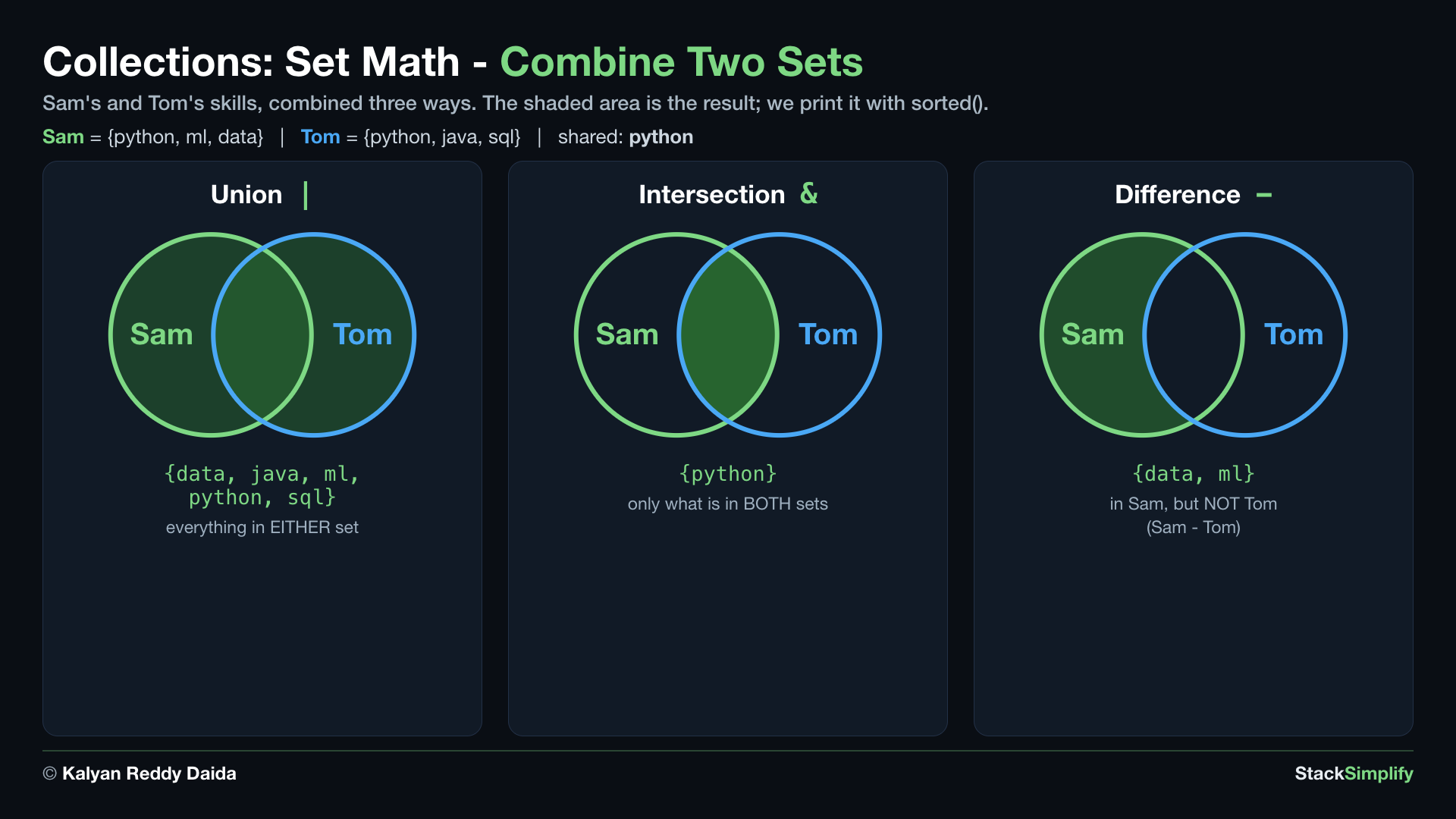
Sets do math like Venn diagrams. Union | is everything in either set, intersection & is only what is in BOTH, and difference - is what is in the first set but not the second. Each returns a NEW set, so we sorted() it to print.
# Concept-07: set math - union | (all), intersection & (shared), difference - (only in the first)
# Question-1: Across Sam's skills {"python", "ml", "data"} and Tom's skills {"python", "java", "sql"}, how do we find everything with sam_skills | tom_skills?
# Question-2: How do we find what they share with sam_skills & tom_skills?
# Question-3: How do we find what only Sam has with sam_skills - tom_skills?
sam_skills = {"python", "ml", "data"}
tom_skills = {"python", "java", "sql"}
print(sorted(sam_skills | tom_skills))  # union: everyone's skills
print(sorted(sam_skills & tom_skills))  # intersection: skills BOTH have
print(sorted(sam_skills - tom_skills))  # difference: skills only Sam has
Concept 8: Symmetric difference ^ (in exactly one set)
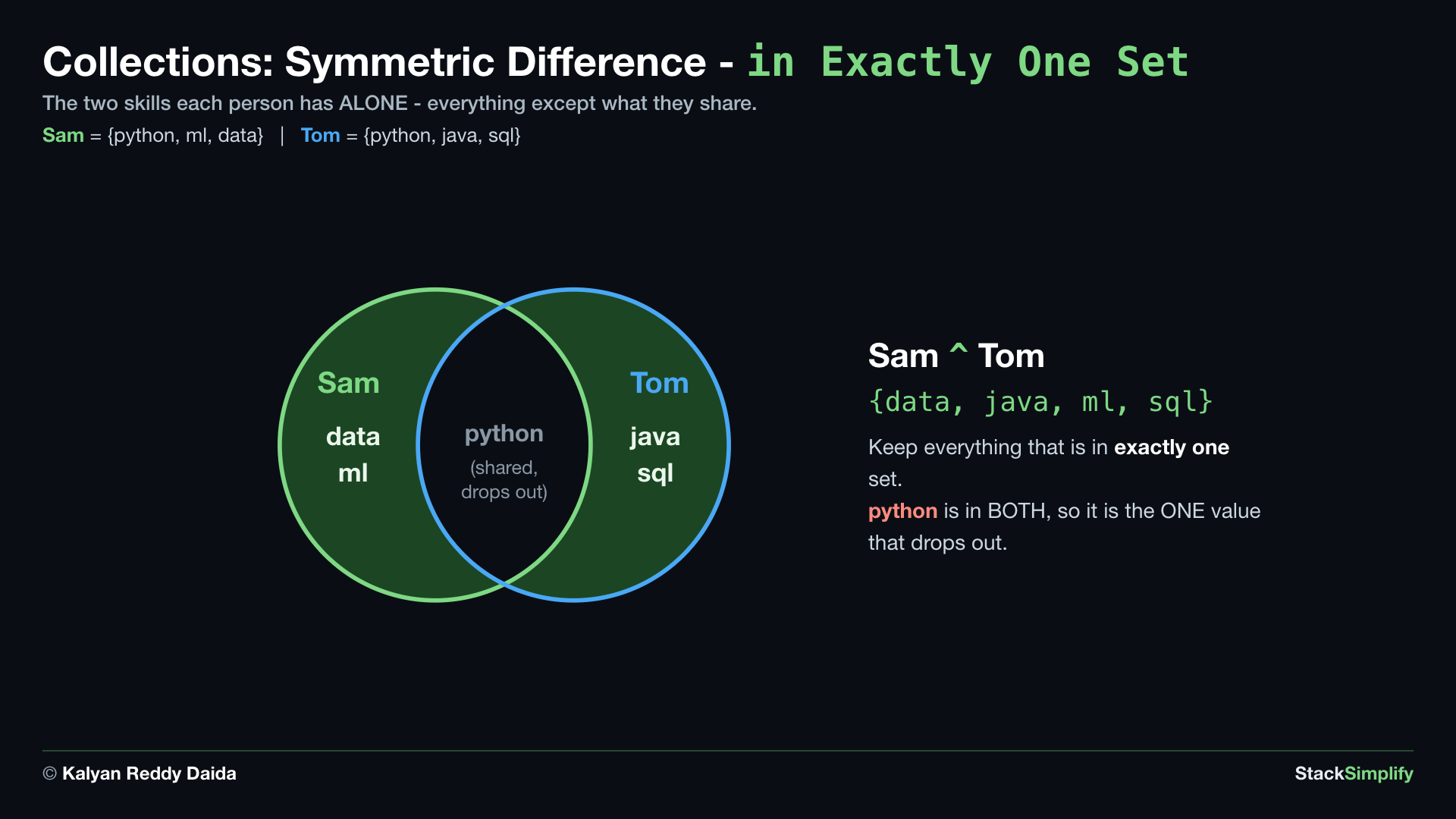
Symmetric difference ^ keeps the values in EXACTLY ONE of the two sets - everything except what they share. It completes the four set operators beside |, &, and -.
# Concept-08: symmetric difference ^ - values in exactly ONE set, not in both
# Question: Which skills does exactly one of Sam {"python", "ml", "data"} or Tom {"python", "java", "sql"} have, dropping the shared ones? (sam_skills ^ tom_skills -> ['data', 'java', 'ml', 'sql'])
sam_skills = {"python", "ml", "data"}
tom_skills = {"python", "java", "sql"}
print(sorted(sam_skills ^ tom_skills))  # ['data', 'java', 'ml', 'sql']: python is in both, so it drops out
Concept 9: Reach the items with a for loop (a set has no index)
Lists, tuples and strings all let you grab an item by position. A set does not - there is no "first" item to ask for, so sam_skills[0] raises TypeError: 'set' object is not subscriptable (E1 below, kept commented so the file still runs).
So how do you reach the items? You loop over the set, and it hands you one item at a time (E2). We loop over sorted(sam_skills) rather than the set itself, because a set has no order of its own and would print in a different order on every run.
This is your first for loop. A full tour of loops comes in Section 06, so for now just read it as "give me each skill, one at a time".
# Concept-09: a set has no index, so we reach its items by LOOPING over it (a full tour of for loops comes in Section 06)
# Question-1: Why does sam_skills[0] fail on a set? ('set' object is not subscriptable - there is no "first" item to ask for)
# Question-2: So how do we reach every one of Sam's skills, one at a time? (loop over the set with for ... in)
sam_skills = {"python", "ml", "data"}
# E1: WRONG - a set has no positions, so there is nothing at [0]
# print(sam_skills[0])  # TypeError: 'set' object is not subscriptable
# E2: RIGHT - a for loop hands us one item at a time
for skill in sorted(sam_skills):  # sorted() so the order is the same every run - a set has no order of its own
    print(skill)
A set has no order and no index
Because a set is unordered, you cannot ask for sam_skills[0] - there is no "first" item, and it raises TypeError: 'set' object is not subscriptable (Concept 9 shows this). When you need a stable order for printing or comparing, wrap it in sorted(), which hands you back an ordered list.
Pages for this step: Concept | Practice | Workshop
Python Files for this step: Concept | Practice | Practice Solutions | Workshop | Workshop Solutions
Practice and Workshop
Every step has a matching practice problem - try it yourself, then expand the solution to check. Some practices end with a short input() "Write a Program" problem. Every step also has an optional workshop problem (the same idea in a car scenario). The numbers line up with the steps, so if you get stuck on practice-03, re-read Concept Step-03.
| Step | Concept Name | Concept | Practice | Workshop |
|---|---|---|---|---|
| 01 | lists | concept | practice | workshop |
| 02 | tuples | concept | practice | workshop |
| 03 | dictionaries | concept | practice | workshop |
| 04 | sets | concept | practice | workshop |
Open the full Practice page and Workshop page for this section - each problem has its statement, expected output, an optional hint, and an expandable solution.
What You Learned
- List: ordered, changeable, square brackets. Index, slice,
append,insert,extend, replace,remove,pop,clear,sort,reverse,index/count,copy,in/not in, and nested lists (a list inside a list). split()/join():split()turns a string into a list;join()turns a list back into a string. The bridge between text and lists.- Tuple: ordered, fixed, round brackets. Great for a group that should not change; unpacks neatly.
- Dictionary: values by key, curly brackets. Look up with
[ ]or.get(), add or update by key, check a key within. A list of dictionaries holds many records. - Set: unique values only, no order. Fast membership, easy de-duplication, and set math (
|union,&intersection,-difference).
Next
Section 06: Loops and Comprehensions. Repeat work over a collection with for, and write compact loops as comprehensions.
Prefer to learn by watching?
The full video course teaches every concept on screen and builds the projects with you, step by step.
Section 04: Operators, Booleans, and Conditionals Next: Section 06: Loops and Comprehensions