06. Loops and Comprehensions
View code on GitHub Download slides (PDF) Get the Video Course
A loop repeats work. Instead of writing the same line for every value, you write it once and let Python run it: for each item in a collection, or for as long as a condition holds. Then you meet comprehensions, a compact way to build a list or dictionary in a single line. Loops are the engine room of programming: almost every real program loops over something.
Practice as you go
Each concept below has matching exercises. When you finish a step, head to the Practice problems for this section, then try the optional Workshop. Every problem includes a solution you can expand.
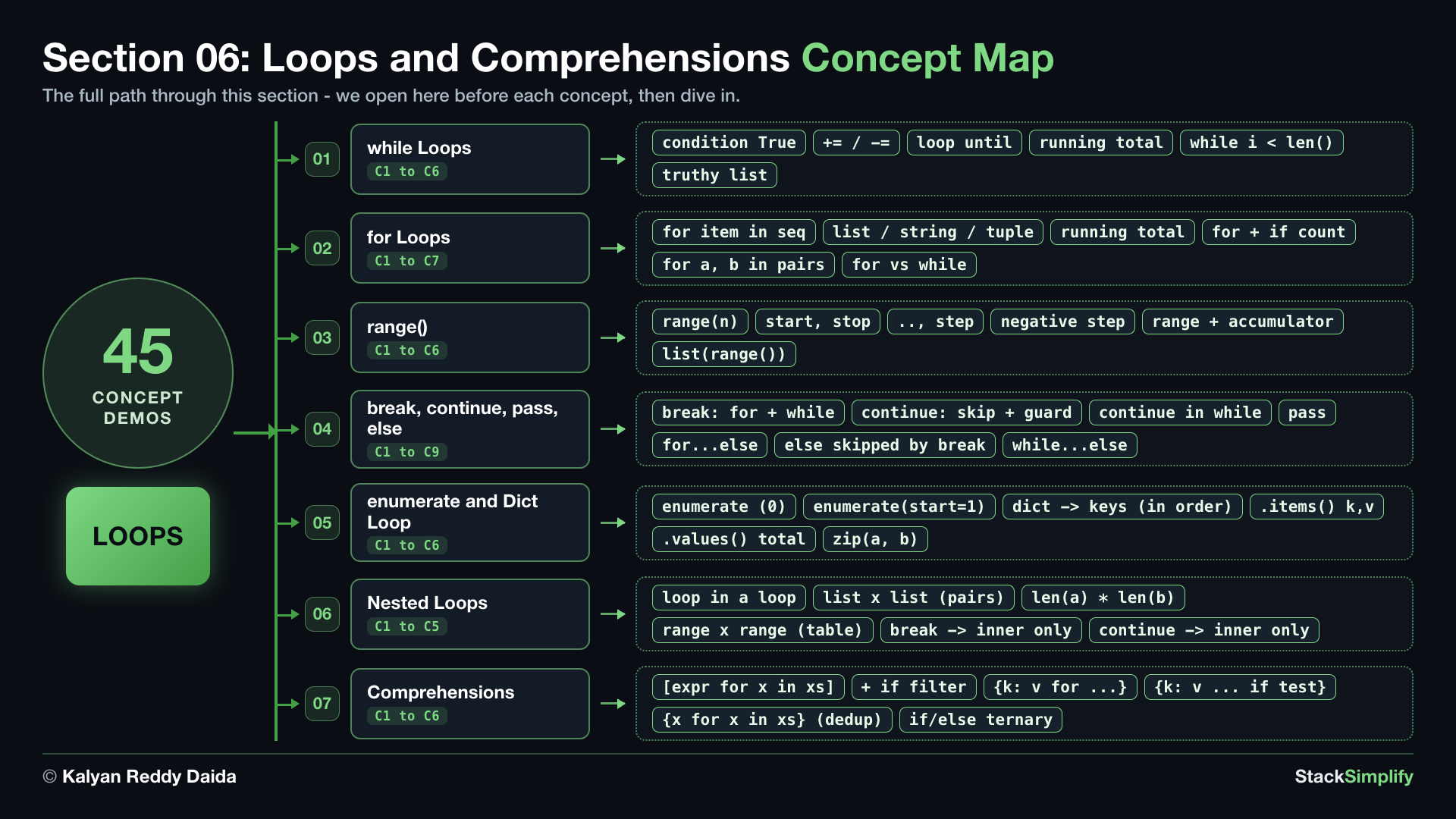
Step-00: What You Will Learn
In this section you will:
- Repeat code while a condition holds with a
whileloop: counting up, counting down, and adding values into a running total. - Run a block once per item with a
forloop over lists, strings, and tuples, and unpack(name, score)pairs right in the loop. - Generate number sequences with
range(), including steps, counting backwards, and turning a range into a list withlist(). - Steer loops with
break,continue,pass, and the loopelse(in bothforandwhileloops). - Number items with
enumerate, pair two lists withzip(), and loop over a dictionary. - Combine loops with nested loops, and build collections in one line with comprehensions.
Keywords in This Section
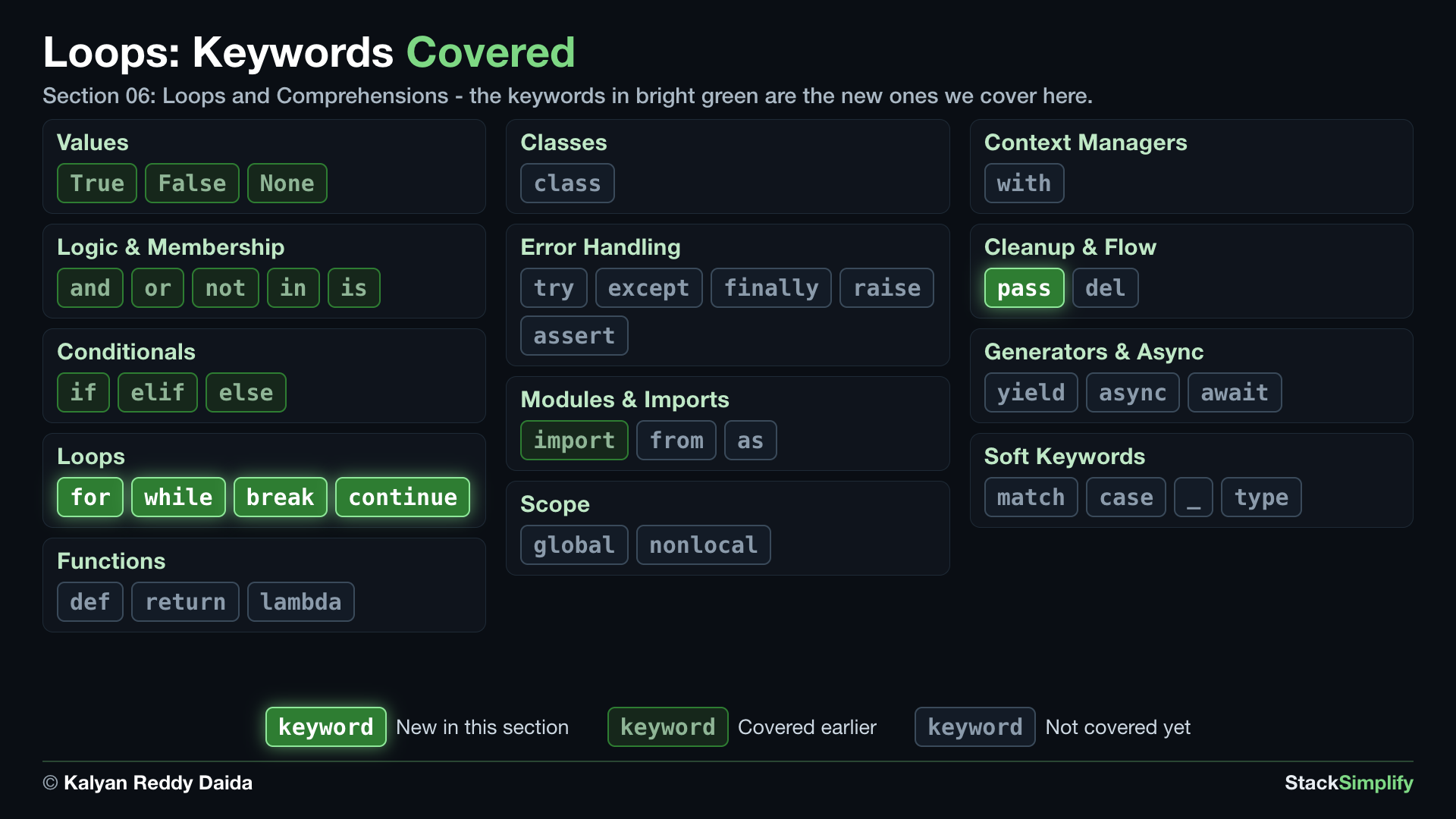
In the map, bright green marks the keywords this section introduces. Dim green marks keywords you already covered in earlier sections, and gray marks the ones still ahead.
Step-01: while Loops
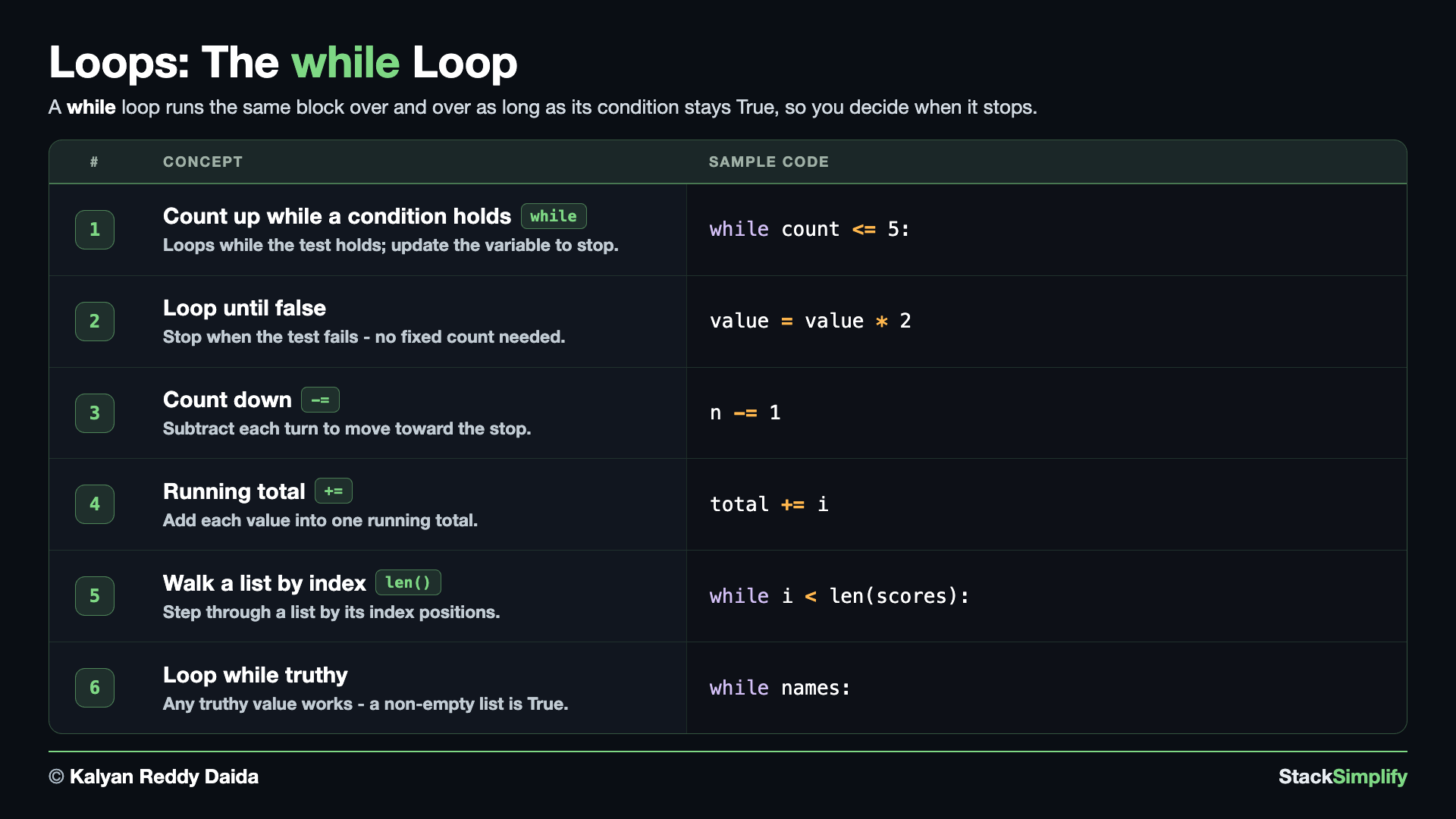
File: s06_step01_while_loops.py
A while loop repeats its block as long as a condition is True. You steer it with a variable you change each turn. Create s06_step01_while_loops.py in python-learn and build it concept by concept.
Concept 1: Count up with a while loop
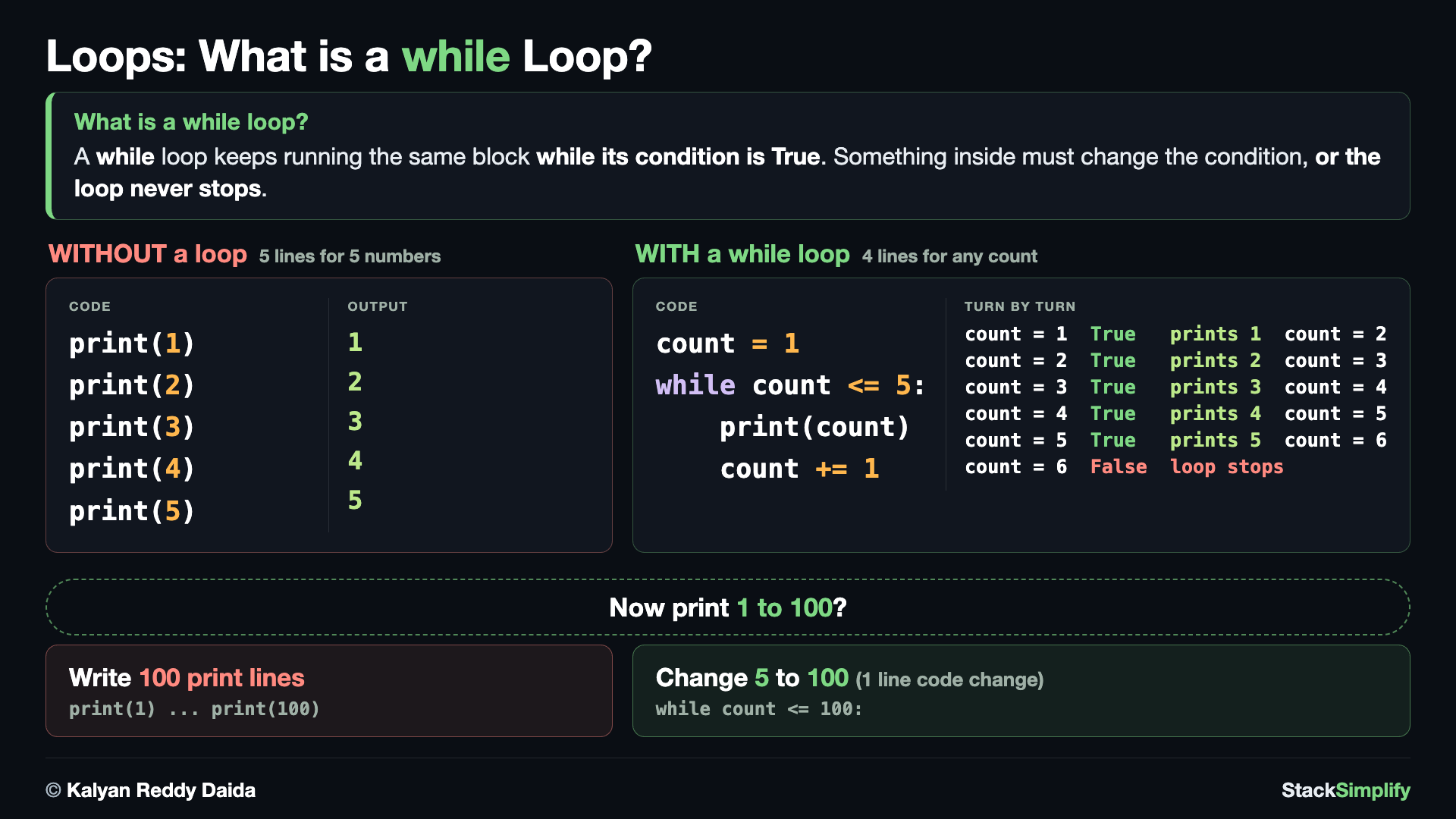
Printing 1 to 5 without a loop takes five print() lines. A while loop does the same job in four lines that never grow: change the 5 to 100 and it prints 1 to 100, with nothing else touched.
A while loop checks a condition, runs its indented block, then checks again, repeating as long as the condition stays True. Something inside must move it toward stopping: here count += 1 adds 1 each turn until count passes 5. The commented block underneath shows the trap - with no count += 1 the condition never turns False, so the loop runs forever; never uncomment it.
# Concept-01: A while loop repeats while its condition is True; change the variable inside or it runs forever
# Question: How do we count from 1 to 5 with a loop, and make sure it actually stops? (the block must change the variable the condition tests)
count = 1
while count <= 5:      # keep going while count is 5 or less
    print(count)
    count += 1         # += 1 moves count forward; WITHOUT this line the loop never stops
# This block would run FOREVER because count never changes - never uncomment it:
# count = 1
# while count <= 5:
#     print(count)
Concept 2: Loop until a condition becomes false
A while loop is the right tool when you do not know up front how many turns you need; you just loop until something happens. Here a value doubles every pass, and the loop keeps going while the value is 100 or less, so it stops before printing anything above 100 (the last line is 64, because the next value, 128, fails the test). The loop runs exactly as many times as the data demands, no counting needed.
# Concept-02: A while loop can run UNTIL a condition becomes false, even with no fixed count
# Question: How do we keep doubling the number 1 while it stays 100 or less? (no fixed count - it stops before printing anything above 100)
value = 1
while value <= 100:    # keep going while value is 100 or less
    print(value)
    value = value * 2  # reassign value to twice its size
Concept 3: Count down by subtracting
You are not limited to counting up. Start high and subtract each turn with n -= 1 to count down. When the condition finally fails, the loop ends and the line after it (print("Done")) runs once.
# Concept-03: Count DOWN by subtracting from the variable each turn with -=
# Question: How do we count down from 5 to 1, and then print "Done"? (-= 1 walks the variable back toward the stop)
n = 5
while n >= 1:          # keep going while n is 1 or more
    print(n)
    n -= 1             # -= 1 moves n backward toward the stop
print("Done")          # runs once, after the loop finishes
Concept 4: Build a running total (an accumulator)
A very common loop pattern is the accumulator: start a total at 0, then add to it on every turn. By the time the loop ends, the total holds the sum of everything you added. You will reuse this pattern constantly, from summing prices to averaging scores.
# Concept-04: Keep a running total (an accumulator) by adding into one variable each turn
# Question: How do we add up the numbers 1 to 5 into one total? (start a total at 0 and add each number in - the accumulator pattern)
total = 0
i = 1
while i <= 5:
    total += i         # add this number into the running total
    i += 1
print("total:", total)  # 15
Concept 5: Walk a list by its index
You can step through a list with a while loop by tracking a position and reading scores[i]. len(scores) gives the count, so while i < len(scores) stops right after the last item. It works, but it is fiddly - the for loop in the next step does the same thing with far less bookkeeping.
# Concept-05: Walk a list one position at a time with while i < len(list) (fiddly - for is cleaner)
# Question: How do we go through the list [70, 95, 60, 88] by its index positions, 0 to the last? (while i < len(scores) stops right after the last item)
scores = [70, 95, 60, 88]
i = 0
while i < len(scores):  # stop when i reaches the length (no item at that index)
    print(scores[i])    # scores[i] is the item at position i
    i += 1
Concept 6: Loop while a list still has items (a truthy test)
The condition does not have to be a number comparison. Any value Python sees as truthy keeps the loop going, and a non-empty list is truthy (an empty list is falsy). So while names: runs as long as the list has items. Each pass calls .pop() (from the Collections section), which removes AND returns the last item, so the list shrinks until it is empty and the loop stops.
# Concept-06: A while test can be ANY truthy value, not only a number comparison (a non-empty list is truthy)
# Question: How do we keep taking items from the list ["Sam", "Tom", "Ben"] until it is empty? (a non-empty list is truthy)
names = ["Sam", "Tom", "Ben"]
while names:            # loops while the list is non-empty (an empty list is "falsy")
    print(names.pop())  # pop() removes AND returns the last item, so the list shrinks each turn
Avoid the infinite loop
A while loop runs forever if its condition never becomes False. Make sure something inside the loop changes a value the condition checks (like count += 1). A loop with no progress is the most common beginner bug.
Pages for this step: Concept | Practice | Workshop
Python Files for this step: Concept | Practice | Practice Solutions | Workshop | Workshop Solutions
Step-02: for Loops
File: s06_step02_for_loops.py
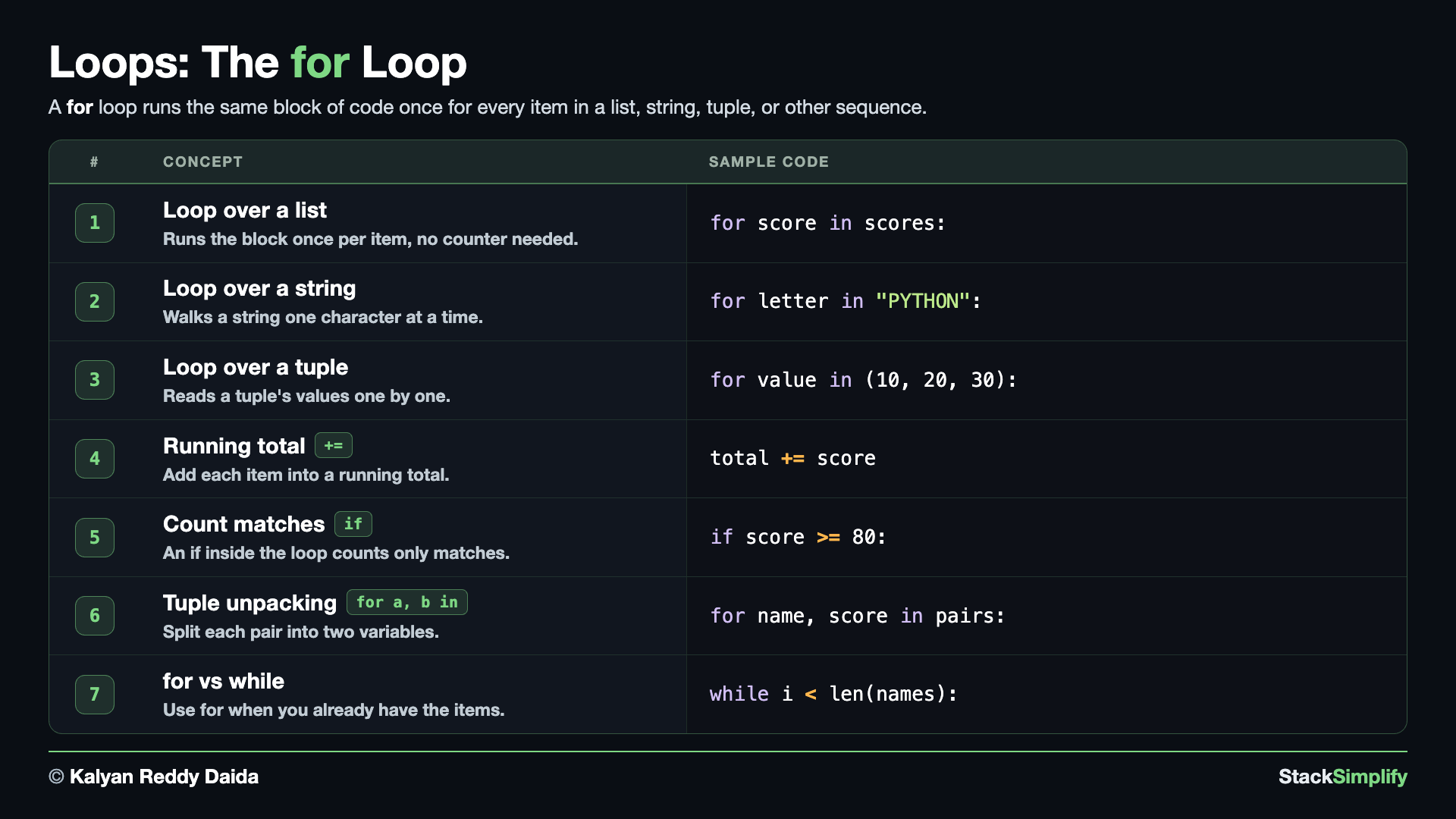
A for loop runs the block once for each item in a sequence, with no counter to manage. Create s06_step02_for_loops.py and build it concept by concept.
Concept 1: Loop over a list
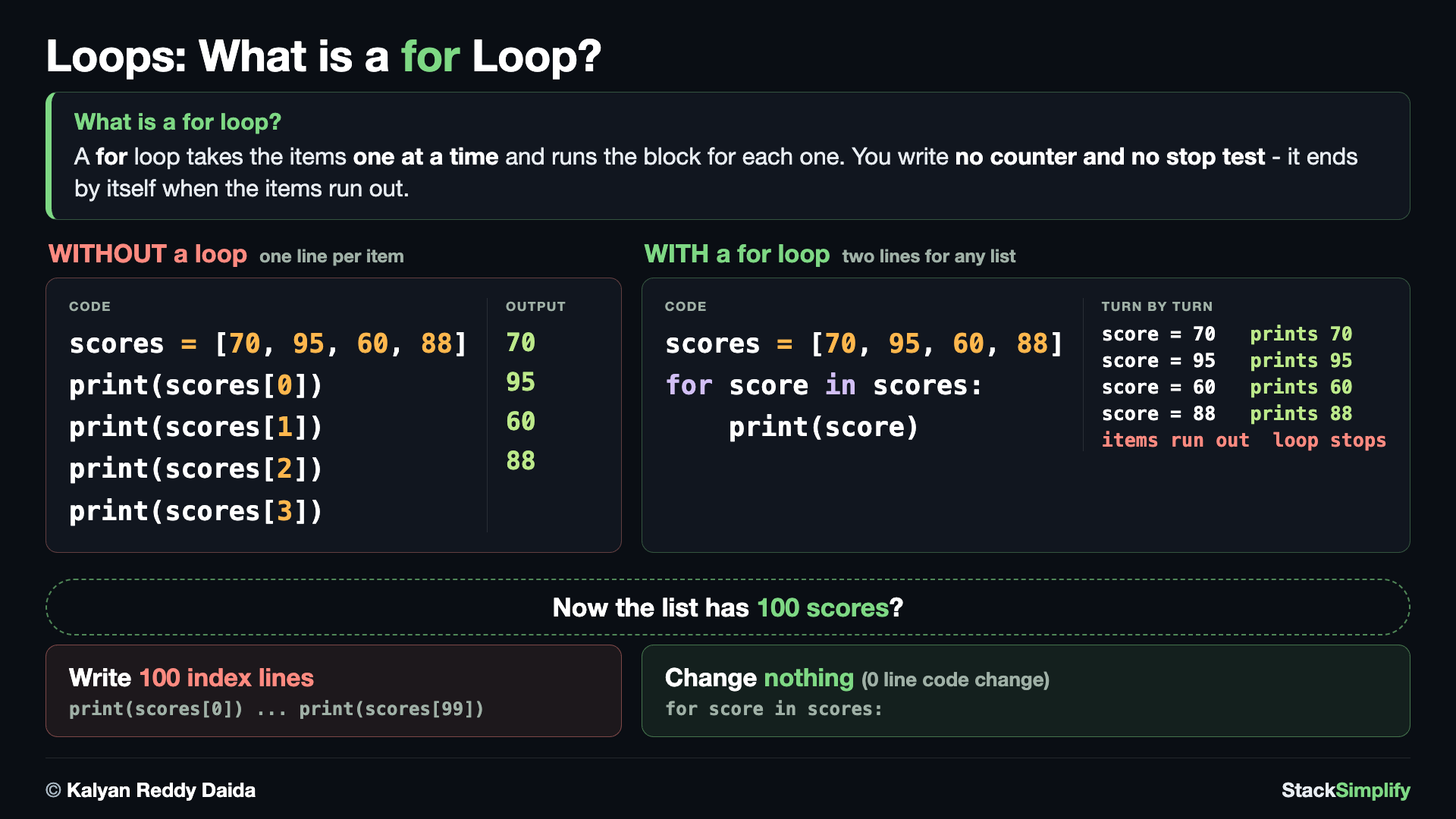
Printing four scores by hand takes one print() line per item, and you have to know how many there are. A for loop walks the list itself: grow it to 100 scores and the loop does not change at all, not even a number.
A for loop hands you one item at a time from a sequence and stops automatically at the end. No counter, no len(), no index: you name the item (score) and use it inside the block. This is the cleanest way to do something with every value in a list.
# Concept-01: A for loop runs the block once for each item, no counter needed
# Question: How do we print every item in the list [70, 95, 60, 88], without a counter? (a for loop hands you one item per turn and stops when they run out)
scores = [70, 95, 60, 88]
for score in scores:
    print(score)
Concept 2: Loop over the letters of a string
A for loop works on any sequence, and a string is a sequence of characters. Looping over a word hands you one letter per turn, in order - handy whenever you need to inspect or count characters.
# Concept-02: A for loop works on ANY sequence, even the letters of a string
# Question: How do we look at the word "PYTHON" one letter at a time? (a string is a sequence too, so a for loop reads it character by character)
for letter in "PYTHON":
    print(letter)
Concept 3: Loop over a tuple
A tuple is a sequence too, so a for loop reads it exactly like a list: each value in order, one per turn. The loop does not care whether the items came from a list, a tuple, or a string.
# Concept-03: A for loop reads a tuple the same way
# Question: How do we go through the values in the tuple (10, 20, 30) one by one?
point = (10, 20, 30)
for value in point:
    print(value)
Concept 4: Build a running total (an accumulator)
To add things up, start a total at 0 and add each item to it on every turn. This accumulator pattern (the same one while used in Step-01) is how you sum a list - here, all the numbers in a list into one total.
# Concept-04: Build a running total by adding each item into an accumulator
# Question: How do we add up all the numbers in the list [70, 95, 60, 88] into one total? (the same accumulator as the while loop, with no counter to manage)
scores = [70, 95, 60, 88]
total = 0
for score in scores:
    total += score        # add this score onto the running total
print("total:", total)     # 313
Concept 5: Count matches with an if inside the loop
Put an if inside the loop and only act when its test is true. Here a counter goes up by 1 for each number that is 80 or above, so the loop counts how many pass. Because >= includes the boundary, a number of exactly 80 counts.
# Concept-05: Put an if inside the for loop to count only the items that match
# Question: How many of the numbers [70, 95, 60, 88] are 80 or above? (count up by 1 only when the test is True)
scores = [70, 95, 60, 88]
passed = 0
for score in scores:
    if score >= 80:        # 80 itself counts, because >= includes the boundary
        passed += 1
print("80 or above:", passed)   # 2
Concept 6: Unpack a tuple in the for header
When each item in a list is a tuple, you can split it into names right in the for header: for name, score in pairs. Each (name, score) pair is unpacked into two variables at once, so you skip pair[0] / pair[1]. You will reuse this in Step-05 with enumerate, zip, and dictionaries.
# Concept-06: Unpack a tuple right in the for header (for a, b in list_of_pairs)
# Question: How do we pair each name with its score in one loop, given [("Sam", 70), ("Tom", 95), ("Ben", 60)]?
pairs = [("Sam", 70), ("Tom", 95), ("Ben", 60)]
for name, score in pairs:  # each item is a (name, score) tuple, split into two variables
    print(name, score)
Concept 7: Choosing between for and while
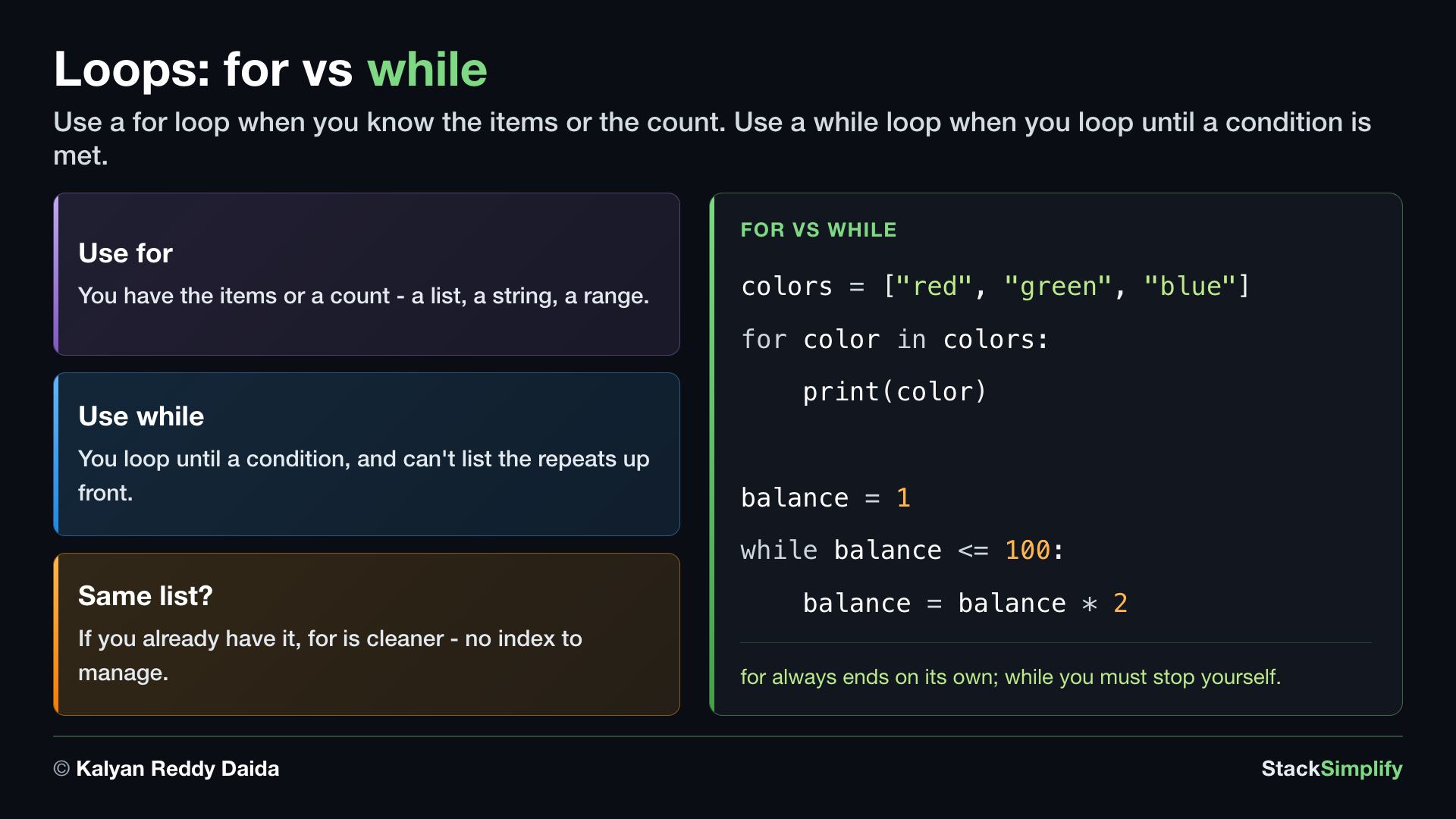
When you already have the items or know the count, a for loop is the cleaner choice: there is no index to set up and no condition to advance, so there is nothing to get wrong. Reach for a while loop only when you loop until a condition you cannot list ahead of time. The two runs print the SAME list: E1 uses a for loop (no index), E2 a while loop with an index you manage yourself - and the for version is plainly shorter.
# Concept-07: for vs while - reach for "for" when you already have the items
# Question: We can print the same list ["Sam", "Tom", "Ben"] both ways - which reads cleaner when the list is already in hand? (for when you have the items, while when you loop until a condition)
names = ["Sam", "Tom", "Ben"]
# E1 (for): for-each, no index or counter to manage
for name in names:
    print(name)
# E2 (while): you manage the index i and the stop yourself
i = 0
while i < len(names):
    print(names[i])
    i += 1
Prefer for when you have the items
If you already hold a list, string, or tuple, a for loop is shorter and safer than a while with an index. Save while for "loop until something happens", where you cannot know the number of turns in advance.
Pages for this step: Concept | Practice | Workshop
Python Files for this step: Concept | Practice | Practice Solutions | Workshop | Workshop Solutions
Step-03: range()
File: s06_step03_range.py
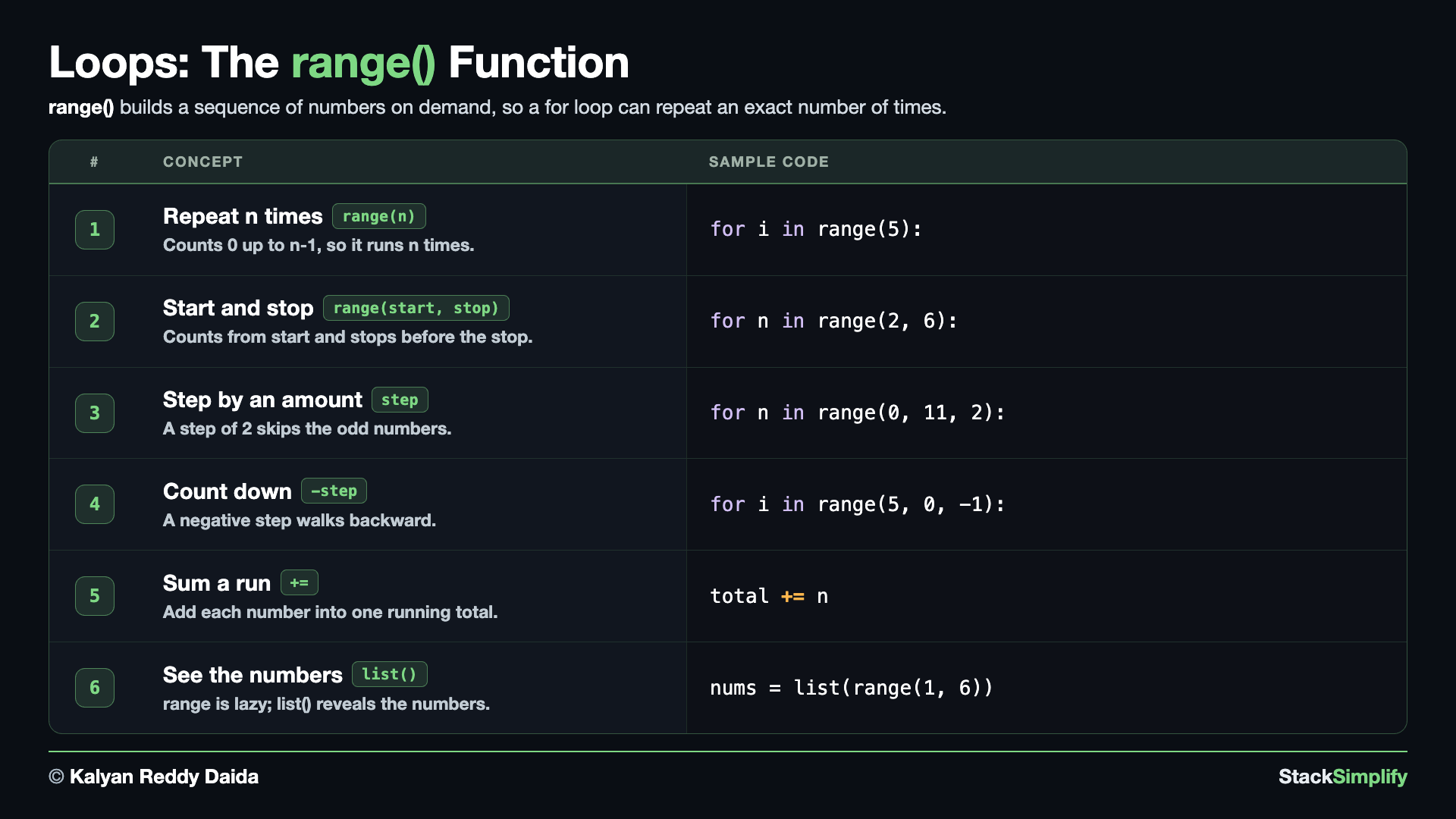
range() generates a sequence of numbers to loop over, perfect for repeating something a set number of times. Create s06_step03_range.py and build it concept by concept.
Concept 1: Repeat n times with range(n)
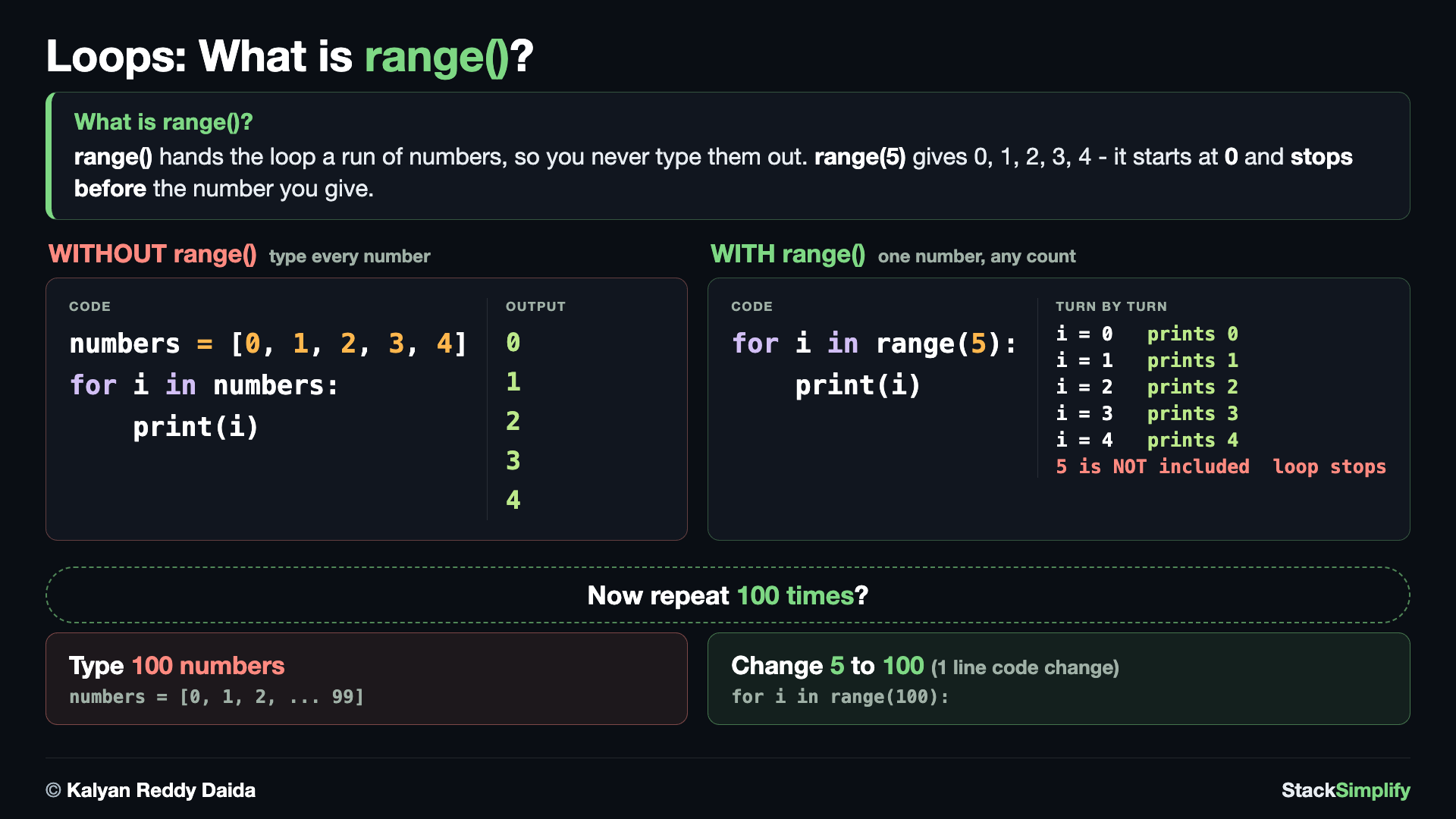
You already know how to loop over a list. range() answers a different question: where do the numbers come from? Instead of typing [0, 1, 2, 3, 4] yourself, range(5) hands them to the loop. Watch the last turn: range(5) stops before 5, so it gives 0 to 4.
range(n) produces the numbers 0 up to n - 1, which is exactly n values. Pair it with a for loop and you have the simplest way to repeat an action a fixed number of times. Notice the count starts at 0, matching how Python indexes everything.
# Concept-01: range(n) gives the numbers 0 up to n-1, so it repeats an action n times
# Question: How do we repeat an action 5 times, counting 0 to 4? (range(n) runs n times, counting 0..n-1)
for i in range(5):
    print(i)
Concept 2: Pick a start with range(start, stop)
Give range two numbers and it starts at the first and stops before the second. So range(2, 6) gives 2, 3, 4, 5, never reaching 6. That "stop is excluded" rule holds across all of range, so it is worth fixing in your mind early.
# Concept-02: range(start, stop) starts where you say and stops BEFORE the stop value
# Question: How do we count from 2 up to 5, leaving out the stop value 6? (range(start, stop) leaves the stop out)
for n in range(2, 6):
    print(n)
Concept 3: Jump by a step with range(start, stop, step)
A third number is the step, the size of each jump. range(0, 11, 2) starts at 0 and adds 2 each time, giving every even number up to 10. Use 11 as the stop so that 10 is included, since the stop itself is always left out.
# Concept-03: range(start, stop, step) jumps by the step you give
# Question: How do we list only the even numbers from 0 to 10? (a step of 2 skips the odd ones)
for n in range(0, 11, 2):
    print(n)
Concept 4: Count down with a negative step
A negative step makes range count backwards. range(5, 0, -1) starts at 5 and subtracts 1 each turn, stopping before 0, so you get 5, 4, 3, 2, 1, with no while loop needed. The line after the loop runs once.
# Concept-04: A negative step counts DOWN instead of up
# Question: How do we count down 5, 4, 3, 2, 1 without a while loop? (a step of -1 walks backward)
for i in range(5, 0, -1):
    print(i)
print("Done")
Concept 5: Total a run of numbers with range and an accumulator
Feed range into the accumulator pattern from Step-01: start a total at 0, then add something on every turn. Here we add up the numbers 1 to 10 into one number. This "repeat a calculation across a range and total it" shape is one of the most common uses of range.
# Concept-05: Pair range with an accumulator to add up a run of numbers
# Question: How do we add up the numbers 1 to 10 into one total? (add each number into one total)
total = 0
for n in range(1, 11):
    total += n
print("total:", total)   # 55
Concept 6: See the numbers with list(range(...))
A range is lazy - it makes its numbers on demand as the loop asks for them, instead of building a list up front. The two runs below show it: printing the range itself just shows range(1, 6) (it has not built the numbers yet), while list() forces it to produce them so you can see them.
# Concept-06: range is lazy, so wrap it in list() to see the numbers it will produce
# Question: How do we see the exact numbers range(1, 6) will produce? (printing the range shows range(1, 6); list() shows the numbers)
# E1: printing the range itself just shows range(1, 6) - it has not built the numbers yet (lazy)
print(range(1, 6))
# E2: list() forces it to produce the numbers, so now you can see them
nums = list(range(1, 6))
print(nums)
range stops before the stop value
range(start, stop) never includes stop itself. To loop through 1 to 10, write range(1, 11). This off-by-one is the most common slip with range, so always add 1 to the last number you want.
Pages for this step: Concept | Practice | Workshop
Python Files for this step: Concept | Practice | Practice Solutions | Workshop | Workshop Solutions
Step-04: break, continue, pass, and else
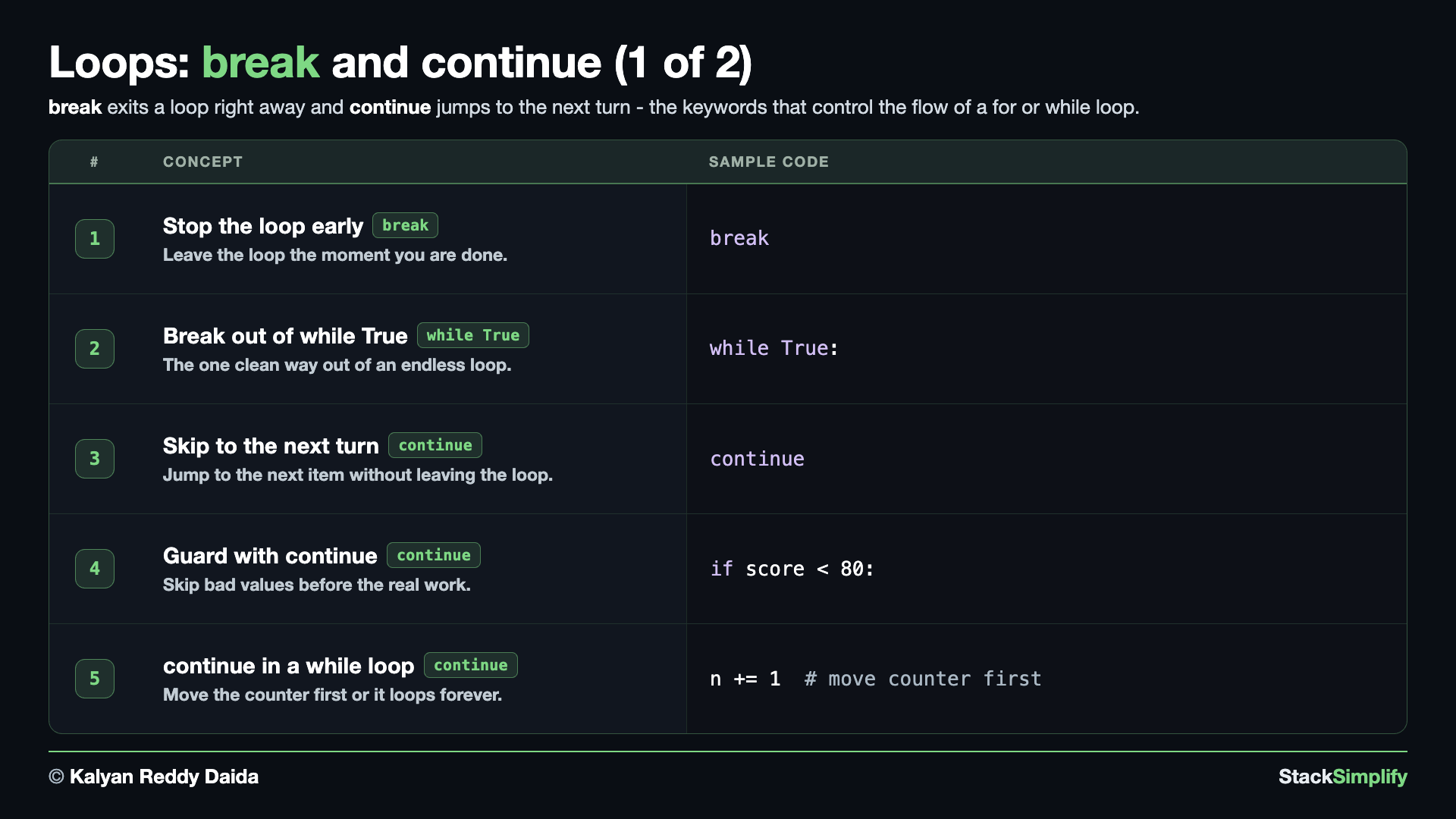
File: s06_step04_break_continue.py
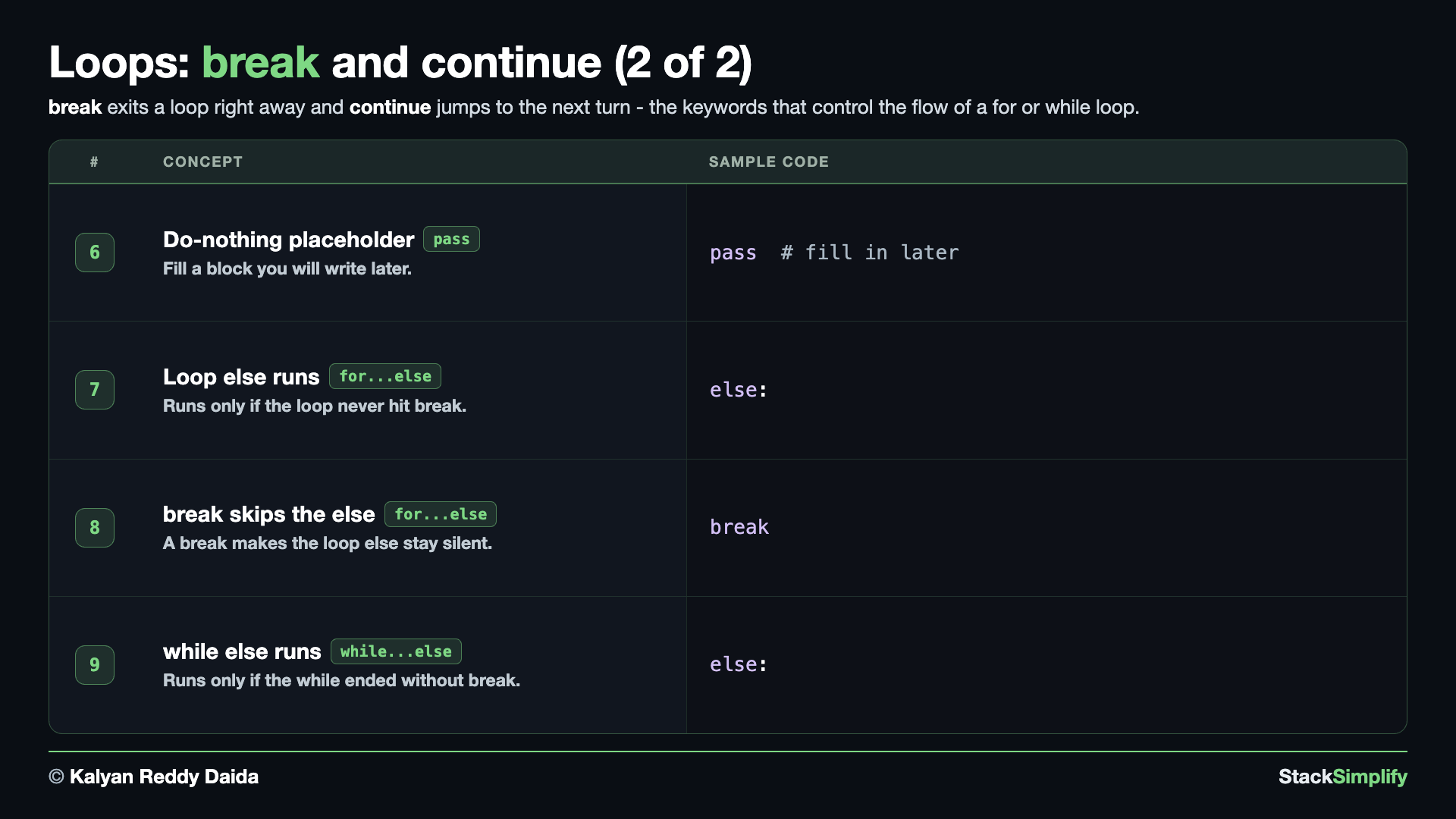
These keywords steer a loop: stop early, skip a turn, do nothing, or react when a loop finishes. Create s06_step04_break_continue.py and build it concept by concept.
Concept 1: Stop early with break
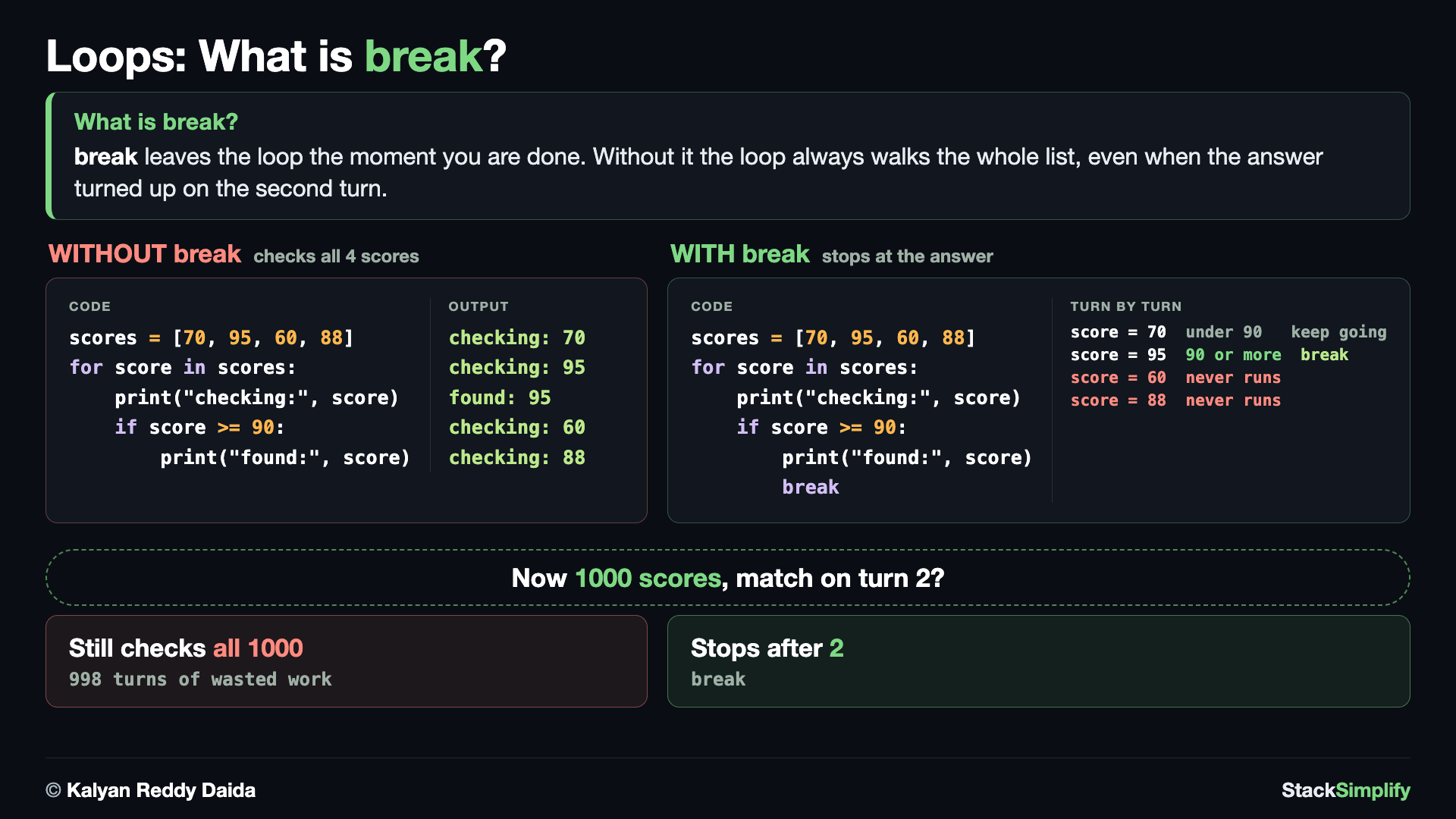
Without break the loop always walks the whole list, even when the answer turned up on turn 2. With break it leaves the moment you are done.
break leaves the loop immediately - the rest of the turns never run. It is perfect for a search: keep going until you find what you want, then stop. Here the loop checks each score, prints the ones it is still checking, and breaks the instant it meets the first score of 90 or above.
# Concept-01: break stops the loop early; leave as soon as you are done
# Question: How do we stop as soon as we find the first score of 90 or above in [70, 95, 60, 88]? (break exits the loop right away)
# E1: no break - the loop announces the answer and then keeps checking the rest anyway
scores = [70, 95, 60, 88]
for score in scores:
    if score >= 90:
        print("first 90+:", score)
    print("still checking:", score)   # 95 is "still checking" right after we found it
# E2: break leaves the loop on the line that found the answer
scores = [70, 95, 60, 88]
for score in scores:
    if score >= 90:
        print("first 90+:", score)
        break
    print("still checking:", score)
print("done checking")
Concept 2: break out of a while True loop
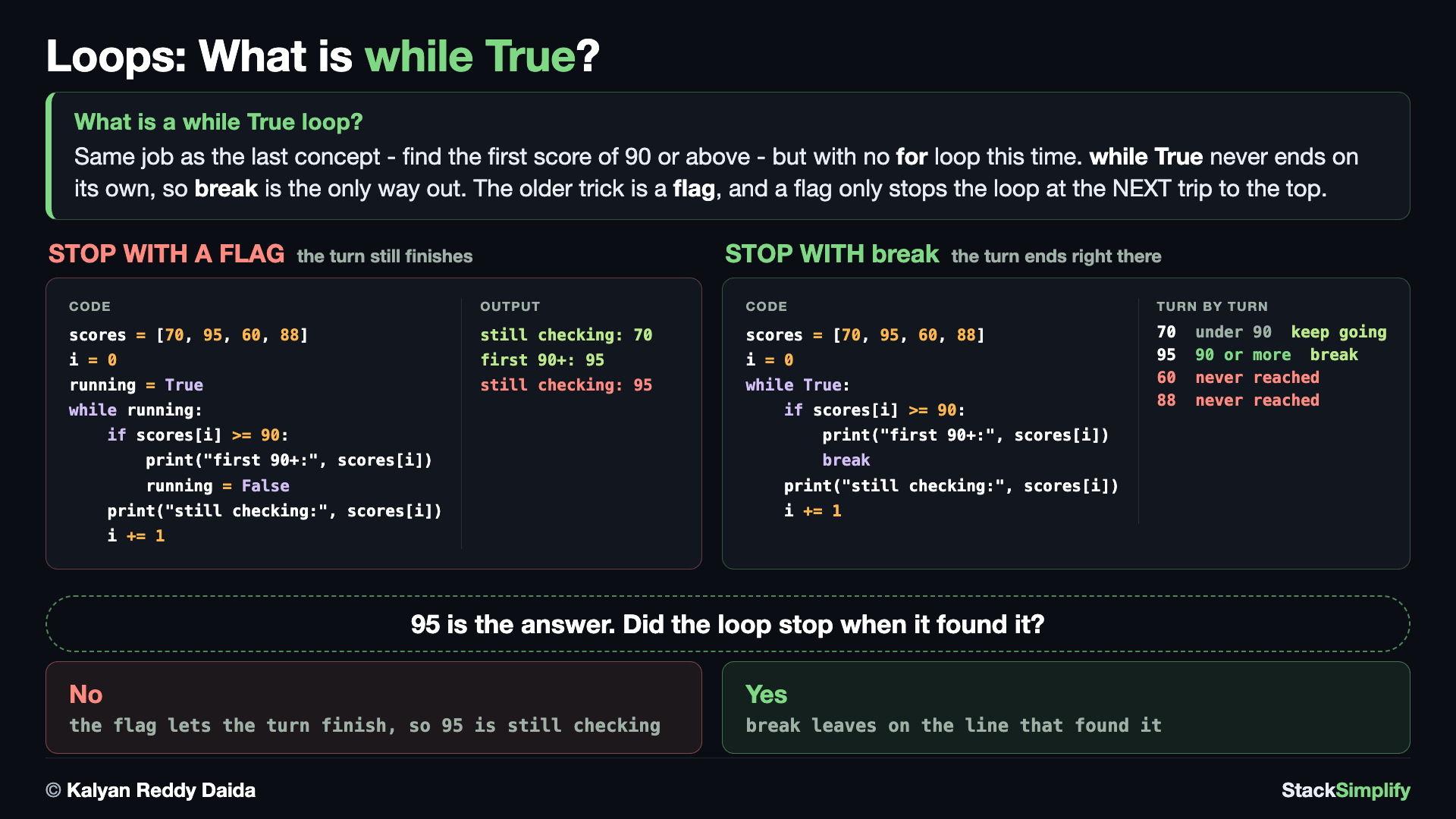
while True never ends on its own, so break is the only way out. Reach for it when the stop signal turns up in the middle of the work rather than at the top.
while True never stops on its own, so break is the only way out. This "keep going until a stop signal" shape is one of the most common real-world while loops: you loop forever and break when a condition is met. Here we read scores one at a time and break the instant we hit one below 65.
# Concept-02: break also exits a while True loop - the SAME search as Concept-01, now without a for
# Question: How do we find the first score of 90 or above in [70, 95, 60, 88] again, this time with a while True loop? (while True never ends on its own, so break is the only way out)
# E1: the older trick is a FLAG - but it only stops the loop at the NEXT trip to the top
scores = [70, 95, 60, 88]
i = 0
running = True
while running:
    if scores[i] >= 90:
        print("first 90+:", scores[i])
        running = False
    print("still checking:", scores[i])   # 95 is reported as "still checking" AFTER we found it
    i += 1
# E2: break leaves on the line that found it, so the turn really does stop
# CAREFUL: a while True that walks an index MUST be sure to find its match. With no 90+ score in
# the list, scores[i] would run past the end and raise IndexError - guaranteeing the exit is YOUR job.
scores = [70, 95, 60, 88]
i = 0
while True:
    if scores[i] >= 90:
        print("first 90+:", scores[i])
        break
    print("still checking:", scores[i])
    i += 1
print("done checking")
Concept 3: Skip a turn with continue
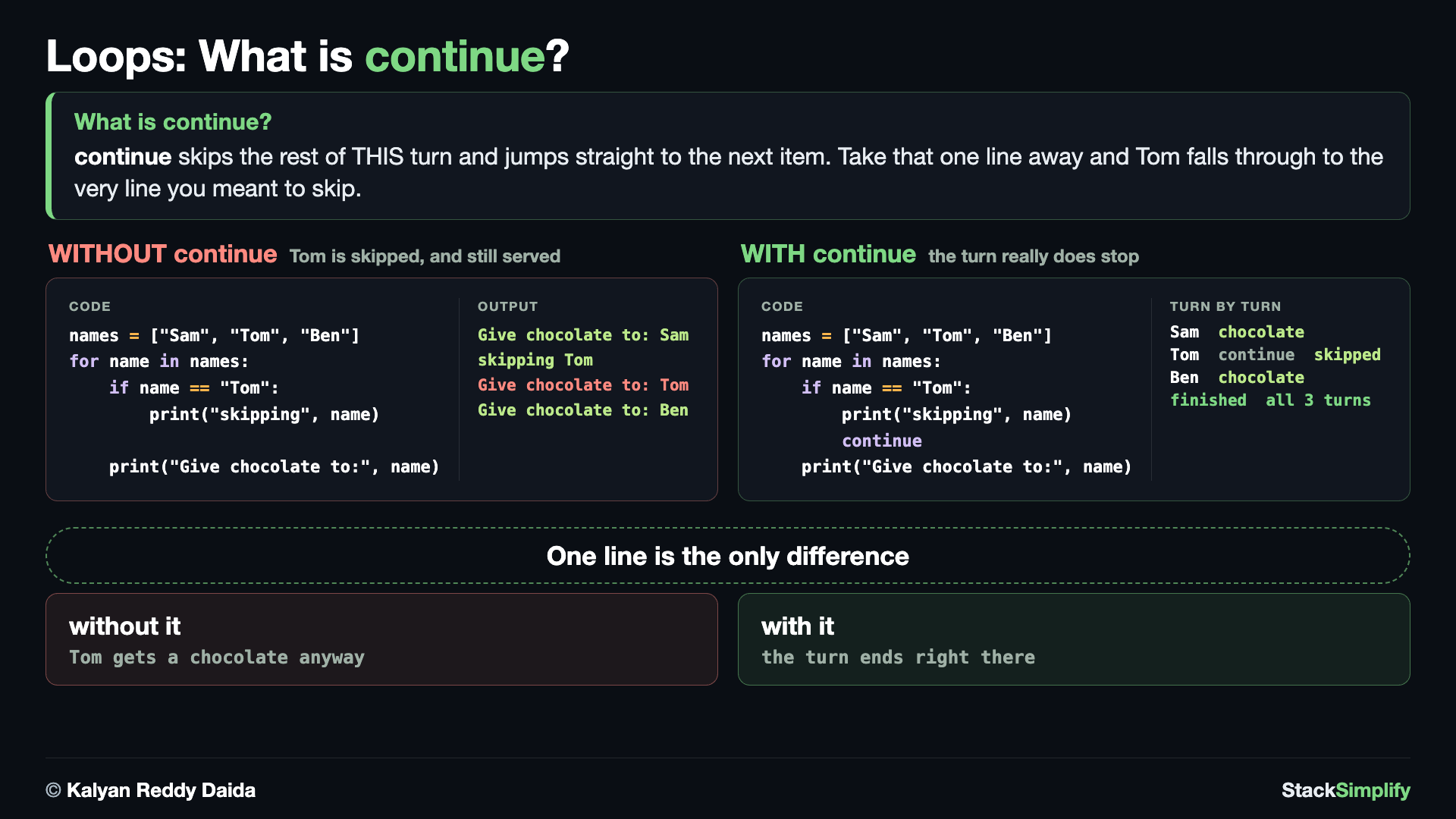
continue skips the rest of THIS turn and jumps to the next item. Unlike break, the loop keeps going - it loses one turn, not the rest of them.
continue skips the rest of the current turn and jumps straight to the next item, without leaving the loop. Use it to ignore some values while still processing the rest. Here it skips the name Tom and carries on with the others. Delete that one line and watch what happens: the program still prints skipping Tom, and then hands Tom a chocolate anyway, because nothing stopped the turn.
# Concept-03: continue skips the rest of THIS turn and jumps to the next item
# Question: How do we skip "Tom" but still give chocolate to every other name in ["Sam", "Tom", "Ben"]? (continue jumps to the next turn without leaving the loop)
# E1: no continue - we announce the skip, then hand Tom a chocolate anyway
names = ["Sam", "Tom", "Ben"]
for name in names:
    if name == "Tom":
        print("skipping", name)
    print("Give chocolate to:", name)
# E2: continue ends THIS turn, so the print below is never reached for Tom
names = ["Sam", "Tom", "Ben"]
for name in names:
    if name == "Tom":
        print("skipping", name)
        continue
    print("Give chocolate to:", name)
print("done")
Concept 4: Guard a loop by skipping bad values with continue
A common use of continue is a guard: skip the values you should not process before the real work. Here we total only the scores of 80 or above - each lower score is skipped with continue, so it never reaches the running total.
# Concept-04: continue guards a loop by skipping bad values before the real work
# Question: How do we add up only the scores of 80 or above in [70, 95, 60, 88] and skip the rest? (continue past the low ones so the total stays clean)
scores = [70, 95, 60, 88]
total = 0
for score in scores:
    if score < 80:
        print("skipping low score:", score)   # without this line you never SEE the guard work
        continue
    total += score
print("total of 80+:", total)
Concept 5: continue inside a while loop (move the counter first)
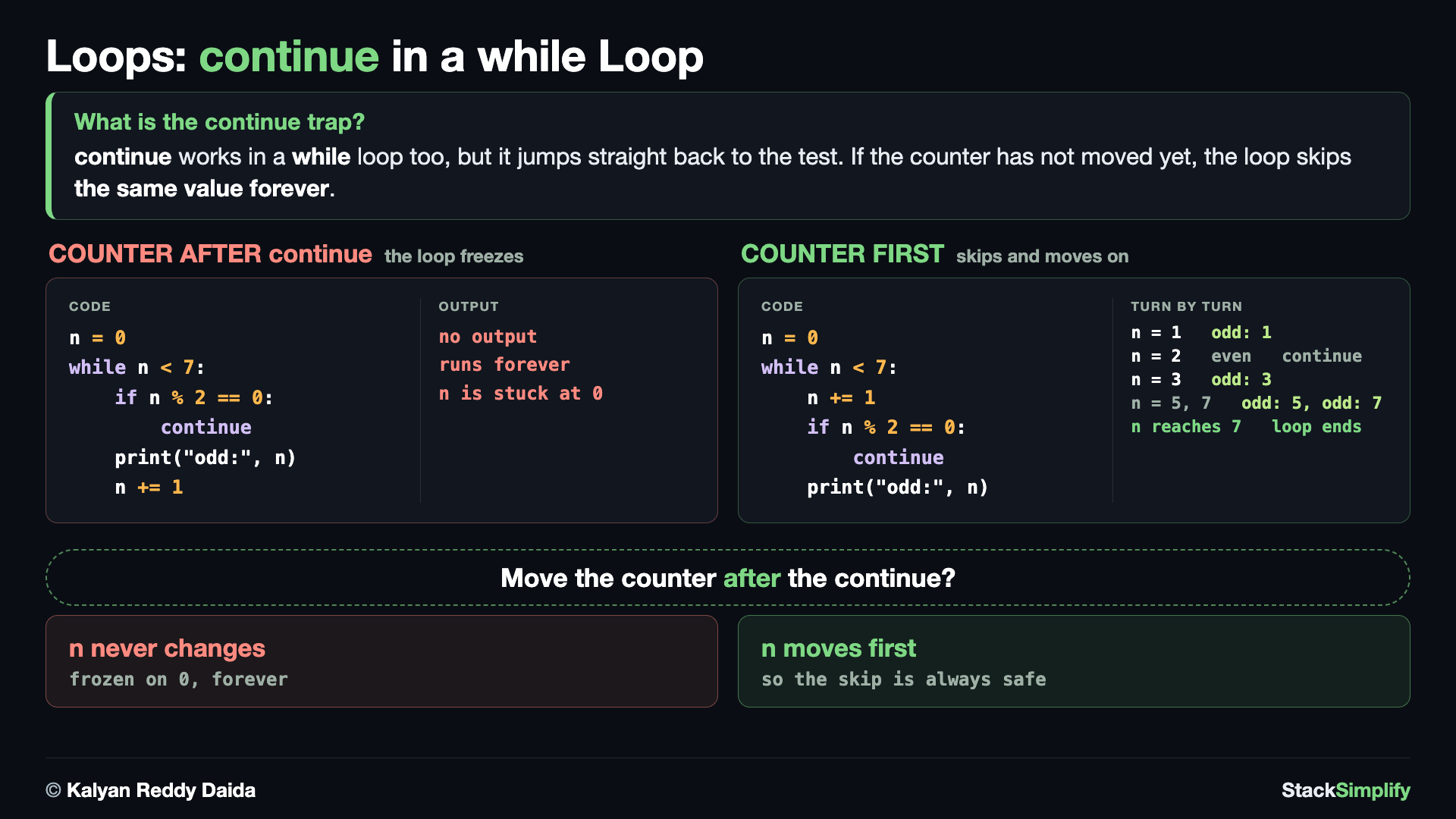
continue works in a while loop too, with one trap: it jumps straight back to the test, so the counter must move BEFORE the continue or the loop skips the same value forever.
continue works in a while loop too, with one trap: the counter must change BEFORE the continue, or the loop jumps back to the same value forever. Here we bump n first, then skip the even ones to print only the odd numbers.
# Concept-05: continue works inside a while loop too - but move the counter FIRST or it loops forever
# Question: How do we print the odd numbers 1 to 7 and skip the even ones with a while loop? (bump the counter before continue, or the skip freezes the loop)
# E1: counter AFTER the continue - the skip jumps back to the top with n unchanged, so the same
# even number is tested forever. This HANGS. Never uncomment it; Ctrl+C stops a runaway loop.
# n = 0
# while n < 7:
#     if n % 2 == 0:
#         continue      # n never moves, so this same even n is tested again, and again...
#     print("odd:", n)
#     n += 1
# E2: counter FIRST, so every turn moves n on before the skip can happen
n = 0
while n < 7:
    n += 1
    if n % 2 == 0:
        continue
    print("odd:", n)
print("done")
Concept 6: A placeholder with pass
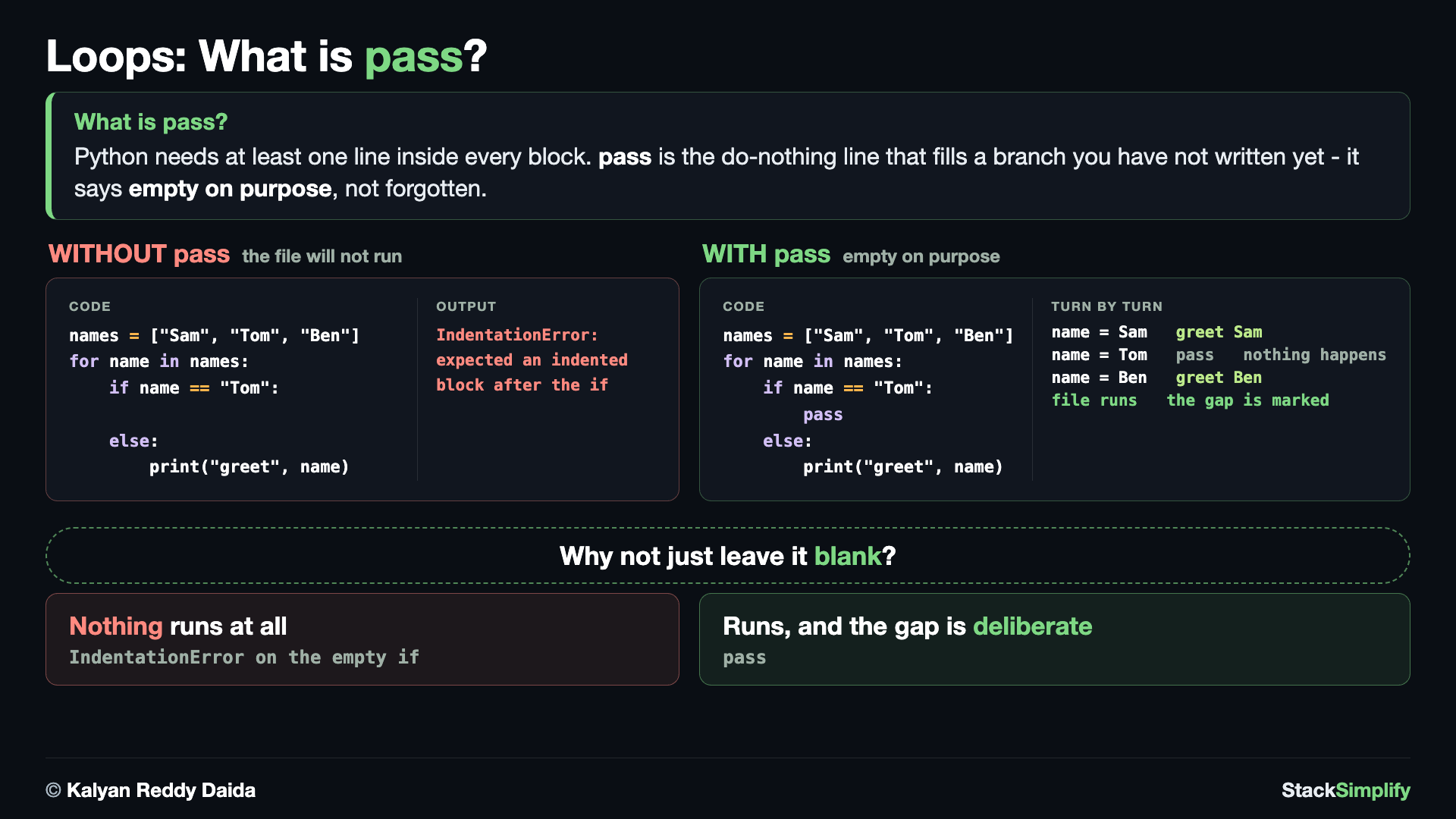
Python needs at least one line inside every block. Leave a branch empty and the file will not run at all - pass is the do-nothing line that fills it and says "empty on purpose".
pass does nothing at all. Python requires a body after a for, if, or else, so pass fills a block you want to leave empty for now without a syntax error. Here we leave the Tom branch empty on purpose while every other name is greeted.
# Concept-06: pass is a do-nothing placeholder; the turn CARRIES ON, which is what makes it different from continue
# Question: How do we leave one branch empty on purpose, and still finish the rest of that turn? (pass does nothing and falls through; continue would jump to the next name)
# E1: an empty branch is not allowed - Python needs at least one line inside every block, so this
# file would not even start: IndentationError: expected an indented block after 'if' statement
# names = ["Sam", "Tom", "Ben"]
# for name in names:
#     if name == "Tom":
#     else:
#         print("greet", name)
# E2: pass fills the branch, and the turn carries on to the line below
names = ["Sam", "Tom", "Ben"]
for name in names:
    if name == "Tom":
        pass    # nothing special for Tom yet - fill this in later
    else:
        print("greet", name)
    print("logged", name)  # runs for EVERY name, Tom included - a continue here would have skipped it
print("done")
Concept 7: The loop else runs only if break never fired
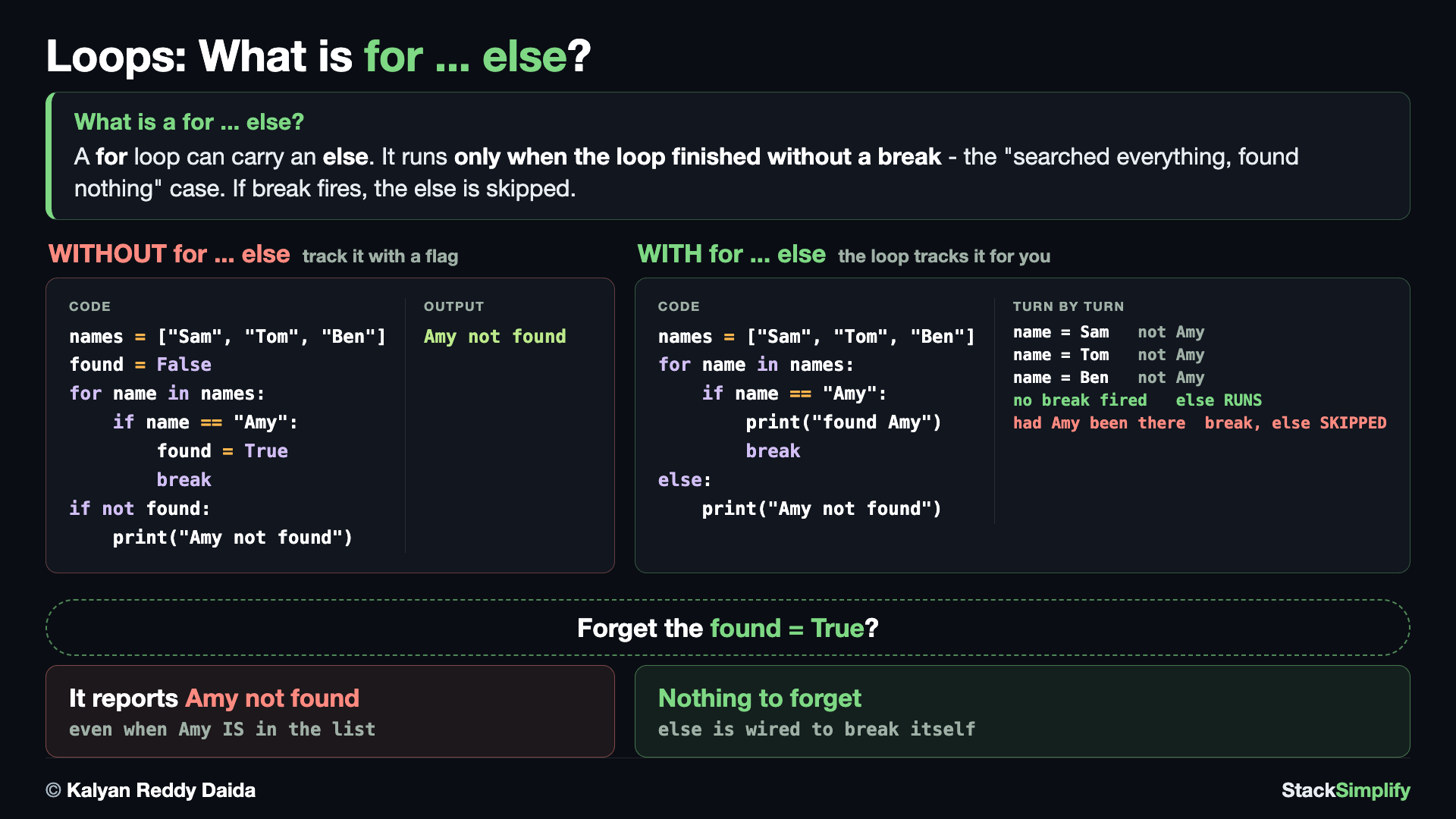
A for loop can carry an else that runs only when the loop finished without a break - the "searched everything, found nothing" case.
A for loop can carry an else, and it runs only if the loop finished without hitting break. That makes it a tidy way to handle "searched everything and never found it". Here Amy is not in the list, so the loop never breaks and the else fires.
# Concept-07: A for loop can carry an else; it runs ONLY if the loop finished without break
# Question: How do we tell "Amy" was NOT in the list ["Sam", "Tom", "Ben"] after checking every name? (the else fires only because break never fired - the "searched all, found none" case)
# E1: the older way - track it with a flag. It works, but the flag is one more thing to keep in
# step: forget the found = True line and it reports "not found" for a name that IS in the list.
names = ["Sam", "Tom", "Ben"]
found = False
for name in names:
    if name == "Amy":
        found = True
        break
if not found:
    print("Amy is not in the list")
# E2: for ... else - the loop tracks it for you, and there is no flag to forget
names = ["Sam", "Tom", "Ben"]
for name in names:
    if name == "Amy":
        print("found Amy")
        break
else:
    print("Amy is not in the list")
Concept 8: The same else is skipped when break fires
To prove the rule, run the same shape on a name that IS in the list. Sam is found, the loop breaks, and the else is skipped - so "not in the list" is never printed. Break fired, else stayed silent.
# Concept-08: The same for else is SKIPPED when break fires - proving the rule
# Question: How do we see that finding "Sam" in ["Sam", "Tom", "Ben"] and breaking makes the else stay silent? (break fired, so the else block is skipped)
# This is Concept-07's second example with ONE name changed, "Amy" -> "Sam". Amy was never in the
# list so the break never fired and the else ran; Sam IS in it, so the break fires and the else is skipped.
names = ["Sam", "Tom", "Ben"]
for name in names:
    if name == "Sam":
        print("found Sam")
        break
else:
    print("Sam is not in the list")
Concept 9: while ... else runs only if no break
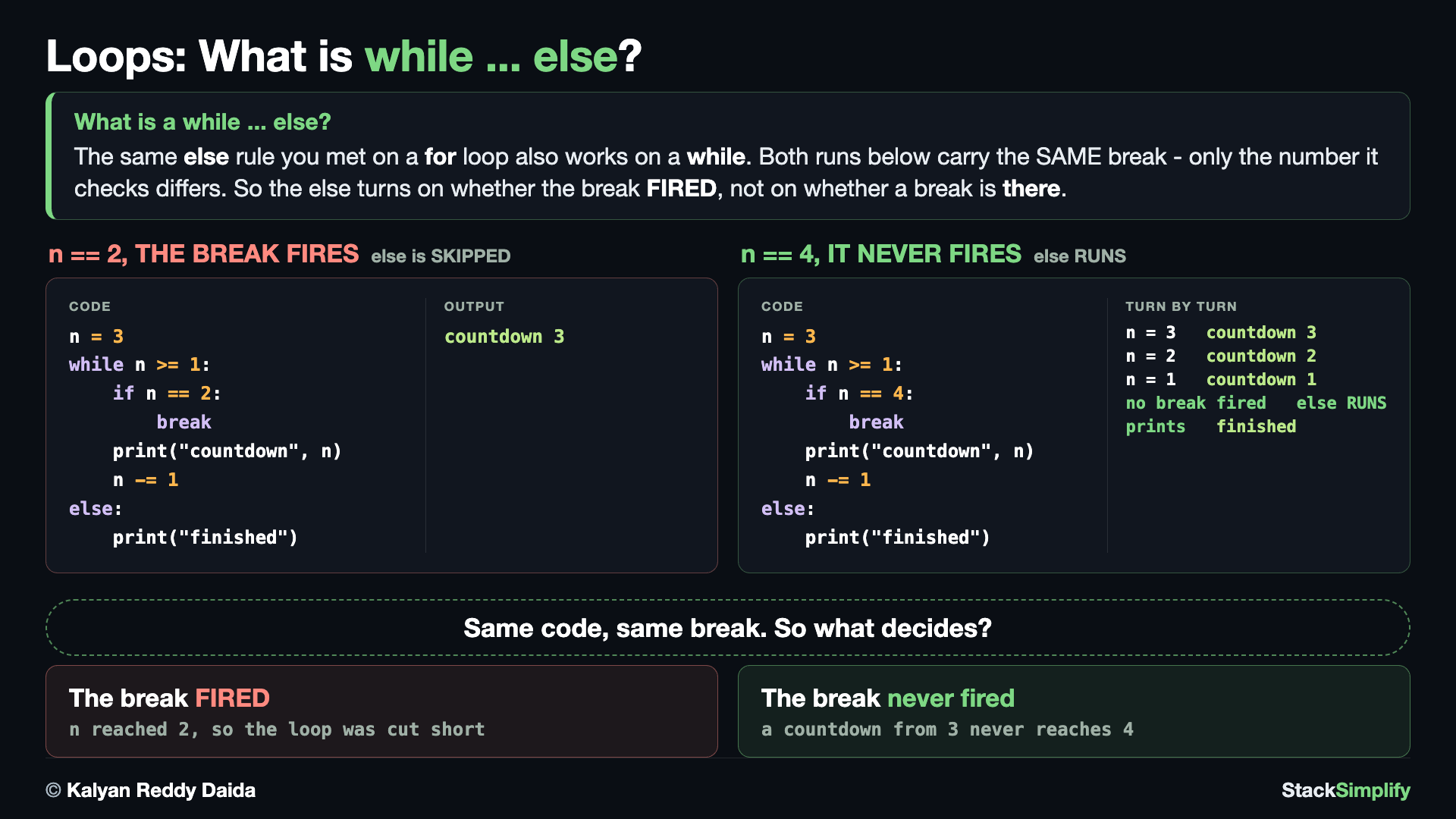
The same else rule works on a while loop: it runs only when the loop ended on its own, and is skipped the moment a break cuts it short.
The loop else also works on a while, with the same rule as the for-else above: it runs only if the while ended on its own, never via break. The two runs below prove it. E1 finishes naturally, so the else fires. E2 hits a break, so the else is skipped.
# Concept-09: else works on a while loop too - it runs only if the while ended without break
# Question: How do we tell a countdown from 3 that finished on its own from one that a break cut short at n == 2? (the while else runs after a natural finish, but a break skips it)
# E1: the break is RIGHT THERE, but a countdown from 3 never reaches 4, so it never fires
# and the else runs. The else depends on whether break FIRED, not on whether break EXISTS.
n = 3
while n >= 1:
    if n == 4:
        print("stopped early")
        break
    print("countdown", n)
    n -= 1
else:
    print("finished on its own")

# E2: the SAME code with ONE number changed - n does reach 2, so the break fires and the else is SKIPPED
n = 3
while n >= 1:
    if n == 2:
        print("stopped early")
        break
    print("countdown", n)
    n -= 1
else:
    print("finished on its own")
Steering a loop at a glance
break leaves the loop entirely; continue skips only the current round and keeps looping; pass does nothing (a placeholder); the loop else runs only when the loop finished without a break. All four work in a while loop as well as a for - just move a while loop's counter before continue. You wrap repeated logic into reusable Functions next.
Pages for this step: Concept | Practice | Workshop
Python Files for this step: Concept | Practice | Practice Solutions | Workshop | Workshop Solutions
Step-05: enumerate, zip, and Looping a Dictionary
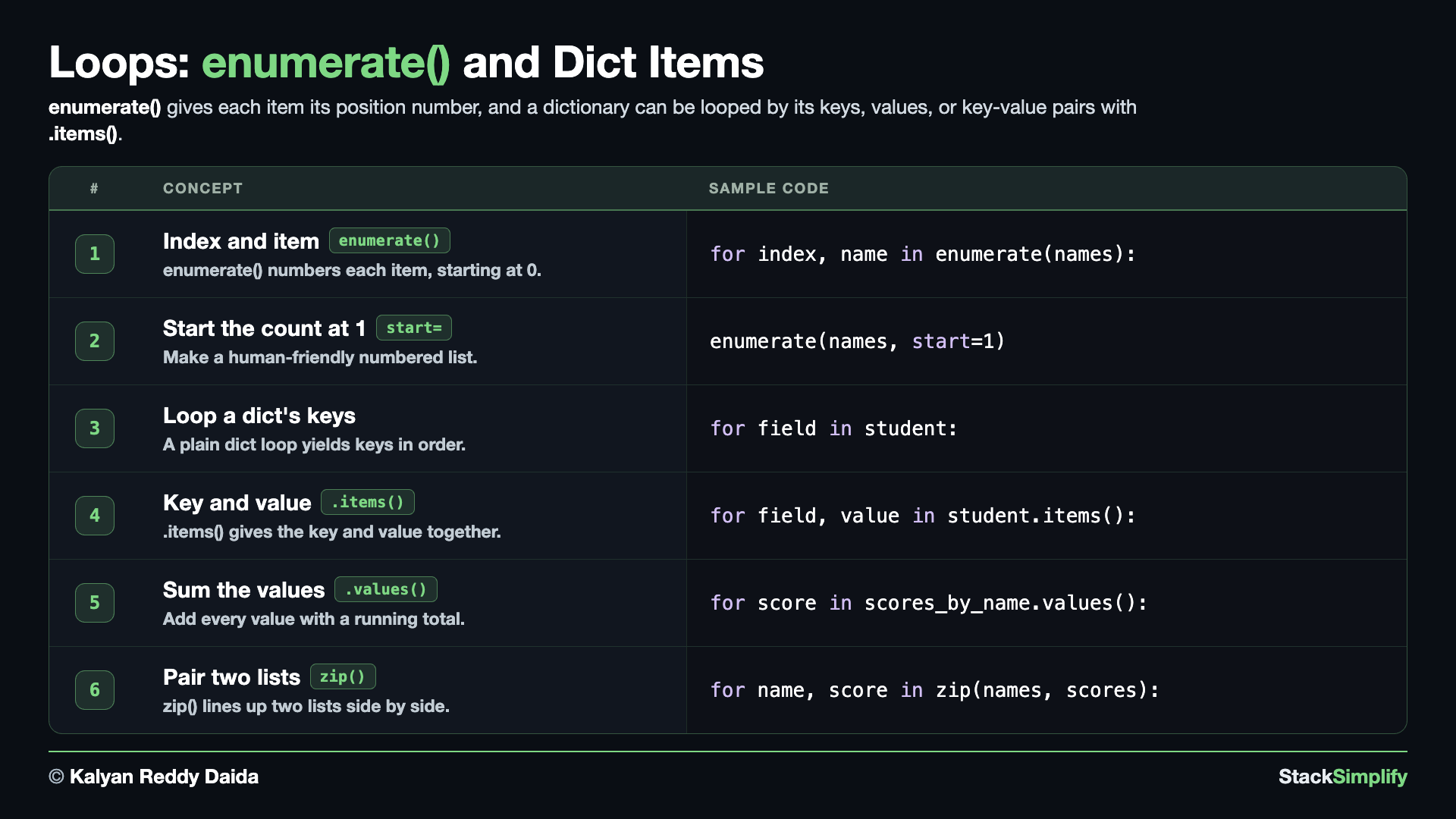
File: s06_step05_enumerate_and_dict.py
Sometimes you need the position as well as the item, you want to pair two lists together, or you want to walk a dictionary. Create s06_step05_enumerate_and_dict.py and build it concept by concept.
Concept 1: Get position and item with enumerate
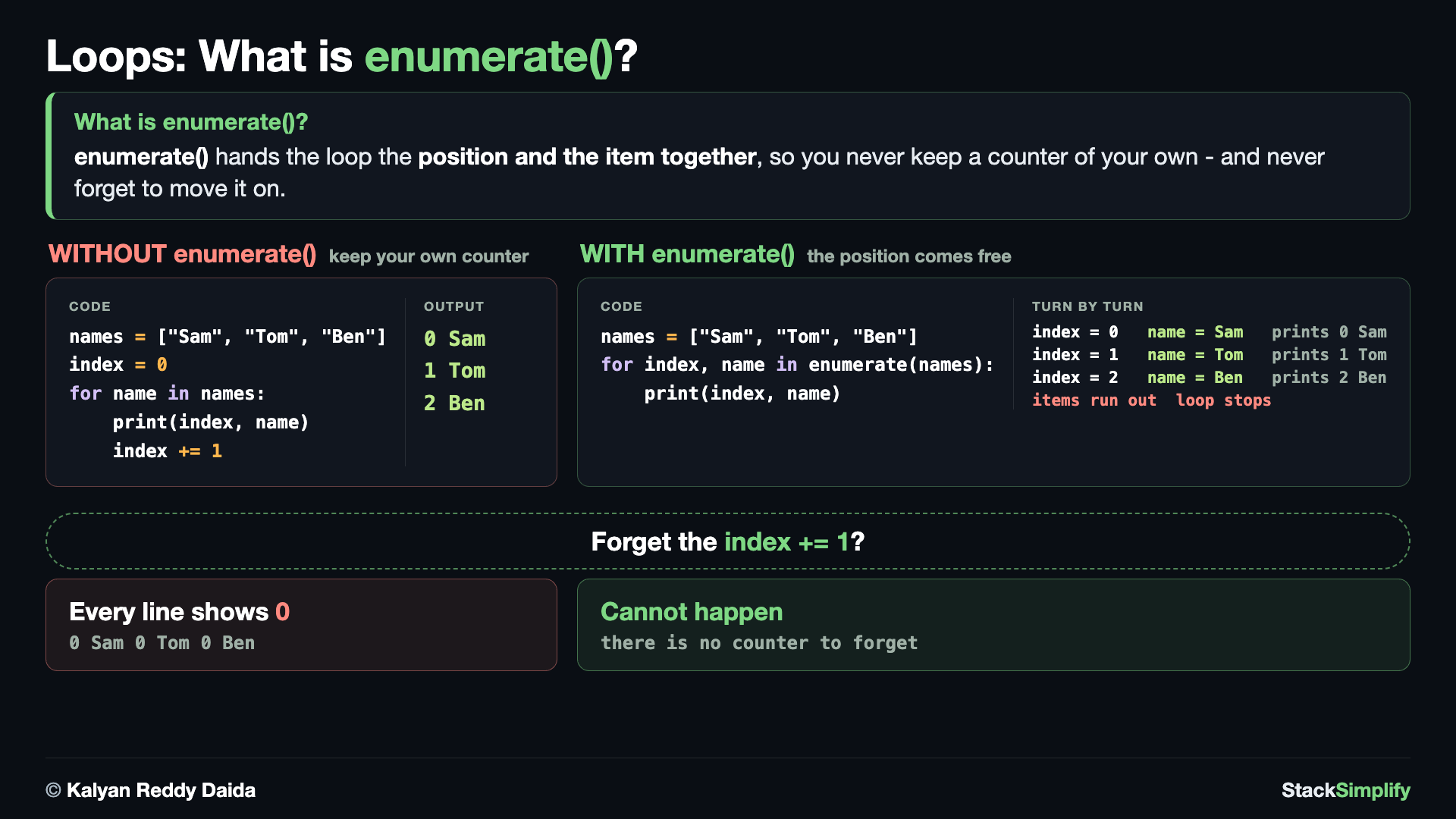
Without enumerate() you keep a counter of your own and must remember to move it on. Forget the index += 1 and every line reports position 0.
enumerate hands you the index and the item together on every turn, so you never track a counter yourself. You unpack the pair into two variables (index, name) right in the for line. By default the count starts at 0, matching list positions - the computer's way of numbering a list.
# Concept-01: enumerate gives the position AND the item together (default start 0)
# Question: How do we number the list ["Sam", "Tom", "Ben"] the computer's way, like "0 Sam, 1 Tom"? (enumerate hands you the position, so you keep no counter of your own)
names = ["Sam", "Tom", "Ben"]
# E1: the long way - keep your own counter and remember to move it on every turn
index = 0
for name in names:
    print(index, name)
    index += 1     # forget this line and every row reports position 0
# E2: the SAME result from enumerate, with no counter to keep and none to forget
for index, name in enumerate(names):
    print(index, name)
Concept 2: Start the count at 1
People read lists starting from 1, not 0. Pass start=1 to enumerate and the numbering begins at 1 - perfect for a human-friendly numbered list. The items are untouched; only the count changes.
# Concept-02: enumerate can start the count at 1, for a numbered list people read
# Question: How do we print a numbered list people can read, like "1. Sam"? (enumerate(names, start=1) begins the count at 1 instead of 0)
names = ["Sam", "Tom", "Ben"]
for position, name in enumerate(names, start=1):
    print(f"{position}. {name}")
Concept 3: Loop a dictionary to get its keys
Looping a dictionary directly gives you its keys, one per turn - the same as writing for field in student.keys(), just shorter. A dictionary remembers insertion order, so the keys always come out in the order they were added, which makes the output predictable. You can then look up each value with student[field] if you need it.
# Concept-03: Looping a dictionary gives you its keys, in the order they were added
# Question: How do we read the field names off the record {"name": "Sam", "age": 20, "city": "Delhi"}, one per turn? (looping a dict gives you its KEYS by default)
student = {"name": "Sam", "age": 20, "city": "Delhi"}
for field in student:   # same as: for field in student.keys()
    print(field)  # a dict loops in insertion order, so this output is always the same
# Do NOT add or delete keys while looping a dict; loop student.copy() if you must change it while looping.
# Uncomment to see the trap - changing the dict mid-loop stops it dead:
# for field in student:
#     student["extra"] = 1   # RuntimeError: dictionary changed size during iteration
Do not change a dict while looping it
Adding or deleting keys while you loop a dictionary stops your program with a RuntimeError. If you must change it while looping, loop over a copy (for field in student.copy():) instead.
Concept 4: Key and value together with .items()
When you want both the key and its value, loop over .items() and unpack the pair into two variables. Each turn gives you a field and the value it points to, which is the natural way to print or process a whole record.
# Concept-04: .items() gives the key AND the value together
# Question: How do we print each field of {"name": "Sam", "age": 20, "city": "Delhi"} with its value, like "name -> Sam"? (.items() hands you the key and the value together)
student = {"name": "Sam", "age": 20, "city": "Delhi"}
for field, value in student.items():
    print(field, "->", value)
Concept 5: Total a dictionary's values
The running-total pattern from Step-01 works on a dictionary too. Loop over .values() to get just the values, and add each into a total. Here it sums the scores in a name-to-score dictionary.
# Concept-05: Add up a dictionary's values with a running total
# Question: How do we add up all the scores in the name-to-score dictionary {"Sam": 70, "Tom": 95, "Ben": 60}? (.values() gives just the values, so the keys are never touched)
scores_by_name = {"Sam": 70, "Tom": 95, "Ben": 60}
total = 0
for score in scores_by_name.values():
    total += score
print("total:", total)
Concept 6: Pair two lists with zip()
zip(a, b) pairs two lists position by position, so you loop over both at once. Each turn hands you one item from each list, unpacked into two variables. It stops at the shorter list, so pairs are always complete - here, each name lined up with its score.
# Concept-06: zip() pairs up two lists, position by position, so loop them side by side
# Question: How do we line up each name in ["Sam", "Tom", "Ben"] with its score in [70, 95, 60], side by side? (zip pairs two lists and stops at the shorter one)
# E1: the everyday use - two lists of the same length, paired position by position
names = ["Sam", "Tom", "Ben"]
scores = [70, 95, 60]
for name, score in zip(names, scores):
    print(f"{name}: {score}")
# E2: one score short - zip stops at the SHORTER list, so Ben is never reached
names = ["Sam", "Tom", "Ben"]
scores = [70, 95]
for name, score in zip(names, scores):
    print(f"{name}: {score}")
print("Ben never appears - zip stopped when the scores ran out")
Reach for enumerate, not a manual counter
When you need both the position and the item, use enumerate instead of setting up a counter and remembering to add 1 to it. It is shorter, reads better, and removes a whole class of off-by-one mistakes.
Pages for this step: Concept | Practice | Workshop
Python Files for this step: Concept | Practice | Practice Solutions | Workshop | Workshop Solutions
Step-06: Nested Loops
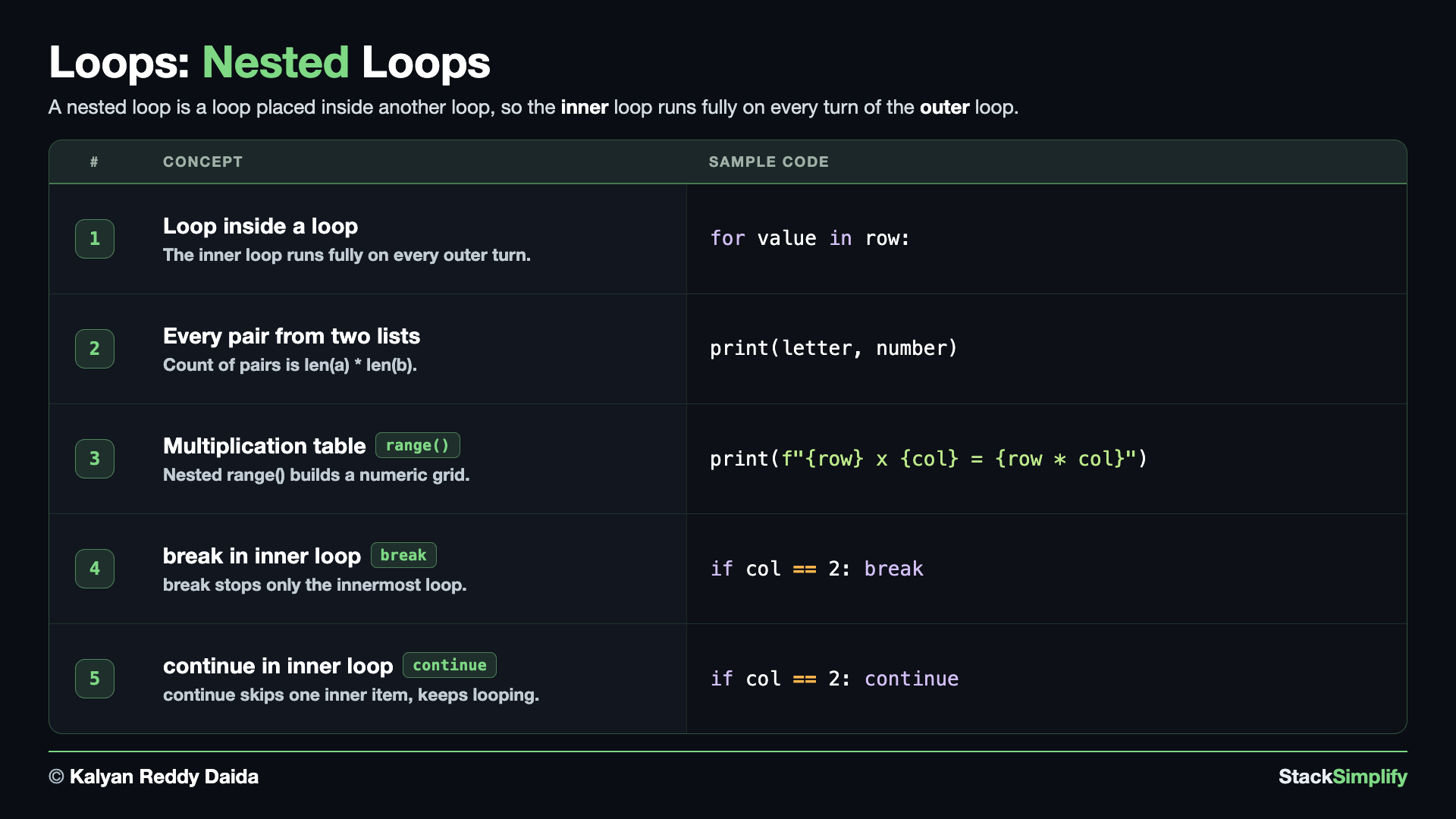
File: s06_step06_nested_loops.py
A loop can contain another loop. The inner loop runs all the way through on every turn of the outer loop. Create s06_step06_nested_loops.py and build it concept by concept.
Concept 1: A loop inside a loop
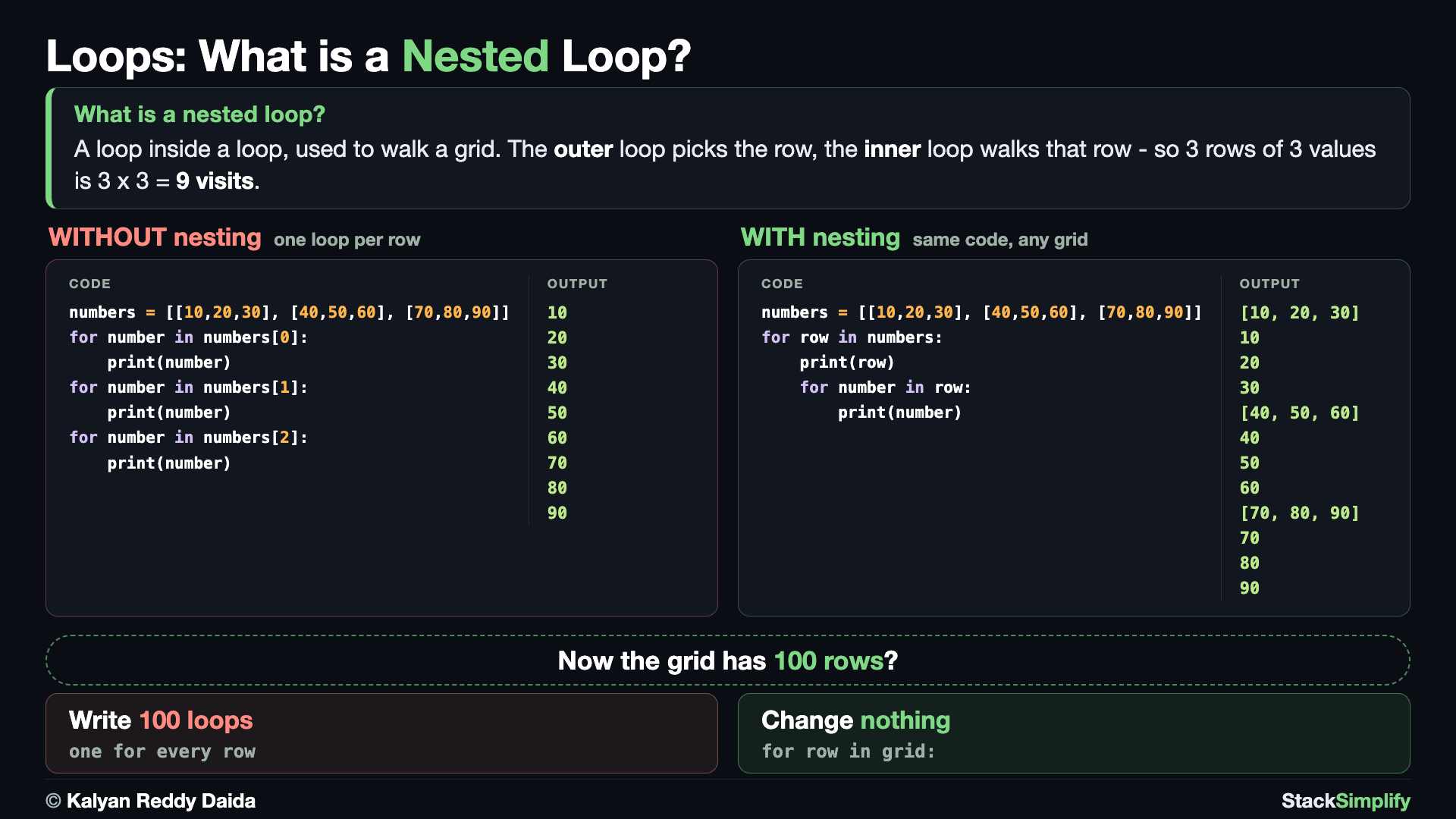
One loop per row means you must know how many rows there are. A nested loop walks any grid: the outer loop picks the row, the inner loop walks it.
When you put one loop inside another, the inner loop runs completely on every single turn of the outer loop. E1 does the job without nesting at all: one loop per row, written out three times, so a grid with 100 rows would need 100 loops. E2 runs just the outer loop, which shows what each turn actually hands you - a whole ROW, which is itself a list. E3 puts the inner loop inside, so each row is announced and then its own numbers are walked before the outer loop moves on.
# Concept-01: A loop inside a loop; the inner loop runs fully on every outer turn
# Question: How do we visit every value in the list of lists [[10, 20, 30], [40, 50, 60], [70, 80, 90]], row by row? (the outer loop hands you a whole row, the inner loop walks the numbers inside it)
numbers = [
    [10, 20, 30],
    [40, 50, 60],
    [70, 80, 90]
]
# E1: without nesting - one loop per row, so you write the same loop again for every row
for number in numbers[0]:
    print(number)
for number in numbers[1]:
    print(number)
for number in numbers[2]:
    print(number)
# E2: the outer loop on its own - each turn hands you one ROW, which is itself a list
for row in numbers:
    print(row)
# E3: add the inner loop - it walks that row's numbers before the outer loop moves on
for row in numbers:
    print(row)
    for number in row:
        print(number)      # the inner loop finishes completely before the outer loop takes the next row
Concept 2: Pair every item of two lists
A common everyday use of nested loops is combining two lists: pair each item of the first with each item of the second. Here every letter meets every number, so the six lines are not a coincidence - the count is always len(first_list) * len(second_list), and the last line prints that product so you can check it against the lines above.
# Concept-02: Pair every item of one list with every item of another; the total pairs are len(first_list) * len(second_list)
# Question-1: How do we make every pair from the lists ["A", "B"] and [1, 2, 3]?
# (Each item of the first list is paired with every item of the second list.)
# Question-2: How many pairs are there?
# (The total pairs are len(first_list) * len(second_list).)
letters = ["A", "B"]
numbers = [1, 2, 3]

for letter in letters:
    for number in numbers:
        print(letter, number)

print("Total pairs:", len(letters) * len(numbers))   # 2 x 3 = 6
Concept 3: Multiplication tables with nested range()
Nest range() inside range() and the two loop variables can be combined, not just printed side by side. The outer number picks the table, the inner number runs 1 to 10, and row * column is the answer. Every outer turn prints its own heading first, so the three tables stay separated on screen.
# Concept-03: Nested range() loops build a multiplication table.
# Question: How do we build the 1 to 3 multiplication tables?
# (For each row, print the table from 1 to 10.)
for row in range(1, 4):
    print(f"\n--- Table of {row} ---")
    for column in range(1, 11):
        print(f"{row} x {column} = {row * column}")
--- Table of 1 ---
1 x 1 = 1
1 x 2 = 2
1 x 3 = 3
1 x 4 = 4
1 x 5 = 5
1 x 6 = 6
1 x 7 = 7
1 x 8 = 8
1 x 9 = 9
1 x 10 = 10

--- Table of 2 ---
2 x 1 = 2
2 x 2 = 4
2 x 3 = 6
2 x 4 = 8
2 x 5 = 10
2 x 6 = 12
2 x 7 = 14
2 x 8 = 16
2 x 9 = 18
2 x 10 = 20

--- Table of 3 ---
3 x 1 = 3
3 x 2 = 6
3 x 3 = 9
3 x 4 = 12
3 x 5 = 15
3 x 6 = 18
3 x 7 = 21
3 x 8 = 24
3 x 9 = 27
3 x 10 = 30
Concept 4: break stops only the innermost loop
Inside nesting, break leaves only the loop it is in - the INNERMOST one. The outer loop carries on to its next turn. Compare the two runs: E1 has no break and prints the full grid; E2 breaks at col 2, so each row's inner loop ends early - but 2-1 still appears, proving the outer loop kept going.
# Concept-04: break stops only the INNERMOST loop, so the outer loop keeps going
# Question: When we break inside the inner loop, does the whole thing stop or just that pass?
# (Only the inner loop stops; the outer loop continues.)
# E1: No break - the inner loop runs fully for every outer loop iteration
for row in range(1, 3):
    print(f"\nStarting row {row}")
    for col in range(1, 4):
        print(f"{row}-{col}")
# E2: break in the INNER loop at column 2
# Only the inner loop stops; the outer loop still moves to the next row.
for row in range(1, 3):
    print(f"\nStarting row {row}")
    for col in range(1, 4):
        if col == 2:
            break
        print(f"{row}-{col}")
Concept 5: continue skips only one inner item
Likewise, continue inside the inner loop skips just that one inner turn and keeps the loop going. Compare the runs: E1 prints the full grid; E2 skips col 2 on every row but still prints the rest, so each row loses only its middle value.
# Concept-05: continue inside the inner loop skips one inner item and keeps going
# Question: How do we skip one inner item on every outer turn but keep the loop going?
# (continue skips only the current inner loop iteration.)
# E1: No continue - every inner item prints
for row in range(1, 3):
    print(f"\nStarting row {row}")
    for col in range(1, 4):
        print(f"{row}-{col}")
# E2: continue skips column 2 on every row, but the inner loop keeps going
for row in range(1, 3):
    print(f"\nStarting row {row}")
    for col in range(1, 4):
        if col == 2:
            continue
        print(f"{row}-{col}")
Keep nesting shallow
Two levels of nesting is common and three is rare. Each level multiplies the work, so a 3-by-2 pair already prints 6 lines. If you find yourself nesting deeper, there is usually a cleaner approach worth looking for.
Pages for this step: Concept | Practice | Workshop
Python Files for this step: Concept | Practice | Practice Solutions | Workshop | Workshop Solutions
Step-07: Comprehensions
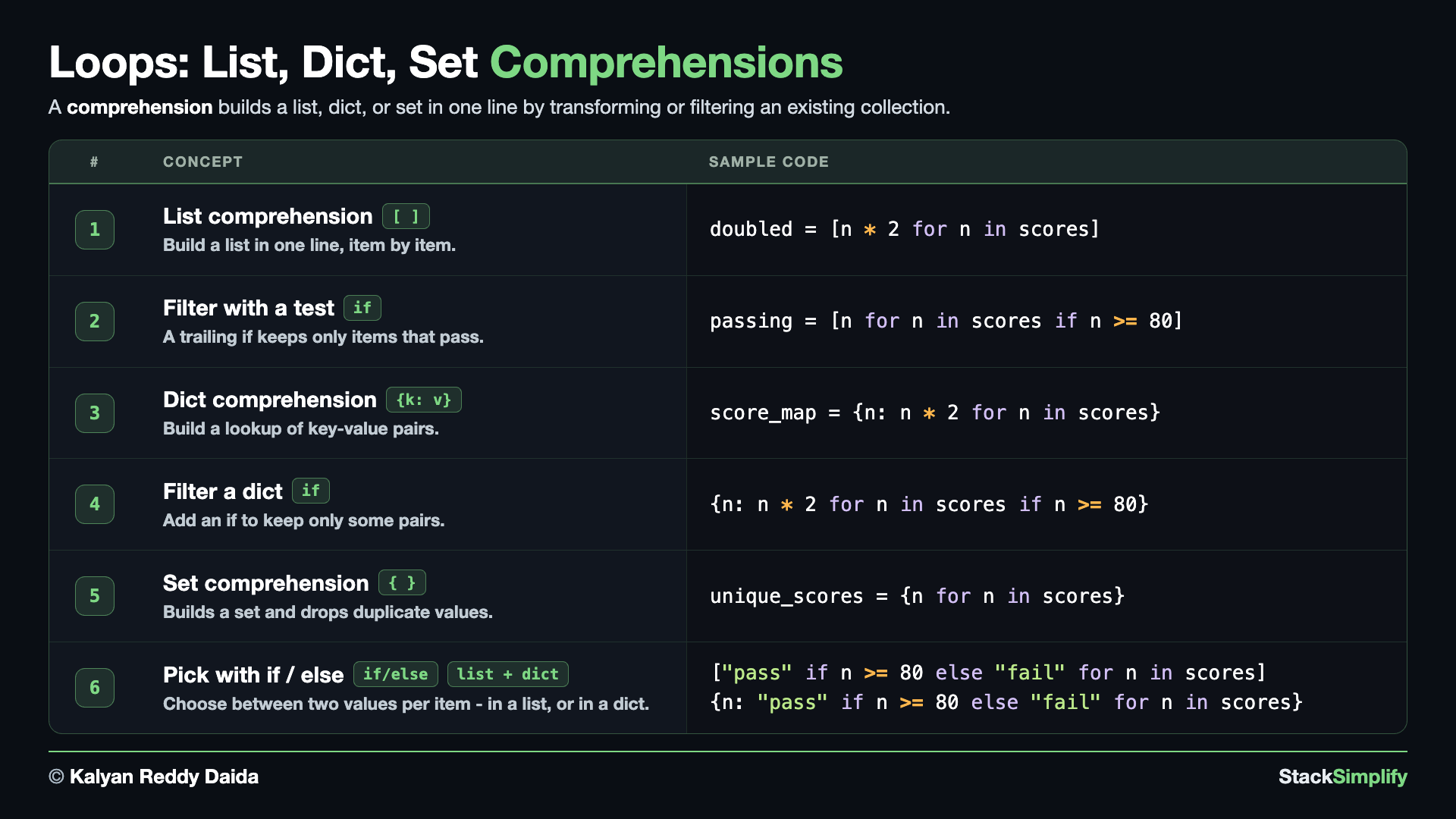
File: s06_step07_comprehensions.py
A comprehension builds a list, dictionary, or set in one line. Create s06_step07_comprehensions.py and build it concept by concept.
Concept 1: A list comprehension
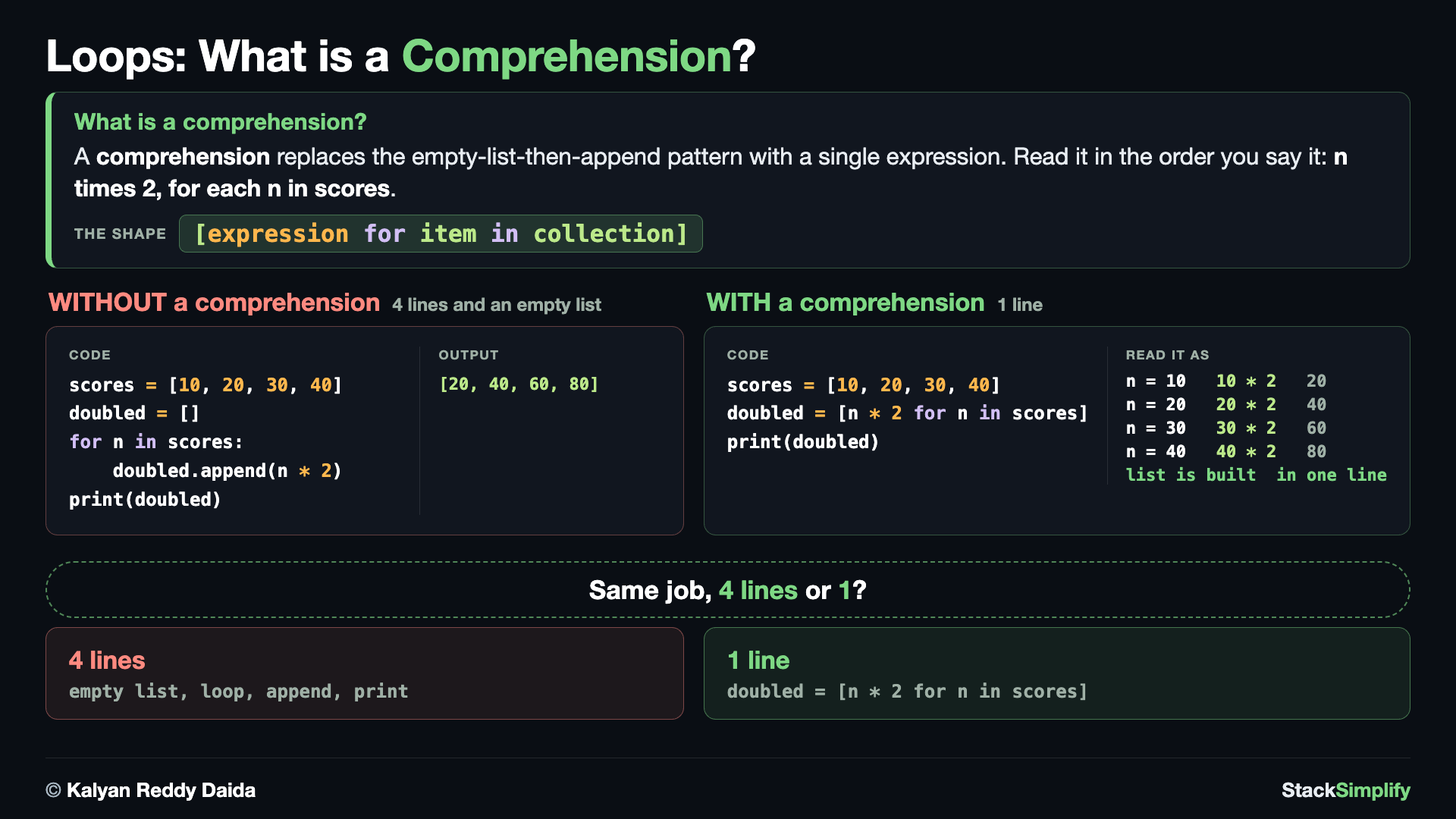
The long way needs an empty list, a loop and an append(). A comprehension does the same job as one expression you read in the order you say it.
A list comprehension builds a new list in a single line: [expression for item in collection]. Read [n * 2 for n in scores] as "n times 2, for each n in scores". E1 builds the list the long way with an empty list and .append(), E2 gets the same answer in one line, and E3 shows the collection does not have to be a list at all - a range() works exactly the same way.
# Concept-01: A list comprehension builds a new list in one line:
# [expression for item in collection]
# Question: How do we double every score in [10, 20, 30, 40]
# without writing a longer for loop?
scores = [10, 20, 30, 40]

# E1: The long way - build the list step by step
doubled = []
for n in scores:
    doubled.append(n * 2)
print(doubled)

# E2: The same result with a one-line comprehension
# Read it as: "n * 2 for each n in scores"
doubled = [n * 2 for n in scores]
print(doubled)

# E3: The collection does not have to be a list
# A range() works exactly the same way
squares = [n * n for n in range(1, 6)]
print(squares)
Concept 2: Filter with an if
Add an if at the end of a comprehension to keep only the items that pass a test. Here if n >= 80 keeps the passing scores and drops the rest. So a comprehension can both transform values and filter them, in the same line.
# Concept-02: Add an if at the end to keep only items that pass a test: [expr for item in collection if test]
# Question: How do we keep only the passing scores (80 or more) in [70, 95, 88, 88] in one line? (>= includes 80)
scores = [70, 95, 88, 88]
passing = [n for n in scores if n >= 80]
print(passing)
Concept 3: A dict comprehension
A dict comprehension builds a dictionary the same way, using {key: value for ...}. Here each score becomes a key and its doubled value the value, so you get a ready-made lookup table in one line. The shape mirrors the list comprehension - only the braces and the key: value pair change.
# Concept-03: A dict comprehension builds a dictionary in one line:
# {key: value for item in collection}
# Question: How do we map each score in [10, 20, 30, 40]
# to its double in one line?
scores = [10, 20, 30, 40]

score_map = {score: score * 2 for score in scores}
print(score_map)
Concept 4: Filter a dict comprehension
A dict comprehension takes a trailing if too. Add if score >= 20 and only those scores make it into the lookup table. Transform and filter, both in one line, for a dictionary.
# Concept-04: Add an if to a dict comprehension to keep only the items that pass a test:
# {key: value for item in collection if condition}
# Question: How do we build a dictionary for only the passing scores (20 or more)
# from [10, 20, 30, 40] in one line?
scores = [10, 20, 30, 40]

passing_map = {score: score * 2 for score in scores if score >= 20}
print(passing_map)
Concept 5: A set comprehension (drops duplicates)
Use braces with a single expression - {expr for item in collection} - and you build a set, which drops duplicates automatically. The value 88 appears twice in the scores, so the set keeps just one of them. The sorted() around the print is only for display, because a set has no fixed order of its own.
# Concept-05: A set comprehension builds a set in one line and removes duplicates:
# {expression for item in collection}
# Question: How do we keep only the distinct scores from [70, 95, 88, 88]?
# (A set keeps each value only once.)
scores = [70, 95, 88, 88]

unique_scores = {score for score in scores}
print(sorted(unique_scores))   # Sort only for display because sets have no fixed order.
{} is an empty dict, not an empty set
{} on its own is an empty dict. An empty set must be written set(). A set comprehension like {n for n in scores} is unambiguous because it has a body, so it always builds a set.
Concept 6: Choose values with an if/else in a list and a dict
To pick between two values, put an if/else BEFORE the for: [a if test else b for item in collection]. Each score becomes "pass" or "fail", and 80 itself passes because the test is >=. The same if/else works in a dict comprehension too: the list version gives you the labels on their own, while the dict version keeps each score WITH its label. Note the difference from Concept 2: a trailing if filters items out, while an if/else at the front chooses a value for every item.
# Concept-06: Use if/else inside a comprehension to choose between two values:
# [value_if_true if condition else value_if_false for item in collection]
# Question: How do we label each score in [70, 95, 80, 65, 55, 89] as "pass" or "fail"
# - first as a list of labels, then as a dictionary that keeps each score with its label?
# (80 or more passes.)
scores = [70, 95, 80, 65, 55, 89]
print(scores)

# A LIST comprehension gives you the labels on their own
labels = ["pass" if score >= 80 else "fail" for score in scores]
print(labels)

# A DICT comprehension keeps each score WITH its label; the same if/else works here
result_map = {score: "pass" if score >= 80 else "fail" for score in scores}
print(result_map)

# map() and filter() can solve similar problems.
# This course focuses on comprehensions because they clearly show
# the collection being built in a single expression.
[70, 95, 80, 65, 55, 89]
['fail', 'pass', 'pass', 'fail', 'fail', 'pass']
{70: 'fail', 95: 'pass', 80: 'pass', 65: 'fail', 55: 'fail', 89: 'pass'}
A word on map() and filter()
Python has two older built-ins that do these same two jobs. map(func, items) transforms every item, the way a plain comprehension does, and filter(func, items) keeps only the items that pass a test, the way a trailing if does. Both are still common and worth recognising on sight. This course writes comprehensions instead, because [n * 2 for n in scores] says what it builds in a single readable line.
Pages for this step: Concept | Practice | Workshop
Python Files for this step: Concept | Practice | Practice Solutions | Workshop | Workshop Solutions
Practice and Workshop
Every step has a matching practice problem - try it yourself, then expand the solution to check. Some practices end with a short input() "Write a Program" problem. Every step also has an optional workshop problem (the same idea in a car scenario). The numbers line up with the steps, so if you get stuck on practice-03, re-read Concept Step-03.
| Step | Concept Name | Concept | Practice | Workshop |
|---|---|---|---|---|
| 01 | while loops | concept | practice | workshop |
| 02 | for loops | concept | practice | workshop |
| 03 | range | concept | practice | workshop |
| 04 | break / continue / else / pass | concept | practice | workshop |
| 05 | enumerate, zip, and dict | concept | practice | workshop |
| 06 | nested loops | concept | practice | workshop |
| 07 | comprehensions | concept | practice | workshop |
Open the full Practice page and Workshop page for this section - each problem has its statement, expected output, an optional hint, and an expandable solution.
What You Learned
whileloops repeat on a condition; change the loop variable, and use them to count up, count down, or build a running total.forloops walk any sequence (lists, strings, tuples) without managing an index.range()generates number sequences, including steps and counting backwards.break,continue,pass, and the loopelsegive you fine control.enumerateadds positions; dictionaries loop by key,.items(), or.values();zip()pairs two lists.- Nested loops build grids and combinations; comprehensions build lists and dictionaries in one line.
Next
Section 07: Functions. Package your code into reusable pieces you can call by name.
Prefer to learn by watching?
The full video course teaches every concept on screen and builds the projects with you, step by step.
Section 05: Collections Next: Section 07: Functions