07. Functions
View code on GitHub Download slides (PDF) Get the Video Course
So far every line of code you wrote ran once, top to bottom. A function changes that: it is a named block of code you can run again and again, whenever you want. This is the biggest jump in your Python so far: with functions, the size of the problems you can solve goes up sharply.
Practice as you go
Each concept below has matching exercises. When you finish a step, head to the Practice problems for this section, then try the optional Workshop. Every problem includes a solution you can expand.
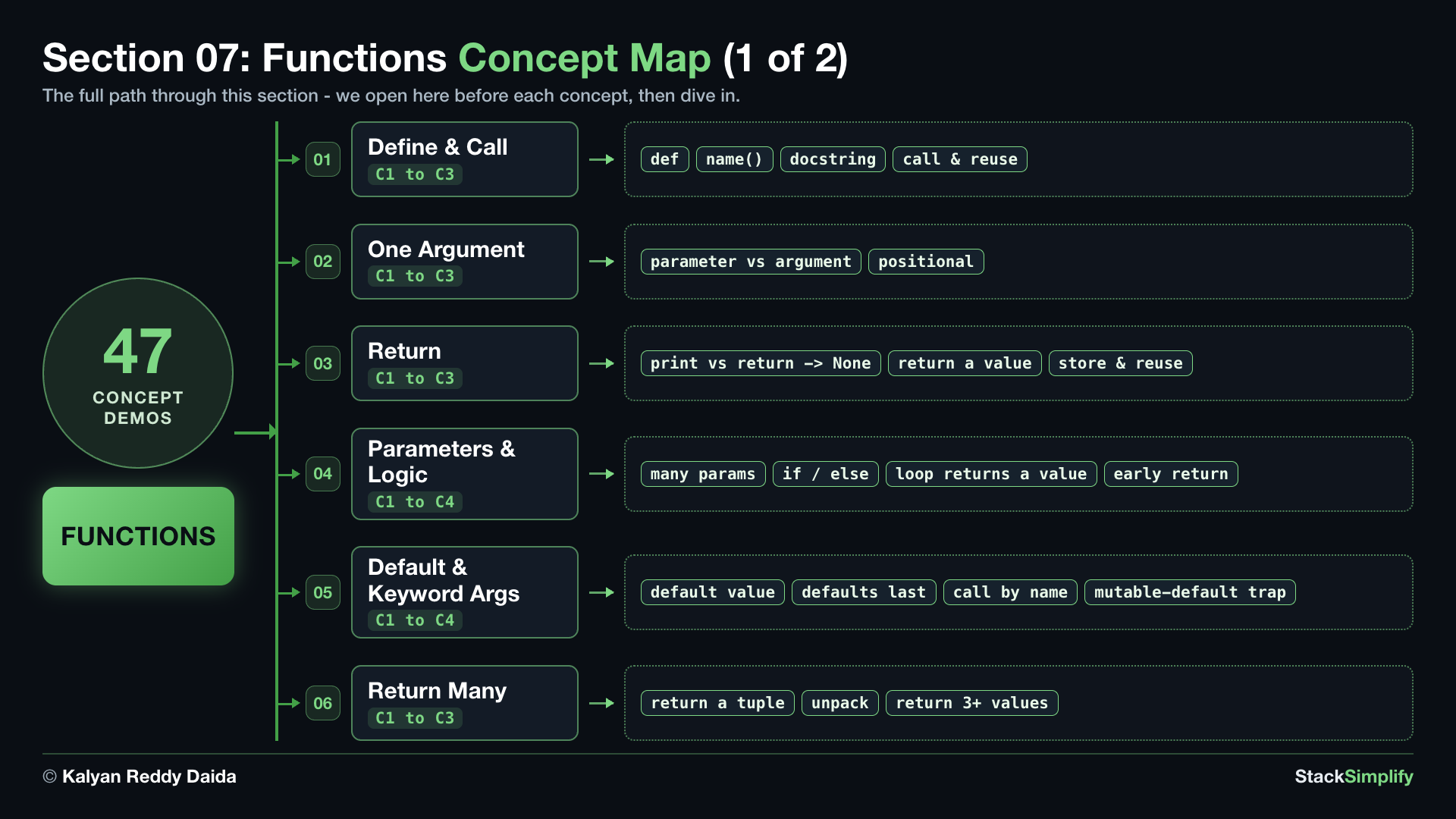
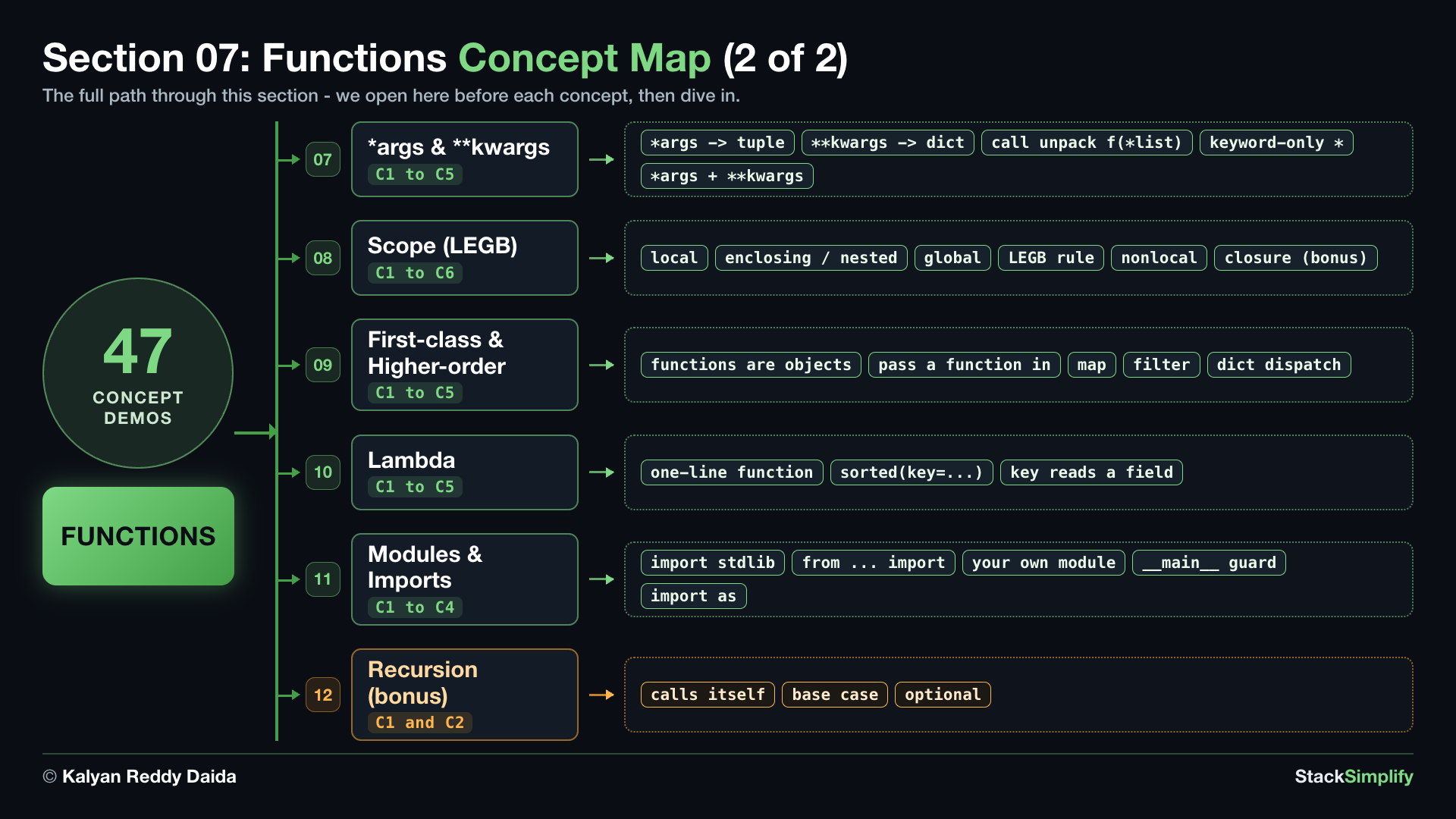
We build functions up the way you would build anything solid: one idea at a time, from simple to powerful. This section has more steps than any other in the course, so the map comes in two halves. We come back to it before each new idea, so you always know where you are.
The first half is the core mechanics - how to define a function, pass it values, and get an answer back:
The second half goes beyond the basics - flexible arguments, scope, functions as values, and modules:
How to read this section. Each concept is a short story: a real question, the code that answers it, and the result. Read it, type it, run it. You will understand it without watching anything.
Step-00: What You Will Learn
In this section you will:
- Define a reusable block of code with
def, call it with(), and describe it with a docstring. - Feed a function values through parameters and arguments, and hand an answer back with
return(a print-only function returnsNone). - Give parameters default values, call them by keyword, and avoid the mutable default argument trap.
- Return many values at once as a tuple and unpack them into separate variables.
- Accept any number of inputs with
*argsand**kwargs, and force keyword-only arguments. - Follow scope with the LEGB rule - local, enclosing, global, built-in - and use
globalandnonlocalwhen you must. - Treat functions as objects: store them, pass them to other functions, and write a one-expression
lambda. - Reuse code across files with modules and
import, and meet recursion as a bonus.
Keywords in This Section
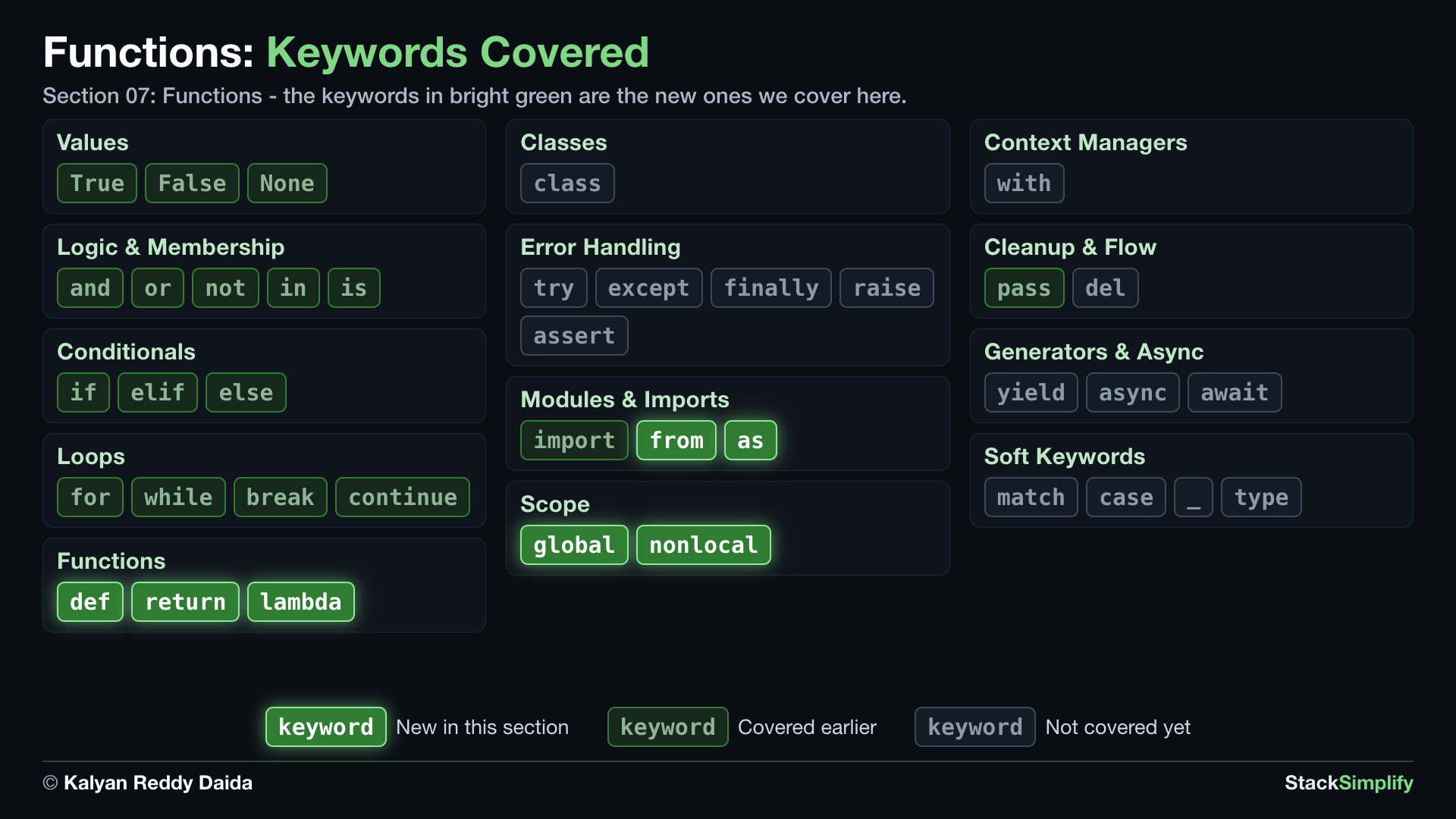
In the map, bright green marks the keywords this section introduces. Dim green marks keywords you already covered in earlier sections, and gray marks the ones still ahead.
Step-01: Define and Call a Function
File: s07_step01_define_and_call.py
Concept 1: Define a block once, run it whenever you call it
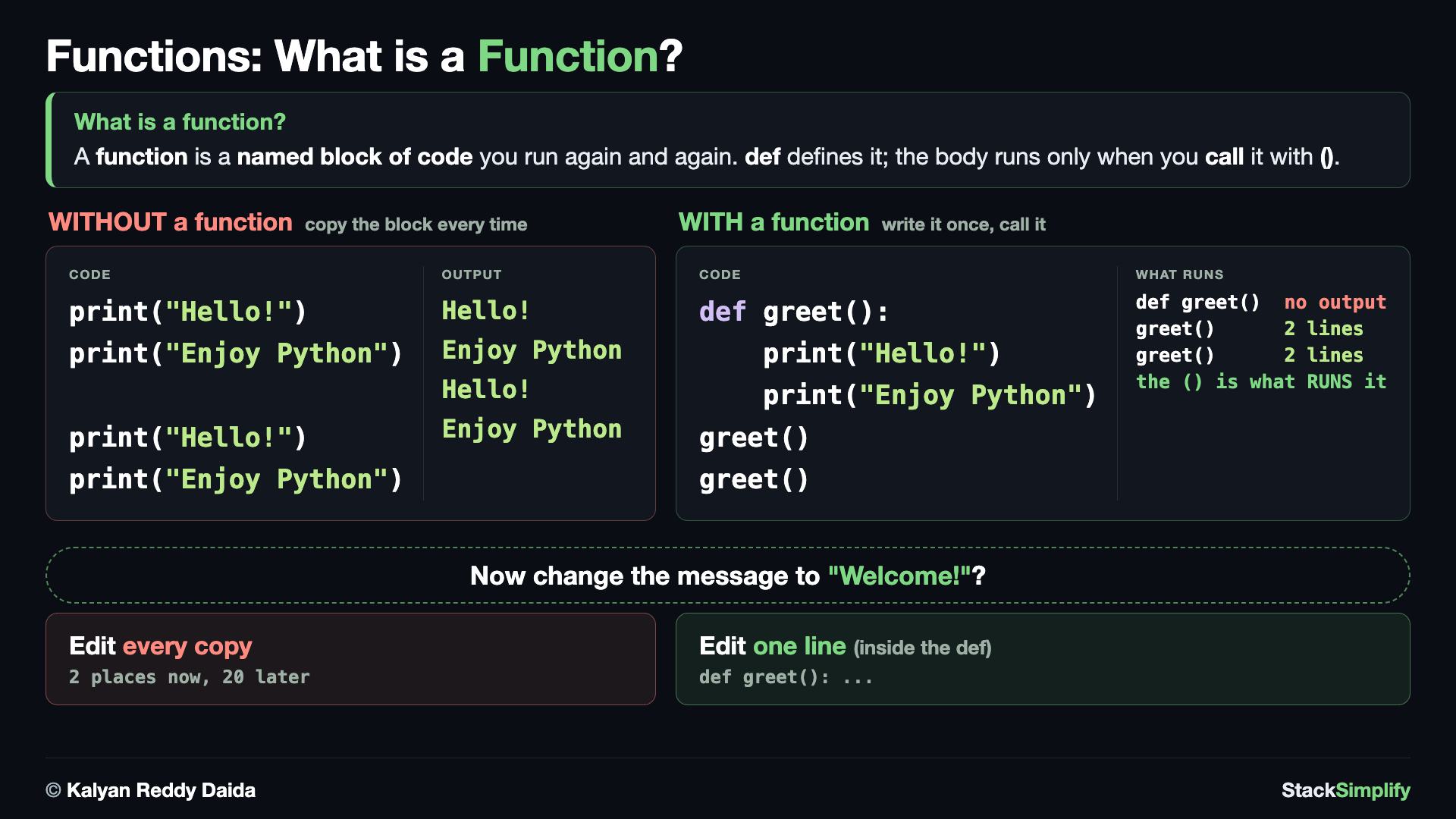
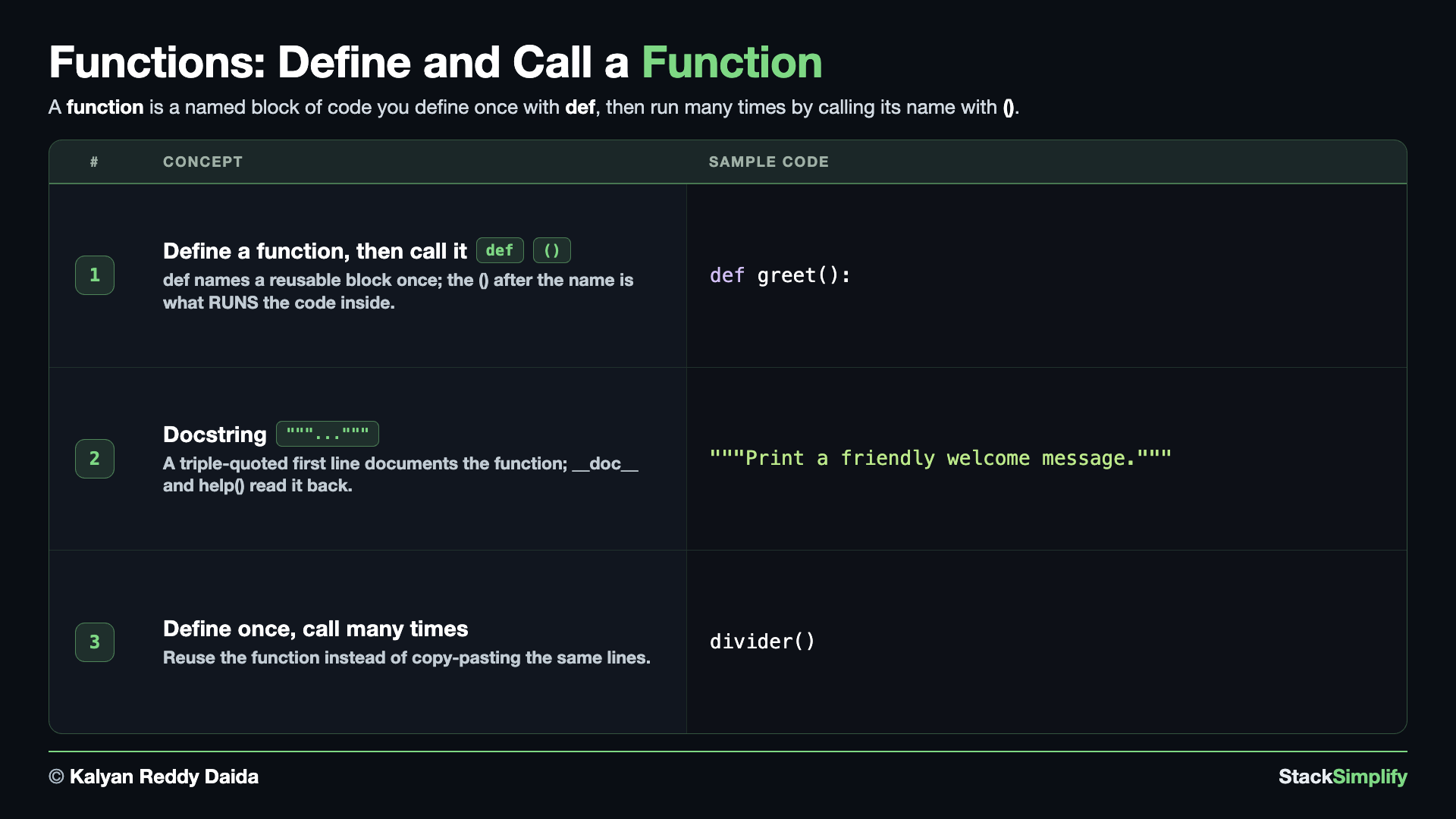
Take some lines of code, give them a name, and run them whenever you want. You define a function with def, a name, parentheses (), and a colon :; everything indented under it is the body. Writing the function does not run it; the body runs only when you call it with its name and ().
# Concept-01: A function is a named block of code; define it with def, then RUN it by calling its name with ()
# Question: How do we run the same block of code many times without copying it? (def names it once; calling it runs it)
def greet():
    print("Hello, welcome to Python!")

# A name with NO () does not run the function - it just points at the function object:
# print(greet)   # <function greet at 0x...>  (the function itself, not the greeting)
greet()  # the () is what RUNS it
Nothing happened until greet() ran it. A name with no () does not call the function; it just points at the function object, so greet() with the parentheses is what runs the body - forgetting the () is the most common beginner slip. Give a function a clear, action-style name (greet, divider) and never reuse a built-in name like len or print. Define is the recipe; call is the cooking. And the recipe has to be written before you cook: a call at the top level of a file must come AFTER the def, or Python raises NameError: name 'greet' is not defined.
Concept 2: Describe the function with a docstring
Record what a function does with a docstring: a line of text in triple quotes as the first thing inside the function.
# Concept-02: A docstring describes what a function does; the first line inside, in triple quotes
# Question: How do we document what a function does, so we (and tools like help()) can read it later?
def welcome():
    """Print a friendly welcome message."""
    print("Glad you are here!")

welcome()
print(welcome.__doc__)
# help(welcome)   # same text, shown in the interactive help pager
The docstring does not print when the function runs; you read it back with welcome.__doc__ (or help(welcome)). A one-line docstring on each function pays off forever.
Concept 3: Define once, call many times
The moment you are about to copy and paste a few lines, that is a function waiting to be born.
# Concept-03: Define once, call many times; that is the whole point of a function (reuse, no copy-paste)
# Question: How does a function save us from writing the same lines again and again?
def divider():
    print("------------------------------")

divider()
print("Section 07: Functions")
divider()
Change the dashes in one place and every divider updates. Write it once, fix it once, reuse it everywhere.
Two naming habits that mark experienced Python code
Docstring shape. Start with one short summary line that begins with a capital and ends with a period, written as an instruction to the function (Print a friendly welcome message.). If more is needed, leave a blank line after that first line and put the details below it, so tools can show the summary on its own.
Function names use snake_case. Section 02 taught this for variables; it holds for functions too - lowercase words joined by underscores, named for the action they perform (print_welcome, add_item, price_range), never PrintWelcome or printwelcome.
Pages for this step: Concept | Practice | Workshop
Python Files for this step: Concept | Practice | Practice Solutions | Workshop | Workshop Solutions
Step-02: One Argument
File: s07_step02_one_argument.py
Concept 1: Feed the function input with a parameter
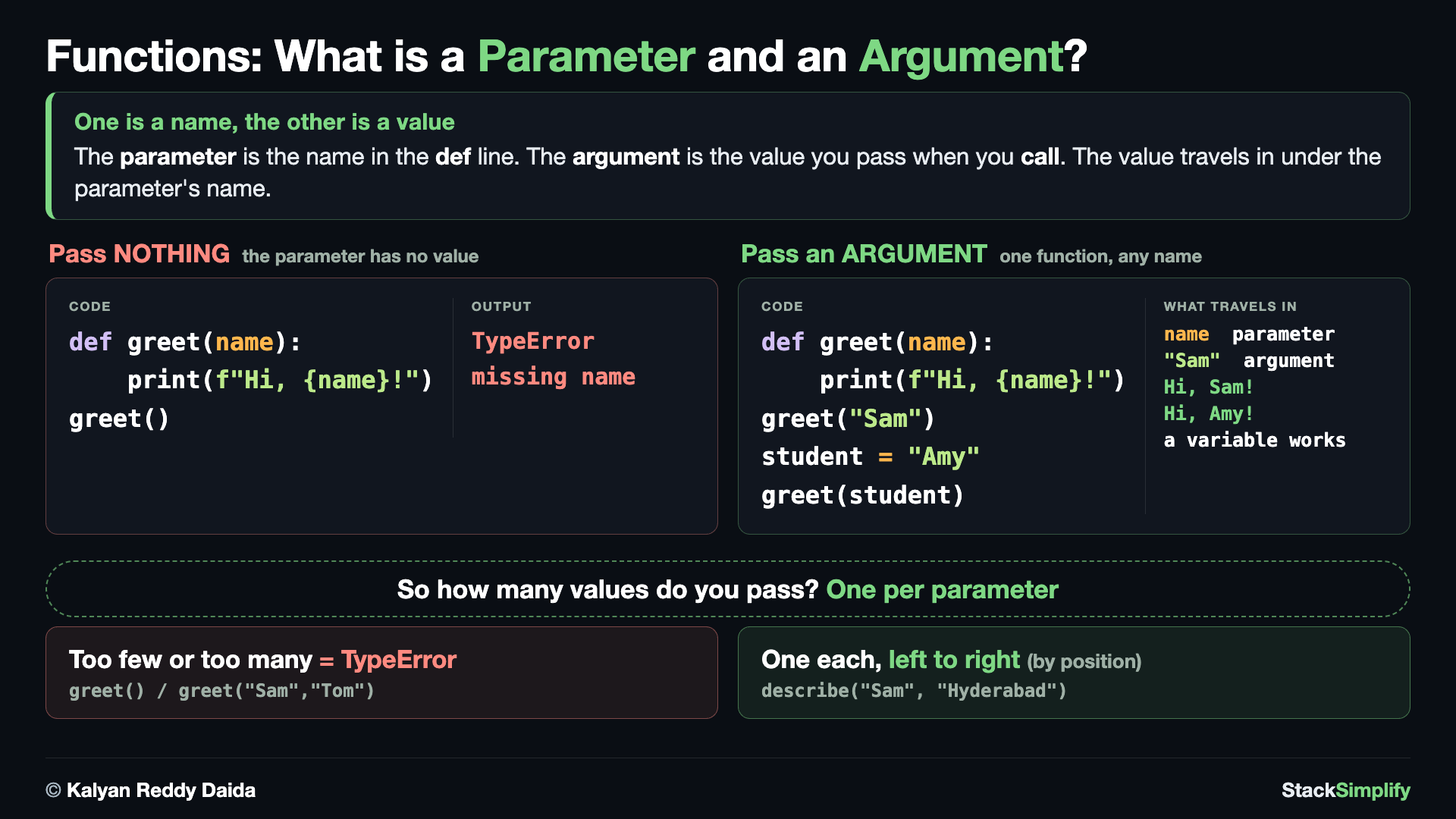
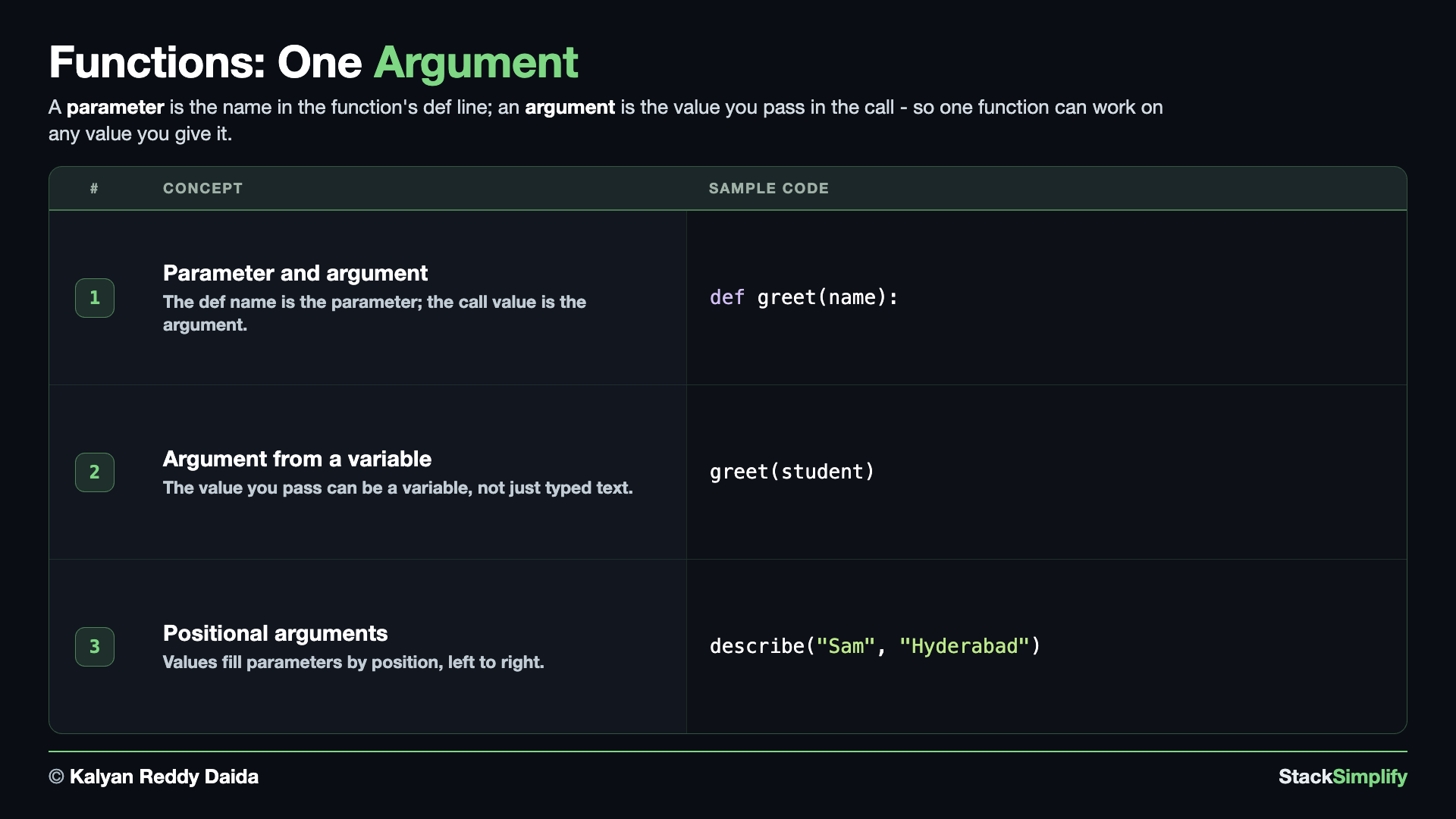
The real power comes when you can feed a function input. A parameter is a name inside the parentheses of the def line; the value you pass when you call is the argument, and it lands in that parameter.
# Concept-01: A parameter is the name in the def line; an argument is the value you pass when you call
# Question: How do we make one function greet ANY name we give it, like "Sam" or "Tom"? (put a parameter in the def, pass an argument in the call)
def greet(name):
    print(f"Hello, {name}!")

greet("Sam")
greet("Tom")
# `name` exists ONLY inside greet - it is created fresh each call (more on this in Scope)
name is the parameter (the catcher); "Sam" is the argument (the value thrown in). One function now greets anybody.
Concept 2: The argument can be a variable
The value you pass can be anything that holds a value, including a variable.
# Concept-02: The argument can be a variable, not just a typed-in value
# Question: How do we greet a name we already stored in a variable, like "Amy"?
# Same greet function as Concept-01, repeated so this block stands on its own
def greet(name):
    print(f"Hello, {name}!")

student = "Amy"
greet(student)
Python looks up student, finds "Amy", and hands that into name.
Concept 3: Arguments fill parameters by position
With more than one parameter, values fill them left to right.
# Concept-03: Arguments fill parameters by POSITION, left to right (positional arguments)
# Question: How does Python know which value goes to which parameter? (by position: first value -> first parameter)
def describe(name, city):
    print(f"{name} is from {city}")

describe("Sam", "Hyderabad")
# A positional call must pass exactly as many values as there are parameters:
# describe("Sam")   # TypeError: missing 'city'
# describe("Sam", "Hyderabad", "India")   # TypeError: too many arguments
"Sam" went to name and "Hyderabad" to city purely by order. These are positional arguments.
Pages for this step: Concept | Practice | Workshop
Python Files for this step: Concept | Practice | Practice Solutions | Workshop | Workshop Solutions
Step-03: Return (print vs return)
File: s07_step03_return.py
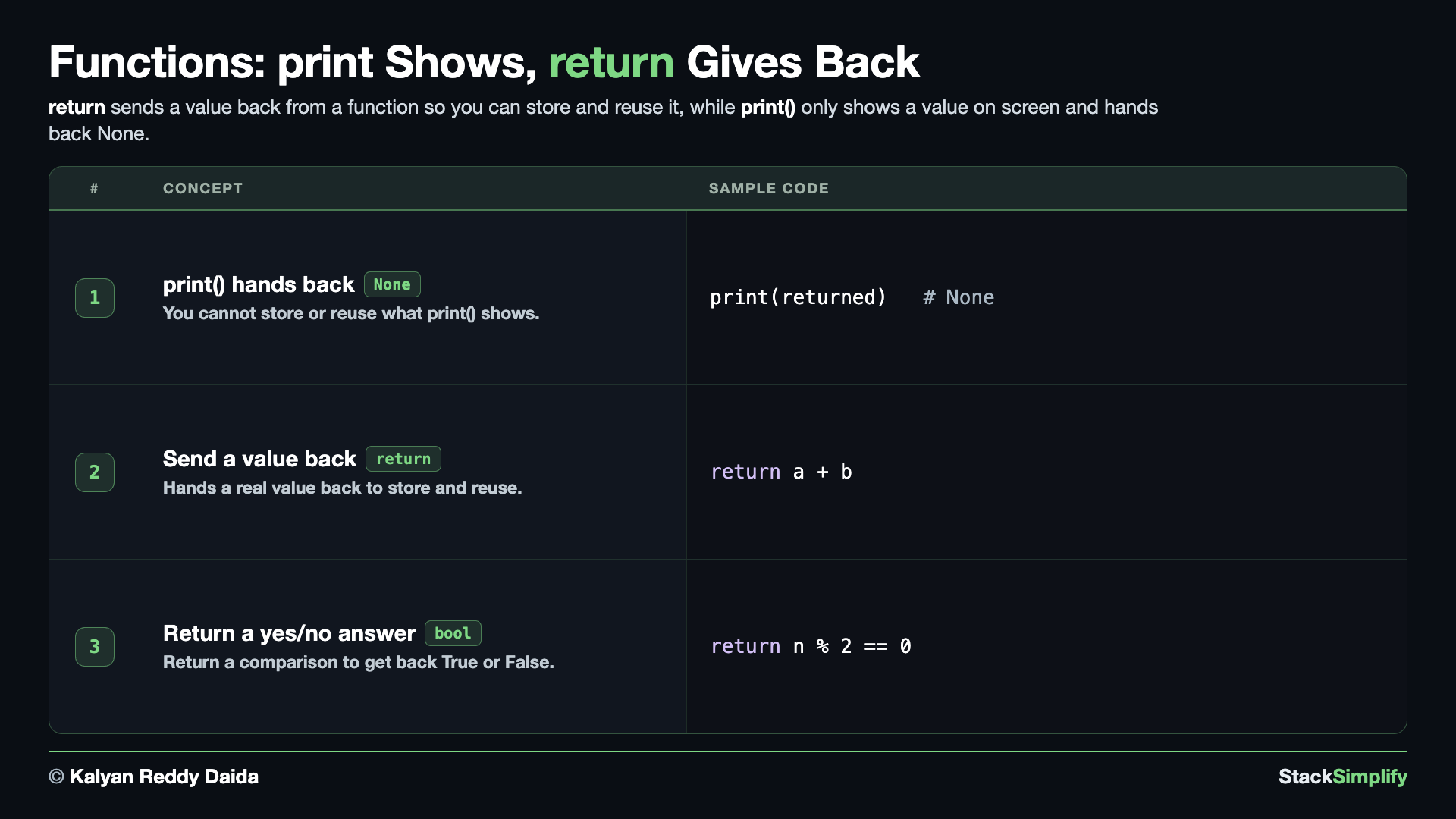
Concept 1: A print-only function hands back None
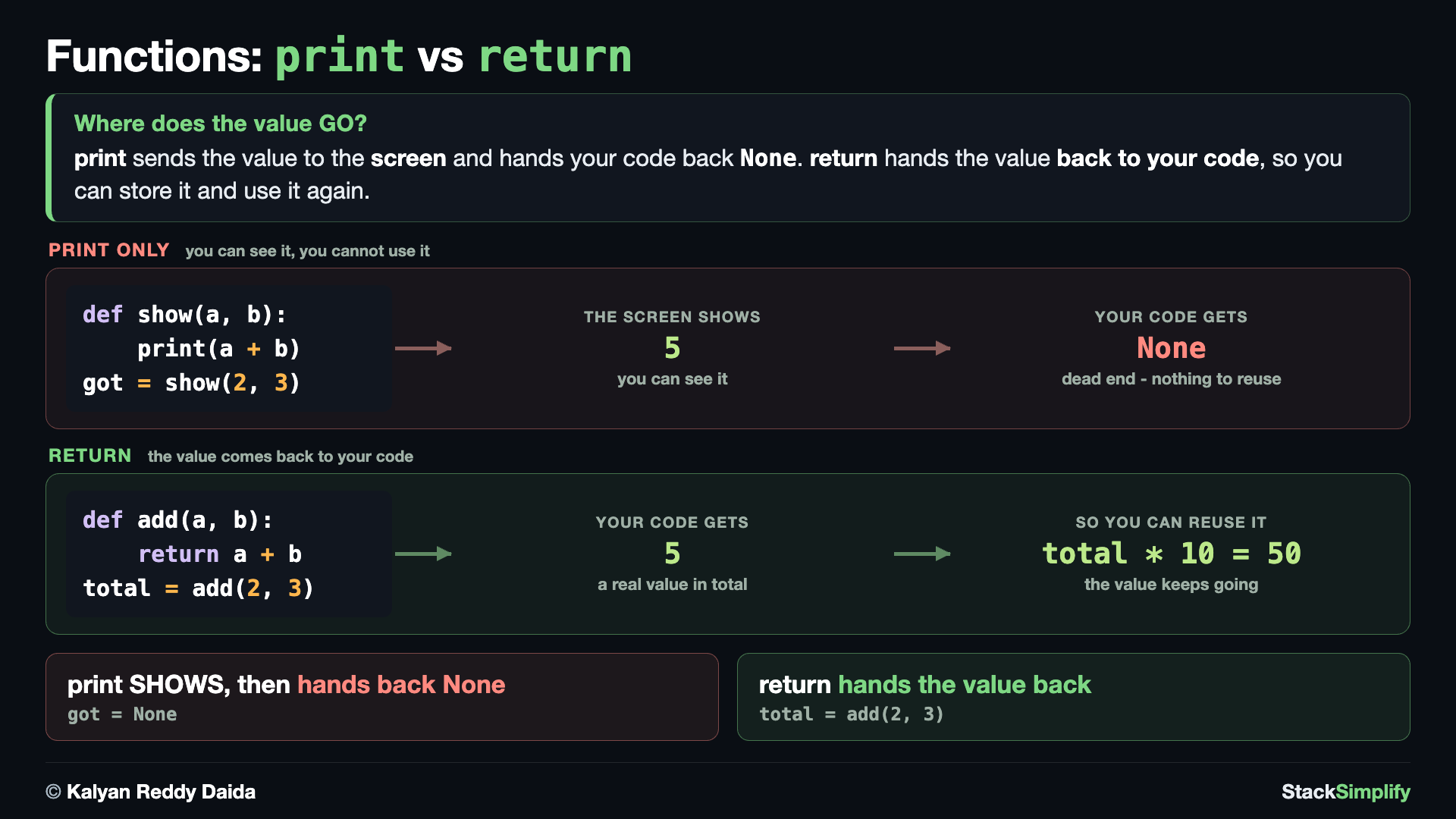
Printing paints text on the screen, but it does not hand a value back to your program. If you save what a print-only function gave you, you get None - nothing came back.
# Concept-01: A print-only function SHOWS a value but hands back None, so you cannot store or reuse it
# Question: We know print shows a value - but can we capture and reuse what a function prints? (no: it hands back None)
def show_sum(a, b):
    print(a + b)

returned = show_sum(2, 3)
print(returned)  # None
print(type(returned))  # <class 'NoneType'>
show_sum printed 5, but saving its result gave None: the function handed nothing back. So how do we get a real value out of a function? That is what return is for.
Concept 2: Hand a value back with return
To get a real value back out of a function, use return. The returned value can be stored and reused - the thing a print-only function could not do.
# Concept-02: return hands the actual value BACK, so you can store it in a variable and reuse it
# Question: How do we get a REAL value back from a function, to store and reuse? (return hands the value back; print could not)
def add(a, b):
    return a + b

result = add(2, 3)
print(result)
print(result * 10)
add(2, 3) hands 5 back; we caught it in result and reused it in result * 10. The rule: most functions should return; only rarely does a function just print().
Concept 3: Return can answer a yes/no question
A comparison like n % 2 == 0 produces a bool, and you can return it.
# Concept-03: return can hand back the answer to a yes/no question (a True/False value)
# Question: How do we make a function ANSWER a yes or no question? (return the comparison; the result is a bool)
def is_even(n):
    return n % 2 == 0

print(is_even(10))
print(is_even(7))
Because the answer is a real value, you could drop it straight into an if.
print is not return
print() only shows a value on screen; return hands it back so other code can use it. A function with no return gives back None.
Pages for this step: Concept | Practice | Workshop
Python Files for this step: Concept | Practice | Practice Solutions | Workshop | Workshop Solutions
Step-04: Parameters and Logic
File: s07_step04_parameters_and_logic.py
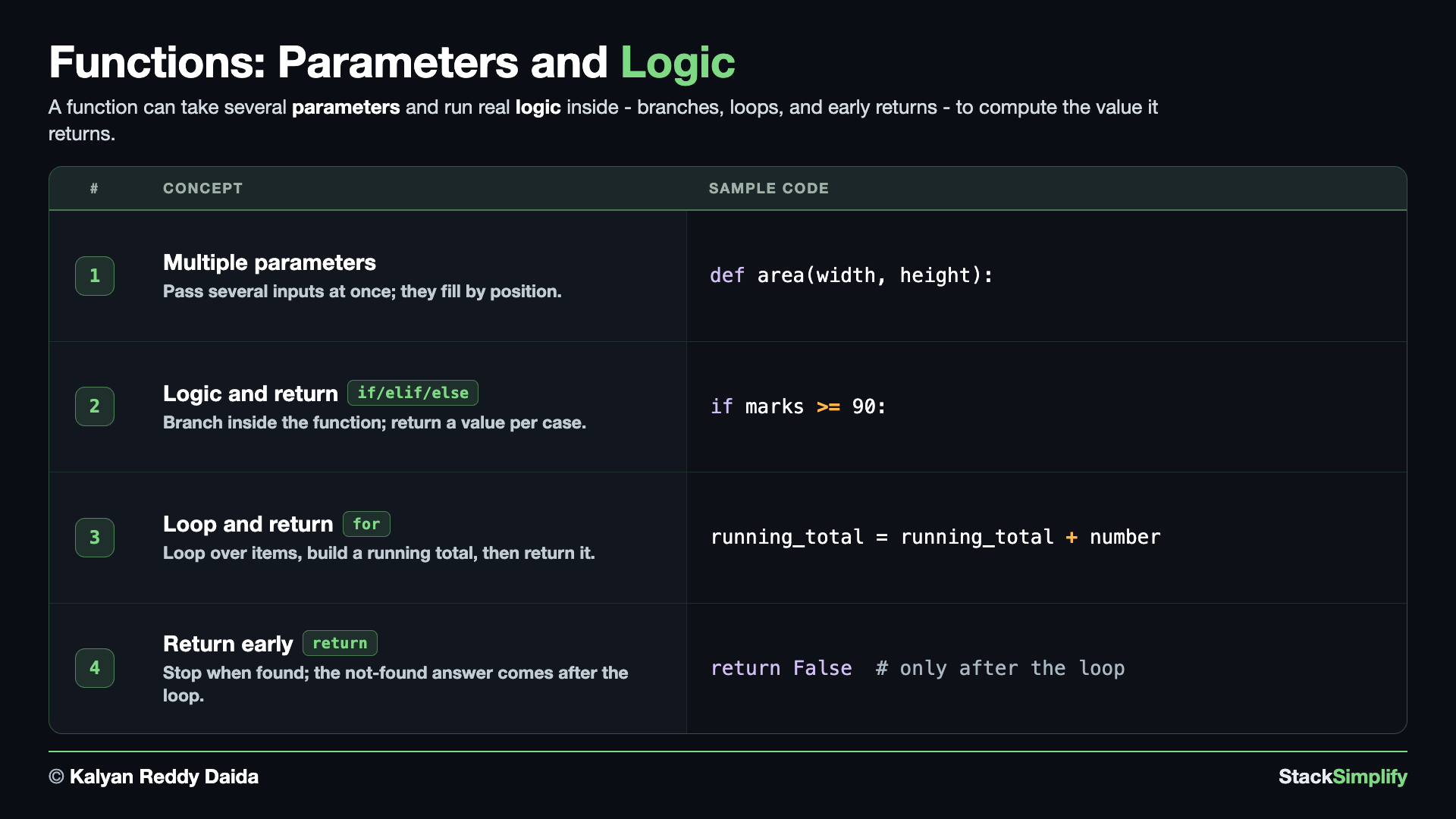
Concept 1: More than one parameter
List several parameters and the values fill them by position - here the two inputs do real work together (width * height), which is why the function needs both.
# Concept-01: A function can take MORE THAN ONE parameter; values fill them by position
# Question: How do we calculate the area of a rectangle by passing both its width (4) and height (3) to a function? (list both parameters; pass the values in order)
def area(width, height):
    return width * height

print(area(4, 3))
Concept 2: Logic inside a function
Put if/elif/else inside and return a different value per case.
# Concept-02: Put logic INSIDE a function (if / elif / else) and return a different value per case
# Question: How do we turn a student's marks into a grade inside a function, like 72 or 95? (if/elif/else, then return the grade)
def get_student_grade(marks):
    if marks >= 90:
        return "A"
    elif marks >= 75:
        return "B"
    elif marks >= 50:
        return "C"
    else:
        return "F"

print(get_student_grade(72))
print(get_student_grade(95))
72 is not >= 90 or >= 75, but it is >= 50, so the function returns "C".
Concept 3: A loop inside, then return the result
A function can run a loop and return what it built up.
# Concept-03: A function can run a LOOP and return a built-up result
# Question: How do we add up a whole list of numbers, like [10, 20, 30], and return the total? (loop over them, keep a running total, return it)
def total(numbers):
    if not numbers:  # guard: no numbers, so there is no total - hand back None
        return None
    running_total = 0
    for number in numbers:
        running_total = running_total + number
    return running_total

print(total([10, 20, 30]))  # 60
print(total([]))  # None (empty list - the guard returned early)
The if not numbers: return None at the top is a guard: it returns early on a bad or empty input before the real work. Handing back None (not 0) makes the guard clear - None means "no total to give", while 0 could be mistaken for a real sum.
Concept 4: Return early from inside a loop
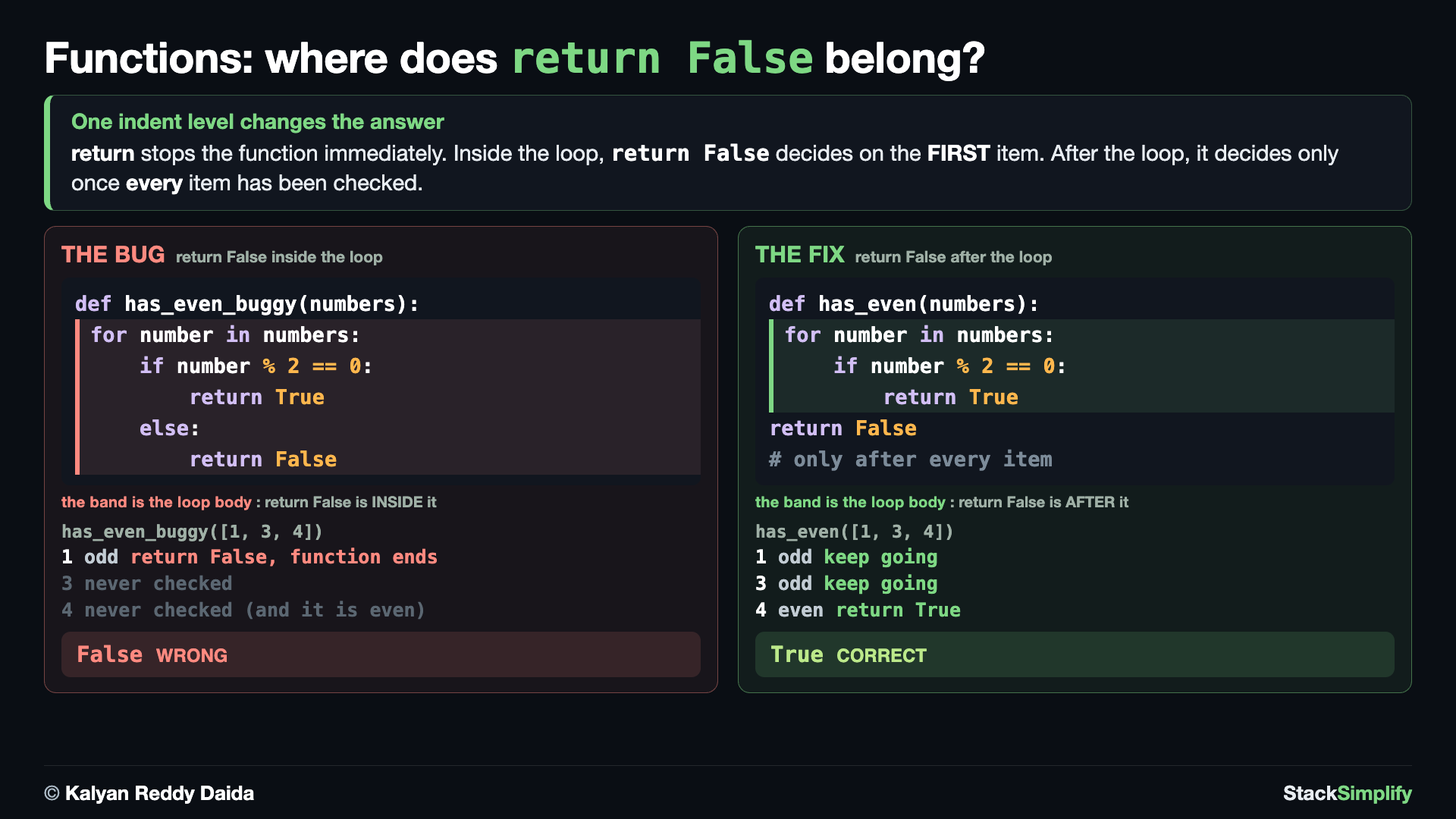
return inside a loop hands the answer back the moment you find it and exits the function immediately, skipping the rest of the list. This is how search / "does any item match" functions are written. You can also write return on its own with no value: that just exits the function early and hands back None, which is handy as a guard when there is nothing to compute.
# Concept-04: return inside a loop stops the function immediately.
# The "not found" return belongs AFTER the loop, not inside it.

# Question: How do we check whether a list contains ANY even number?
# Stop as soon as we find one.

# E1: Common mistake - returning False too early
def has_even_buggy(numbers):
    for number in numbers:
        if number % 2 == 0:
            return True
        else:
            return False  # WRONG: decides after the first item instead of checking them all

print(has_even_buggy([1, 3, 4]))  # False - WRONG: 4 is even, but the function stopped at 1
print(has_even_buggy([1, 3, 5]))  # False - Correct by luck (there is no even number)

# E2: Correct - return True when found, otherwise return False after the loop
def has_even(numbers):
    for number in numbers:
        if number % 2 == 0:
            return True  # Found an even number - stop the loop and the function
    return False  # Reached only if no even number was found

print(has_even([1, 3, 4]))  # True  - Correct: it kept checking until it found 4
print(has_even([1, 3, 5]))  # False - Correct: every number was checked
E1 shows the classic bug: return False inside the loop (in an else) answers on the very first item, so has_even_buggy([1, 3, 4]) wrongly returns False even though 4 is even. E2 fixes it by moving return False AFTER the loop (dedented): return True still stops early on the first hit, but False is reached only once every item has been checked.
Pages for this step: Concept | Practice | Workshop
Python Files for this step: Concept | Practice | Practice Solutions | Workshop | Workshop Solutions
Step-05: Default Parameters and Keyword Arguments
File: s07_step05_default_keyword_args.py
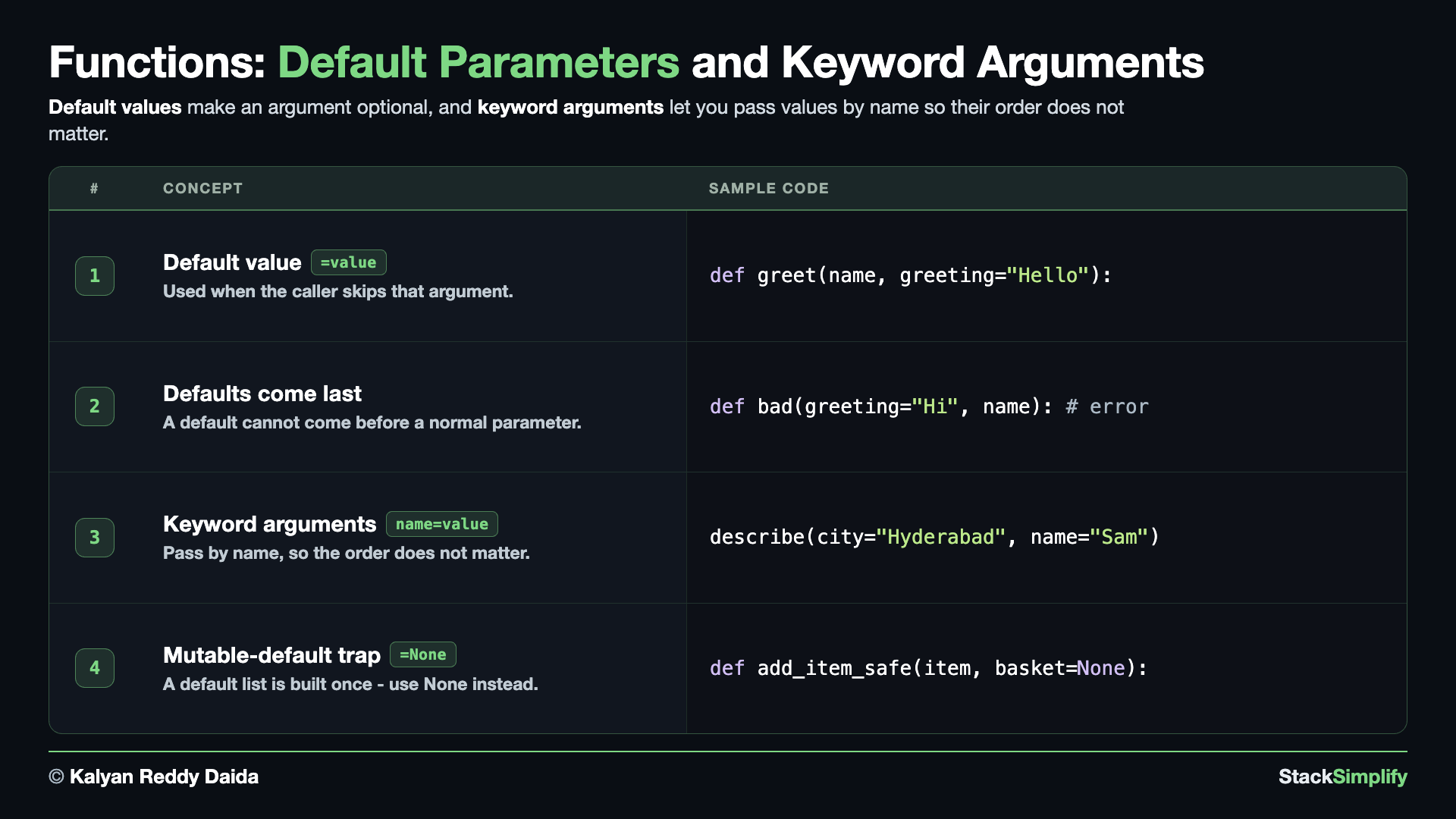
Concept 1: A default value makes an input optional
Give a parameter a default; it is used when you do not pass that argument.
# Concept-01: A default value is used when you do NOT pass that argument
# Question: How do we make an input optional, with a sensible default? (give the parameter a default value in the def line)
def greet(name, greeting="Hello", punctuation="!"):
    print(f"{greeting}, {name}{punctuation}")

greet("Sam")  # both defaults used
greet("Tom", "Welcome")  # override greeting only
greet("Amy", "Hi", ".")  # override both defaults
With two defaults, a call can supply 0, 1, or 2 of the optional values: the first uses both defaults, the second overrides only greeting, the third overrides both.
Concept 2: Defaults must come last
A parameter with a default cannot come before a normal one.
# Concept-02: Parameters WITH defaults must come AFTER parameters without them
# Question: Why does Python reject a default before a normal parameter? (defaults must be last; the line below would be an error)
# def bad(greeting="Hi", name):   # SyntaxError: parameter without a default follows parameter with a default
We leave it commented because Python would refuse to even start the program.
Concept 3: Keyword arguments
Name each value in the call and the order no longer matters.
# Concept-03: Keyword arguments. Name each value in the call, so the order does not matter
# Question: How do we pass arguments by NAME so we do not depend on their order? (write name=value in the call)
def describe(name, city):
    print(f"{name} lives in {city}")

describe(city="Hyderabad", name="Sam")  # all keyword: order does not matter
describe("Ben", city="Delhi")  # mix: positional first, then keyword
# At the call site, any keyword argument must come AFTER the positional ones:
# describe(name="Sam", "Hyderabad")   # SyntaxError: positional argument follows keyword argument
Naming each value lets order not matter (first call). You can also mix styles - positional first, then keyword (second call) - but a keyword argument can never come before a positional one at the call site.
Concept 4: The mutable default argument trap
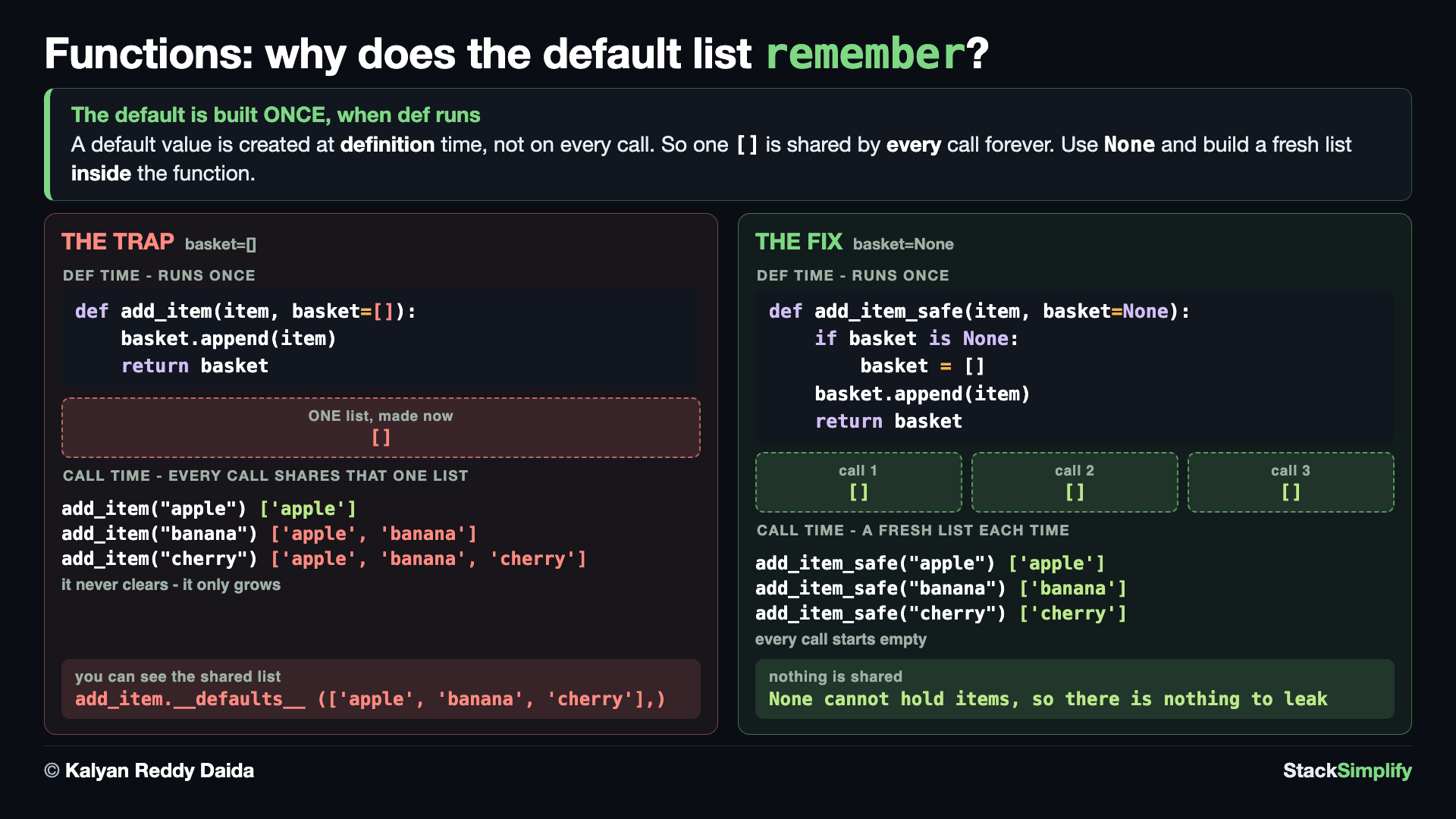
A default list is created once and reused across calls, a classic bug. The two runs make the same two calls: E1 (add_item, default []) accidentally keeps the old items, so the second call already holds ['apple']; E2 (add_item_safe, default None) makes a fresh list each call and starts empty.
# Concept-04: The mutable default argument trap. A default list is created ONCE and reused across function calls.

# Question: Why does a default list seem to "remember" values from previous function calls?
# (Default parameter values are created only once when the function is defined. Use None to create a fresh list for each call.)

# E1: The TRAP - the same default list is reused on every call
def add_item(item, basket=[]):   # Avoid using a mutable object as a default value
    basket.append(item)
    return basket

print(add_item("apple"))    # ['apple']
print(add_item("banana"))   # ['apple', 'banana'] - 'apple' is still there!

# E2: The FIX - use None, then create a new list inside the function
def add_item_safe(item, basket=None):
    if basket is None:
        basket = []

    basket.append(item)
    return basket

print(add_item_safe("apple"))    # ['apple']
print(add_item_safe("banana"))   # ['banana'] - each call gets a fresh list
The fix is a habit: default to None, then build a fresh list inside the function - never a bare [].
Never use a mutable default like []
A default list is created ONCE and shared across calls, a classic surprise. Use None as the default and make a fresh list inside. You can label these parameters with Type Hints next.
A list you PASS IN can be changed by the function
The same fact one level up. When you pass a list (or a dict, or any other changeable object) to a function, the function does not get a copy - it gets the very same object. So if the function does basket.append("apple"), the caller's list grows too. Numbers and strings cannot be changed at all, so they never behave this way. When you do not want the caller's list touched, either work on a copy inside the function (items = items.copy()) or return a new list instead of changing the one you were given.
Pages for this step: Concept | Practice | Workshop
Python Files for this step: Concept | Practice | Practice Solutions | Workshop | Workshop Solutions
Step-06: Return Many Values
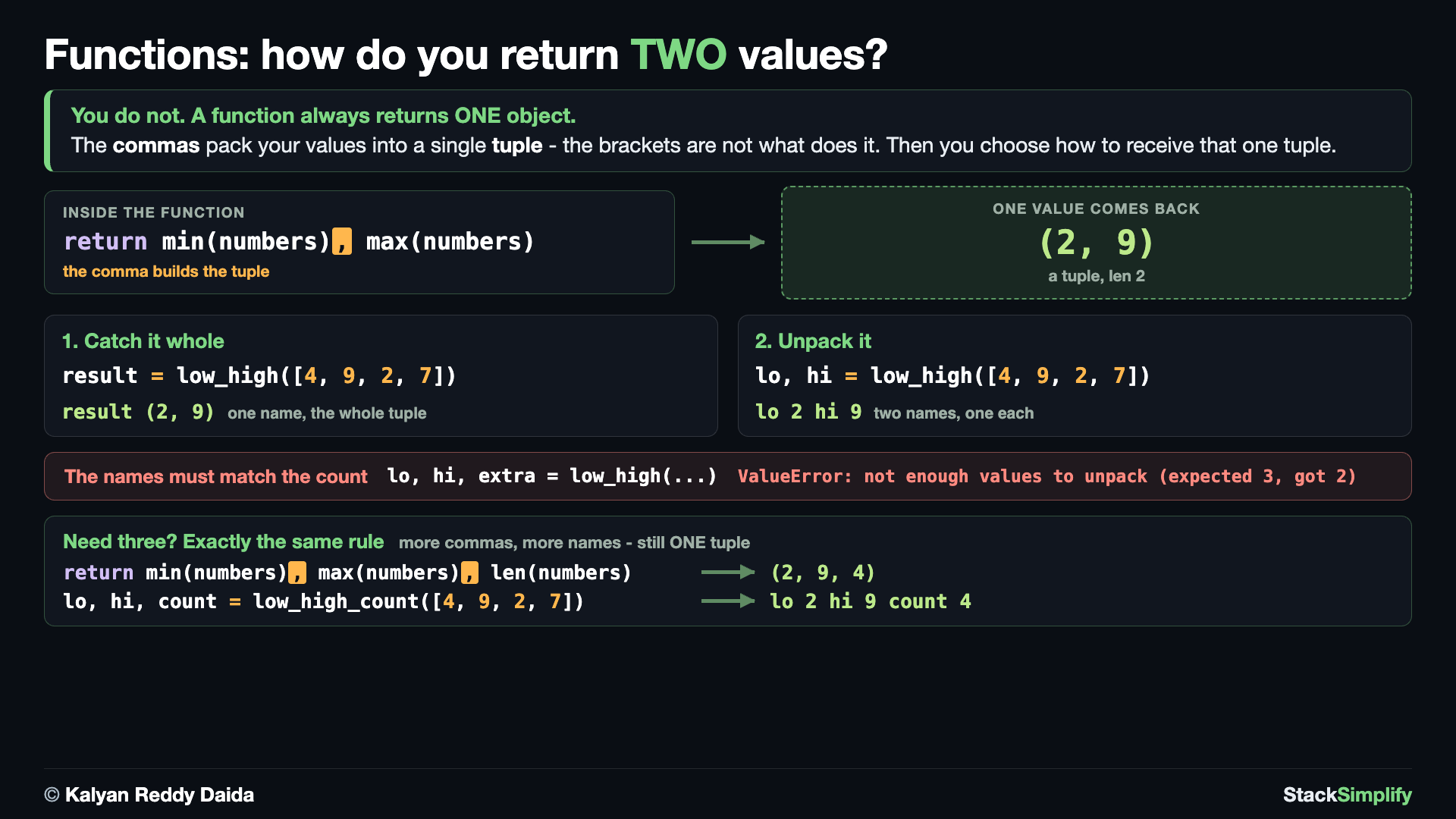
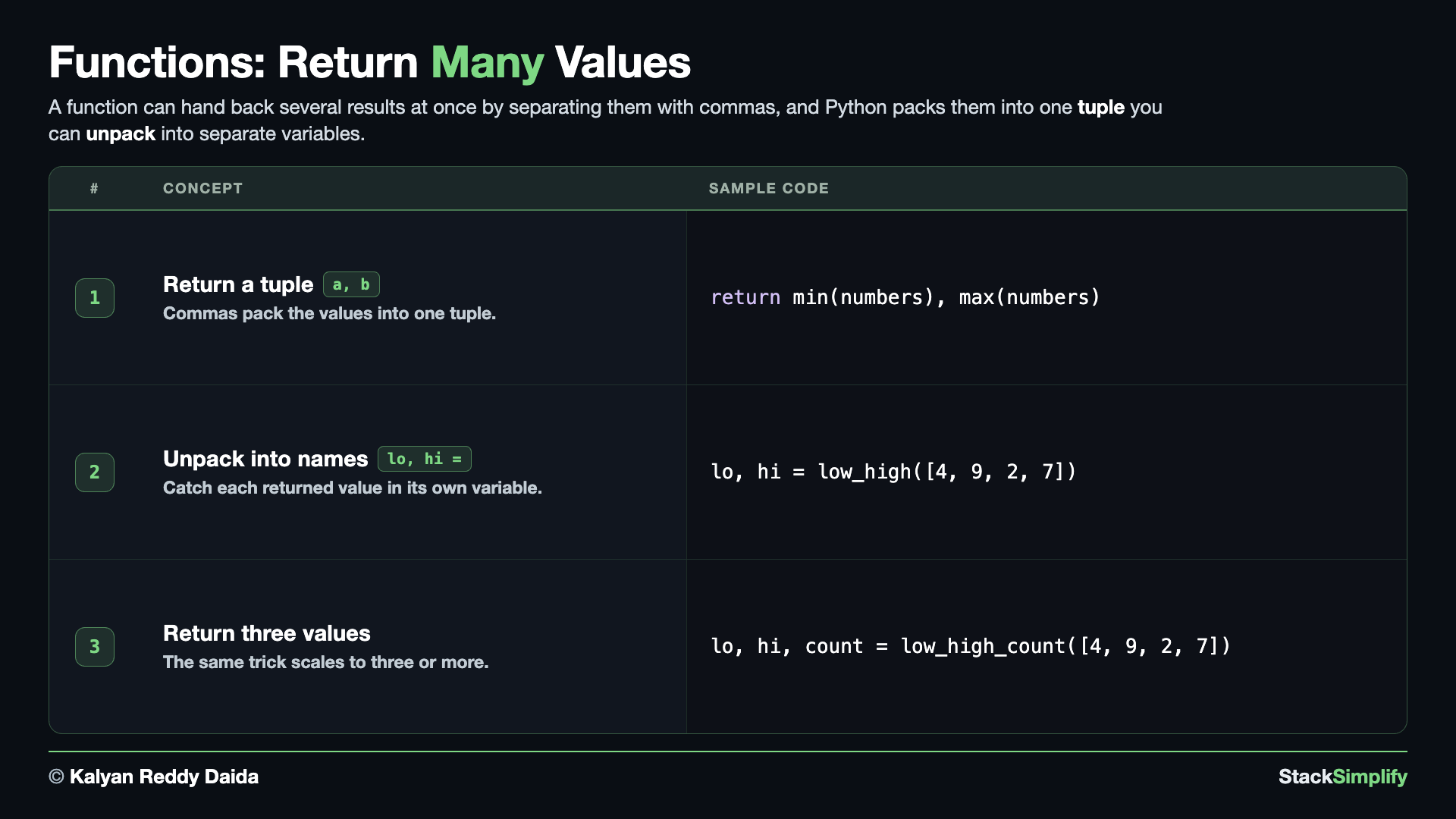
File: s07_step06_return_many.py
Concept 1: Return several values as a tuple
Separate return values with commas and you get a tuple. Two built-ins appear here for the first time: min(numbers) gives the smallest item in a list and max(numbers) gives the largest, so you do not have to loop and compare yourself.
# Concept-01: Return MANY values at once by separating them with commas; you get a tuple
# Question: How does a function hand back more than one result, like the lowest and highest of [4, 9, 2, 7]? (return them comma-separated; it becomes a tuple)
def low_high(numbers):
    # A function returns ONE object. The commas (not the brackets) pack both values
    # into a single tuple, so we can catch it whole (result) or unpack it (lo, hi).
    return min(numbers), max(numbers)

result = low_high([4, 9, 2, 7])
print(result)
A function always returns exactly one object; the commas are what pack the values into a single tuple (the brackets are optional).
Concept 2: Unpack the returned tuple
Catch the results into their own names in one line (the unpacking you met with tuples in Section 5).
# Concept-02: Unpack the returned tuple into separate variables in one line
# Question: How do we catch several returned values into their own names? (unpack them: lo, hi = low_high(...))
# Same low_high function as Concept-01, repeated so this block stands on its own
def low_high(numbers):
    return min(numbers), max(numbers)

lo, hi = low_high([4, 9, 2, 7])
print("low:", lo)
print("high:", hi)
# lo, hi, extra = low_high([4, 9, 2, 7])  # ValueError: not enough values to unpack (expected 3, got 2)
The number of names on the left must match the number of values returned - asking for three names from a two-value tuple is a ValueError.
Concept 3: Return three values and unpack them
The pattern is not limited to two - return as many as you like, comma-separated, and unpack into that many names.
# Concept-03: Return three values and unpack them into three names
# Question: How do we hand back the low, high, AND count of [4, 9, 2, 7] at once? (return three, comma-separated; unpack into three names)
def low_high_count(numbers):
    return min(numbers), max(numbers), len(numbers)

lo, hi, count = low_high_count([4, 9, 2, 7])
print("low:", lo)
print("high:", hi)
print("count:", count)
Pages for this step: Concept | Practice | Workshop
Python Files for this step: Concept | Practice | Practice Solutions | Workshop | Workshop Solutions
Step-07: args and *kwargs
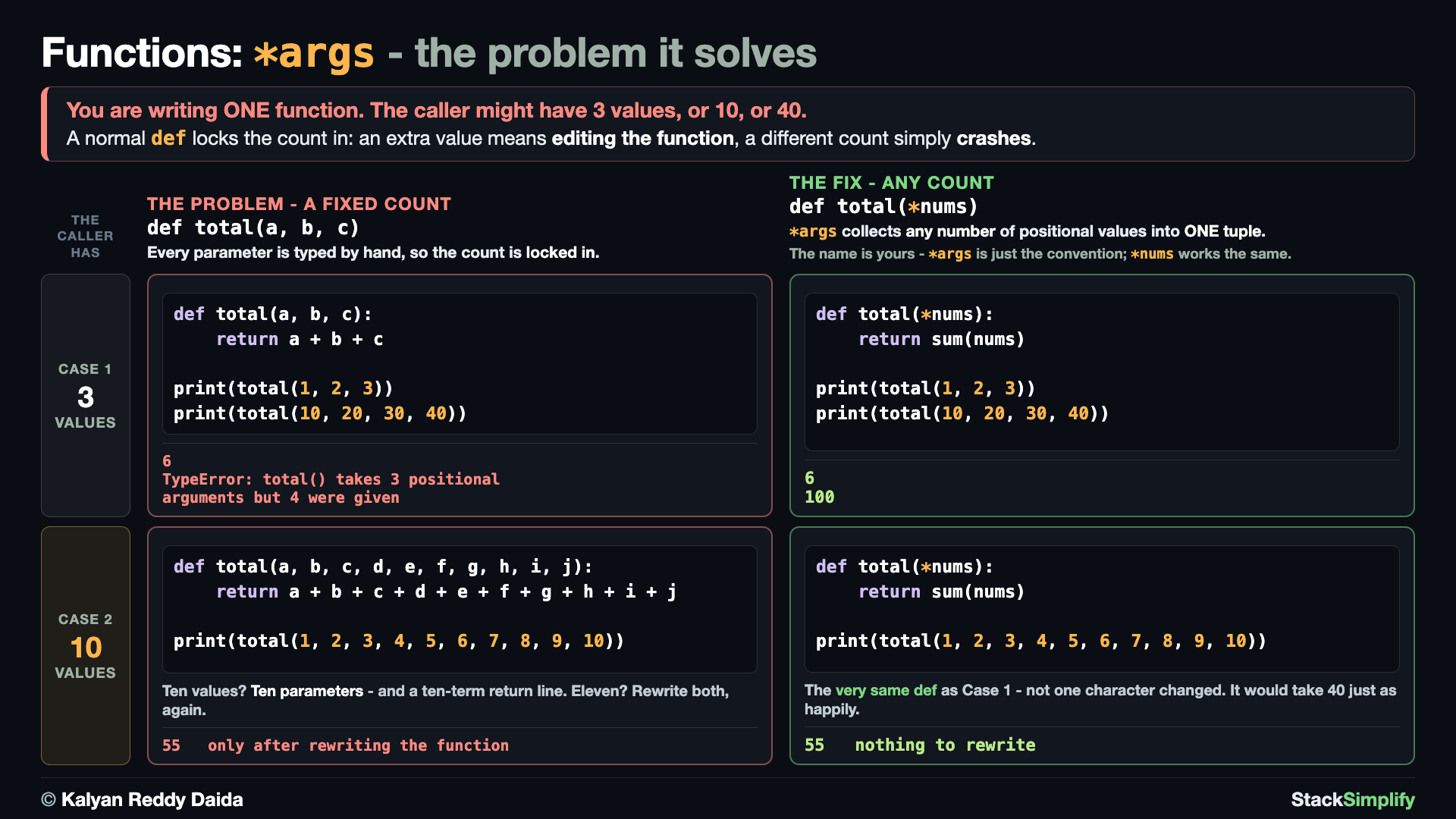
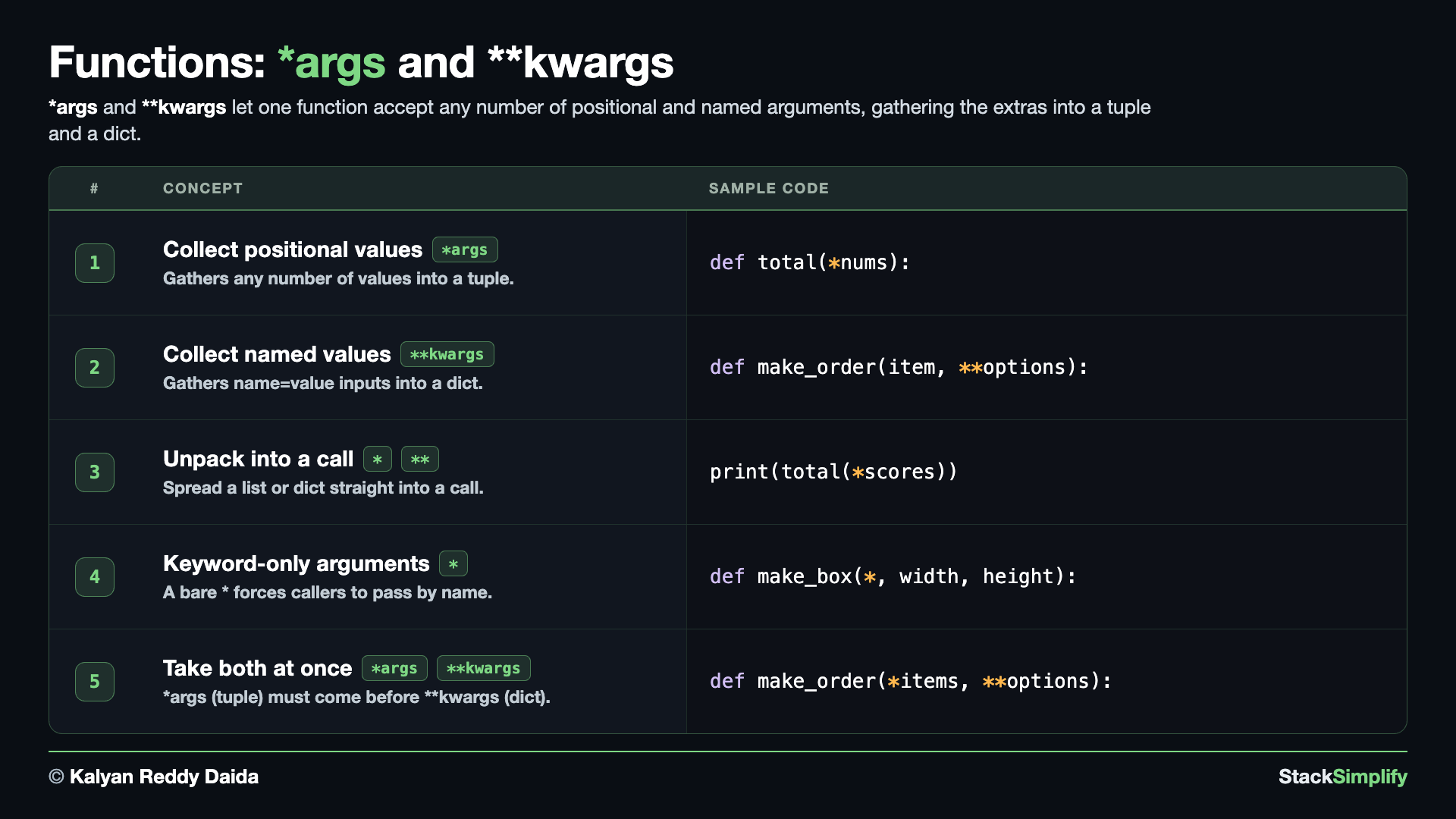
File: s07_step07_args_kwargs.py
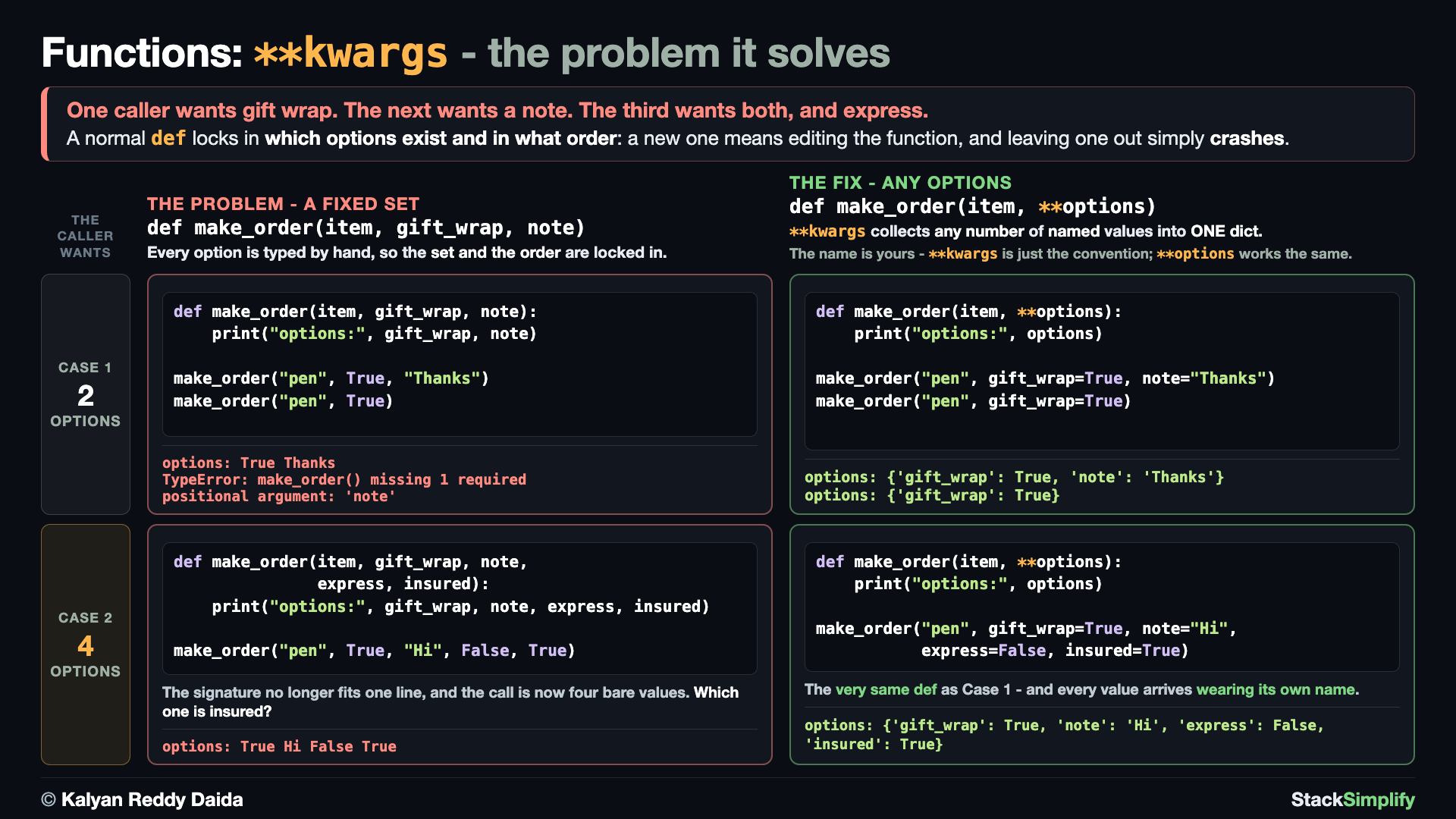
Concept 1: Collect extra positionals with *args
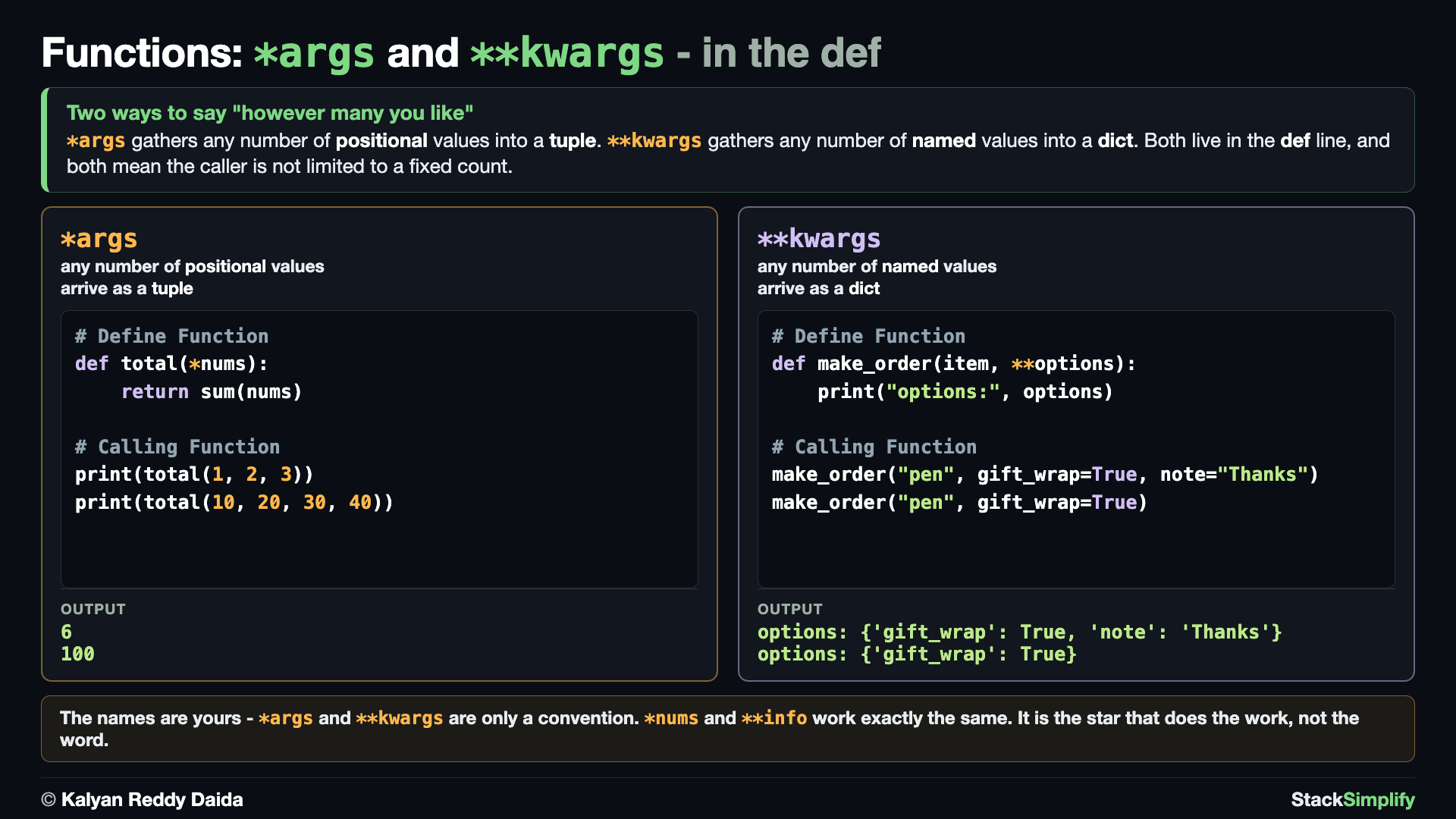
E1 is the problem: def total(a, b, c) fixes the count the moment you write it, so three values work and a fourth is a TypeError. The failing call is left commented - uncomment it to watch it happen. E2 is the fix: *args accepts any number of positional values, and the same two calls both work. One more built-in appears here for the first time: sum(nums) adds up every number in a list or tuple and gives back the total.
# Concept-01: *args collects any number of positional values into a tuple
# Question: How do we accept an UNLIMITED number of values, like adding up 1, 2, 3 or 10, 20, 30, 40? (*args gathers them into a tuple)
# E1: THE PROBLEM - a fixed parameter list locks the count in the moment you write it
def total(a, b, c):
    return a + b + c

print(total(1, 2, 3))
# print(total(10, 20, 30, 40))  # uncomment: TypeError, takes 3 positional arguments but 4 were given

# E2: THE FIX - one star takes however many values the caller happens to have
def total(*nums):  # the name is yours: *args is the convention, *nums is fine too
    return sum(nums)

print(total(1, 2, 3))
print(total(10, 20, 30, 40))
Concept 2: Collect named values with **kwargs
E1 is the problem: def make_order(item, gift_wrap, note) fixes WHICH options exist and in what order, so a caller who wants gift wrap but no note gets a TypeError - again left commented so you can uncomment it. E2 is the fix: **kwargs gathers whatever name=value pairs arrive into one dictionary, so both calls work and each value carries its own name.
# Concept-02: **kwargs collects any number of named values into a dictionary
# Question: How do we let each caller choose WHICH options to pass - gift wrap, a note, both, neither? (**kwargs gathers them into a dict)
# E1: THE PROBLEM - a fixed option list locks in which options exist, and their order
def make_order(item, gift_wrap, note):
    print("options:", gift_wrap, note)

make_order("pen", True, "Thanks")
# make_order("pen", True)  # uncomment: TypeError, missing 1 required positional argument: 'note'

# E2: THE FIX - two stars take whatever named options the caller has
def make_order(item, **options):  # the name is yours: **kwargs is the convention, **options is fine too
    print("options:", options)

make_order("pen", gift_wrap=True, note="Thanks")
make_order("pen", gift_wrap=True)
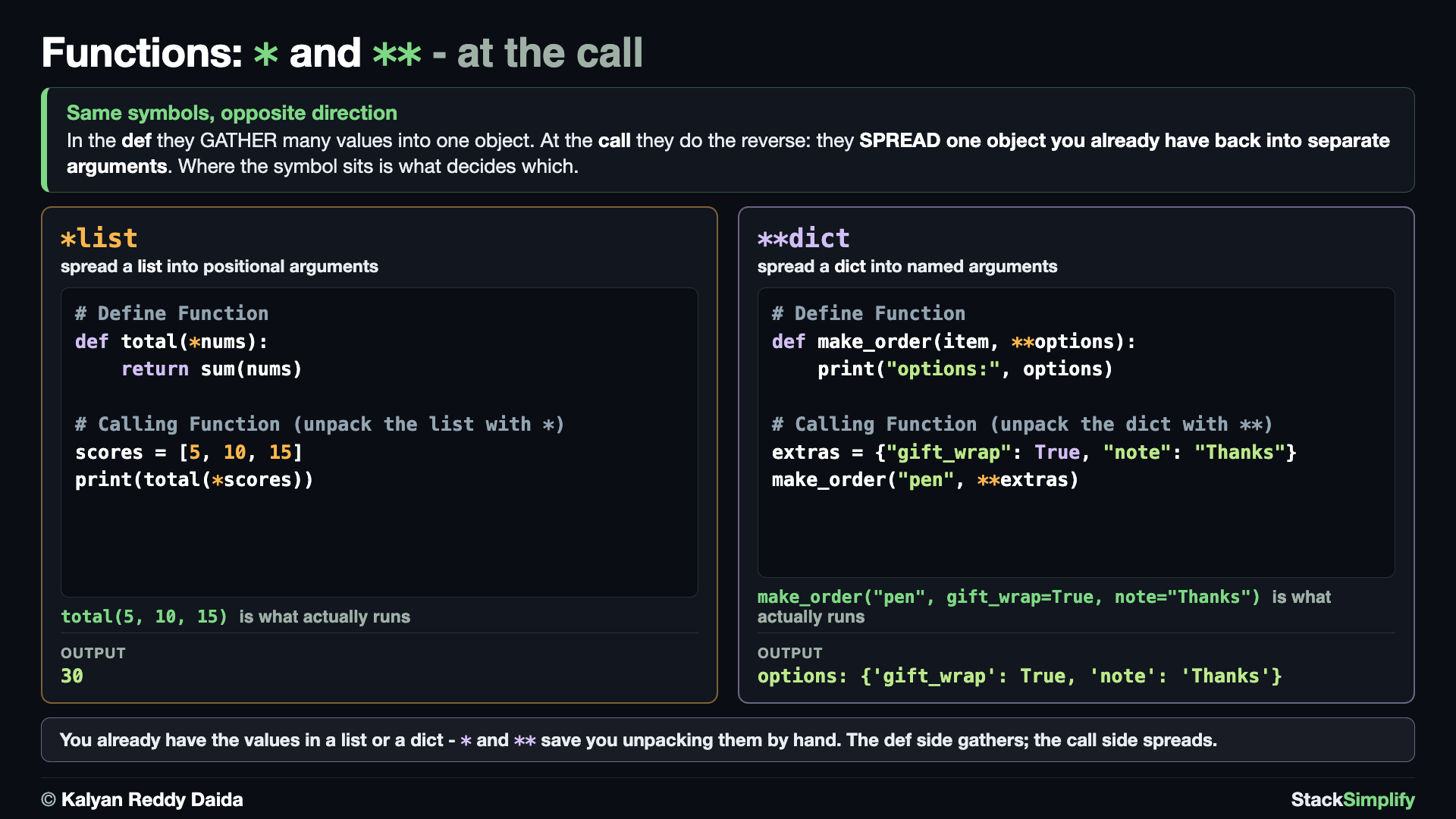
Concept 3: Unpack a list or dict into a call
Spread a list with * and a dict with ** straight into a function call. Both functions are the ones from Concepts 1 and 2, repeated so this block stands on its own - only the call site changes.
# Concept-03: Call-site unpacking. Spread a list with * and a dict with ** straight into a call
# Question-1: How do we feed a list we already have, like [5, 10, 15], into a function's arguments? (unpack with * before the list)
# Question-2: How do we feed a dict we already have, like {"gift_wrap": True, "note": "Thanks"}, into a function's arguments? (unpack with ** before the dict)
# Same *args function as Concept-01, repeated so this block stands on its own
def total(*nums):
    return sum(nums)

scores = [5, 10, 15]
print(total(*scores))  # * spreads the list into total(5, 10, 15)

# Same **kwargs function as Concept-02, repeated so this block stands on its own
def make_order(item, **options):
    print("options:", options)

extras = {"gift_wrap": True, "note": "Thanks"}
make_order("pen", **extras)  # ** spreads the dict into make_order("pen", gift_wrap=True, note="Thanks")
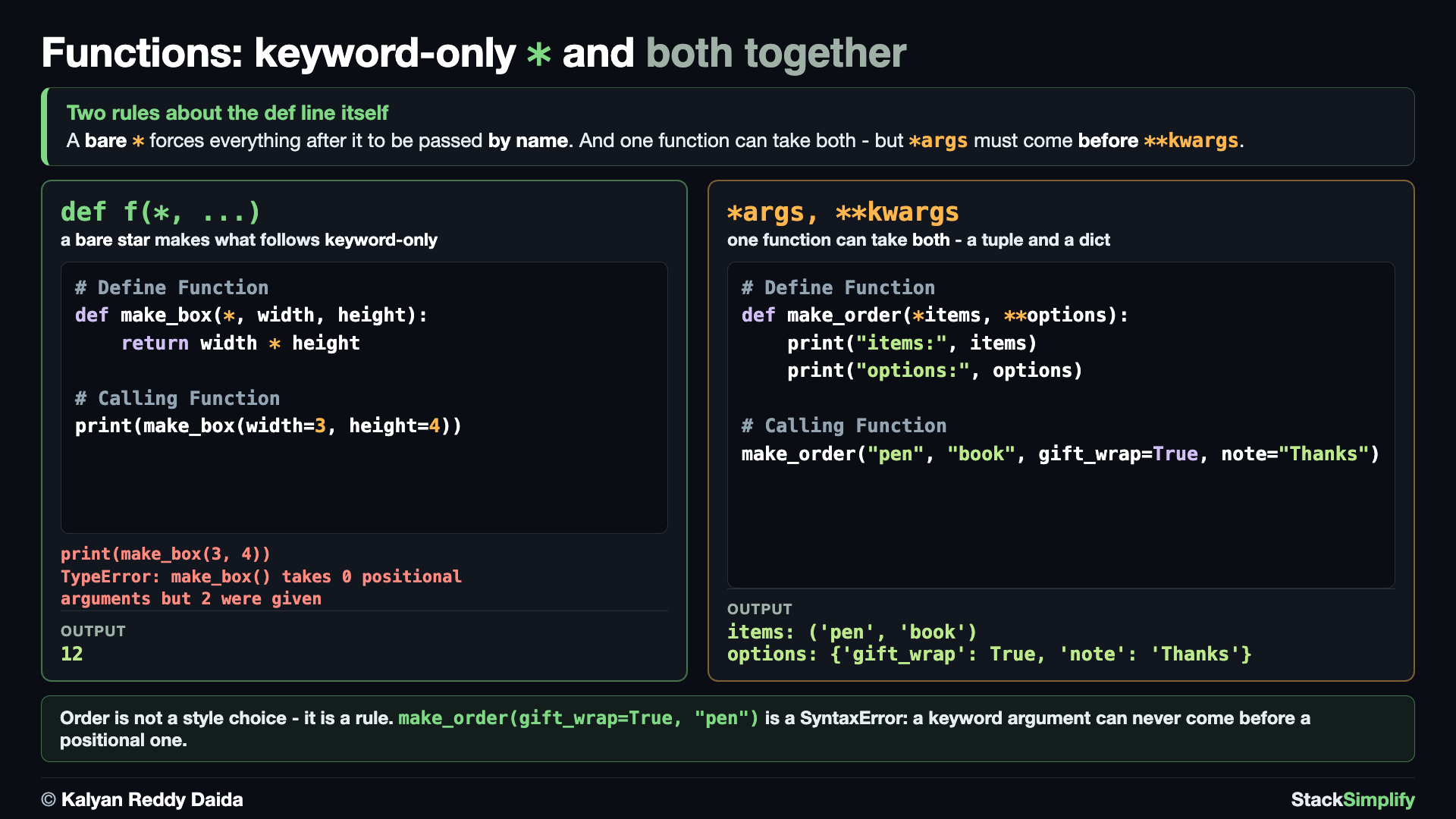
Concept 4: Keyword-only arguments
A bare * forces the arguments after it to be passed by name. It has a mirror image, a bare /, which forces the parameters BEFORE it to be passed by position only. You will not need to write / yourself, but you will see it in help() output for built-in functions, so it is worth recognizing.
# Concept-04: Keyword-only arguments. A bare * forces the arguments after it to be passed by name
# Question: How do we MAKE callers pass an argument by name, for clarity? (put a bare * before it: def f(*, flag))
def make_box(*, width, height):
    return width * height

print(make_box(width=3, height=4))
# print(make_box(3, 4))  # uncomment: TypeError, make_box() takes 0 positional arguments but 2 were given
make_box(3, 4) would be an error. The bare * means width and height must be named.
Concept 5: One function can take both *args and **kwargs
A single function can accept any number of positional values AND any number of named ones - the *args (a tuple) must come before **kwargs (a dict).
# Concept-05: One function can take BOTH; *args (a tuple) must come BEFORE **kwargs (a dict)
# Question: How does a function accept any positionals AND any named options at once, like a logging call? (*args first, then **kwargs)
# The same make_order as Concept-02, grown up: any number of ITEMS as well as any number of options
def make_order(*items, **options):
    print("items:", items)
    print("options:", options)

make_order("pen", "book", gift_wrap=True, note="Thanks")
# This would be a SyntaxError - a keyword argument cannot come before a positional one:
# make_order(gift_wrap=True, "pen")
Pages for this step: Concept | Practice | Workshop
Python Files for this step: Concept | Practice | Practice Solutions | Workshop | Workshop Solutions
Step-08: Scope (LEGB)
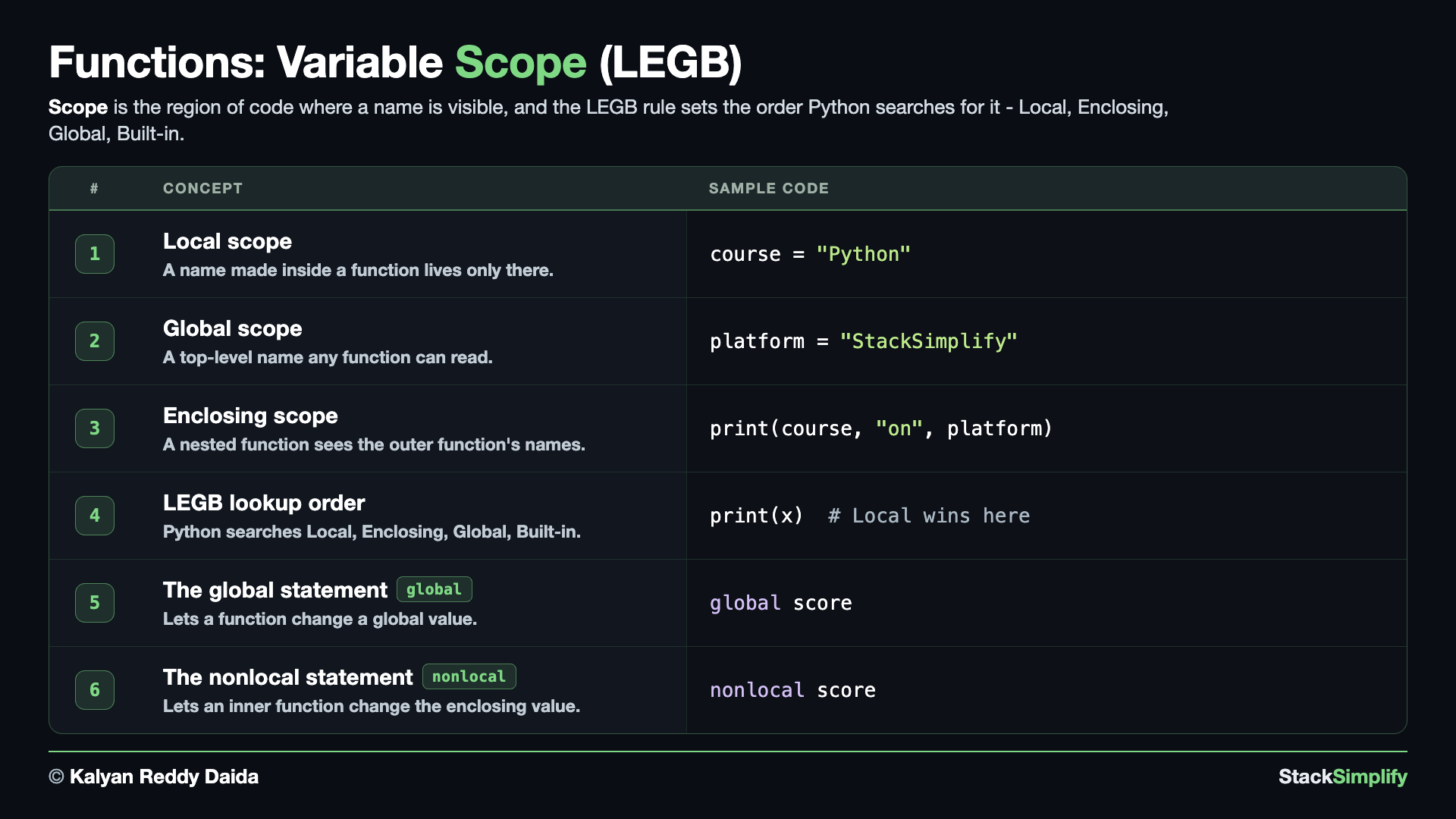
File: s07_step08_scope.py
Every variable has a scope: where it lives and who can see it. Python searches names in one order, the LEGB rule: Local, Enclosing, Global, Built-in.
Concept 1: Local scope
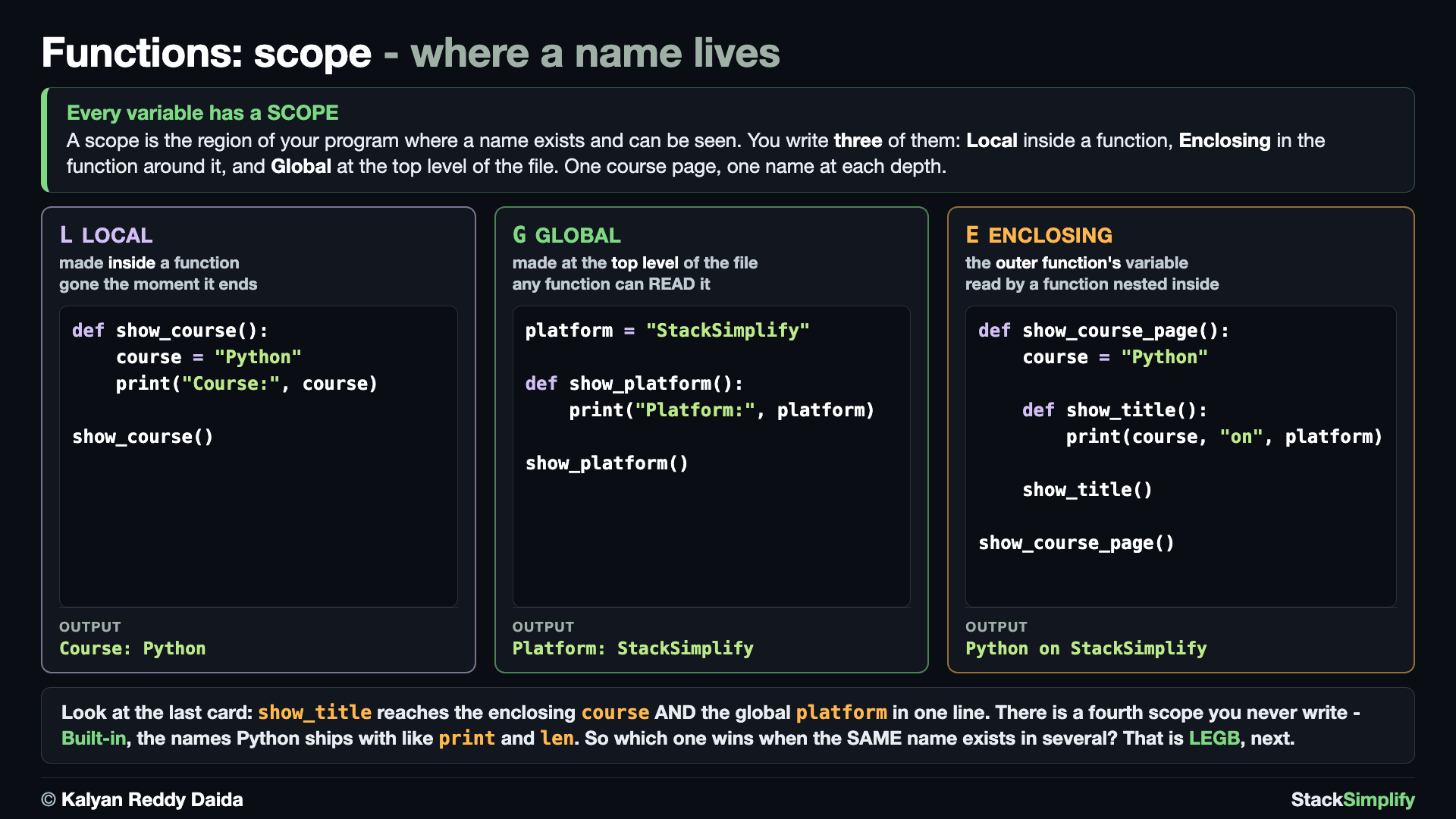
A variable assigned inside a function lives only there. course is born inside show_course and is gone the moment the function ends.
# Concept-01: LOCAL scope. A variable assigned inside a function lives only there
# Question: Where does a variable made inside a function live? (in the function's LOCAL scope; it is gone when the function ends)
def show_course():
    course = "Python"  # LOCAL: born here, gone the moment the function ends
    print("Course:", course)

show_course()
Concept 2: Global scope
A name at the top level of the file; a function can read it. platform sits outside every function, so show_platform reads it without being handed it.
# Concept-02: GLOBAL scope. A name at the top level of the file; a function can READ it
# Question: How can every function in a file share one value, like the platform name, without passing it each time? (define it at the top level; functions can READ that global)
platform = "StackSimplify"  # GLOBAL: top level of the file, so every function can read it

def show_platform():
    print("Platform:", platform)  # reads the global 'platform'

show_platform()
Concept 3: Enclosing scope (nested functions)
A function inside another function can see the outer one's variables. show_title is nested inside show_course_page, so it reads the enclosing course and the global platform in one line.
# Concept-03: ENCLOSING scope. A function INSIDE another function can see the outer function's variables (nested functions)
# Question: If we put a function inside another function, can the inner one see the outer one's variables? (yes, the ENCLOSING scope)
platform = "StackSimplify"  # GLOBAL: top level of the file, so every function can read it

def show_course_page():
    course = "Python"  # belongs to show_course_page, the ENCLOSING function

    def show_title():
        print(course, "on", platform)  # the enclosing 'course' AND the global 'platform'

    show_title()

show_course_page()
Concept 4: The LEGB rule
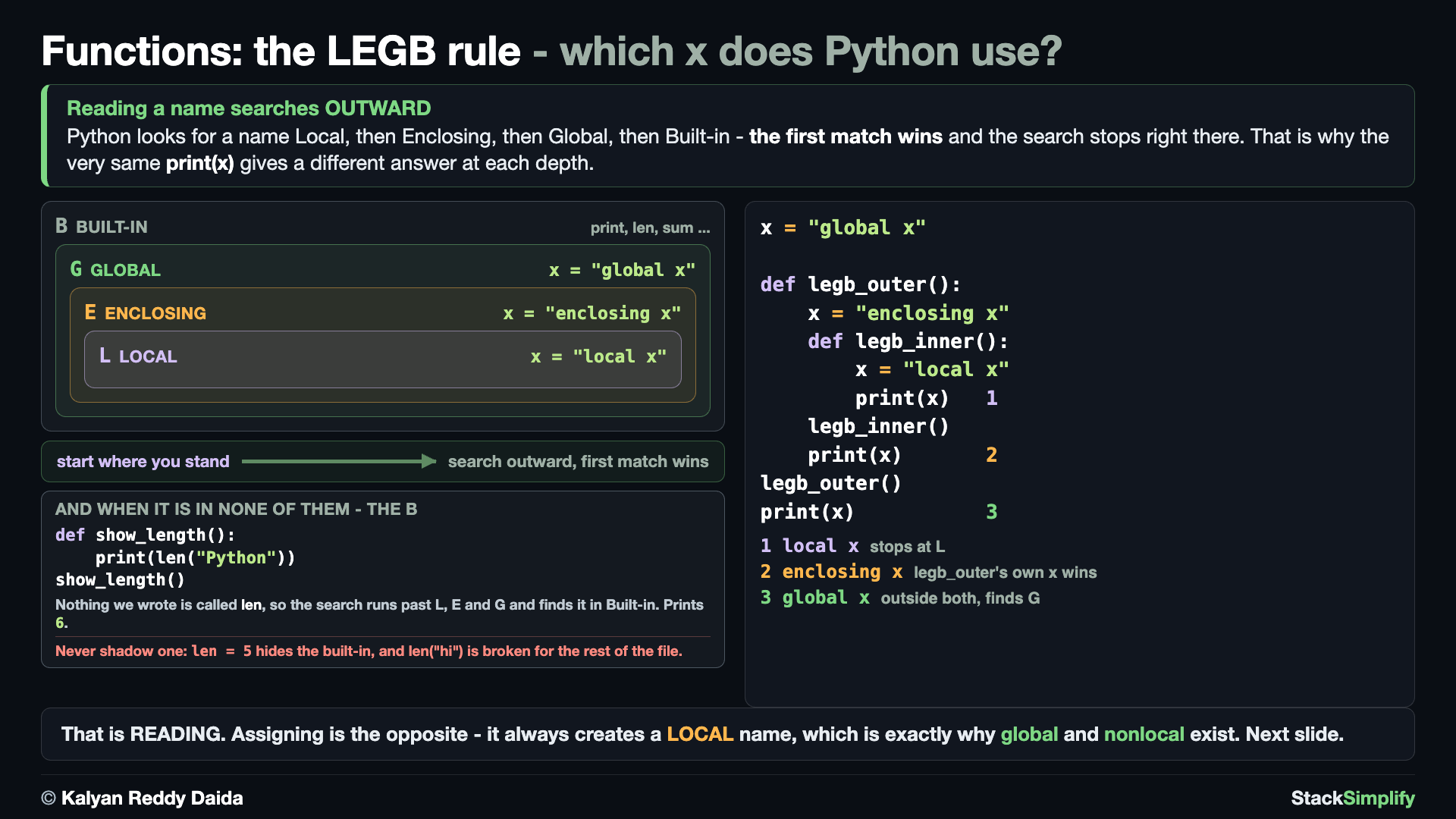
When the same name exists in several places, Python uses the first it finds: Local, then Enclosing, then Global, then Built-in. E1 puts the same x at three depths so you can watch each one win in turn. E2 shows the last letter, the one E1 never reaches: nothing we wrote is called len, so the search runs past Local, Enclosing and Global and finds it in Built-in. len is a built-in name Python provides, like print, sum and max - which is also why shadowing one with len = 5 breaks it for the rest of the file.
# Concept-04: The LEGB rule. Python looks up a name in this order: Local, Enclosing, Global, Built-in
# Question-1: When the same name exists in several places, which one does Python use? (LEGB: Local first, then Enclosing, then Global, then Built-in)
# Question-2: What if the name is in NONE of the places we wrote, like len? (Python keeps searching outward and finds it in Built-in)
# E1: the L, the E and the G. Guess first: which x prints inside legb_inner, in legb_outer, and at the very end?
x = "global x"

def legb_outer():
    x = "enclosing x"
    def legb_inner():
        x = "local x"
        print(x)  # Local wins here
    legb_inner()
    print(x)  # Enclosing wins here

legb_outer()
print(x)  # Global wins here

# E2: the B. Nothing we wrote is called len - not local, not enclosing, not global - so the
# search runs all the way out to Built-in, and that is where Python finds it
def show_length():
    print(len("Python"))

show_length()
# len is a built-in NAME Python provides, like print, sum and max. Never shadow one:
# len = 5   # this HIDES the built-in len(); now len("hi") would break
Concept 5: The global statement
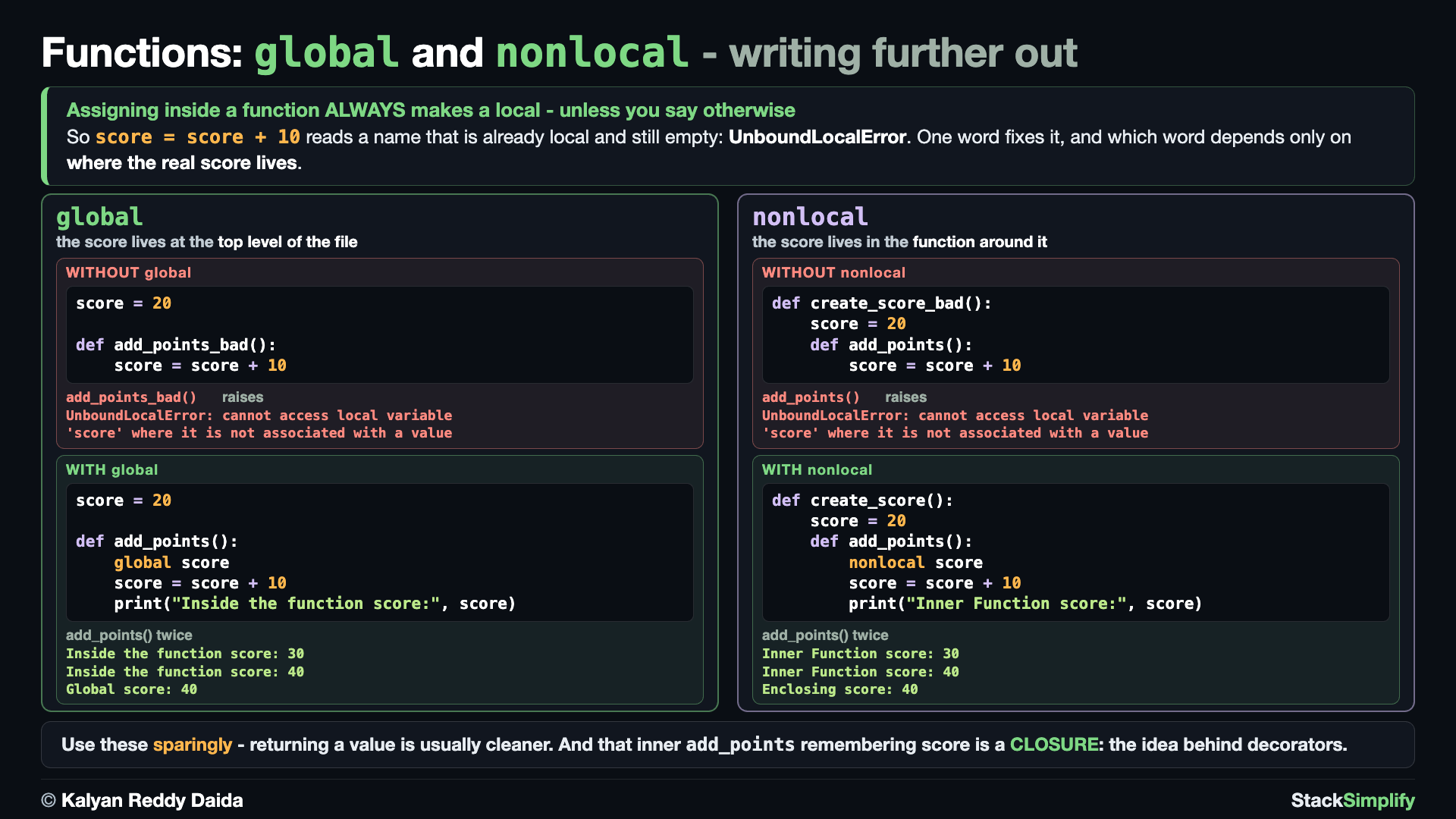
The two runs make the contrast: E1 assigns to score inside the function WITHOUT global, which makes score local - so the read on the right of the = has nothing to read. The call is left commented; uncomment it to see the UnboundLocalError, and the global stays 20. E2 declares global score, so the same function reaches the real global and the total climbs to 40. Use global sparingly - returning a value is usually cleaner.
# Concept-05: The global statement. Let a function CHANGE a global variable (use it sparingly; returning a value is usually cleaner)
# Question: How can a function actually change a global value? (declare it with 'global' first, but prefer returning a value)
# E1: WITHOUT global: assigning to score makes it LOCAL, so reading it first causes an error
score = 20  # a global: defined at the top level of the file

def add_points_bad():
    score = score + 10  # UnboundLocalError: score is local here, and has no value yet
    print("Inside the function score:", score)

# Call the function
# add_points_bad()  # uncomment to see the error
print("Global score:", score)  # 20: the global was never changed

# E2: WITH global: 'global score' makes the assignment target the REAL global
score = 20

def add_points():
    global score
    score = score + 10
    print("Inside the function score:", score)

# Call the function
add_points()
add_points()
print("Global score:", score)  # 40: the function changed the global
Concept 6: The nonlocal statement (and closures)
The two runs make the contrast: E1 assigns to score inside the inner function WITHOUT nonlocal, which makes score local to add_points - so the read on the right of the = has nothing to read. The call is left commented; uncomment it to see the UnboundLocalError, and the enclosing score stays 20. E2 declares nonlocal score, so add_points updates the enclosing one and the total reaches 40.
# Concept-06: The nonlocal statement. Let an inner function CHANGE the ENCLOSING function's variable
# Question: How can an inner (nested) function change a variable that belongs to the outer function? (declare it 'nonlocal')
# E1: WITHOUT nonlocal: assigning to score makes it LOCAL, so reading it first causes an error
def create_score_bad():
    score = 20  # belongs to create_score_bad (enclosing)

    def add_points():
        score = score + 10  # UnboundLocalError: score is local here, and has no value yet
        print("Inner Function score:", score)

    # Call the inner function
    # add_points()  # uncomment to see the error
    print("Enclosing score:", score)  # 20: the enclosing score was never changed

# Call the outer function
create_score_bad()

# E2: WITH nonlocal: 'nonlocal score' makes add_points update the ENCLOSING score
def create_score():
    score = 20

    def add_points():
        nonlocal score
        score = score + 10
        print("Inner Function score:", score)

    # Call the inner function
    add_points()
    add_points()
    print("Enclosing score:", score)  # 40: the enclosing score was changed

# Call the outer function
create_score()

# Note: An inner function that remembers variables from its enclosing function
# is called a CLOSURE. It is the idea behind decorators, which the next course covers.
An inner function that remembers variables from its enclosing function (like add_points remembering score) is called a closure: the idea behind decorators, which the next course covers. Day to day: prefer passing values in and returning them over global/nonlocal.
Pages for this step: Concept | Practice | Workshop
Python Files for this step: Concept | Practice | Practice Solutions | Workshop | Workshop Solutions
Step-09: First-class and Higher-order Functions
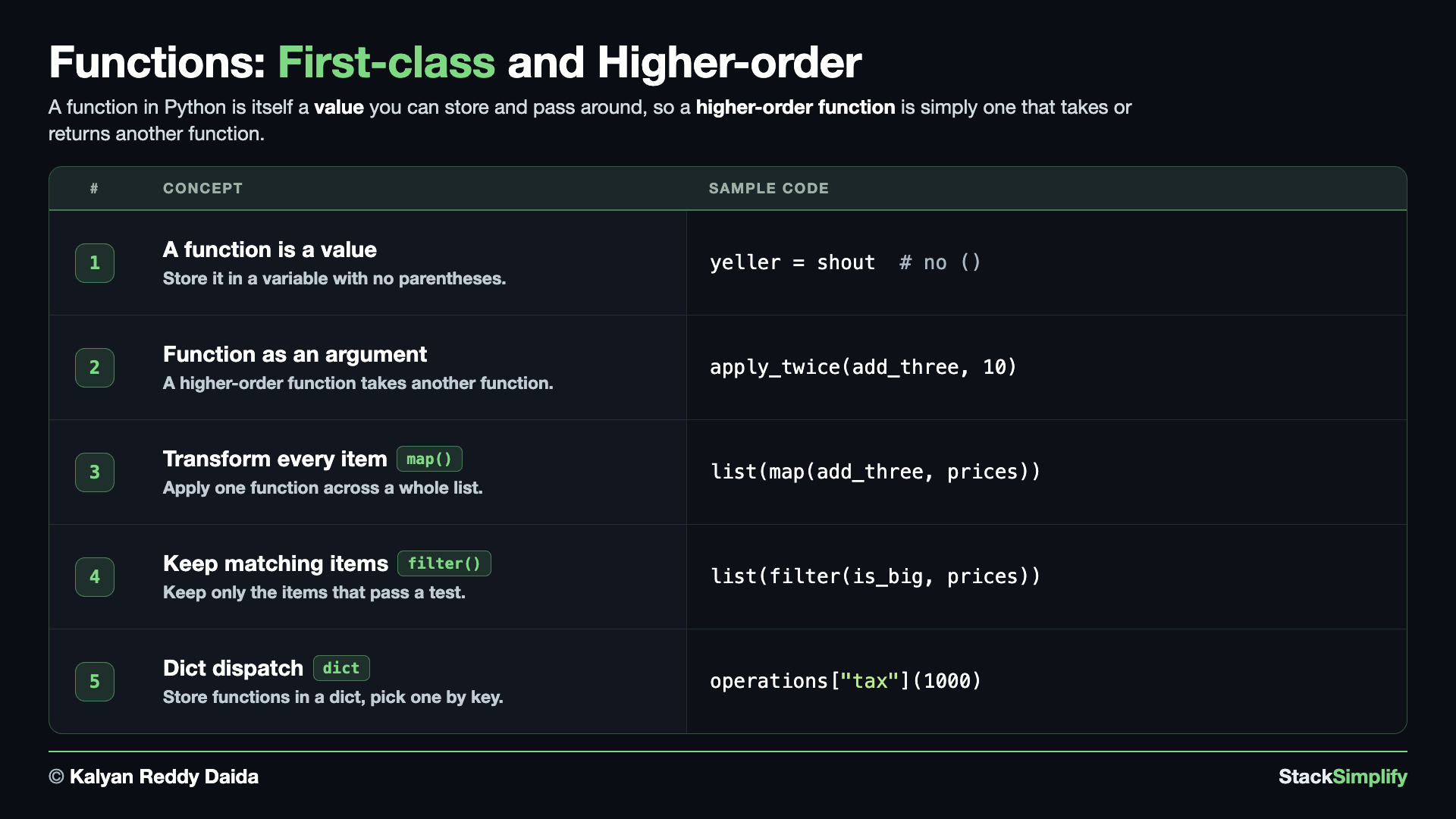
File: s07_step09_first_class_functions.py
Concept 1: A function is a value
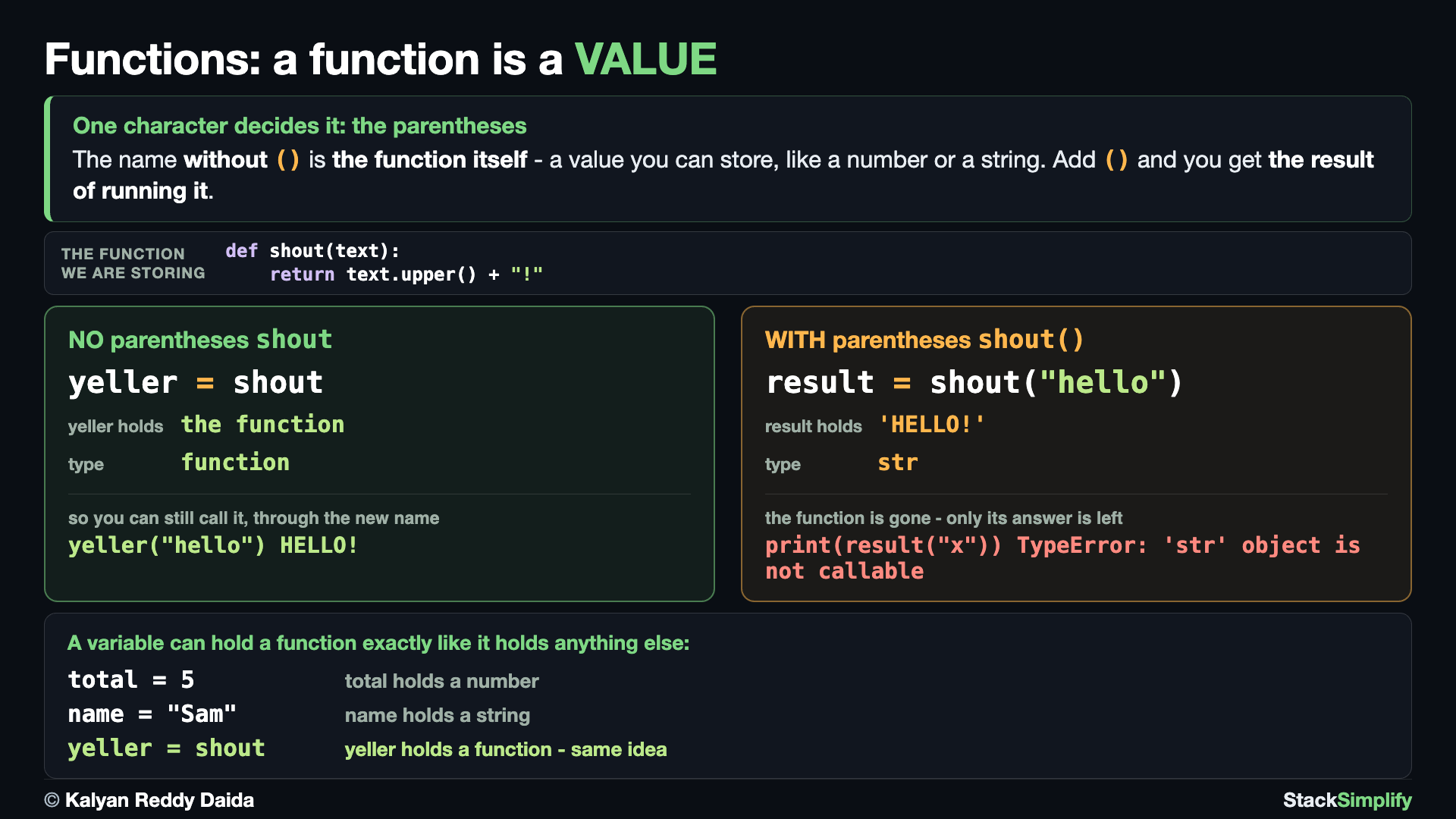
You can store a function in a variable and call it through that name.
# Concept-01: A function is a value (an object). You can store it in a variable and call it through that name
# Question: How do we give a long function name a short alias we can call instead? (assign the function to a variable, with no parentheses)
def shout(text):
    return text.upper() + "!"

# NO parentheses: the variable holds the FUNCTION itself
yeller = shout  # store the function itself; note: no parentheses
print(yeller("hello"))  # call it through the new name

# WITH parentheses: the variable holds the RESULT of running it
result = shout("hello")
print(result)
# print(result("x"))  # uncomment: TypeError, 'str' object is not callable
Note the one character that decides it: yeller = shout with no parentheses stores the function itself, so yeller can still be called. result = shout("hello") with parentheses runs it and stores the answer, so result is a plain string - calling it raises TypeError: 'str' object is not callable. That failing line is left commented; uncomment it to see it.
Concept 2: Pass a function into another function
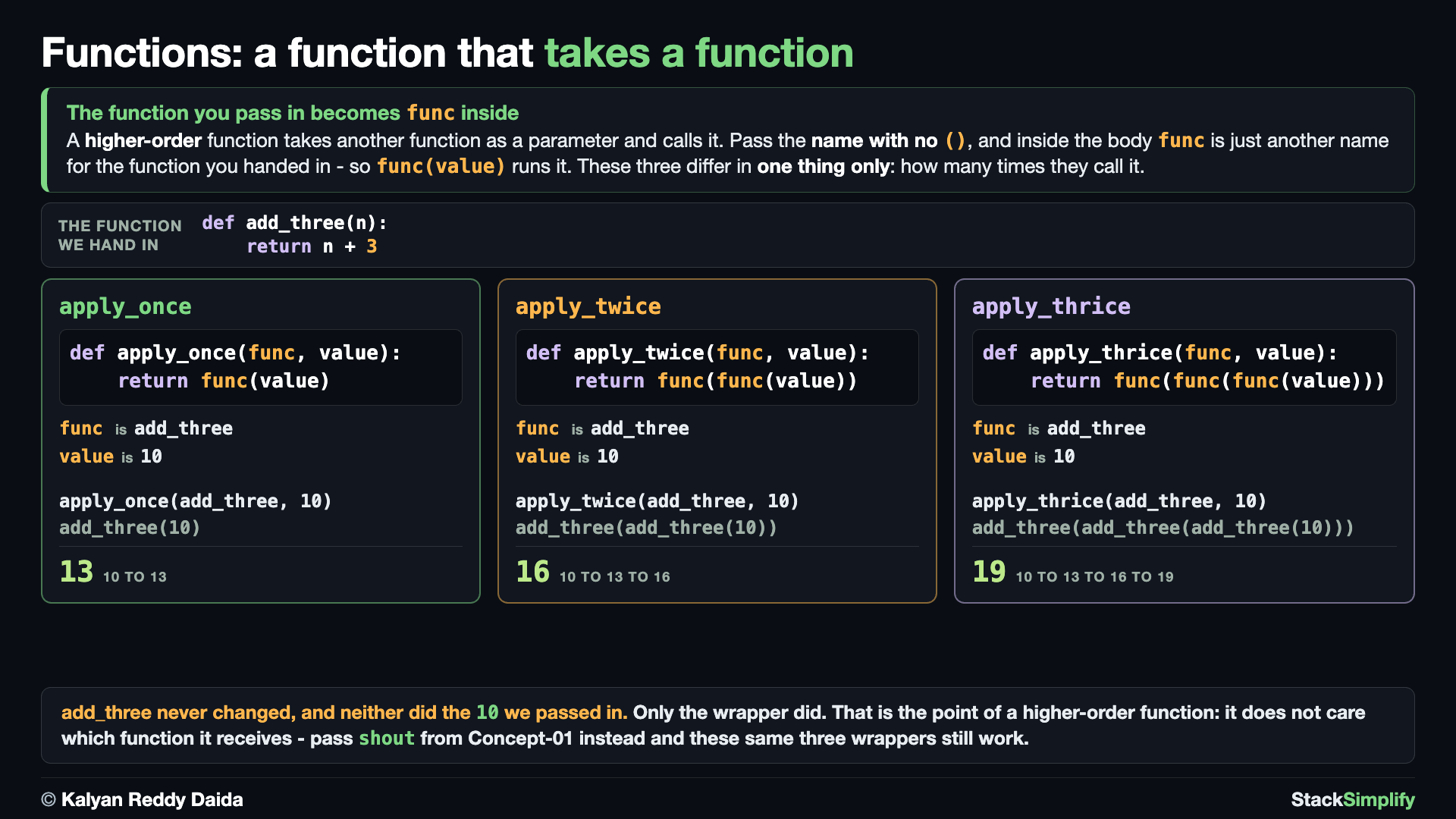
A function that takes another function is a higher-order function. We write a plain add_three first, then three functions that each run whatever function you hand them - once, twice and three times. Only the number of calls changes; add_three itself is untouched, and it is passed by NAME with no ().
# Concept-02: A function can take ANOTHER function as an argument (a higher-order function)
# Question: How do we pass one function into another so it runs once, twice or three times? (pass the function NAME as the argument, with no parentheses)
# First, a plain function we already know how to write:
def add_three(n):
    return n + 3

# Now higher-order functions: each one TAKES a function (func) and runs it on a value:
def apply_once(func, value):
    return func(value)

def apply_twice(func, value):
    return func(func(value))

def apply_thrice(func, value):
    return func(func(func(value)))

# Pass add_three itself as the argument - its NAME, with no ():
print(apply_once(add_three, 10))
print(apply_twice(add_three, 10))
print(apply_thrice(add_three, 10))
This is the idea behind sorted(key=...) in the next step.
Concept 3: map - run a function on every item
map(func, list) runs func on every item and hands back the results. It returns a lazy map object, not a list - so wrap it in list(), and type() confirms what you got back.
# Concept-03: map applies a function to EVERY item of a list and gives back the transformed results (a built-in higher-order function)
# Question: How do we apply one function to a whole list at once, like adding 3 to every price in [10, 20, 30, 40]? (map(add_three, prices) transforms each)
# Same add_three as Concept-02, repeated so this block stands on its own
def add_three(n):
    return n + 3

prices = [10, 20, 30, 40]
prices_new = list(map(add_three, prices))  # map gives a map object; list() turns it into a list
print(prices_new)
print(type(prices_new))
A list comprehension often reads cleaner for the same job ([add_three(n) for n in prices]), but knowing map helps you read other people's code.
Concept 4: filter - keep the items that pass a test
filter(func, list) keeps only the items func says True to and drops the rest. Like map, it returns a lazy object, so wrap it in list().
# Concept-04: filter keeps only the items a function says True to, and drops the rest (a built-in higher-order function)
# Question: How do we keep only the items in [50, 120, 90, 200] that pass a test, like the ones over 100? (filter(is_big, prices) selects)
def is_big(n):
    return n > 100

prices = [50, 120, 90, 200]
print(list(filter(is_big, prices)))  # keep only the big ones -> [120, 200]
The same job as a comprehension: [n for n in prices if is_big(n)].
Concept 5: Functions can live in a dict (dispatch)
Because a function is an object, you can store several in a dict and pick one by key. For a name it knows, both give the SAME answer (1100): E1 uses an if/elif chain that grows a branch for every new checkout operation; E2 stores the functions in a dict and just looks one up - adding an operation is one more key, with no if-chain to touch. Note the else in E1: without it, an unknown name would fall off the end and the function would quietly hand back None.
# Concept-05: Functions are objects, so they can live in a dict and be picked by key at runtime (dispatch)
# Question: How do we pick which checkout operation to run - shipping, tax, or a coupon - without a big if-chain? (store the functions in a dict, look one up by key)
# E1: the long way: an if/elif chain, and it grows by one branch for every new operation
def run_operation(name, total):
    if name == "shipping":
        return total + 50
    elif name == "tax":
        return total + (total // 10)
    elif name == "coupon":
        return total - 100
    else:
        return total  # unknown name: hand the total back unchanged, never None
print(run_operation("tax", 1000))  # 1100
print(run_operation("gift", 1000))  # 1000 - unknown name, total unchanged

# E2: dict dispatch: store the functions in a dictionary and pick which one to run by key
# A new operation is just one more key-value pair - no if/elif chain
def add_shipping(total):
    return total + 50

def add_tax(total):
    return total + (total // 10)

def apply_coupon(total):
    return total - 100

operations = {
    "shipping": add_shipping,
    "tax": add_tax,
    "coupon": apply_coupon
}

# Get the function stored under the "tax" key - this does NOT call the function
print(operations["tax"])  # <function add_tax at ...>

# Store the selected function in a variable, then CALL it with 1000 as the argument
chosen = operations["tax"]
print(chosen(1000))  # 1100

# Or get the function and CALL it directly with 1000 as the argument
print(operations["tax"](1000))  # 1100

# Other options: pick a different operation by changing only the key
print(operations["shipping"](1000))  # 1050
print(operations["coupon"](1000))  # 900
Read E2's three prints as one idea in three steps. operations["tax"] on its own fetches the function and does not run it - that is why the first line prints <function add_tax at ...> and not a number. Park it in chosen and call chosen(1000), or skip the variable and call it straight away with operations["tax"](1000): both give 1100, because they are the same function reached two ways. After that, swapping the key is the whole story - operations["shipping"](1000) and operations["coupon"](1000) run different code through the identical lookup. As the checkout menu grows, E1's if/elif chain grows a branch each time, while E2's dict just gains one more key-value pair - that is the win of dispatch.
Pages for this step: Concept | Practice | Workshop
Python Files for this step: Concept | Practice | Practice Solutions | Workshop | Workshop Solutions
Step-10: Lambda
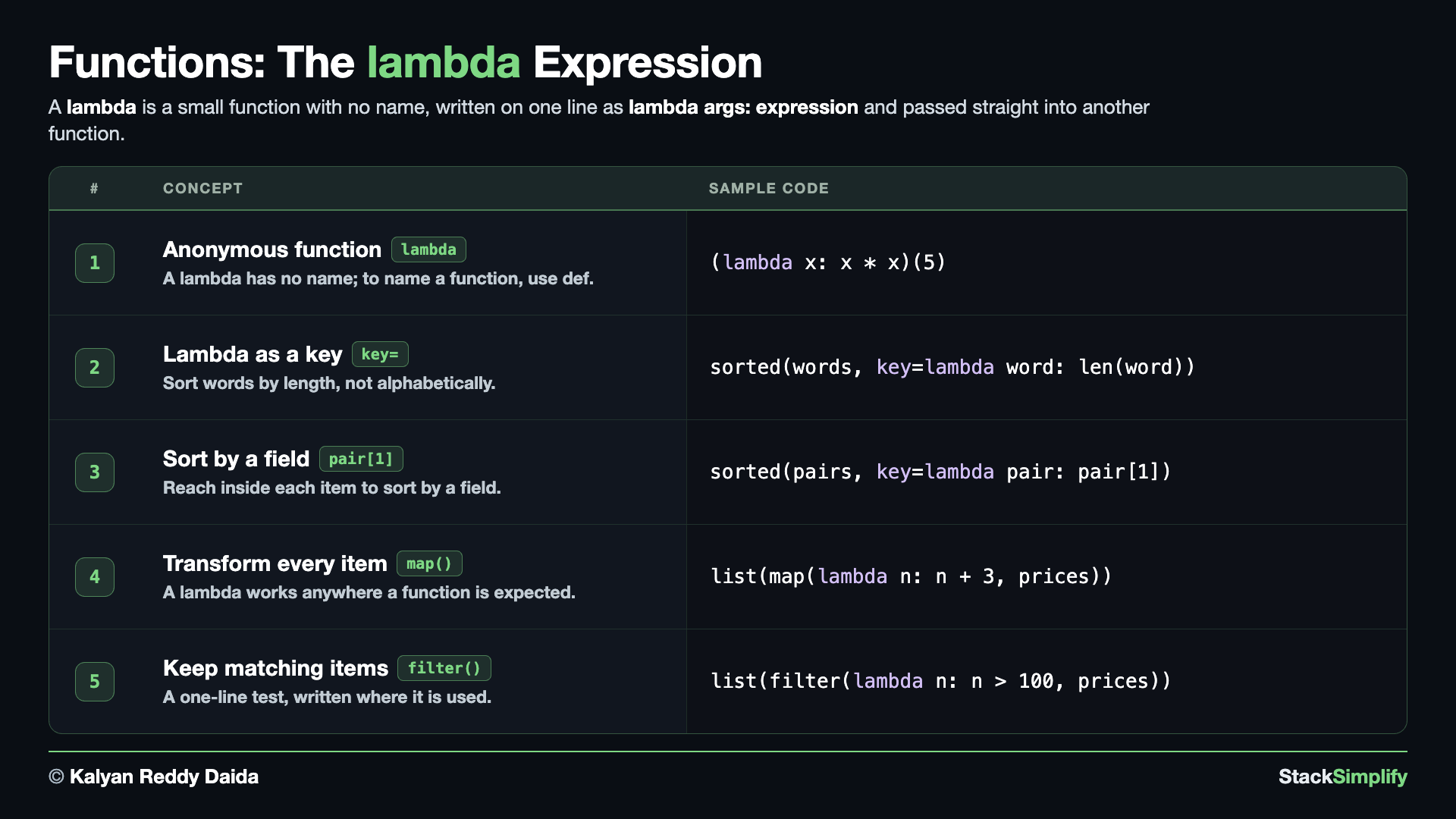
File: s07_step10_lambda.py
Concept 1: A tiny one-line function
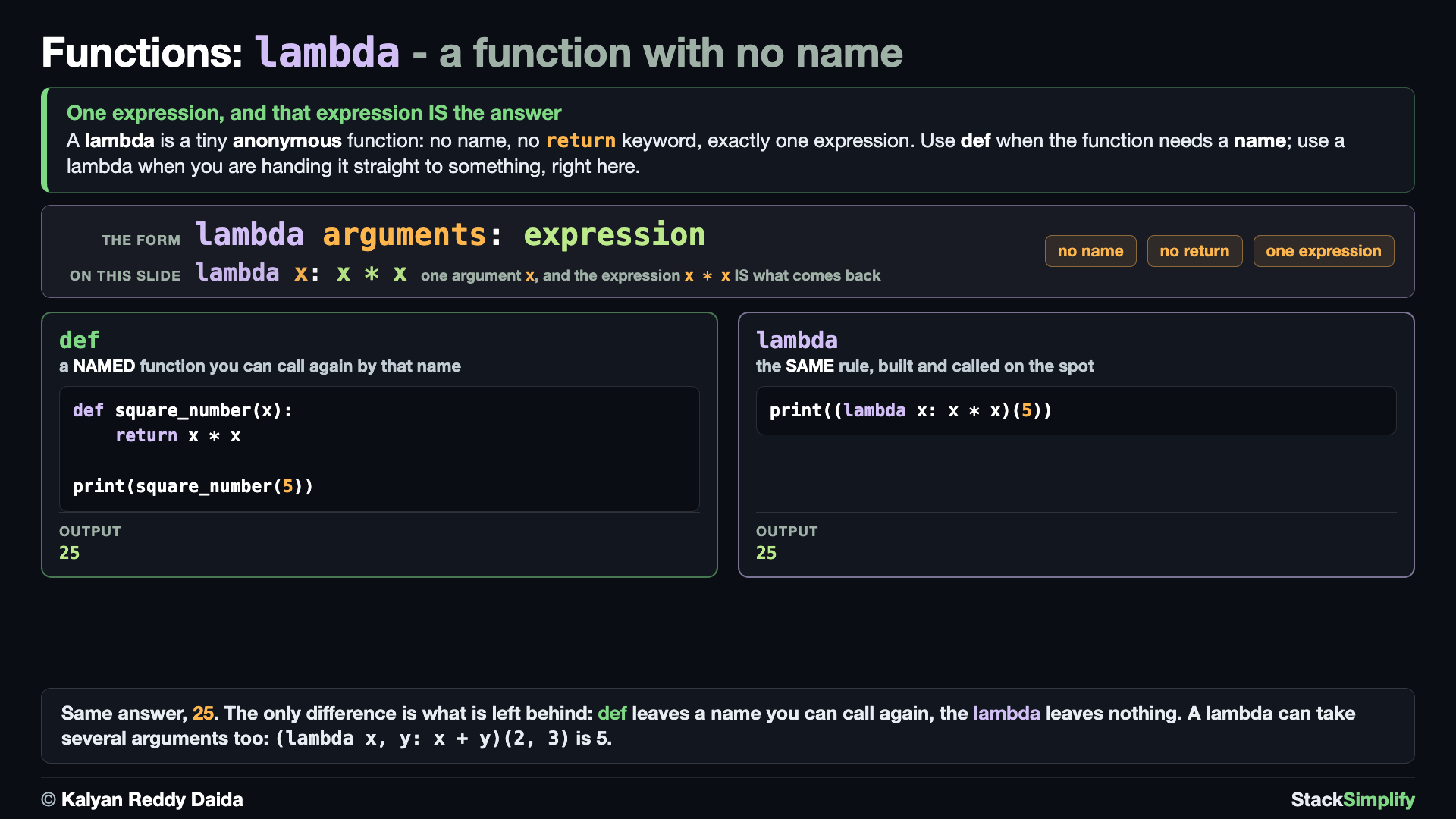
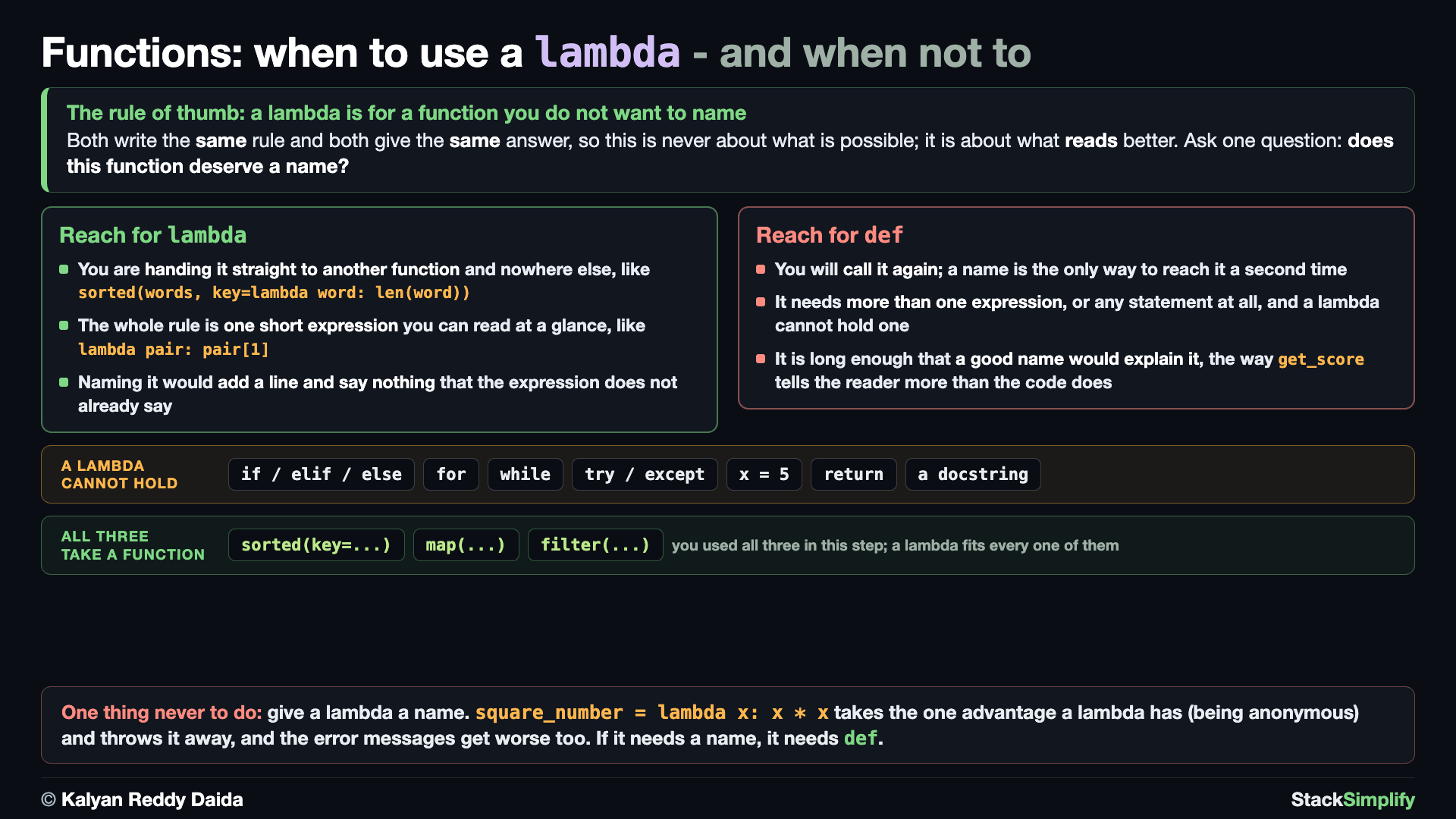
A lambda is a small, nameless function: lambda args: expression.
# Concept-01: A lambda is a tiny ANONYMOUS function - one expression, no name (lambda args: expression)
# Question: How do we write a small function we only need for a moment? (a lambda has no name; to NAME a function, use def)
# A lambda body is ONE expression (no statements, no return keyword) - that is the whole rule.
# E1: with def - a NAMED function, so you can call it again by that name
def square_number(x):
    return x * x

print(square_number(5))

# E2: with lambda - the SAME rule as an ANONYMOUS expression, built and called on the spot
print((lambda x: x * x)(5))
# A lambda can take several arguments too: (lambda x, y: x + y)(2, 3) is 5
Both runs answer 25; the difference is whether the function has a NAME. E1 uses def, so square_number exists afterwards and can be called again. E2 builds the same rule as a lambda and calls it on the spot with (lambda x: x * x)(5) - nothing is left behind. The one rule is that a lambda's body is a single expression: no statements, no return. It can still take several arguments.
Concept 2: Use a lambda in place
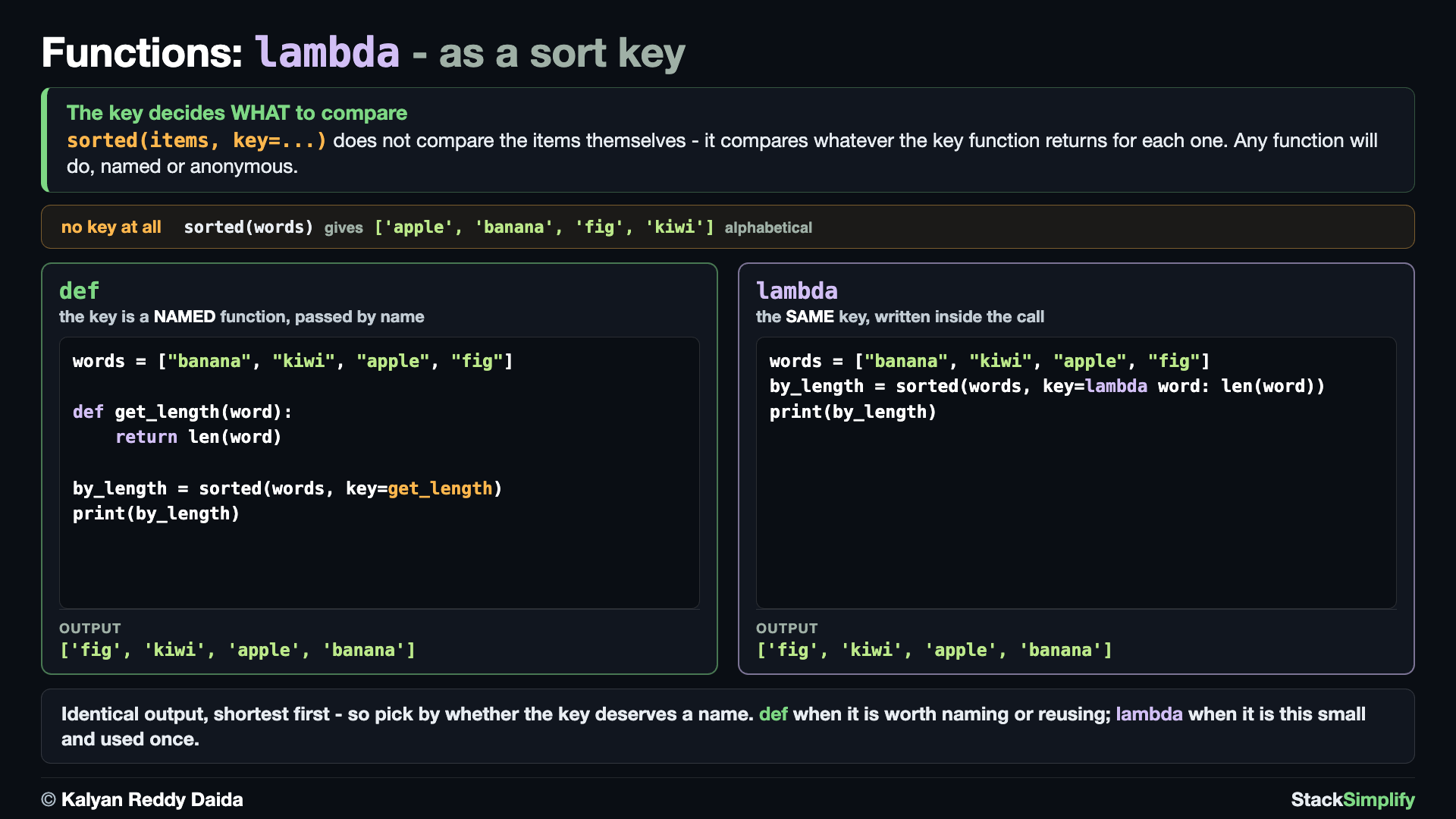
The real use is handing a function to another function, like sorted(key=...). Either kind of function works as the key.
# Concept-02: The real use. Hand a function to ANOTHER function, like sorted(key=...) - def or lambda
# Question: How do we sort words like ["banana", "kiwi", "apple", "fig"] by their LENGTH instead of alphabetically? (give sorted a key function; a lambda is perfect here)
# E1: with def - the key is a NAMED function, passed to sorted by name
words = ["banana", "kiwi", "apple", "fig"]

def get_length(word):
    return len(word)

by_length = sorted(words, key=get_length)
print(by_length)

# E2: with lambda - the SAME key written straight into the call, with no name to invent
words = ["banana", "kiwi", "apple", "fig"]
by_length = sorted(words, key=lambda word: len(word))
print(by_length)
Both runs print the same order, shortest first - the key decides WHAT to compare, and here that is the length. E1 names the key get_length and hands sorted that name. E2 writes the same rule inline as a lambda, so there is no name to invent for a function used once. Reach for def when the key is worth naming or reusing; reach for a lambda when it is this small.
Concept 3: A key lambda that reads a field
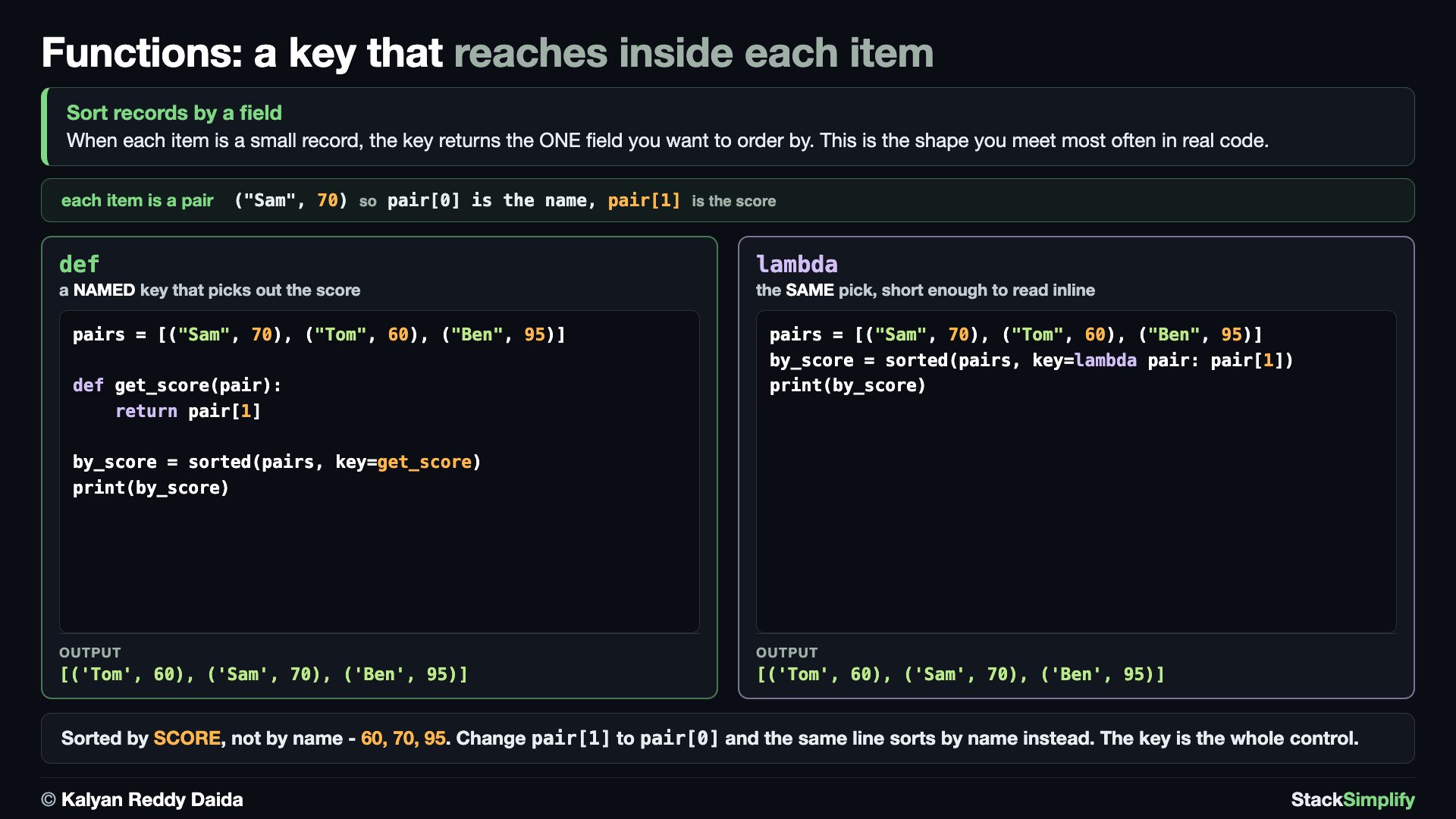
A key function can reach inside each item. Sorting a list of (name, score) pairs by the score means the key returns pair[1] for each pair - the everyday "sort records by a field" idiom, written both ways.
# Concept-03: A key function can dig INTO each item - sort (name, score) pairs by the score
# Question: How do we sort records by a field inside each item, like [("Sam", 70), ("Tom", 60), ("Ben", 95)] by score? (key=lambda pair: pair[1])
# E1: with def - the key picks out pair[1], the score
pairs = [("Sam", 70), ("Tom", 60), ("Ben", 95)]

def get_score(pair):
    return pair[1]

by_score = sorted(pairs, key=get_score)
print(by_score)

# E2: with lambda - the same pick, short enough to read inside the call
pairs = [("Sam", 70), ("Tom", 60), ("Ben", 95)]
by_score = sorted(pairs, key=lambda pair: pair[1])
print(by_score)
Each pair is compared by pair[1] (the score), so the list comes back ordered 60, 70, 95 - identically from the named get_score and from the lambda. This is the shape you will meet most often in real code.
Concept 4: map with a lambda
sorted is not special. Any function that expects a function will take a lambda, and map from Step-09 is the next one. map applies a function to every item of a list; the only question is whether that function needs a name. Adding 3 to a price does not, so the lambda goes straight into the call.
# Concept-04: map with a lambda - transform every item without naming the transformation
# Question: How do we add 3 to every price in [10, 20, 30, 40] without inventing a name for "add 3"? (map takes any function, and a lambda fits right inside the call)
# E1: with def - the same map as Step-09, where the transformation carries a name
def add_three(n):
    return n + 3

prices = [10, 20, 30, 40]
print(list(map(add_three, prices)))

# E2: with lambda - the same transformation, written where it is used
prices = [10, 20, 30, 40]
print(list(map(lambda n: n + 3, prices)))
Both lines give [13, 23, 33, 43]. The difference is that E1 leaves add_three behind for the rest of the file, while E2 leaves nothing - the transformation existed only for the length of that one call.
Concept 5: filter with a lambda
filter is the other half of the pair from Step-09: it keeps the items a function answers True to and drops the rest. The test here is one comparison, n > 100, which is exactly the kind of one-line rule a lambda is for.
# Concept-05: filter with a lambda - keep the items a one-line test says True to
# Question: How do we keep only the prices over 100 in [50, 120, 90, 200] without naming the test? (filter takes any function that answers True or False)
# E1: with def - the same filter as Step-09, where the test carries a name
def is_big(n):
    return n > 100

prices = [50, 120, 90, 200]
print(list(filter(is_big, prices)))

# E2: with lambda - the same test, written where it is used
prices = [50, 120, 90, 200]
print(list(filter(lambda n: n > 100, prices)))
Both lines keep [120, 200]. Read E2 aloud and it says what it does - keep the prices where n > 100 - with no name to look up anywhere else. That is the whole case for a lambda: when the expression is shorter and clearer than any name you could give it.
Pages for this step: Concept | Practice | Workshop
Python Files for this step: Concept | Practice | Practice Solutions | Workshop | Workshop Solutions
Step-11: Modules and Imports
File: s07_step11_modules_imports.py
Virtual environments - a quick reminder
Everything in this section uses Python's built-in modules (like math) and your own .py files, so there is nothing to install here. Later, when you install third-party packages with pip (for data, web, or ML work), always do it inside a virtual environment so each project keeps its own clean, separate set of packages. New to this or want a refresher? See Virtual Environments from Section 01.
Concept 1: Import from the standard library
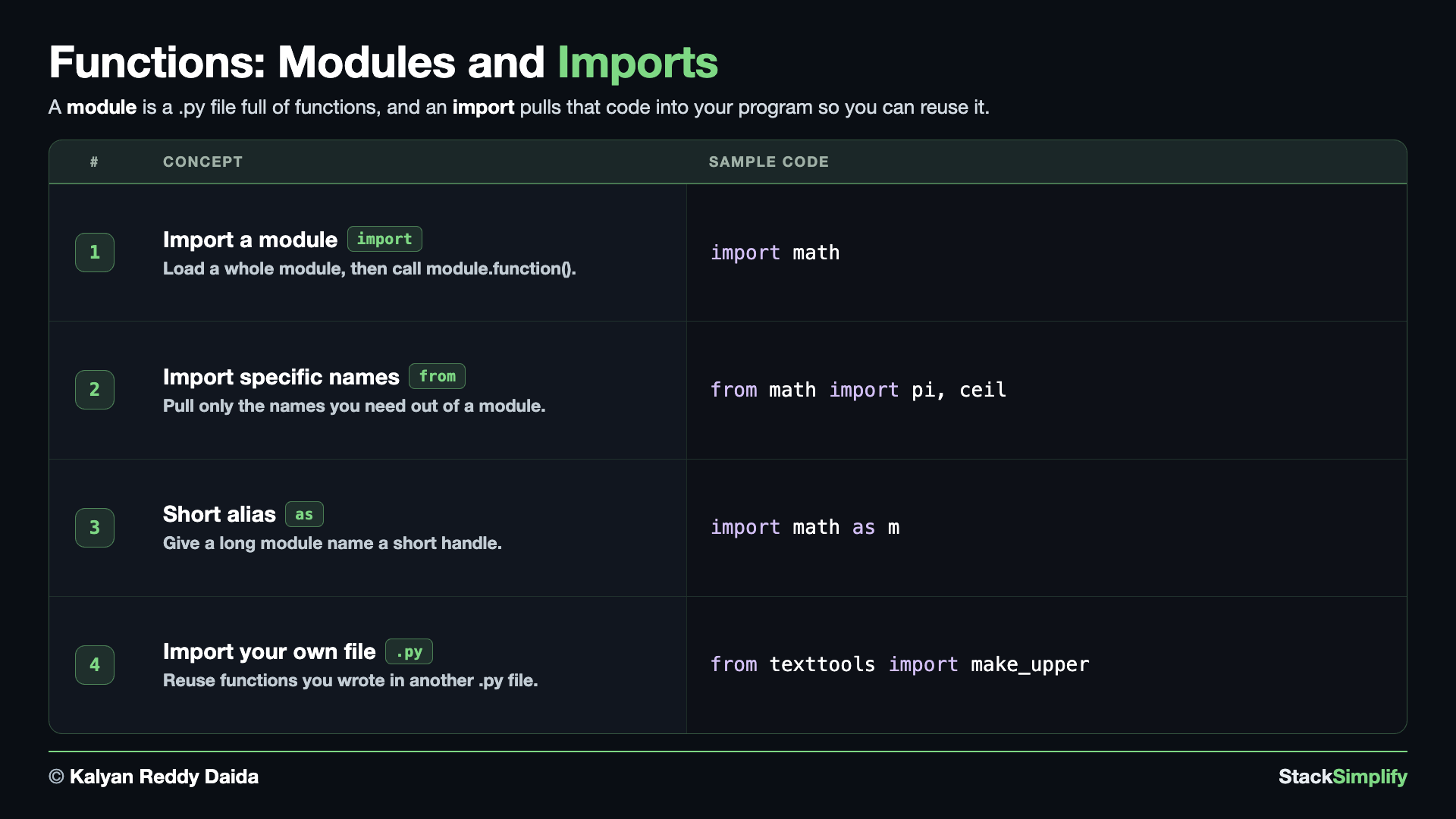
Python ships with ready-made functions; import the module, then use module.function().
# Concept-01: Import a function from Python's standard library and use it
# Question: How do we use ready-made functions that come with Python, like a square root? (import the module, then module.function())
import math

print(math.sqrt(144))
print(math.floor(3.7))
Concept 2: Import specific names
Pull just the names you need with from module import name.
# Concept-02: Import specific names with "from module import name"
# Question: How do we pull just the names we need from a module? (from module import name1, name2)
from math import pi, ceil

print(pi)
print(ceil(4.1))
Concept 3: Alias a module or name with as
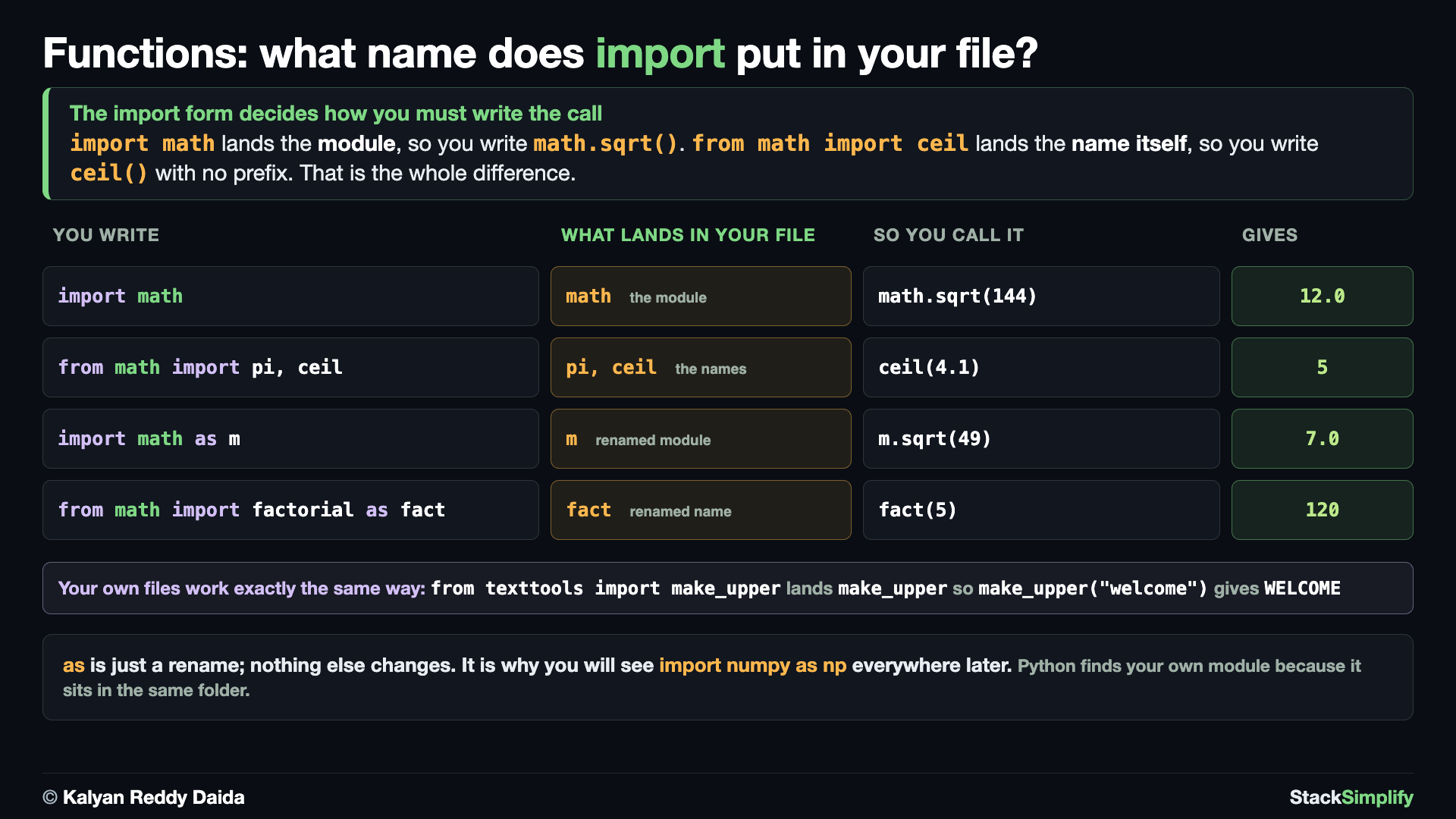
That completes the three ways to import from a module you did not write: the module (import math), a name from it (from math import pi), and either of those under a shorter handle with as - the shape behind the famous import numpy as np.
# Concept-03: Give a module (or name) a short alias with "as"
# Question: How do we give a long module name a short handle, the way pros write import numpy as np? (import module as alias)
import math as m
print(m.sqrt(49))

from math import factorial as fact
print(fact(5))
You can alias a whole module (import math as m) or a single imported name (factorial as fact).
Concept 4: Make your own module and import from it
Everything so far imported code someone else wrote. The real skill is putting your own functions in their own .py file and importing them - and that starts by creating the file.
Step 1. Create a file named texttools.py in the same folder as this one, containing exactly this:
# A small module of our OWN. Other files can import these functions.
# (Step-11 imports make_upper and make_lower from here.)

def make_upper(text):
    """Return the text in capital letters."""
    return text.upper()

def make_lower(text):
    """Return the text in small letters."""
    return text.lower()

if __name__ == "__main__":
    # This guard is explained in full in Section 12. In short: this block runs ONLY
    # when you run texttools.py directly, not when another file imports it.
    print(make_upper("hi"))
    print(make_lower("HI"))
Step 2. Now import from it. Python finds texttools because it sits in the same folder:
# Concept-04: Make your OWN module, then import from it - a .py file of functions sitting next to this one
# Question: How do we reuse functions we wrote in another file? (put them in their own .py, then import from it)
# STEP 1 - create a file named texttools.py in THIS folder, containing exactly this:
#
#     def make_upper(text):
#         return text.upper()
#
#     def make_lower(text):
#         return text.lower()
#
# STEP 2 - now import from it. Python finds texttools because it sits in the same folder as this file.
from texttools import make_upper, make_lower

print(make_upper("welcome"))
print(make_lower("WELCOME"))

# Beyond the standard library: other people publish modules on PyPI. Install one from your
# terminal (NOT inside Python), for example:  pip install requests
# then use it with "import requests", just like math above.
Notice what did not happen: texttools.py ends with an if __name__ == "__main__": block, and none of its prints appeared on import. That guard is a topic of its own - you will meet it properly in Section 12, where it is shown against the bug it exists to prevent.
Beyond the standard library
Other people publish modules on PyPI. You install one from your terminal (not inside Python) with pip install <name> (for example pip install requests), then import it just like math. Avoid from module import * (it hides where names came from), and use dir(module) to see what a module offers.
Pages for this step: Concept | Practice | Workshop
Python Files for this step: Concept | Practice | Practice Solutions | Workshop | Workshop Solutions
Step-12: Recursion (bonus)
File: s07_step12_recursion.py
This step is a bonus. Most everyday repeating is done with loops (Section 6). Recursion is a tool for a few problems. Learn it so you recognize it when you meet it.
Concept 1: A function that calls itself
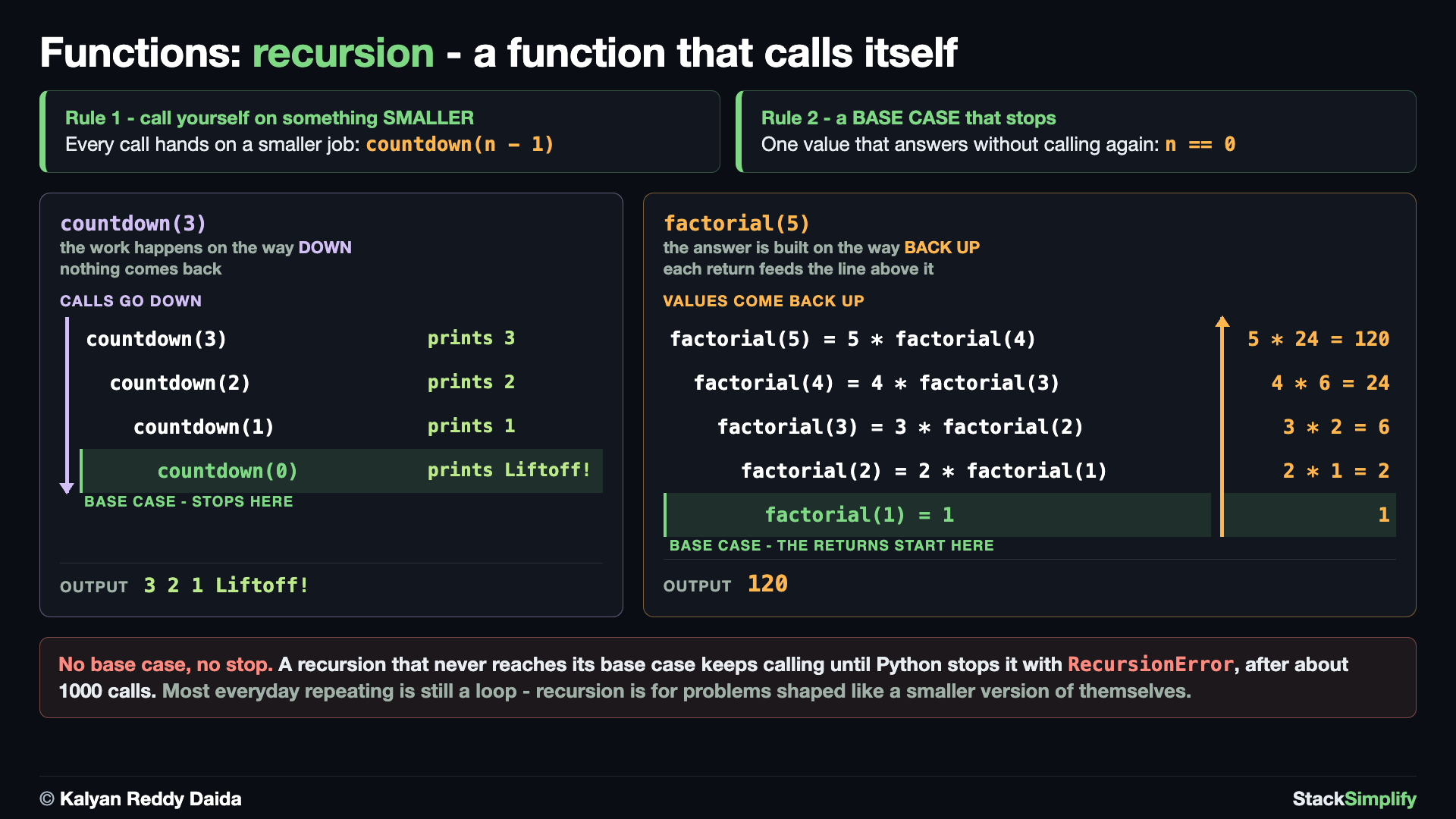
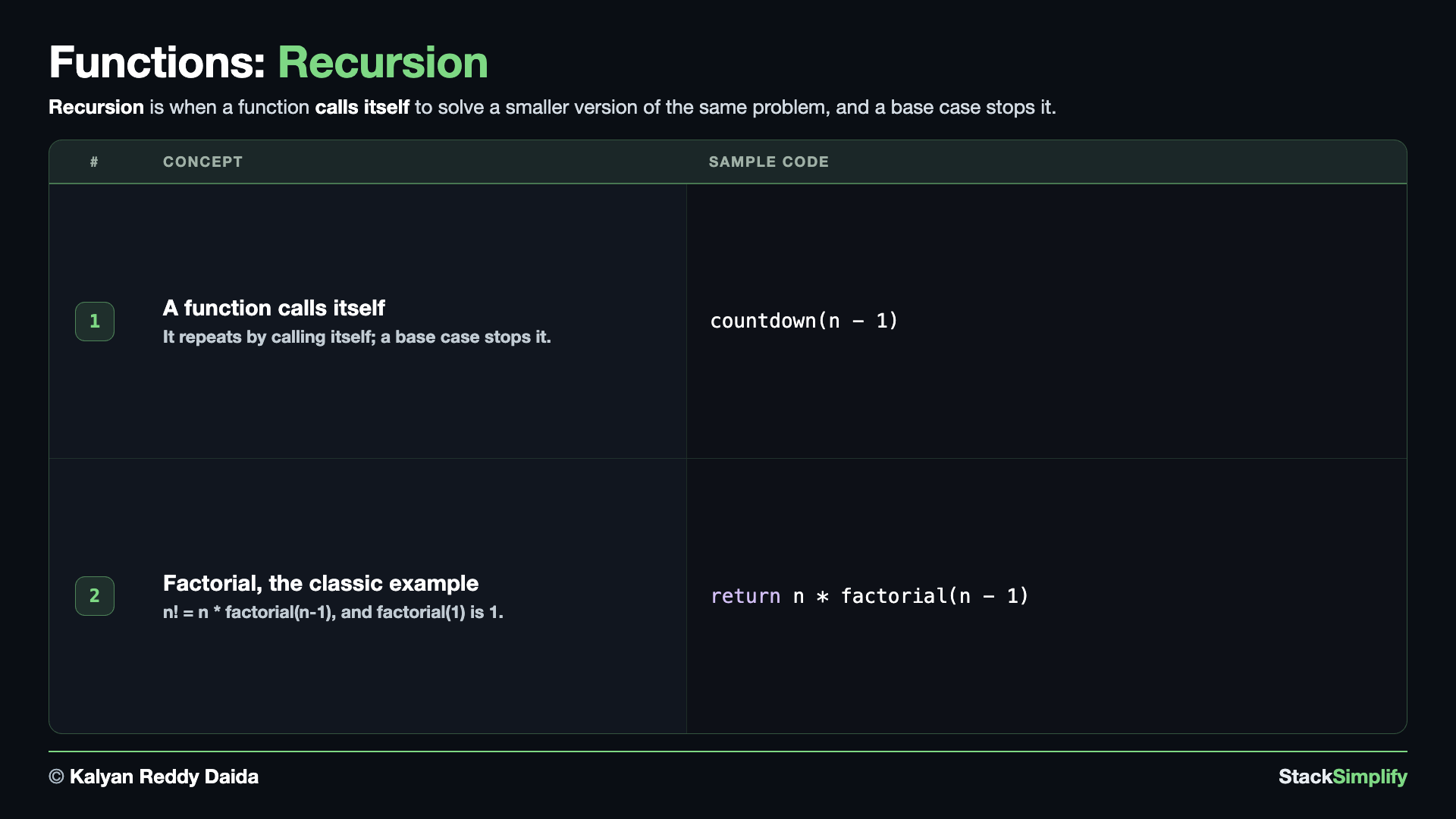
Recursion is a function that calls itself, with a base case that stops it.
# Concept-01: Recursion. A function that calls ITSELF, with a base case to stop
# Question: How can a function repeat by calling itself, like counting down to zero? (call itself with a smaller value; STOP at the base case)
def countdown(n):
    if n == 0:  # base case, stop here
        print("Liftoff!")
        return
    print(n)
    countdown(n - 1)  # recursive call, with a smaller n

countdown(3)
# WARNING - no base case means it never stops. Python stops it with a
# RecursionError after about 1000 calls (its recursion limit). Never run this:
# def forever(n):
#     print(n)
#     forever(n - 1)   # nothing stops it -> RecursionError
Each call works on a smaller n until the base case (n == 0) stops it.
Concept 2: Factorial, the classic example
A factorial of a whole number n (written n!) is n multiplied by every whole number below it, all the way down to 1 - so 5! = 5 * 4 * 3 * 2 * 1 = 120. The neat part: a factorial is defined in terms of a smaller factorial, n! = n * (n - 1)!, and the smallest case 1! = 1 ends the chain. That "answer built from a smaller version of the same problem" shape is exactly what recursion does, which is why factorial is the classic first example.
# Concept-02: The classic example, factorial (n! = n * (n-1) * ... * 1)
# Question: How do we compute a factorial with recursion? (n! = n * factorial(n-1), and factorial(1) is 1)
def factorial(n):
    if n == 1:  # base case
        return 1
    return n * factorial(n - 1)

print(factorial(5))
# factorial(5) -> 5 * factorial(4) -> 5 * 4 * factorial(3) -> ... -> 5 * 4 * 3 * 2 * 1 = 120
# The base case here is n == 1, so this factorial expects n >= 1

# Note: most everyday repeating is done with loops (Section 6). Recursion is a tool for
# a few problems. This is a BONUS so you recognize it when you meet it later.
Always give recursion a base case, or it never stops.
Pages for this step: Concept | Practice | Workshop
Python Files for this step: Concept | Practice | Practice Solutions | Workshop | Workshop Solutions
Practice and Workshop
Every step has a matching practice problem - try it yourself, then expand the solution to check. Some practices end with a short input() "Write a Program" problem. Every step also has an optional workshop problem (the same idea in a car scenario). The numbers line up with the steps, so if you get stuck on practice-03, re-read Concept Step-03.
| Step | Concept Name | Concept | Practice | Workshop |
|---|---|---|---|---|
| 01 | Define and Call a Function | concept | practice | workshop |
| 02 | One Argument | concept | practice | workshop |
| 03 | Return (print vs return) | concept | practice | workshop |
| 04 | Parameters and Logic | concept | practice | workshop |
| 05 | Default Parameters and Keyword Arguments | concept | practice | workshop |
| 06 | Return Many Values | concept | practice | workshop |
| 07 | args and *kwargs | concept | practice | workshop |
| 08 | Scope (LEGB) | concept | practice | workshop |
| 09 | First-class and Higher-order Functions | concept | practice | workshop |
| 10 | Lambda | concept | practice | workshop |
| 11 | Modules and Imports | concept | practice | workshop |
| 12 | Recursion (bonus) | concept | practice | workshop |
Open the full Practice page and Workshop page for this section - each problem has its statement, expected output, an optional hint, and an expandable solution.
Milestone unlocked
You now know enough to build Milestone Project 1: CLI Expense Tracker - it needs only Sections 01-07. Build it now for a confidence boost, or come back to it after Section 13.
What You Learned
- Define functions with
defand call them; document with docstrings; reuse instead of copy-pasting. - Feed input with arguments; get results back with return (a print-only function returns
None). - More parameters and logic; default and keyword arguments (and the mutable default argument trap).
- Return many values as a tuple and unpack them;
*args/**kwargsfor any number of inputs, plus keyword-only arguments. - Scope (LEGB): local, enclosing/nested, global, built-in;
global/nonlocal(prefer return). - Functions are objects you can pass around; lambda for a one-expression anonymous function; modules to reuse across files.
- Recursion (bonus): a function that calls itself with a base case.
Next
Section 08: Type Hints. Label the types your functions take and return, the foundation for the data and machine-learning code later in this family.
Prefer to learn by watching?
The full video course teaches every concept on screen and builds the projects with you, step by step.
Section 06: Loops and Comprehensions Next: Section 08: Type Hints