11. Standard Library Essentials
View code on GitHub Download slides (PDF) Get the Video Course
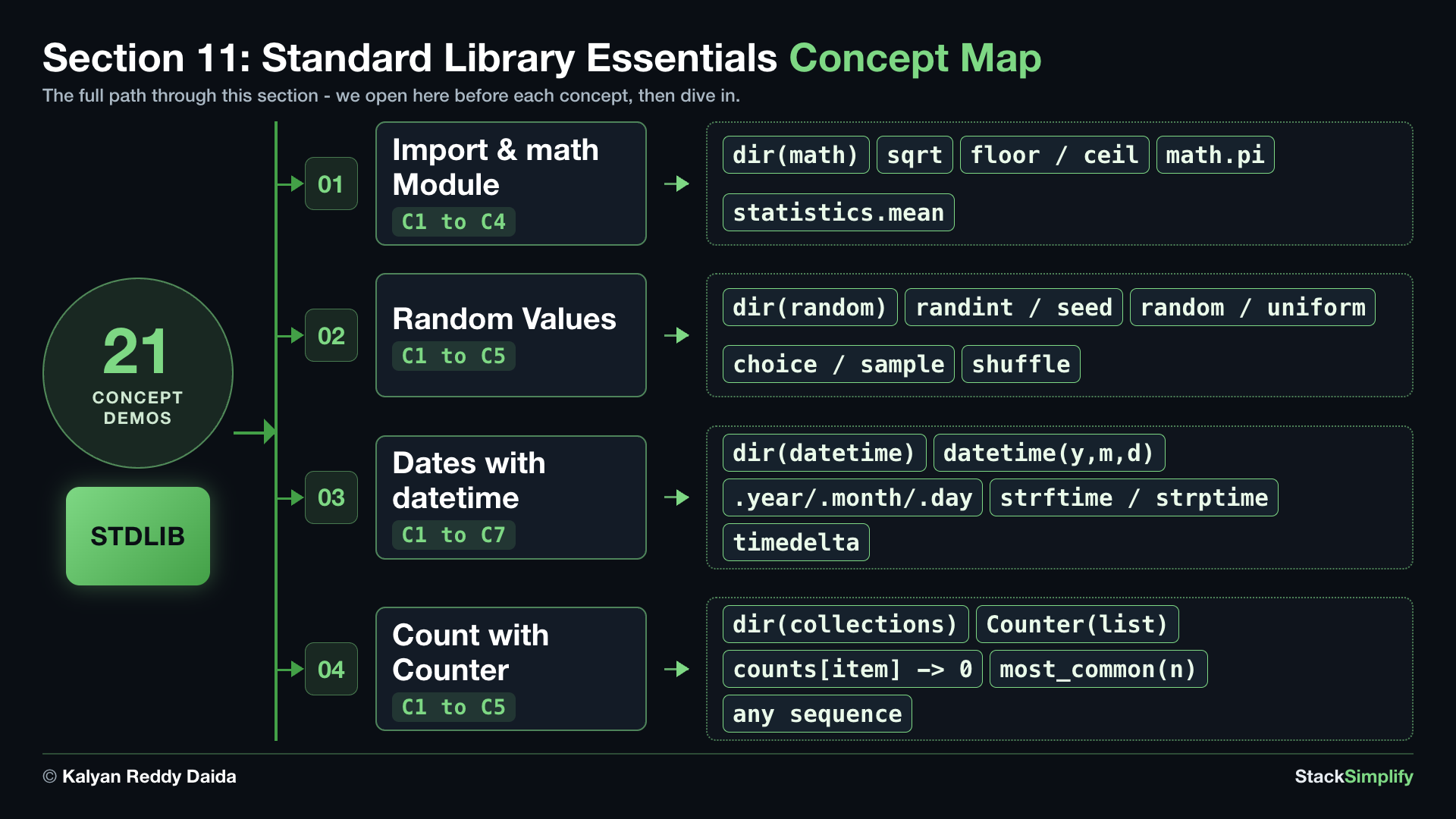
Python comes with a large set of ready-made tools called the standard library. These tools are already installed. You do not download anything. You just import the one you need and use it. In this section you will take a short tour of four of the handiest ones - the math module for calculations, the random module for random values, the datetime module for dates, and collections.Counter for counting items in a list - plus a first taste of the statistics module.
Practice as you go
Each concept below has matching exercises. When you finish a step, head to the Practice problems for this section, then try the optional Workshop. Every problem includes a solution you can expand.
You will see how much you get for free. Instead of writing your own square-root or date-formatting code, you reach for a module that already does it well.
Step-00: What You Will Learn
In this section you will work through how to:
- Use
importto bring in a module, and use themathmodule:sqrt,floor,ceil, and the constantpi; plusstatistics.meanfor the average of a list. - Use the
randommodule to roll a dice, pick from a list, and shuffle; userandom.seedso the results are repeatable. - Use the
datetimemodule to build a fixed date, read its parts, format it withstrftime, parse text back into a date withstrptime, add days withtimedelta, and subtract two dates to find the days between them. - Use
collections.Counterto count how many times each item appears in a list, and find the most common ones.
Step-01: Import a Module and Use math
File: s11_step01_math_module.py
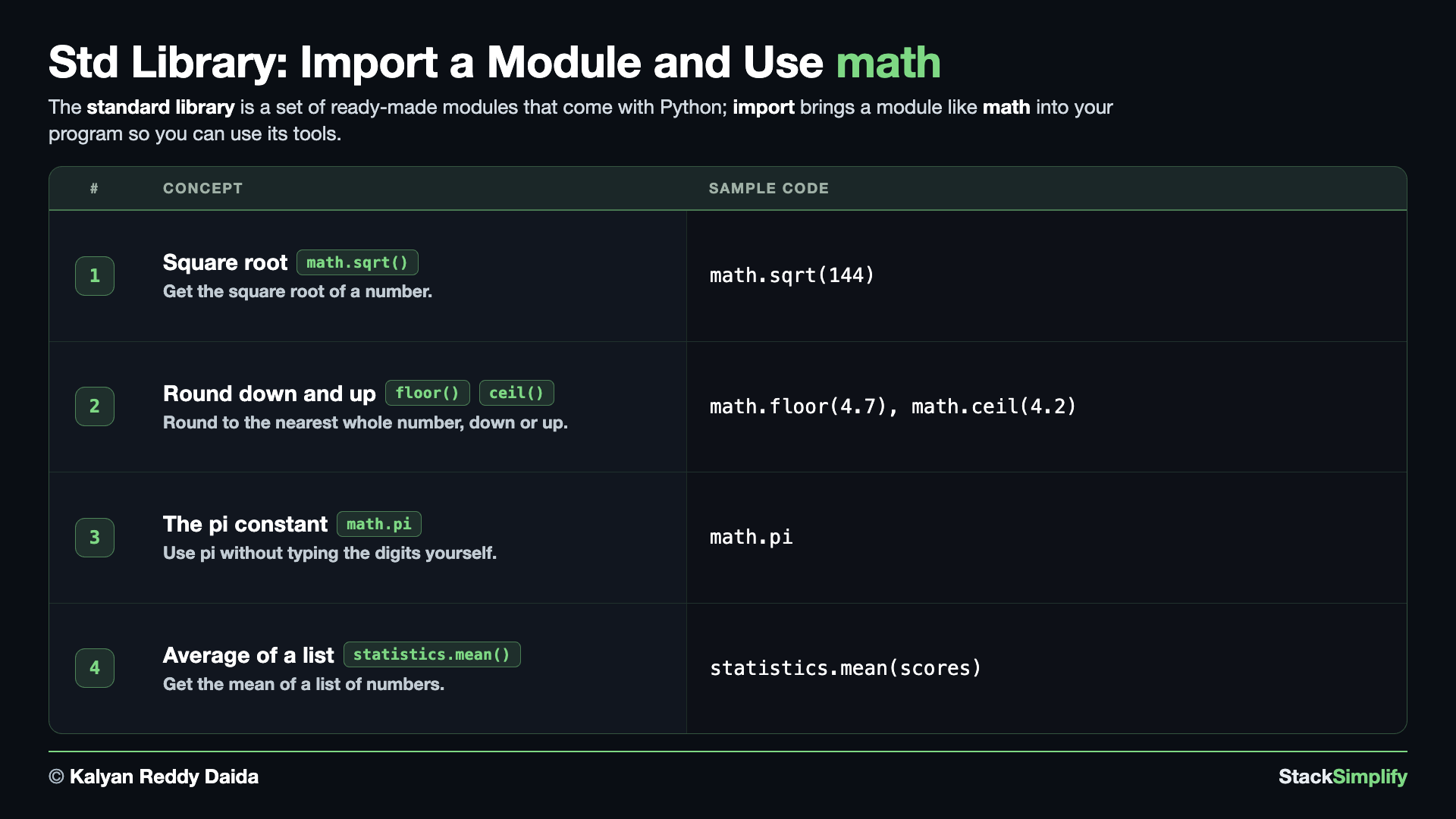
A module is a file of ready-made code, and import is how you bring one in. Create s11_step01_math_module.py in python-learn and build it up one concept at a time.
Concept 1: Square root with math.sqrt
A module is a file of ready-made code that someone already wrote and tested for you. import math at the top of the block makes that toolbox available, and from then on you reach inside it with a dot: math.sqrt(...). The import line prints nothing by itself; it is the door, not the room.
You never have to memorise a module. dir(math) hands back every name inside it, and len() counts them: 68 here. Six of those are Python's own private bookkeeping, each marked by a leading underscore, so the comprehension drops them and leaves 62 tools you can actually call. That number grows with each Python release, so an older Python shows a few less.
math.sqrt is one of those 62. math.sqrt(n) gives you the square root of a number, and it always hands back a float (a decimal), so the square root of 144 comes out as 12.0, not 12. This saves you from writing the square-root logic yourself.
# Concept-01: dir() shows what is inside a module; math.sqrt is one of the tools it lists
# Question: How do we see what math offers, and then use one of those tools? (dir(math), then math.sqrt(144) -> 12.0)
import math

# dir() lists every name inside a module.
all_names = dir(math)

# Python keeps a few private names of its own. They start with an underscore, so skip them.
math_tools = [tool for tool in all_names if not tool.startswith("_")]

print("names in math:", len(all_names))
print("tools you can use:", len(math_tools))
print(", ".join(math_tools))

# math.sqrt is one of those tools. Reach for it with a dot.
print("square root of 144 is:", math.sqrt(144))
names in math: 68
tools you can use: 62
acos, acosh, asin, asinh, atan, atan2, atanh, cbrt, ceil, comb, copysign, cos, cosh, degrees, dist, e, erf, erfc, exp, exp2, expm1, fabs, factorial, floor, fma, fmod, frexp, fsum, gamma, gcd, hypot, inf, isclose, isfinite, isinf, isnan, isqrt, lcm, ldexp, lgamma, log, log10, log1p, log2, modf, nan, nextafter, perm, pi, pow, prod, radians, remainder, sin, sinh, sqrt, sumprod, tan, tanh, tau, trunc, ulp
square root of 144 is: 12.0
Concept 2: Round down and up with math.floor and math.ceil
When you need a whole number, these two control the direction. math.floor always rounds down, so 4.7 becomes 4. math.ceil always rounds up, so 4.2 becomes 5. Think of a recipe: floor uses less, ceil uses more.
E1 runs those same two numbers through the round() you met in Section 02, which goes to whichever whole number is nearest: 4.7 rounds up to 5, and 4.2 rounds down to 4. E2 hands the same numbers to floor and ceil, and both disagree with round. math.floor(4.7) is 4 even though 5 is closer, because floor never looks at which is nearer. That is the whole difference: round picks the closest, floor and ceil pick a direction.
# Concept-02: math.floor rounds DOWN, math.ceil rounds UP, unlike round() which goes to the nearest
# Question-1: How do we round 4.7 DOWN to the nearest whole number? (math.floor(4.7) -> 4)
# Question-2: How do we round 4.2 UP to the nearest whole number? (math.ceil(4.2) -> 5)
import math

# E1: First, the round() you met in Section 02. It goes to whichever whole number is NEAREST.
print("round(4.7):", round(4.7))
print("round(4.2):", round(4.2))

# E2: Second, floor and ceil. They IGNORE which is nearer and always go their own way.
print("floor of 4.7 is:", math.floor(4.7))
print("ceil of 4.2 is:", math.ceil(4.2))
Concept 3: Use a module constant like math.pi
A module can hold ready-made values too, not just functions. math.pi is the exact value of pi already typed out for you, so you never have to remember the digits. Here you print it, then round it down with floor (3) and up with ceil (4).
# Concept-03: math also holds handy constants; math.pi is the value of pi
# Question: How do we use the exact value of pi without typing the digits ourselves? (math.pi)
import math
print("pi is about:", math.pi)

print("floor of pi is:", math.floor(math.pi))
print("ceil of pi is:", math.ceil(math.pi))
Concept 4: The average with statistics.mean
math is not the only toolbox. The statistics module is another one in the standard library. E1 works the average out the way Section 06 taught you: start a total at 0, add each score onto it, then divide by how many there are. E2 hands the same list to statistics.mean and gets the same 86.6 back in one call. The module is not doing anything magical, it is doing that same arithmetic for you, under a name that says what it means.
# Concept-04: the statistics module is another batteries-included toolbox; statistics.mean gives the average
# Question: How do we find the average (mean) of a list of scores [85, 90, 78, 92, 88] without adding them up and dividing ourselves? (statistics.mean)
import statistics

scores = [85, 90, 78, 92, 88]

# E1: by hand with a running total, the way Section 06 taught it
total = 0
for score in scores:
    total += score
print("by hand:", total / len(scores))

# E2: the statistics module does the same work in one call
print("statistics.mean:", statistics.mean(scores))
You import a module once
A real program writes import math one time at the top of the file, and every concept below can then use it. We repeat the import line in each block here only so each snippet runs on its own. You first met import back in Variables and Data Types.
Pages for this step: Concept | Practice | Workshop
Python Files for this step: Concept | Practice | Practice Solutions | Workshop | Workshop Solutions
Step-02: Random Values with random
File: s11_step02_random_module.py
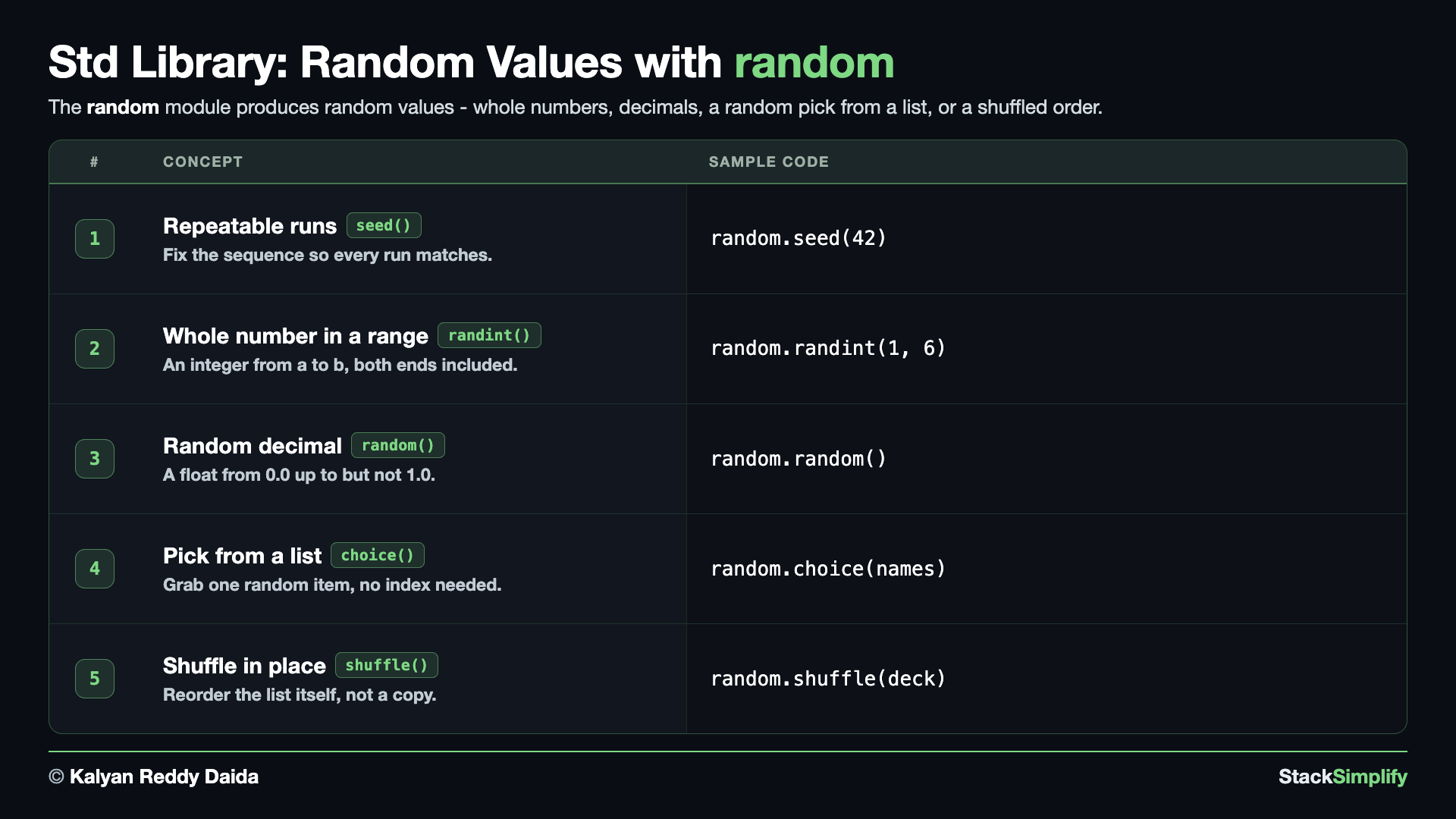
The random module makes random values: a random whole number, a decimal, a random pick from a list, and a shuffled list. Create s11_step02_random_module.py and build it concept by concept.
Every block seeds itself, and you can switch that off
Each concept below calls random.seed(42) of its own, so you can copy any single block into a terminal and get exactly the output printed here. Comment that line out and run it again to see the real behaviour: a different value every time. A real program leaves the seed out entirely.
Concept 1: What is inside random, with dir()
dir() works on any module, not just math. Hand it random and you get all 70 names it holds, or 33 once Python's private ones are filtered out. Read that list and you will spot randint, random, choice, seed and shuffle: the whole of this step, before you have learned any of it. The handful in capitals, like BPF and TWOPI, are internal helpers the module uses on itself.
# Concept-01: dir() shows what is inside the random module, the same way it did for math
# Question: What tools does the random module give us, and is the dice roll we want in there?
import random

all_names = dir(random)
random_tools = [tool for tool in all_names if not tool.startswith("_")]

print("names in random:", len(all_names))
print("tools you can use:", len(random_tools))
print(", ".join(random_tools))
names in random: 70
tools you can use: 33
BPF, LOG4, NV_MAGICCONST, RECIP_BPF, Random, SG_MAGICCONST, SystemRandom, TWOPI, betavariate, binomialvariate, choice, choices, expovariate, gammavariate, gauss, getrandbits, getstate, lognormvariate, main, normalvariate, paretovariate, randbytes, randint, random, randrange, sample, seed, setstate, shuffle, triangular, uniform, vonmisesvariate, weibullvariate
Concept 2: A whole number with random.randint, made repeatable by random.seed
random.randint(a, b) gives you a random whole number from a to b, with both ends included. That makes it perfect for a dice roll: random.randint(1, 6) can return any of 1 through 6. The random.seed(42) line above it fixes the starting point the numbers grow from, so the same seed always gives the same sequence. Comment that line out and run the file a few times: the roll changes on every run, which is what a real game wants. Every concept below carries the same line for the same reason.
# Concept-02: random.randint(a, b) gives a whole number from a to b, both ends included
# Question: How do we roll a dice in code (pick a whole number from 1 to 6, both ends included)?
import random

random.seed(42)   # comment this line out, run it a few times, and the roll changes every time
print("a dice roll:", random.randint(1, 6))
Concept 3: A decimal with random.random, any range with random.uniform
random.random() gives a random decimal from 0.0 up to (but never reaching) 1.0, and it takes no arguments. E2 is random.uniform(a, b), the same idea stretched to a range you choose, so a random price between 10 and 99 is a single call. Comment the random.seed(42) line out and run it again to watch both decimals change.
# Concept-03: random.random() gives a decimal from 0.0 up to 1.0; random.uniform(a, b) gives one in any range
# Question: How do we get a random decimal, either between 0.0 and 1.0 or between two bounds we choose?
import random

random.seed(42)   # comment this line out and the decimals change every run

# E1: random() always lands between 0.0 and 1.0, and takes no arguments.
print("the decimal:", random.random())

# E2: uniform(a, b) is the same idea stretched to any range you choose.
print("a price:", random.uniform(10, 99))
Concept 4: A random pick with random.choice, several with random.sample
random.choice(items) picks one item from a list at random, so you do not have to work out an index number yourself. E1 calls it three times and Sam comes back twice: choice has no memory, so nothing stops it handing you the same person again. E2 is random.sample(items, k), which takes several at once and never repeats anyone, which is what you actually want for three winners. Comment the seed line out to see different names each run.
# Concept-04: random.choice picks ONE item; random.sample picks several at once with no repeats
# Question: How do we pick one random name, and how do we pick three winners without the same person twice?
import random

random.seed(42)   # comment out to see it change; keep 42 to see the repeat in E1
names = ["Sam", "Tom", "Ben", "Joe"]

# E1: choice hands back ONE name. Call it three times and the same person can come back.
print("three separate picks:", random.choice(names), random.choice(names), random.choice(names))

# E2: sample takes several at once and never repeats anyone.
print("three winners:", random.sample(names, 3))
Concept 5: Shuffle in place with random.shuffle
random.shuffle(items) reorders a list in place: it changes the original list instead of handing you a new one. E1 shows the mistake almost everyone makes first. Coming from sorted(), you write deck = random.shuffle(deck), and because shuffle hands back None, that line throws your deck away and leaves you with nothing. E2 is the fix: call shuffle and let it change the list, then print deck to see the new order.
# Concept-05: random.shuffle reorders a list IN PLACE, and hands back None rather than the new list
# Question: What happens if we write deck = random.shuffle(deck), the way we would with sorted()?
import random

random.seed(42)   # comment this line out and the deck lands in a different order each run

# E1: First, the mistake. shuffle returns None, so assigning its result throws the deck away.
deck = [1, 2, 3, 4, 5]
deck = random.shuffle(deck)
print("deck after assigning the result:", deck)

# E2: Second, the fix. Call shuffle and let it change the list itself; do not assign it.
deck = [1, 2, 3, 4, 5]
random.shuffle(deck)
print("shuffled list:", deck)
Pages for this step: Concept | Practice | Workshop
Python Files for this step: Concept | Practice | Practice Solutions | Workshop | Workshop Solutions
Step-03: Dates with datetime
File: s11_step03_datetime_module.py
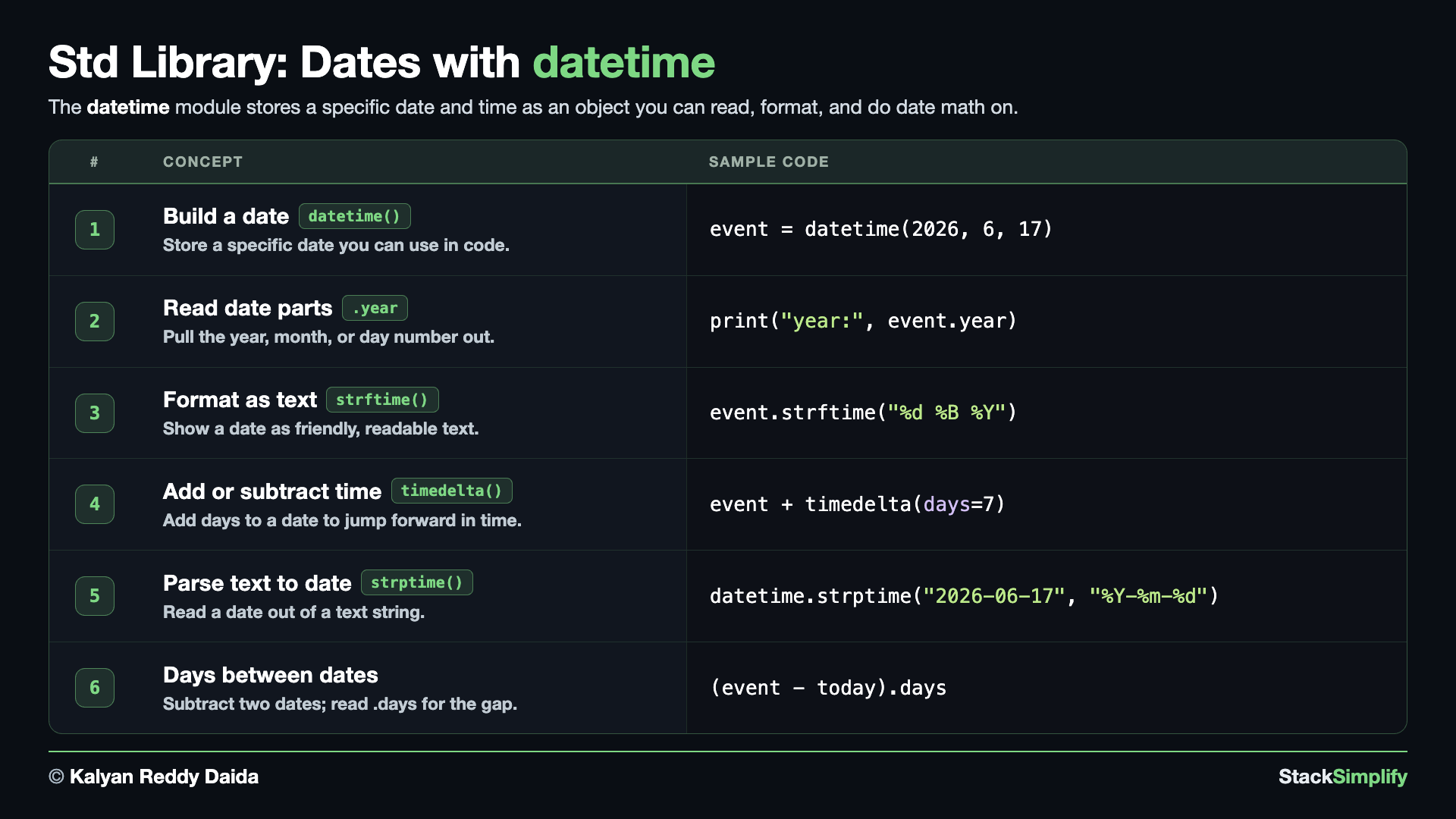
The datetime module works with dates and times. Create s11_step03_datetime_module.py and build it concept by concept.
Concept 1: What is inside datetime, with dir()
Same move as math and random: before you use a module, ask it what it holds. The list is short, and the names in it are the whole step: date, datetime, timedelta, timezone. Notice that datetime appears twice, once as the module you just imported and once as a class inside it. That is why the concepts below write from datetime import datetime: they reach past the module to the class. datetime_CAPI is plumbing the module uses on itself.
# Concept-01: dir() shows what is inside the datetime module, the same way it did for math and random
# Question: What does the datetime module hold, and where does the datetime we import come from?
import datetime

all_names = dir(datetime)
datetime_tools = [tool for tool in all_names if not tool.startswith("_")]

print("names in datetime:", len(all_names))
print("tools you can use:", len(datetime_tools))
print(", ".join(datetime_tools))
names in datetime: 19
tools you can use: 10
MAXYEAR, MINYEAR, UTC, date, datetime, datetime_CAPI, time, timedelta, timezone, tzinfo
Concept 2: Build a date with datetime
datetime(year, month, day) builds a specific date you can store and use. There is also datetime.now() for the current moment, but that changes every run, so here we build a fixed date - June 17, 2026 - to keep the output the same. Printing a datetime shows the date along with a 00:00:00 time, since we gave no time of day.
# Concept-02: Build a date with datetime(year, month, day), fixed here so the output never changes
# Question: How do we store a specific date like June 17, 2026 so we can use it in our code?
# datetime.now() would give the current time
from datetime import datetime, timedelta
event = datetime(2026, 6, 17)
print("the date is:", event)
Concept 3: Read a date's parts with .year, .month, and .day
Once you have a date, you can pull out its pieces with .year, .month, and .day. Each one gives you a plain number, which is handy when you want to compare dates or build your own label. No extra import or call is needed - the parts are right there on the date.
# Concept-03: Read a date's parts with its .year, .month, and .day attributes
# Question: How do we pull out just the year, month, or day number from a date we already have, like datetime(2026, 6, 17)?
from datetime import datetime, timedelta
event = datetime(2026, 6, 17)
print("year:", event.year)
print("month:", event.month)
print("day:", event.day)
Concept 4: Format a date as text with strftime
strftime turns a date into a text string using format codes: %Y is the four-digit year, %m the month number, %d the day, and %B the full month name. This lets you show a date the way a person reads it, like 17 June 2026, instead of the raw computer format.
# Concept-04: strftime formats a date as text (%Y year, %m month, %d day, %B full month name)
# Question: How do we turn a date into a text string that reads naturally, like '17 June 2026' instead of showing computer format? (strftime is the tool)
from datetime import datetime, timedelta
event = datetime(2026, 6, 17)
print("formatted:", event.strftime("%Y-%m-%d"))
print("friendly: ", event.strftime("%d %B %Y"))
Concept 5: Add time with timedelta
timedelta is a length of time you can add to or subtract from a date. timedelta(days=7) is one week, so adding it to June 17 gives June 24. This is how you answer everyday questions like "what date is a week from now?" without counting on your fingers.
# Concept-05: timedelta is a length of time you can add or subtract
# Question: How do we add 7 days to a date like datetime(2026, 6, 17) to find when an event happens a week later? (timedelta(days=7))
from datetime import datetime, timedelta
event = datetime(2026, 6, 17)
one_week_later = event + timedelta(days=7)
print("one week later:", one_week_later.strftime("%d %B %Y"))
Concept 6: Read a date out of text with strptime
strptime is the reverse of strftime. Where strftime writes a date out as text, strptime reads a date back out of text - perfect for dates that arrive as strings from a file or a form. You give it the text and a format that describes its layout, and it hands back a real date you can use, so parsed.year is 2026.
# Concept-06: strptime is the reverse of strftime; it reads a date OUT of a text string
# Question: How do we turn the text "2026-06-17" (say from a file) back into a real date we can use? (strptime parses text into a date)
from datetime import datetime, timedelta
parsed = datetime.strptime("2026-06-17", "%Y-%m-%d")
print("parsed date:", parsed)
print("parsed year:", parsed.year)
Concept 7: Subtract two dates to get a timedelta
Adding a timedelta moves a date forward (previous concept); the inverse is just as handy. Subtract one date from another and you get a timedelta back, and its .days tells you how many days apart they are - the everyday "how many days until my event?" question, answered in one line.
# Concept-07: subtracting two dates gives a timedelta; its .days tells how many days apart they are
# Question: How do we find how many days until an event, like from datetime(2026, 6, 3) to datetime(2026, 6, 17)? (subtract the dates; the result is a timedelta, read its .days)
from datetime import datetime, timedelta
event = datetime(2026, 6, 17)
today = datetime(2026, 6, 3)
days_left = event - today
print("days until event:", days_left.days)
Use a fixed date for repeatable output
datetime.now() gives the current moment, which is great in real code but changes every run. When you need the same output every time, like in a lesson or a test, build a fixed date with datetime(2026, 6, 17) instead.
Pages for this step: Concept | Practice | Workshop
Python Files for this step: Concept | Practice | Practice Solutions | Workshop | Workshop Solutions
Step-04: Count Items with collections.Counter
File: s11_step04_collections_counter.py
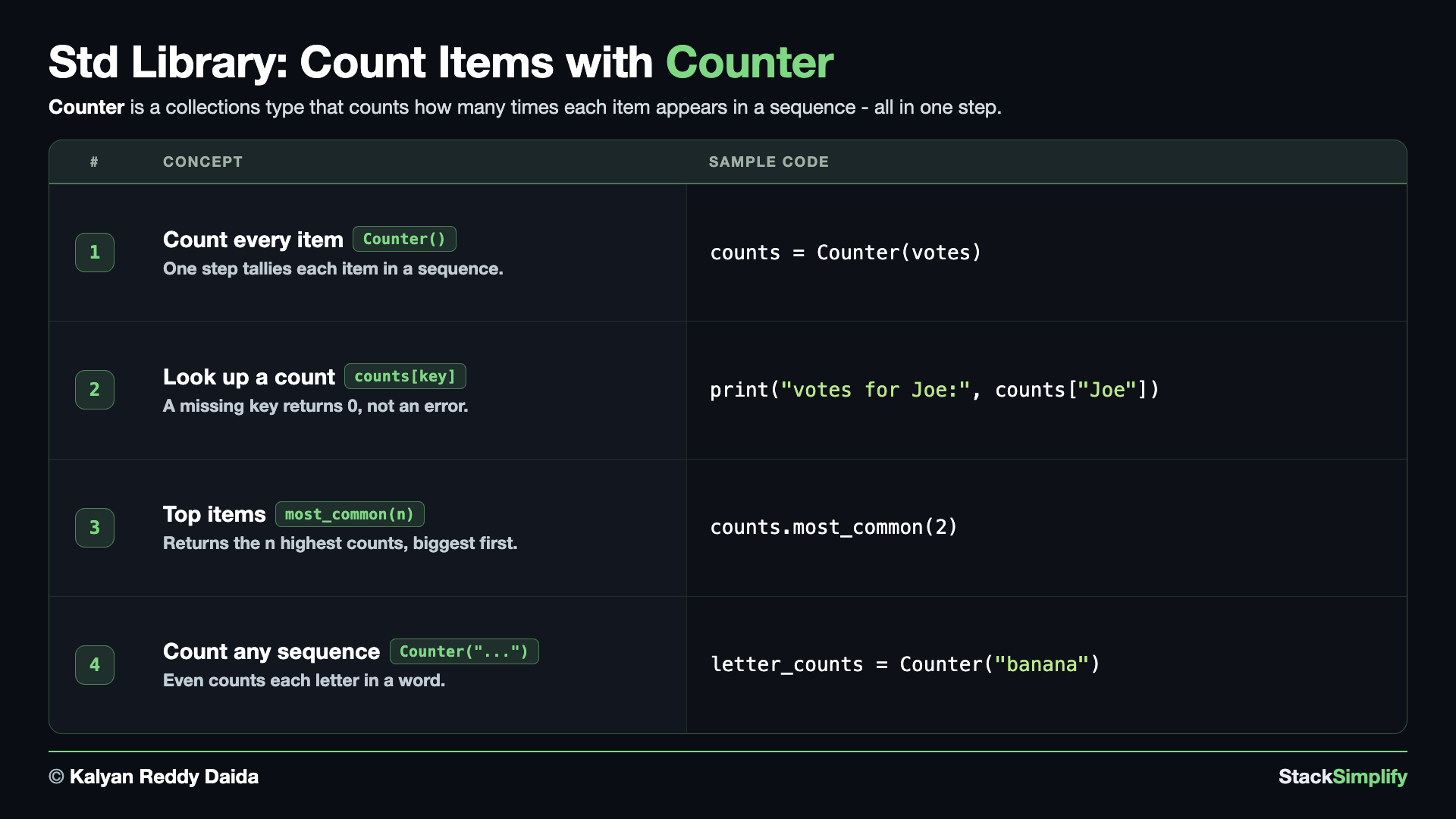
The collections module has extra container types beyond the built-in list and dict, and Counter is one of the most useful. Create s11_step04_collections_counter.py and build it concept by concept.
Concept 1: What is inside collections, with dir()
One last look inside a toolbox before using it. collections holds eleven names, and Counter is right there among them alongside defaultdict, deque, namedtuple and OrderedDict. This step teaches Counter; the others are waiting for you when you need them.
# Concept-01: dir() shows what is inside the collections module, the same way it did for math and random
# Question: What does the collections module give us, and is Counter one of them?
import collections

all_names = dir(collections)
collections_tools = [tool for tool in all_names if not tool.startswith("_")]

print("names in collections:", len(all_names))
print("tools you can use:", len(collections_tools))
print(", ".join(collections_tools))
names in collections: 38
tools you can use: 11
ChainMap, Counter, OrderedDict, UserDict, UserList, UserString, abc, defaultdict, deque, heapq, namedtuple
Concept 2: Count items in one step with Counter
Hand Counter a list and it counts how many times each item appears, all in one step - no loop, no manual tally. Here it counts a list of votes where some names repeat. It prints in order from most common to least common, so you can see the winner at a glance.
# Concept-02: Counter counts how many times each item appears, in one step
# Question: How do we count how many votes each person got from a list ["Sam", "Tom", "Sam", "Ben", "Sam", "Tom"] where names repeat, in one step?
from collections import Counter
votes = ["Sam", "Tom", "Sam", "Ben", "Sam", "Tom"]
counts = Counter(votes)
print("counts:", counts)
Concept 3: Read one count, and missing items return 0
You read a single count just like a dictionary: counts["Sam"] gives 3. The friendly part is what happens for a name that never appeared - counts["Joe"] returns 0 instead of raising an error. That means you can ask about any item safely, without checking first.
# Concept-03: Ask for one item's count like a dictionary; a missing item returns 0 (no error)
# Question: How do we ask a Counter for one person's votes, like Sam (in the list) or Joe (not in the list), and get 0 instead of an error when the name is missing?
from collections import Counter
votes = ["Sam", "Tom", "Sam", "Ben", "Sam", "Tom"]
counts = Counter(votes)
print("votes for Sam:", counts["Sam"])
print("votes for Joe:", counts["Joe"])
Concept 4: The top items with most_common
most_common(n) gives you the top n items, highest count first, as a list of (item, count) pairs. Ask for the top 2 and you get the two leading vote-getters in order. This is the quick way to answer "who is winning?" without sorting the counts yourself.
# Concept-04: most_common(n) returns the top n items, highest count first
# Question: How do we find the top 2 vote-getters from votes ["Sam", "Tom", "Sam", "Ben", "Sam", "Tom"] and see their counts sorted from highest to lowest? (most_common(2))
from collections import Counter
votes = ["Sam", "Tom", "Sam", "Ben", "Sam", "Tom"]
counts = Counter(votes)
print("top 2:", counts.most_common(2))
Concept 5: Count any sequence, even the letters in a word
Counter is not limited to lists - it counts any sequence, and a string is a sequence of letters. Hand it "banana" and it tallies each letter, so you instantly see three as, two ns, and one b. The same tool that counts votes also counts characters.
# Concept-05: Counter works on any sequence, even the letters in a word
# Question: How do we count how many times each letter shows up in a word, like 'a' in 'banana'?
from collections import Counter
letter_counts = Counter("banana")
print("letters in banana:", letter_counts)
Counter never raises KeyError
Asking a plain dict for a missing key raises a KeyError, but a Counter returns 0 for any item it has not seen. That makes counting code shorter and safer - you can read counts[anything] without checking first.
Pages for this step: Concept | Practice | Workshop
Python Files for this step: Concept | Practice | Practice Solutions | Workshop | Workshop Solutions
Practice and Workshop
Every step has a matching practice problem - try it yourself, then expand the solution to check. Some practices end with a short input() "Write a Program" problem. Every step also has an optional workshop problem (the same idea in a car scenario). The numbers line up with the steps, so if you get stuck on practice-03, re-read Concept Step-03.
| Step | Concept Name | Concept | Practice | Workshop |
|---|---|---|---|---|
| 01 | math module | concept | practice | workshop |
| 02 | random module | concept | practice | workshop |
| 03 | datetime module | concept | practice | workshop |
| 04 | collections counter | concept | practice | workshop |
Open the full Practice page and Workshop page for this section - each problem has its statement, expected output, an optional hint, and an expandable solution.
What You Learned
import <name>brings in a standard-library module; you then use its tools with a dot, likemath.sqrt(...).mathdoes calculations:sqrt,floor(round down),ceil(round up), and constants likemath.pi;statistics.meangives the average of a list.randommakes random values:randint,random,choice, andshuffle;random.seed(n)makes the results repeatable.datetimebuilds and formats dates: read.year/.month/.day, format withstrftime, parse text withstrptime, add time withtimedelta, and subtract two dates to get the days between them. Use a fixed date when you need the same output every run.collections.Countercounts items in a list and gives youmost_common(n)for the top items.
The standard library is huge - this was just a taste
You met four handy modules here (plus a taste of statistics), but Python ships with over 200 more in its standard library. A few you will meet soon: os (talk to the operating system - files and folders), sys (info about Python itself), plus json and pathlib, which you already used in Section 10. Whenever you need something, search "python standard library
Next
Section 12: Virtual Environments and Packaging. Give each project its own clean set of packages with a virtual environment, and organize your code into modules and packages you can import.
Prefer to learn by watching?
The full video course teaches every concept on screen and builds the projects with you, step by step.
Section 10: Files, JSON, and Paths Next: Section 12: Virtual Environments and Packaging