13. Classes and OOP Basics
View code on GitHub Download slides (PDF) Get the Video Course
A class is a blueprint for making objects that bundle data together. So far your data has lived in separate variables, lists, and dictionaries. A class lets you keep related data in one neat package (for example a product's name, price, and stock together) and add small functions (methods) that work on that data. In this section you will see WHY objects exist, define a class with __init__, tell class data apart from object data, add methods, give your object a readable printout with __str__ and __repr__, and add class-level helpers with @classmethod and @staticmethod.
Practice as you go
Each concept below has matching exercises. When you finish a step, head to the Practice problems for this section, then try the optional Workshop. Every problem includes a solution you can expand.
This is enough to read and write everyday classes. The deeper OOP topics come in the follow-up course: the four pillars (encapsulation, inheritance, polymorphism, abstraction), @property, @dataclass, and operator overloading.
One class per step, and every concept runs on its own
Every step works with ONE class, Product, the core of our "Pyzon Store" example. Every concept block below is complete on its own: it shows the class it needs and creates the objects it uses, so you can read (or run) any single block without hunting for missing pieces. The class grows a little from one concept to the next, which is the point: watch what each new piece adds.
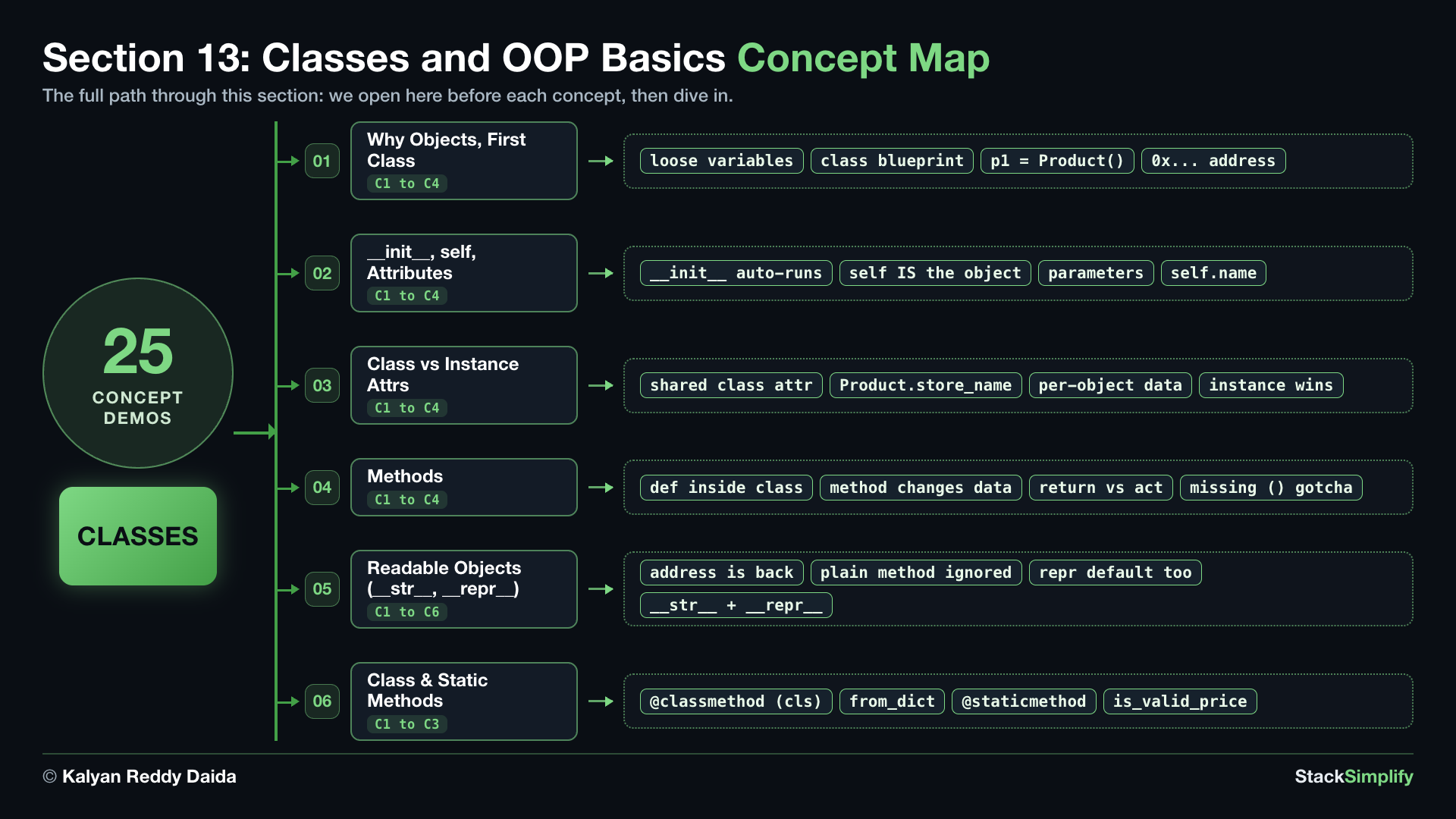
Step-00: What You Will Learn
By the end of this section you can:
- Explain why objects exist, define a class, and create objects (instances) from it.
- Use
__init__andselfso every object starts with its own data (instance attributes). - Tell a class attribute (shared by all) from an instance attribute (per object), and know which wins.
- Add methods that use and change the object's data, and avoid the missing-
()mistake. - Give an object a friendly printout with
__str__and a precise, developer-facing one with__repr__. - Add class-level helpers:
@classmethod(an alternate constructor) and@staticmethod(a related utility).
Keywords in This Section
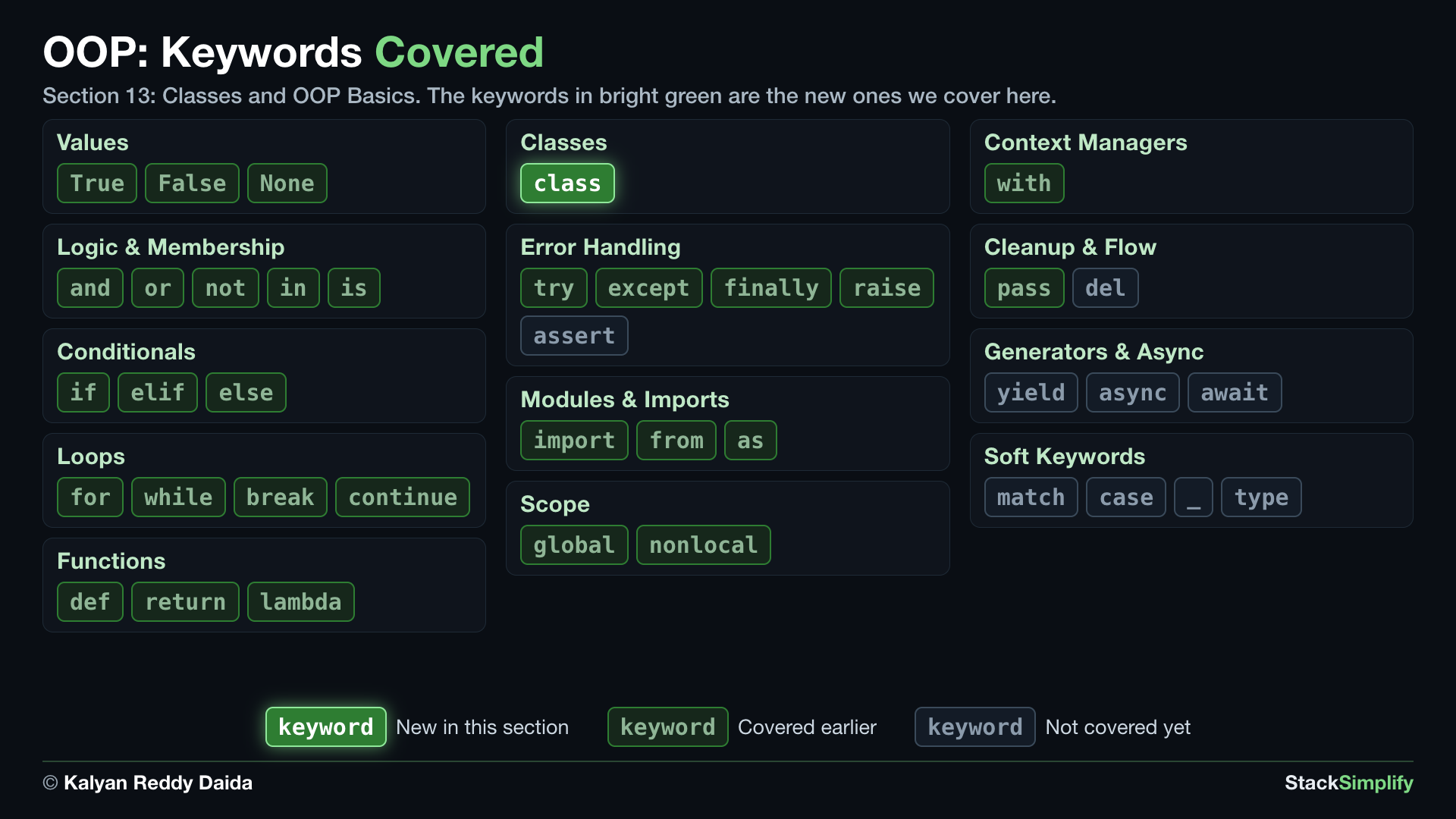
In the map, bright green marks the keywords this section introduces. Dim green marks keywords you already covered in earlier sections, and gray marks the ones still ahead.
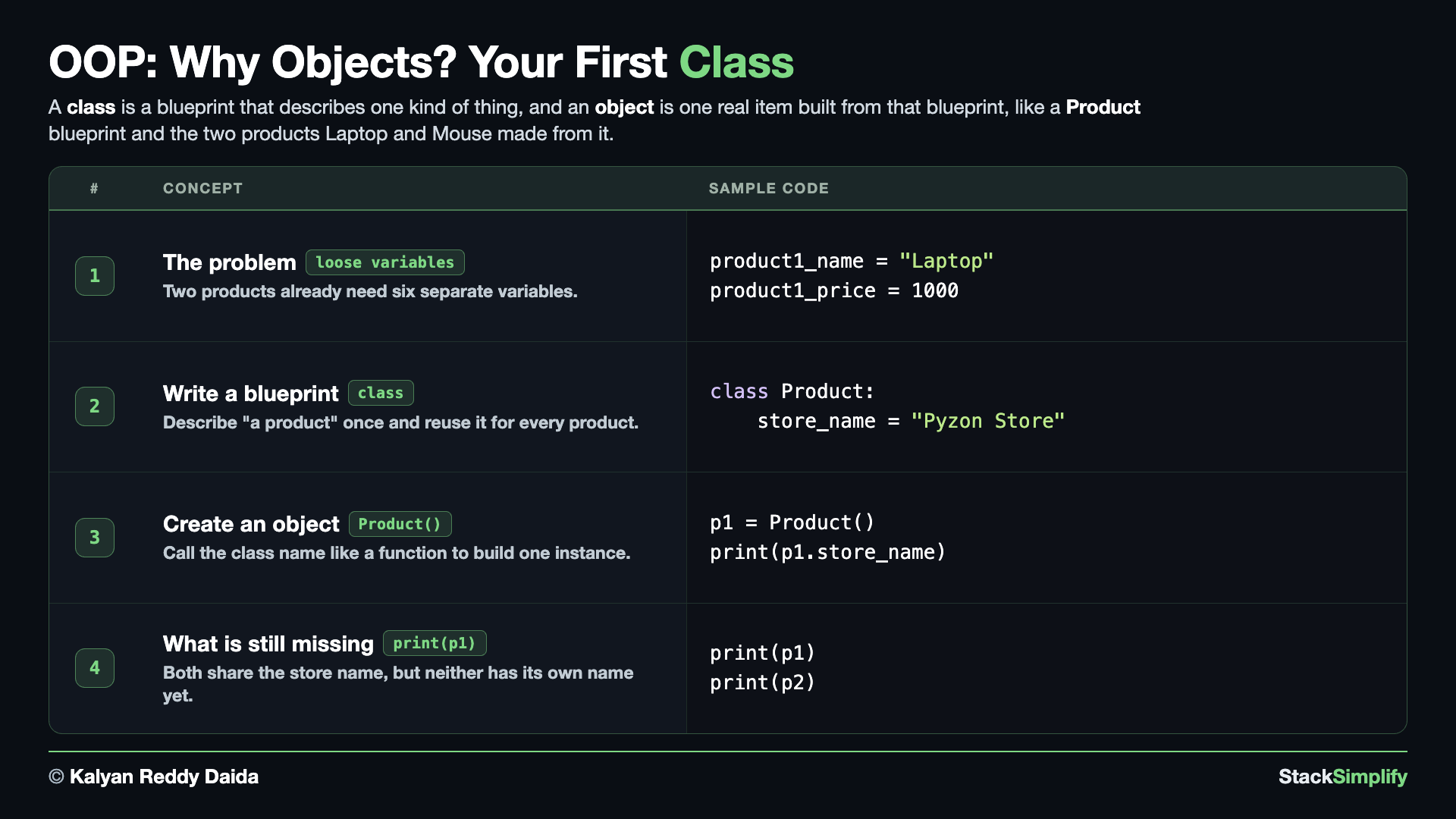
Step-01: Why Objects? Your First Class
File: s13_step01_why_objects_and_first_class.py
Before the syntax, the reason. Create s13_step01_why_objects_and_first_class.py in python-learn and build it concept by concept.
Concept 1: Loose variables get messy fast
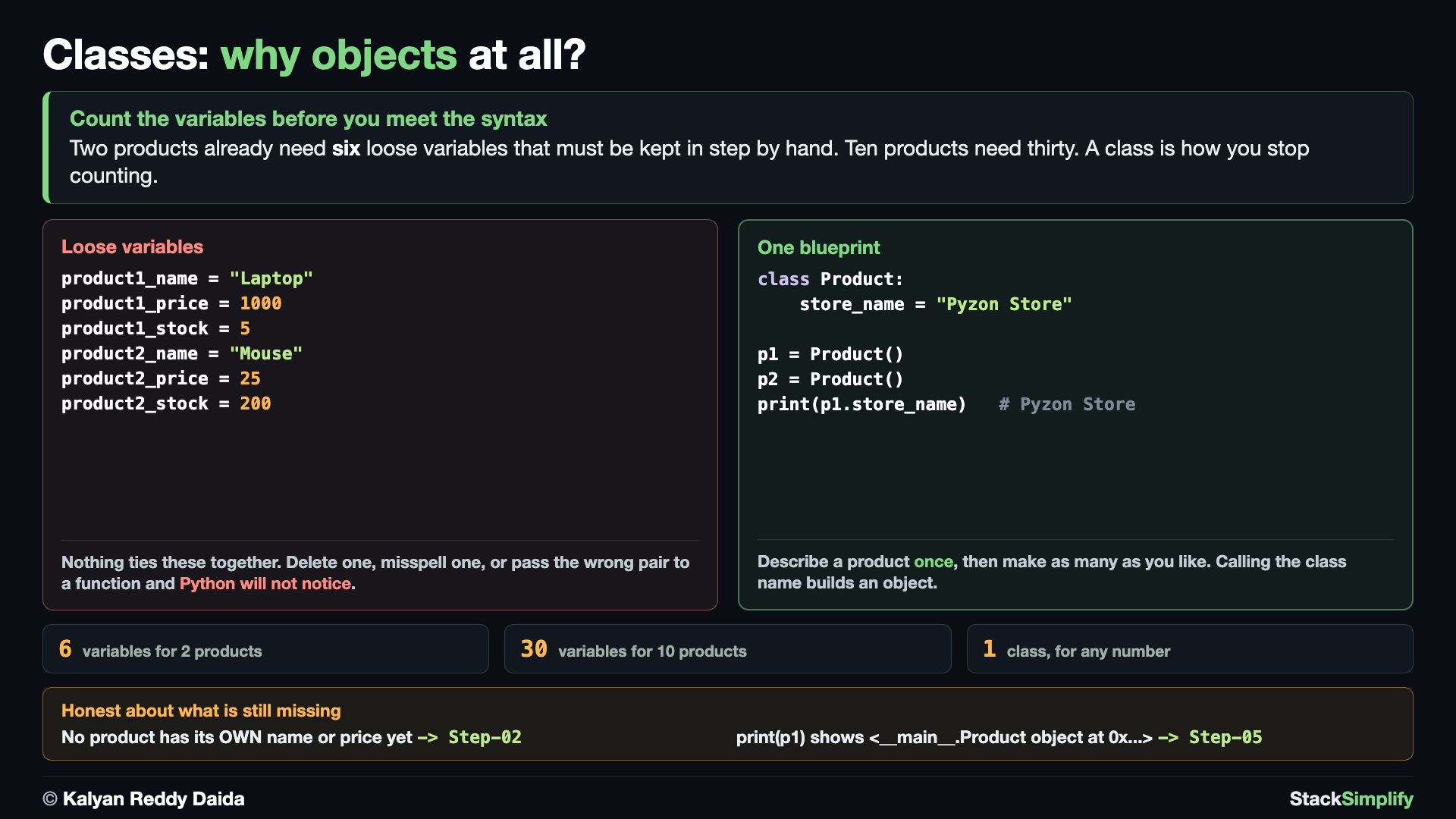
Right now, storing two products means six separate variables, and nothing ties product1_name to product1_price except the name you chose. Ten products would mean thirty variables. There is no single thing called "a product" in your program, only loose values you have to keep straight yourself.
# Concept-01: Without objects, one product's data lives in loose variables that are easy to mix up
# Question: What goes wrong when each product's name, price, and stock live in separate variables? (nothing ties them together, and two products already need six)
product1_name = "Laptop"
product1_price = 1000
product1_stock = 5
product2_name = "Mouse"
product2_price = 25
product2_stock = 200
print(product1_name, product1_price, product1_stock)
print(product2_name, product2_price, product2_stock)
# Two products already need six variables. Ten products would need thirty.
Concept 2: A class is a blueprint
A class describes what every product looks like, written once. The class keyword starts the blueprint, and the indented body holds what belongs to it. Every product is sold by the same store, so that shared name goes straight in the blueprint. Nothing is created yet; this is the plan, not the building.
# Concept-02: A class is a blueprint that describes what every product looks like
# Question: How do we describe "a product" ONCE and reuse that description for every product? (write a class with the class keyword)
class Product:
    store_name = "Pyzon Store"
Concept 3: Create objects from the blueprint
You make an object (also called an instance) by calling the class name like a function. Each call gives you a separate object built from the same blueprint.
# Concept-03: Create an object (also called an instance) by calling the class name
# Question: How do we make actual products from the Product blueprint? (call the class name like a function; each call makes a separate object that can read the blueprint's store_name)
class Product:
    store_name = "Pyzon Store"

p1 = Product()
p2 = Product()
print(p1.store_name)
print(p2.store_name)
Concept 4: What is still missing: own data and a printout
Both products print the same store name, and that half is correct: they really are sold by the same store, so writing it once in the blueprint is exactly right (Step-03 comes back to why). The problem is the other half: neither product has a name or price of its own, so the two objects are indistinguishable. And printing an object shows a memory address instead of the data. Those are the two problems the next steps solve: __init__ gives each object its own data in Step-02, and __str__ gives it a readable printout in Step-05.
# Concept-04: Sharing the store name is right, but no product has its OWN data yet, and printing one shows a memory address
# Question: What is still missing once p1 and p2 exist? (no name or price of their own, and print(p1) shows only a memory address; __init__ fixes the first in Step-02, __str__ the second in Step-05)
class Product:
    store_name = "Pyzon Store"

p1 = Product()
p2 = Product()
print(p1)
print(p2)
The exact addresses differ every run, and that is the point: the number is meaningless to a reader.
Pages for this step: Concept | Practice | Workshop
Python Files for this step: Concept | Practice | Practice Solutions | Workshop | Workshop Solutions
Step-02: Give Each Object Its Own Data (__init__ and self)
File: s13_step02_init_self_instance_attributes.py
Now give each product its own data. Create s13_step02_init_self_instance_attributes.py.
Concept 1: __init__ runs automatically
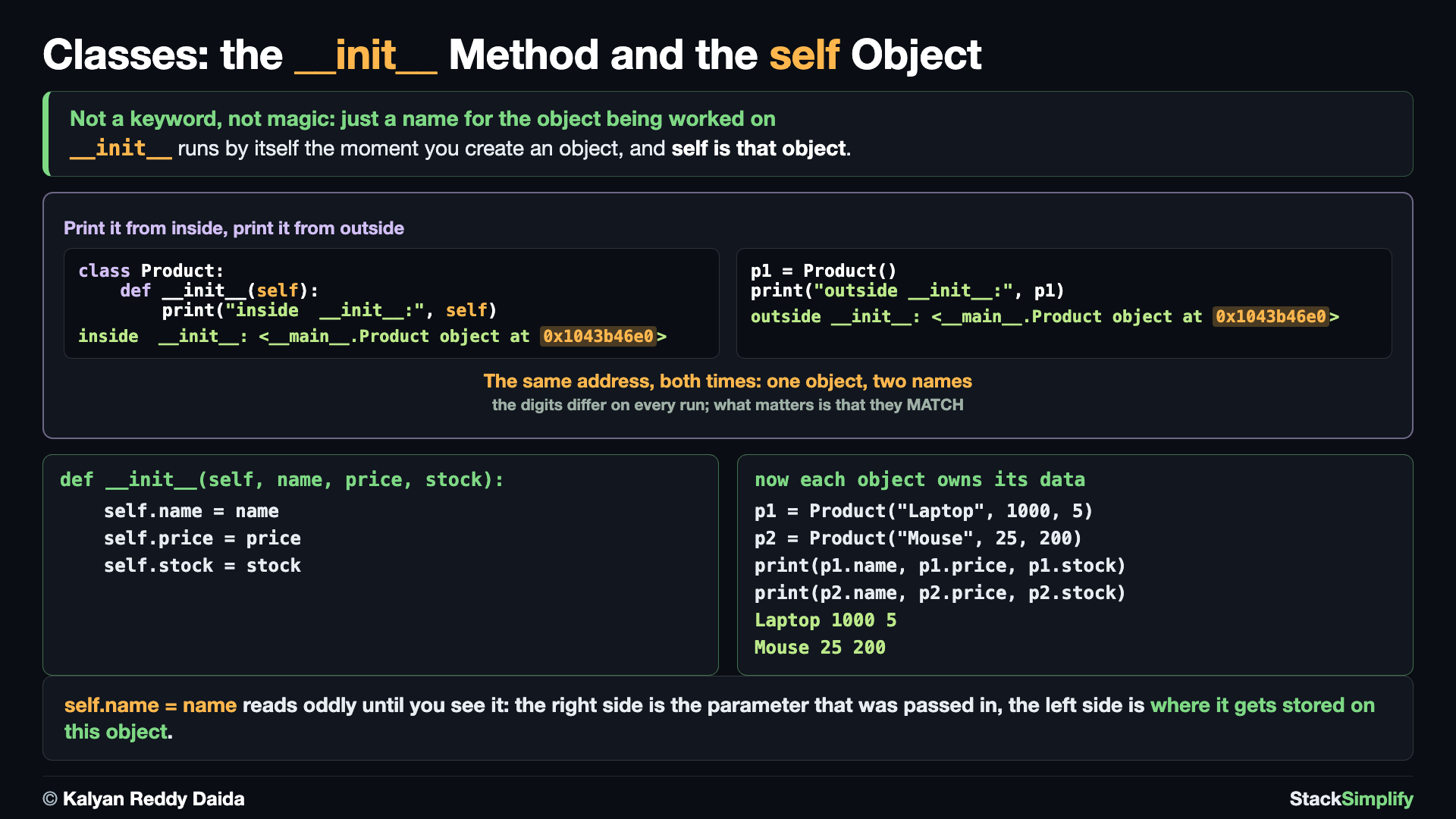
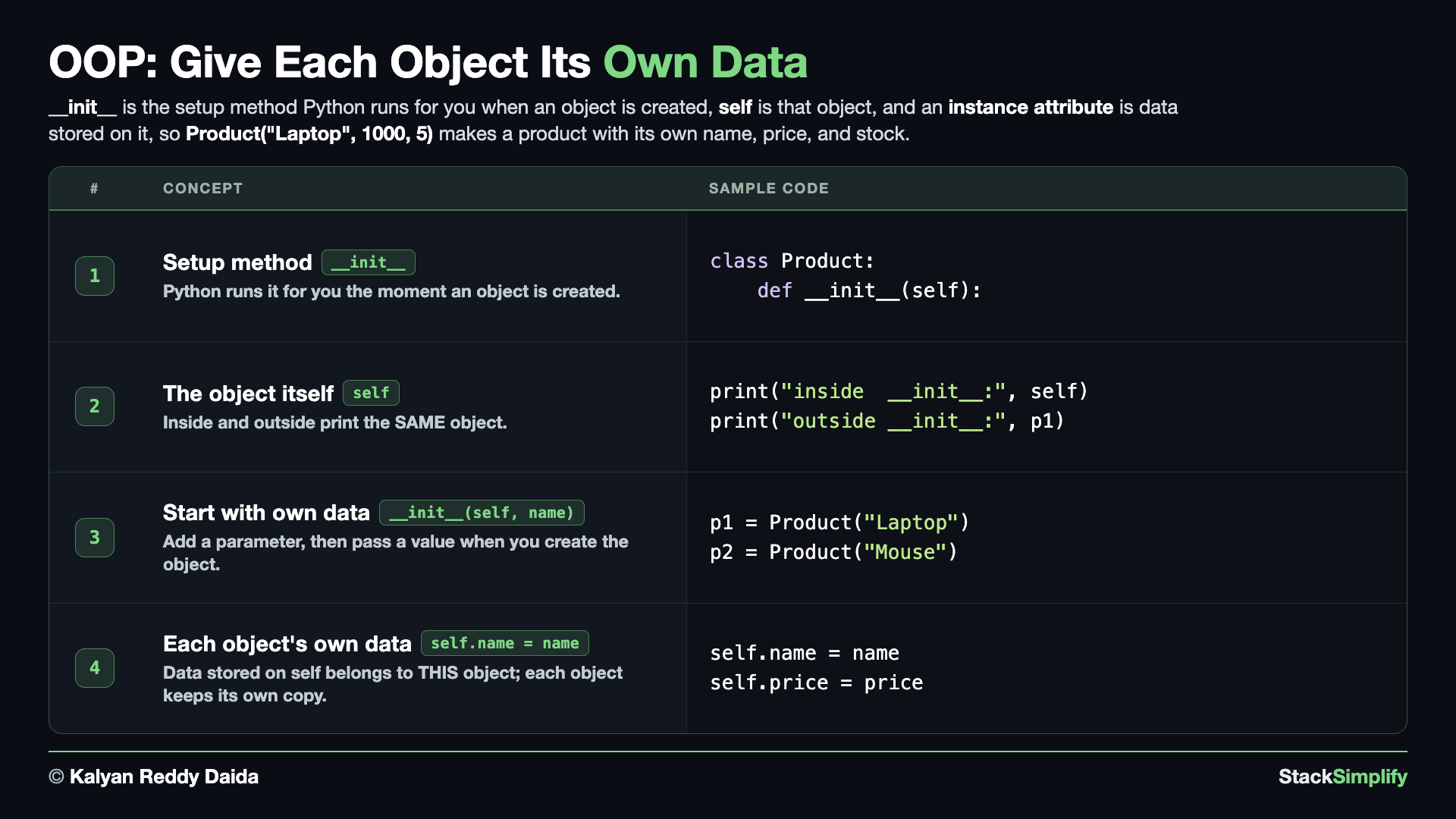
__init__ is a special method Python runs for you the moment you create an object. You never call it yourself; building the object calls it.
# Concept-01: __init__ is a special method Python runs automatically when you create an object
# Question: In Step-01 no product had a name of its own. How do we run some setup code the moment a product is created? (define __init__, and Python calls it for you)
class Product:
    def __init__(self):
        print("A new product was created")

p1 = Product()
Concept 2: self IS the object
The first parameter, self, is the object being built. Print it inside __init__ and print the variable outside: they are the SAME object at the same address.
# Concept-02: self is the object being created; it is how the method reaches that object's own data
# Question: What exactly is self? (it is the same object you get back, so print(self) inside and print(p1) outside show the SAME object)
class Product:
    def __init__(self):
        print("inside  __init__:", self)

p1 = Product()
print("outside __init__:", p1)
inside  __init__: <__main__.Product object at 0x1011086e0>
outside __init__: <__main__.Product object at 0x1011086e0>
Concept 3: Parameters give each object its own data
Add a parameter to __init__ and store it on self. Now each product can start with a different name.
# Concept-03: Give __init__ parameters so each object starts with its OWN data
# Question: How do we finally give each product a different name, like Product("Laptop") and Product("Mouse")? (add a parameter to __init__ and store it on self)
class Product:
    def __init__(self, name):
        self.name = name

p1 = Product("Laptop")
p2 = Product("Mouse")
print(p1.name)
print(p2.name)
Concept 4: Each object stores its own data
Data stored on self is an instance attribute. Store more than one, and each object keeps its own copy, so the Laptop's price never touches the Mouse's.
# Concept-04: Attributes stored on self are instance attributes; the usual style is self.name = name
# Question: How do we store more than one piece of data per product, like a name, a price AND a stock count? (assign each parameter onto self; each object keeps its own copy)
class Product:
    def __init__(self, name, price, stock):
        # Instance attribute: data that belongs to THIS object
        self.name = name
        self.price = price
        self.stock = stock

p1 = Product("Laptop", 1000, 5)
p2 = Product("Mouse", 25, 200)
print(p1.name, p1.price, p1.stock)
print(p2.name, p2.price, p2.stock)
Pages for this step: Concept | Practice | Workshop
Python Files for this step: Concept | Practice | Practice Solutions | Workshop | Workshop Solutions
Step-03: Class Attributes vs Instance Attributes
File: s13_step03_class_vs_instance_attributes.py
Some data belongs to every product; some belongs to one. Create s13_step03_class_vs_instance_attributes.py.
Concept 1: A class attribute is shared
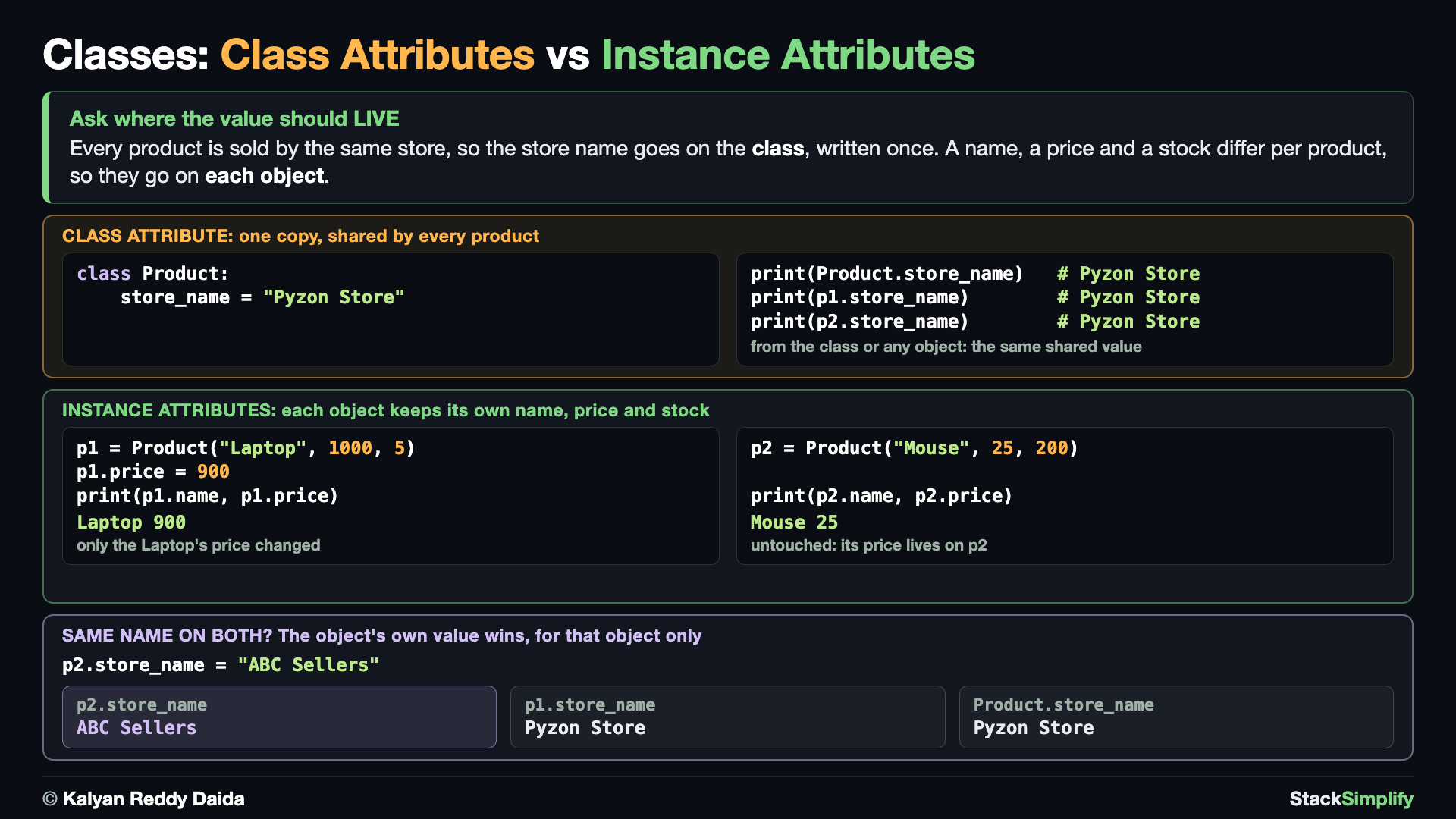
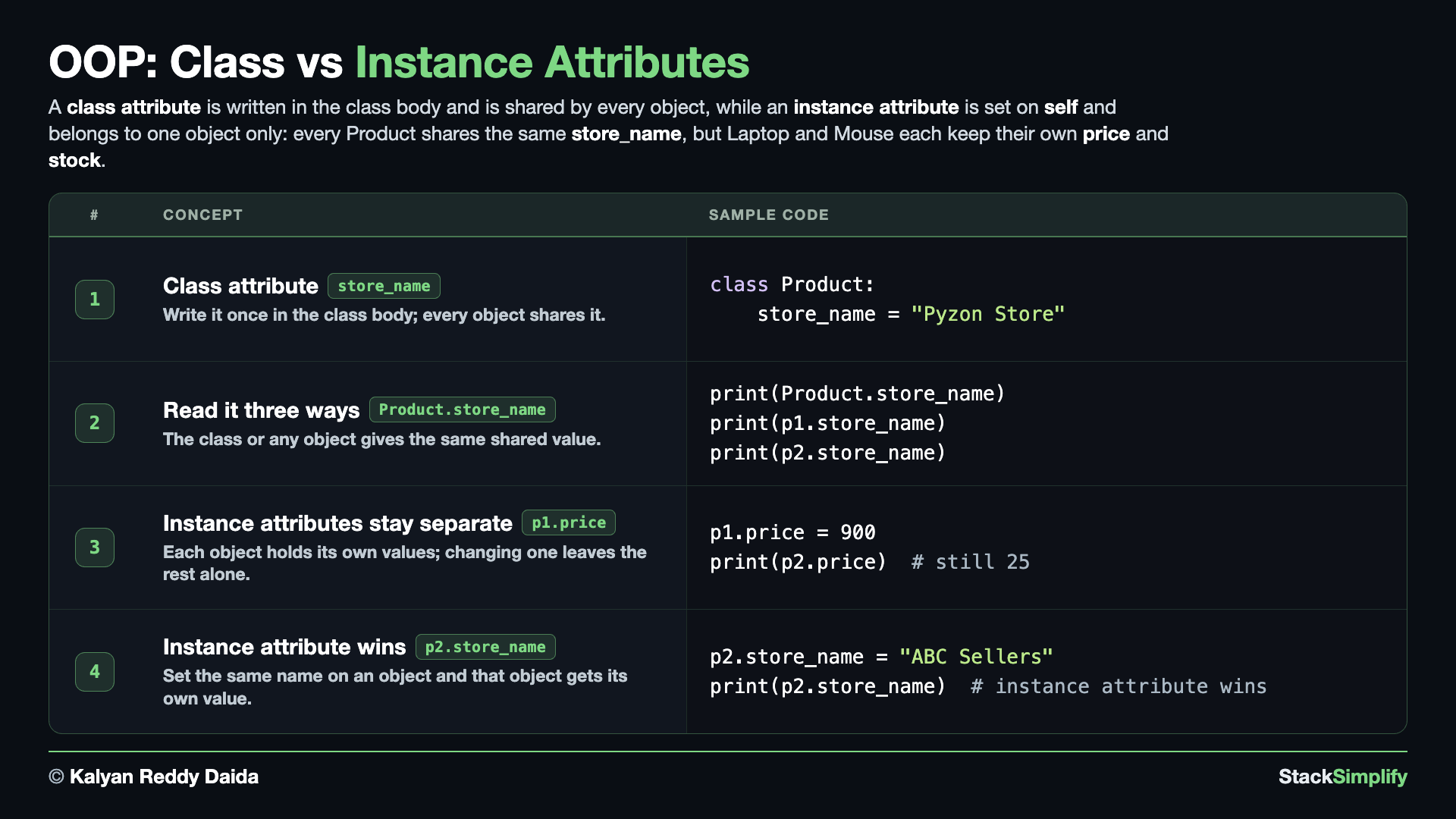
A class attribute is written in the class body, outside __init__, and is shared by every object. The store name is the same for all products, so it lives once on the class.
# Concept-01: A class attribute is written in the class body and is SHARED by every object
# Question: Every product is sold by the same store. How do we keep that one store name for all of them instead of storing it on each product? (write it once in the class body as a class attribute; every object reads the same value)
class Product:
    # Class Attribute
    store_name = "Pyzon Store"
    # Defined a Init method / Function
    def __init__(self, name, price, stock):
        # Instance Attributes
        self.name = name
        self.price = price
        self.stock = stock

p1 = Product("Laptop", 1000, 5)
p2 = Product("Mouse", 25, 200)
print(p1.store_name)
print(p2.store_name)
Concept 2: Read a class attribute from the class or an object
Because it lives on the class, you can read a class attribute straight from the class, even before any object exists, or through any object. All three lines below print the same shared value.
# Concept-02: A class attribute can be read from the class itself OR through any object
# Question: How do we read the store name, from the class or from a product? (both work: Product.store_name, p1.store_name and p2.store_name all give the same shared value)
class Product:
    # Class Attribute
    store_name = "Pyzon Store"
    # Defined a Init method / Function
    def __init__(self, name, price, stock):
        # Instance Attributes
        self.name = name
        self.price = price
        self.stock = stock

p1 = Product("Laptop", 1000, 5)
p2 = Product("Mouse", 25, 200)

# Reading the class attribute three ways
print("Using Class:", Product.store_name)
print("Using p1 object:", p1.store_name)
print("Using p2 object:", p2.store_name)
Concept 3: Instance attributes stay separate
Instance attributes belong to one object only. Change the Laptop's price and stock, and the Mouse is untouched: each object keeps its own data.
# Concept-03: Instance attributes belong to one object only; changing one does not touch the others
# Question: What happens to the Mouse when only the Laptop's price and stock change? (nothing, because name, price and stock live on each object separately; the Mouse keeps 25 and 200)
class Product:
    # Class Attribute
    store_name = "Pyzon Store"
    # Defined a Init method / Function
    def __init__(self, name, price, stock):
        # Instance Attributes
        self.name = name
        self.price = price
        self.stock = stock

# Create an object of a class
p1 = Product("Laptop", 1000, 5)
p2 = Product("Mouse", 25, 200)
print("P1 - Before Update:", p1.name, p1.price, p1.stock)
print("P2 - Before Update:", p2.name, p2.price, p2.stock)
p1.price = 900
p1.stock = 500
print("P1 - After Update:", p1.name, p1.price, p1.stock)
print("P2 - After Update:", p2.name, p2.price, p2.stock)
P1 - Before Update: Laptop 1000 5
P2 - Before Update: Mouse 25 200
P1 - After Update: Laptop 900 500
P2 - After Update: Mouse 25 200
Concept 4: The instance attribute wins
If the same name exists on the class AND on the object, the instance attribute wins for that object, and the class value stays as it was for everyone else.
# Concept-04: If the same name exists on the class AND the instance, the instance attribute wins
# Question: One product is sold by a third-party seller under their own store name. How do we change it for that product only, without touching every other product? (assign it on that object; p2 gets its own value, while p1 and the class still read Pyzon Store)
class Product:
    # Class Attribute
    store_name = "Pyzon Store"
    # Defined a Init method / Function
    def __init__(self, name, price, stock):
        # Instance Attributes
        self.name = name
        self.price = price
        self.stock = stock

# Create an object of a class
p1 = Product("Laptop", 1000, 5)
p2 = Product("Mouse", 25, 200)
print("P1 - Before Update:", p1.store_name, p1.name, p1.price, p1.stock)
print("P2 - Before Update:", p2.store_name, p2.name, p2.price, p2.stock)
p2.store_name = "ABC Sellers"
print("P1 - After Update:", p1.store_name, p1.name, p1.price, p1.stock)
print("P2 - After Update:", p2.store_name, p2.name, p2.price, p2.stock)
print("After Update - Class level:", Product.store_name)
P1 - Before Update: Pyzon Store Laptop 1000 5
P2 - Before Update: Pyzon Store Mouse 25 200
P1 - After Update: Pyzon Store Laptop 1000 5
P2 - After Update: ABC Sellers Mouse 25 200
After Update - Class level: Pyzon Store
Pages for this step: Concept | Practice | Workshop
Python Files for this step: Concept | Practice | Practice Solutions | Workshop | Workshop Solutions
Step-04: Adding Behavior with Methods
File: s13_step04_methods.py
A class is not only data; it can DO things. Create s13_step04_methods.py.
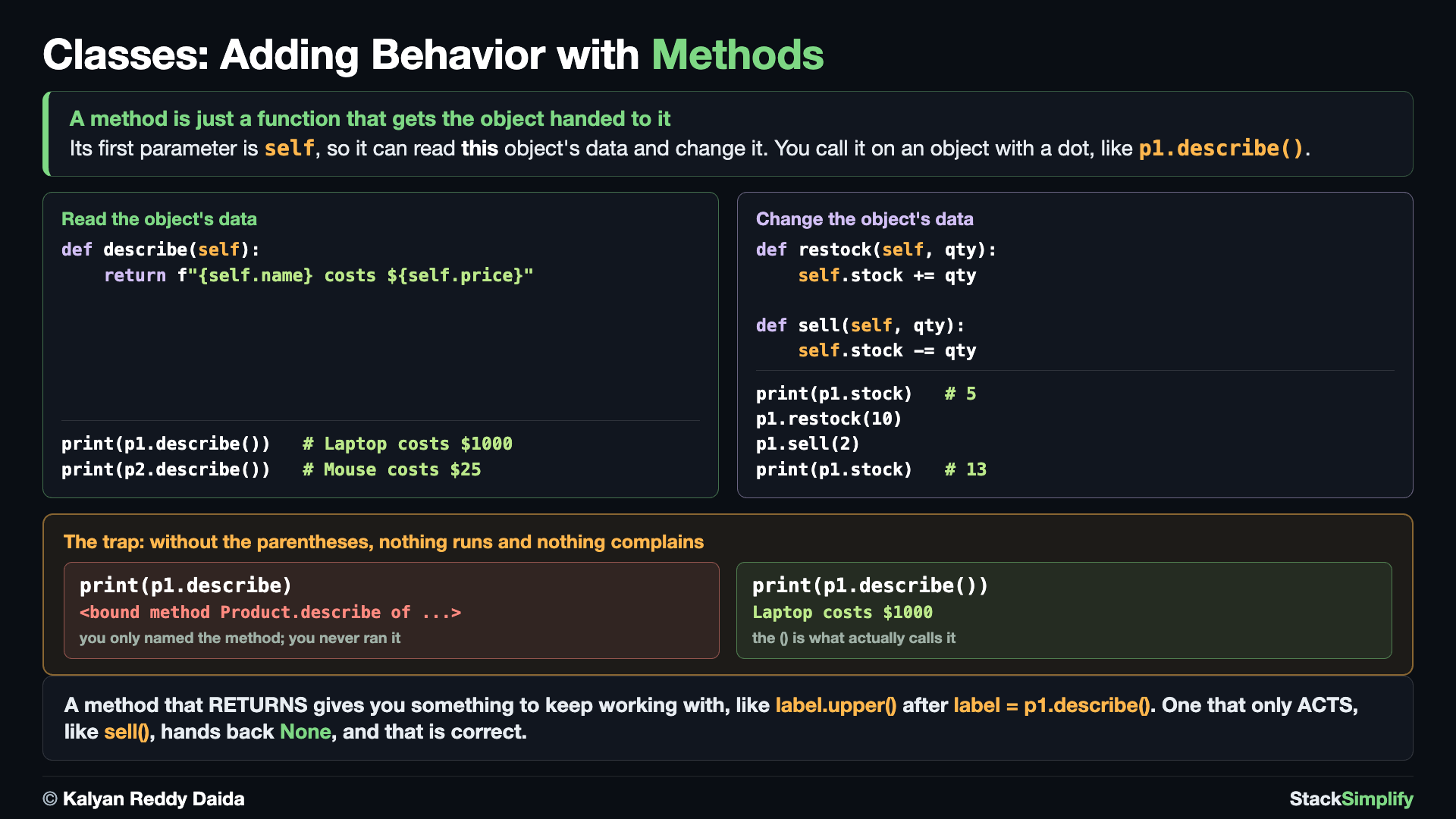
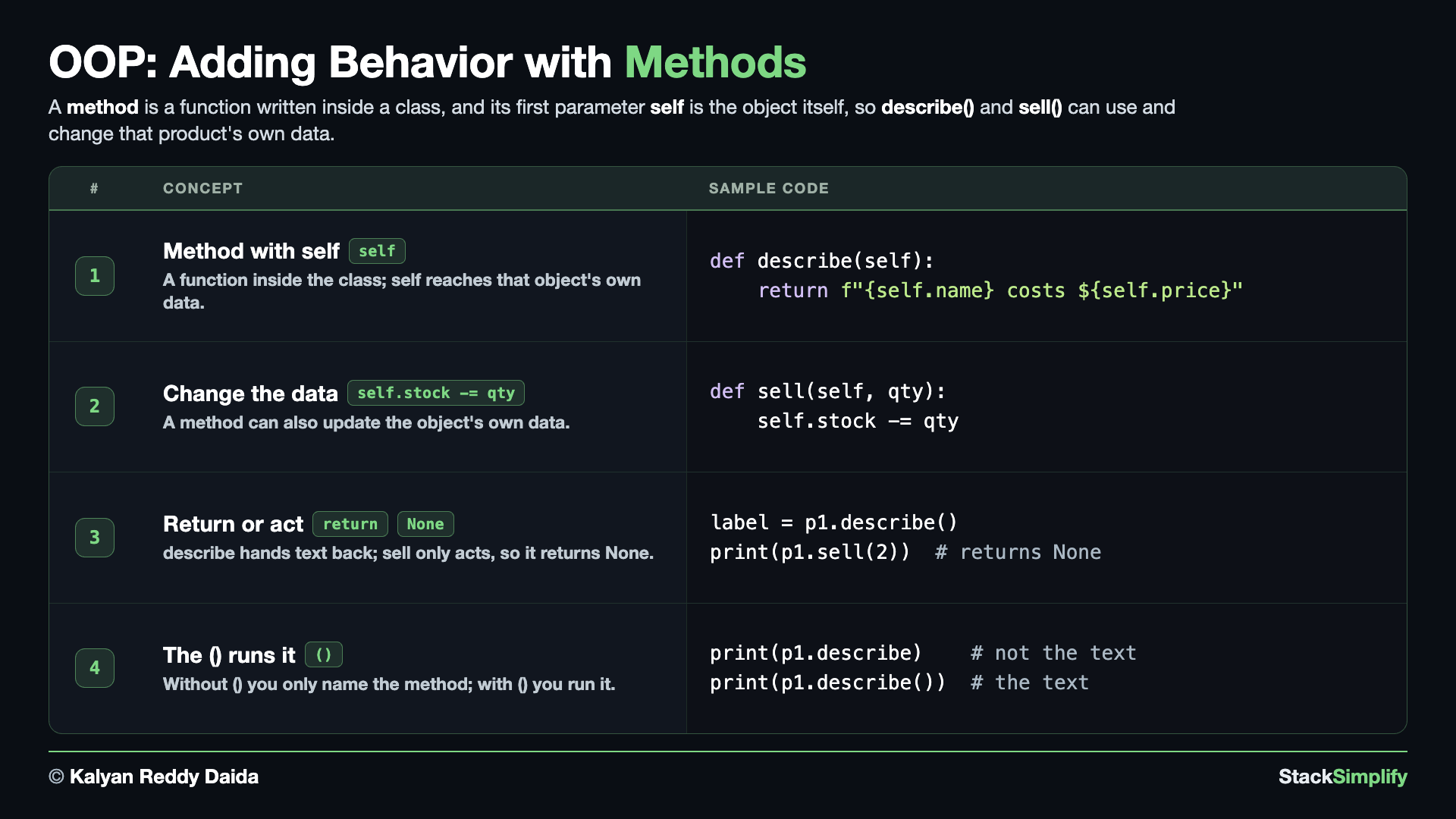
Concept 1: A method is a function inside the class
A method is a function written inside the class. Its first parameter is self, so it can reach the object's own data.
# Concept-01: A method is a function inside a class; its first parameter is self, so it can use the object's own data
# Question: How do we give a product behavior as well as data, like a line built from its own name and price? (write a method inside the class and reach the data through self)
# Define a class
class Product:
    # Class Attribute
    store_name = "Pyzon Store"
    # Defined a Init method / Function
    def __init__(self, name, price, stock):
        # Instance Attributes
        self.name = name
        self.price = price
        self.stock = stock

    # Describe method
    def describe(self):
        return f"{self.name} costs ${self.price}"

# Create an object of a class
p1 = Product("Laptop", 1000, 5)
p2 = Product("Mouse", 25, 200)
print(p1.describe())
print(p2.describe())
Concept 2: A method can change the data
A method can also CHANGE the object's data. Keep the stock rules inside the class (restock and sell update self.stock), so the rest of your code just asks.
# Concept-02: A method can also CHANGE the object's data
# Question: How do we let a product be sold or restocked, so the stock change lives inside the class instead of everywhere in our code? (write methods that update self.stock)
# Define a class
class Product:
    # Class Attribute
    store_name = "Pyzon Store"
    # Defined a Init method / Function
    def __init__(self, name, price, stock):
        # Instance Attributes
        self.name = name
        self.price = price
        self.stock = stock

    # Describe method
    def describe(self):
        return f"{self.name} costs ${self.price}"

    # Restock method
    def restock(self, qty):
        # self.stock = self.stock + qty
        self.stock += qty

    # Sell Method
    def sell(self, qty):
        # self.stock = self.stock - qty
        self.stock -= qty

# Create an object of a class
p1 = Product("Laptop", 1000, 5)
p2 = Product("Mouse", 25, 200)
print("Current stock:", p1.stock)
p1.restock(20)
print("After restock:", p1.stock)
p1.sell(24)
print("After sell:", p1.stock)
Concept 3: Return a value or just act
A method can return a value you use later, or just act and return nothing. describe hands back text; restock only changes stock, so it returns None.
# Concept-03: A method can RETURN a value or just ACT; returning lets the caller use the result
# Question: How do we choose between a method that returns a value and one that just acts? (describe returns text we can keep using, like label.upper(); restock only changes stock, so it returns None)
# Define a class
class Product:
    # Class Attribute
    store_name = "Pyzon Store"
    # Defined a Init method / Function
    def __init__(self, name, price, stock):
        # Instance Attributes
        self.name = name
        self.price = price
        self.stock = stock

    # Describe method
    def describe(self):
        return f"{self.name} costs ${self.price}"

    # Restock method
    def restock(self, qty):
        # self.stock = self.stock + qty
        self.stock += qty

    # Sell Method
    def sell(self, qty):
        # self.stock = self.stock - qty
        self.stock -= qty

# Create an object of a class
p1 = Product("Laptop", 1000, 5)
p2 = Product("Mouse", 25, 200)
print("Describe method returns data:", p1.describe())
label = p1.describe()
print(label.upper())

# returns None
print("Restock method doesn't return data:", p1.restock(20))
print(p1.stock)
my_stock_data = p1.restock(20)
print("My Stock data:", my_stock_data)
Describe method returns data: Laptop costs $1000
LAPTOP COSTS $1000
Restock method doesn't return data: None
25
My Stock data: None
Concept 4: Forgetting () gives the method, not the result
A method needs the () to run. Without it, you get the method object itself, not the result.
# Concept-04: A method needs the () to run; without (), you get the method object itself
# Question: Why does p1.describe() give the text but p1.describe does not? (without () you only name the method and get the method object; with () you actually run it)
# Define a class
class Product:
    # Class Attribute
    store_name = "Pyzon Store"
    # Defined a Init method / Function
    def __init__(self, name, price, stock):
        # Instance Attributes
        self.name = name
        self.price = price
        self.stock = stock

    # Describe method
    def describe(self):
        return f"{self.name} costs ${self.price}"

    # Restock method
    def restock(self, qty):
        # self.stock = self.stock + qty
        self.stock += qty

    # Sell Method
    def sell(self, qty):
        # self.stock = self.stock - qty
        self.stock -= qty

# Create an object of a class
p1 = Product("Laptop", 1000, 5)
p2 = Product("Mouse", 25, 200)
print("With parentheses:", p1.describe())
print("Without parentheses:", p1.describe)
With parentheses: Laptop costs $1000
Without parentheses: <bound method Product.describe of <__main__.Product object at 0x1042f86e0>>
Pages for this step: Concept | Practice | Workshop
Python Files for this step: Concept | Practice | Practice Solutions | Workshop | Workshop Solutions
Step-05: Readable Objects: __str__ and __repr__
File: s13_step05_str_and_repr.py
A word about these names: dunder methods
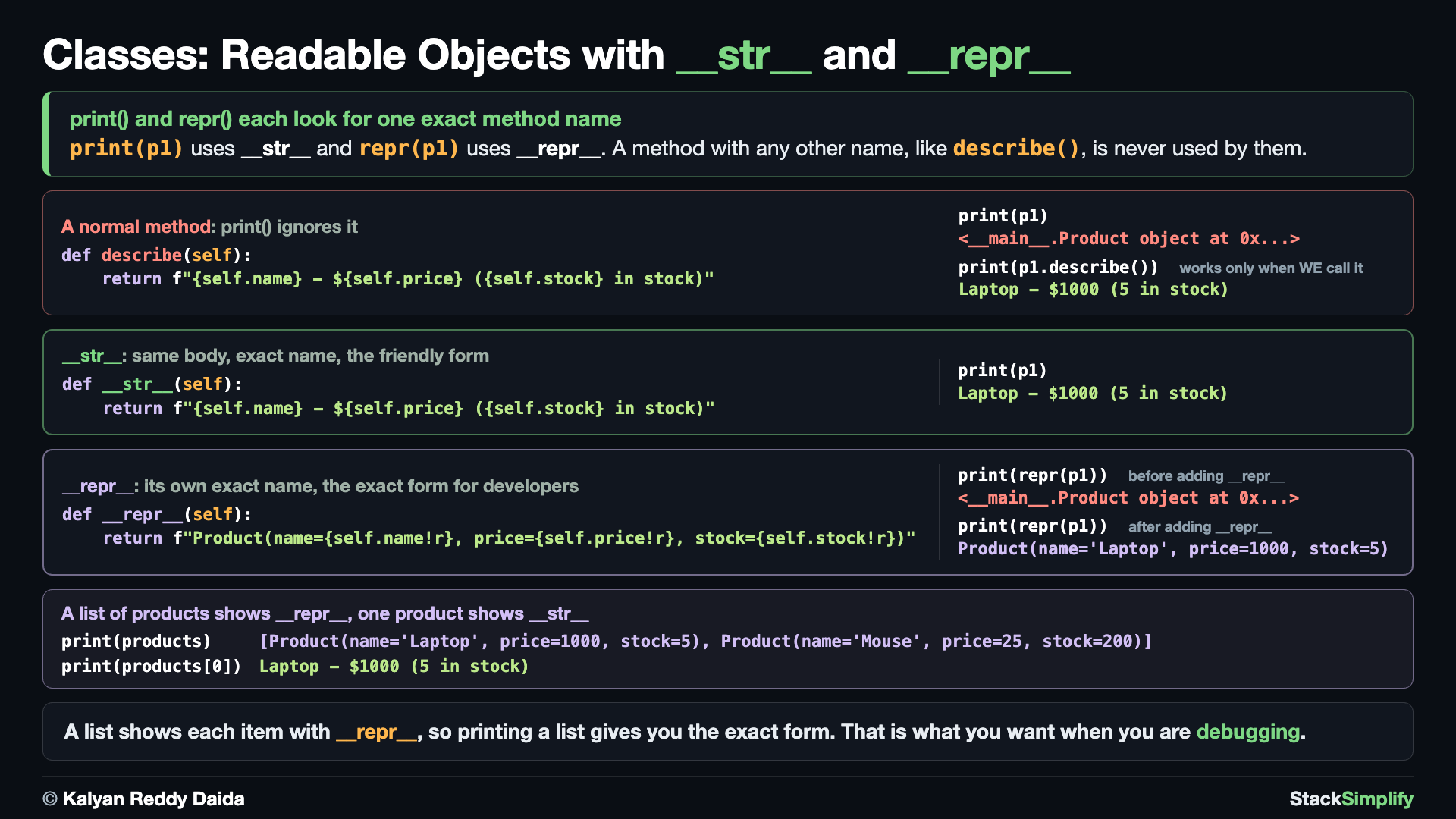
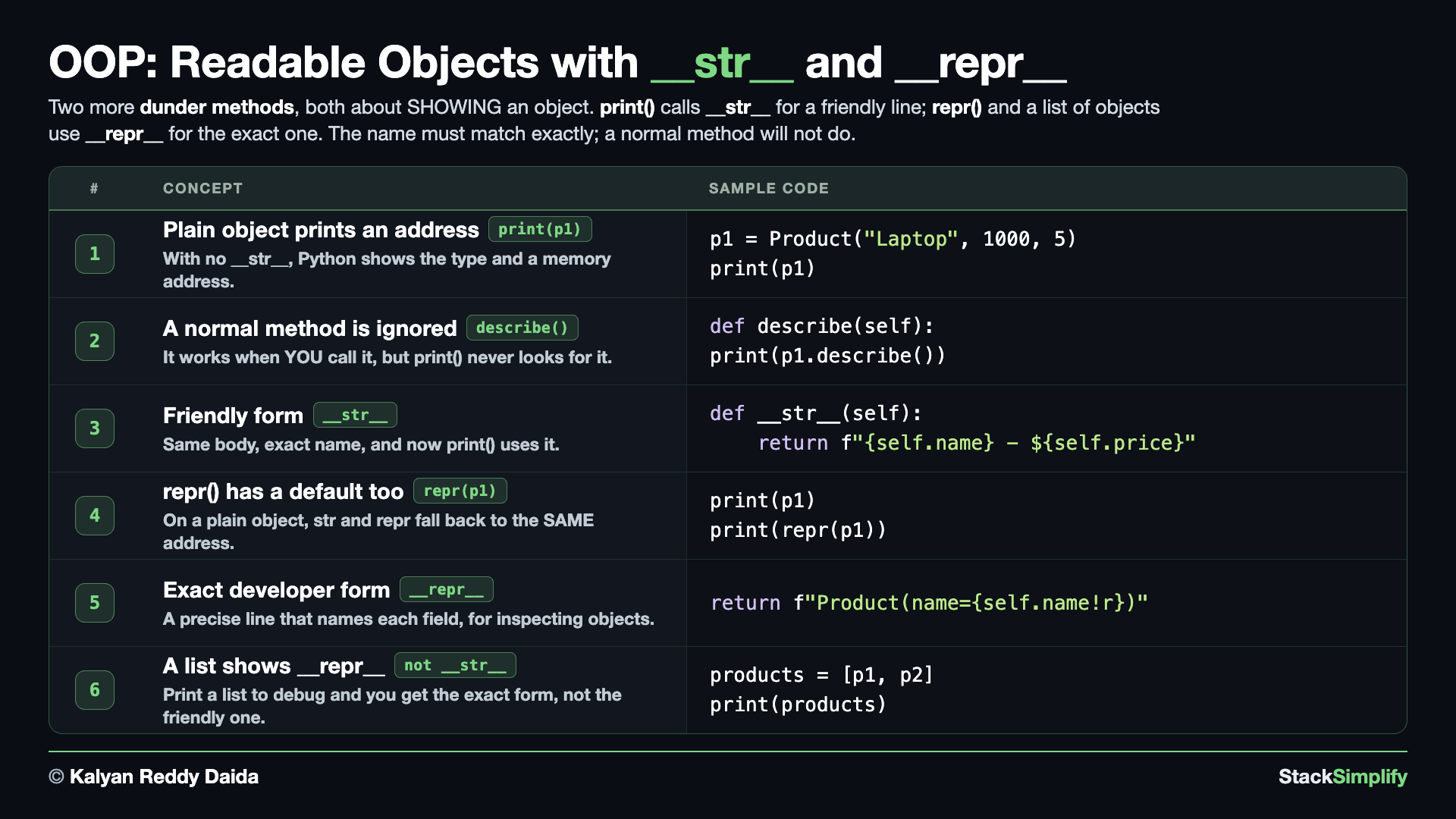
Names wrapped in double underscores like __init__, __str__, and __repr__ are called dunder methods (short for "double underscore"). You do not call them yourself; Python calls them for you at the right moment: __init__ when you build an object, __str__ when you print() it. You have already used one (__init__); this step adds two more.
Create s13_step05_str_and_repr.py and make your object print nicely.
Concept 1: The memory address is back
Printing a plain object shows a memory address, not the data. It is the same problem you saw in Step-01. Python has no idea how you want your object shown, so it falls back to the type and address.
# Concept-01: Printing a plain object shows a memory address, not the data
# Question: We saw this in Step-01. Why does print(p1) show <__main__.Product object at 0x...> instead of the product? (Python has no idea how you want your object shown, so it falls back to the type and address)
# Define a class
class Product:
    # Defined a Init method / Function
    def __init__(self, name, price, stock):
        # Instance Attributes
        self.name = name
        self.price = price
        self.stock = stock

p1 = Product("Laptop", 1000, 5)
print(p1)
Concept 2: A normal method is not enough
You could write a normal method that builds the text, but print() will not use it. print() does not hunt for a likely-looking method; it looks for one exact name.
# Concept-02: A normal method can build the text, but print() will not use it
# Question: We already know how to write methods, so why does print(p1) still show the address when describe() clearly works? (print() does not hunt for a likely-looking method; it looks for one exact name)
# Define a class
class Product:
    # Defined a Init method / Function
    def __init__(self, name, price, stock):
        # Instance Attributes
        self.name = name
        self.price = price
        self.stock = stock

    def describe(self):                      # a normal method, no underscores
        return f"{self.name} costs ${self.price} and {self.stock} in stock"

p1 = Product("Laptop", 1000, 5)
print(p1)                                    # still the address; print() ignored describe()
print(p1.describe())                         # the text was there all along, if WE call it
Concept 3: __str__ is the friendly form
Give the method the exact name __str__ (the same body, only the name changed), and print() uses it by itself.
# Concept-03: __str__ tells print() how to show the object in a friendly way
# Question: How do we make print(p1) show "Laptop costs $1000 and 5 in stock" by itself? (name the method exactly __str__, because print() looks for that one name)
# Define a class
class Product:
    # Defined a Init method / Function
    def __init__(self, name, price, stock):
        # Instance Attributes
        self.name = name
        self.price = price
        self.stock = stock

    # Dunder Methods
    # __str__ method
    def __str__(self):                       # same body as describe, only the NAME changed
        return f"{self.name} costs ${self.price} and {self.stock} in stock"

p1 = Product("Laptop", 1000, 5)
print(p1)
Concept 4: repr() has its own default too
repr() is the other built-in that turns an object into text. On a plain object it gives the same unhelpful address, so it needs its own special method, __repr__.
# Concept-04: repr() has its own default too, and it is the same unhelpful address
# Question: print(p1) fell back to an address without __str__. What does repr(p1) show on the same plain object? (the same address, because repr has its own default; it needs its own special method, __repr__)
# Define a class
class Product:
    # Defined a Init method / Function
    def __init__(self, name, price, stock):
        # Instance Attributes
        self.name = name
        self.price = price
        self.stock = stock

p1 = Product("Laptop", 1000, 5)
print(p1)          # the str default: an address
print(repr(p1))    # the repr default: the SAME address, and repr needs its own method too
Concept 5: __repr__ is the exact form
__repr__ is the developer form, meant to be exact rather than pretty. repr(), the REPL, and containers all use it.
The !r after a value in the f-string asks for its repr() form, which is why the text comes out with quotes around it: name='Laptop' rather than name=Laptop.
# Concept-05: __repr__ is the developer form, meant to be exact rather than pretty
# Question: How do we make repr(p1) show a precise form with the field names, instead of that default? (add __repr__, the version repr(), the REPL, and containers all use)
# Define a class
class Product:
    # Defined a Init method / Function
    def __init__(self, name, price, stock):
        # Instance Attributes
        self.name = name
        self.price = price
        self.stock = stock

    # Dunder Methods
    # __str__ method
    def __str__(self):
        return f"{self.name} costs ${self.price} and {self.stock} in stock"

    # __repr__ method
    def __repr__(self):
        return f"Product(name={self.name!r}, price={self.price!r}, stock={self.stock!r})"

p1 = Product("Laptop", 1000, 5)
print(p1)          # __str__: the friendly one
print(repr(p1))    # __repr__: the exact one
Concept 6: A list uses __repr__, a single object uses __str__
A container (like a list) shows the __repr__ of each item, while print() on a single object uses __str__. So a list of objects gives you the precise version, which is handy for debugging.
# Concept-06: A list uses __repr__ for each item, while a single object uses __str__
# Question: We wrote a friendly __str__, so why does printing a LIST of products show the exact form instead? (a container shows the __repr__ of each item; print() on one object still uses __str__, so a list gives you the precise version, handy for debugging)
# Define a class
class Product:
    # Defined a Init method / Function
    def __init__(self, name, price, stock):
        # Instance Attributes
        self.name = name
        self.price = price
        self.stock = stock

    # Dunder Methods
    # __str__ method
    def __str__(self):
        return f"{self.name} costs ${self.price} and {self.stock} in stock"

    # __repr__ method
    def __repr__(self):
        return f"Product(name={self.name!r}, price={self.price!r}, stock={self.stock!r})"

products = [Product("Laptop", 1000, 5), Product("Mouse", 25, 200)]
print(products)       # a list shows __repr__ for each item
print(products[0])    # a single object still uses __str__
[Product(name='Laptop', price=1000, stock=5), Product(name='Mouse', price=25, stock=200)]
Laptop costs $1000 and 5 in stock
Pages for this step: Concept | Practice | Workshop
Python Files for this step: Concept | Practice | Practice Solutions | Workshop | Workshop Solutions
Step-06: Class Methods and Static Methods (@classmethod and @staticmethod)
File: s13_step06_classmethod_staticmethod.py
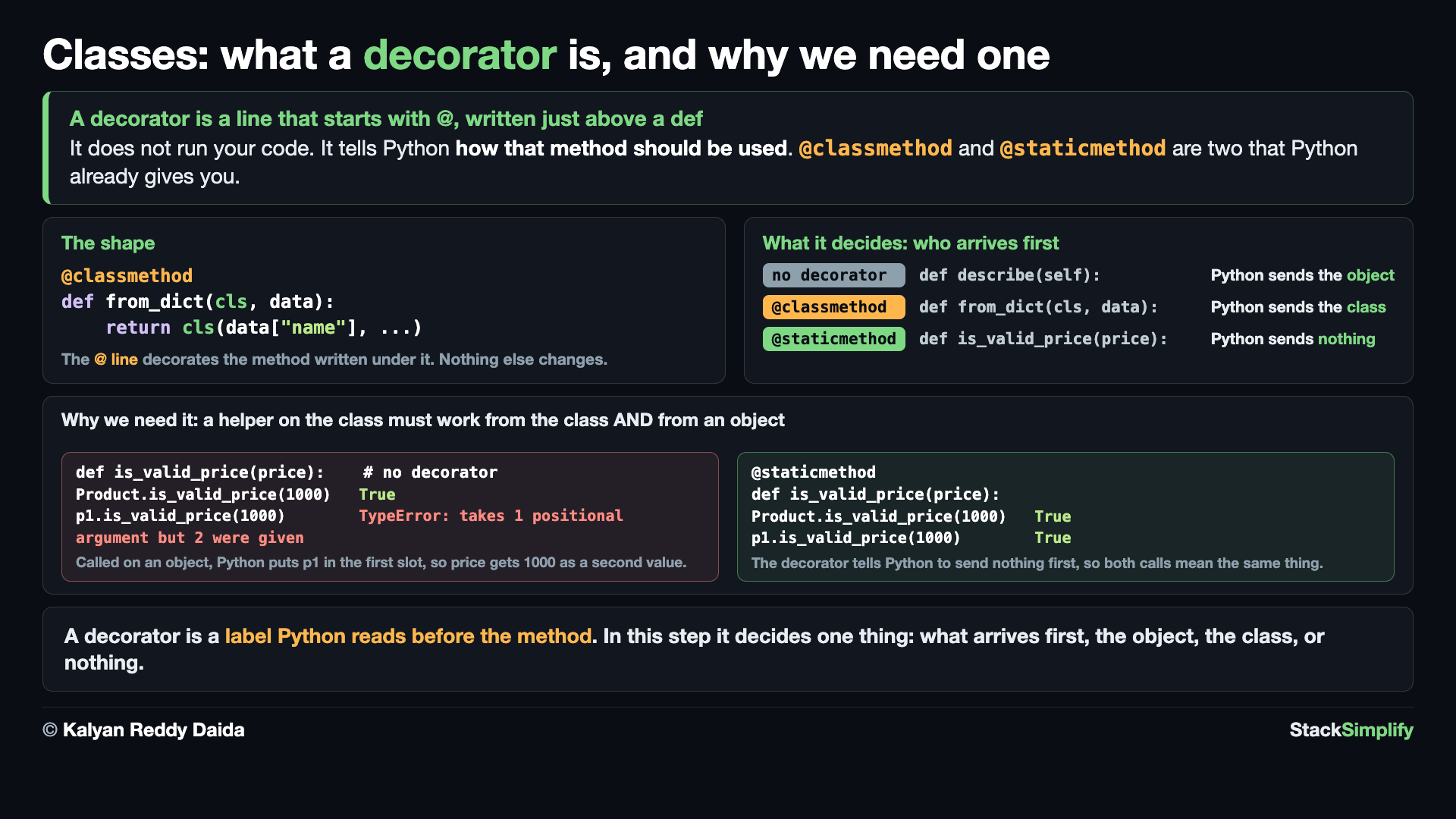
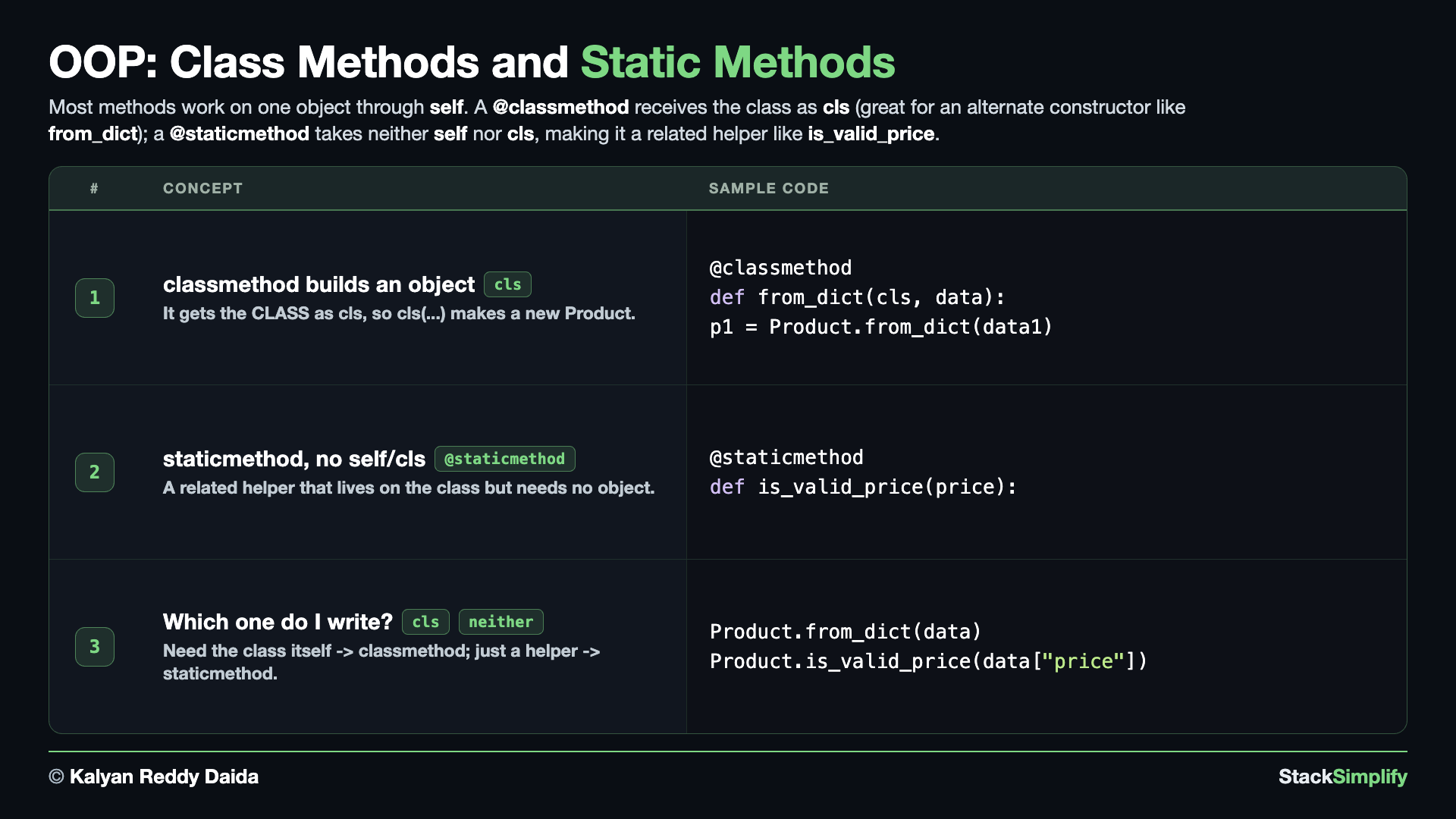
Most methods work on one object through self. Two decorators add methods that belong to the CLASS instead. Create s13_step06_classmethod_staticmethod.py.
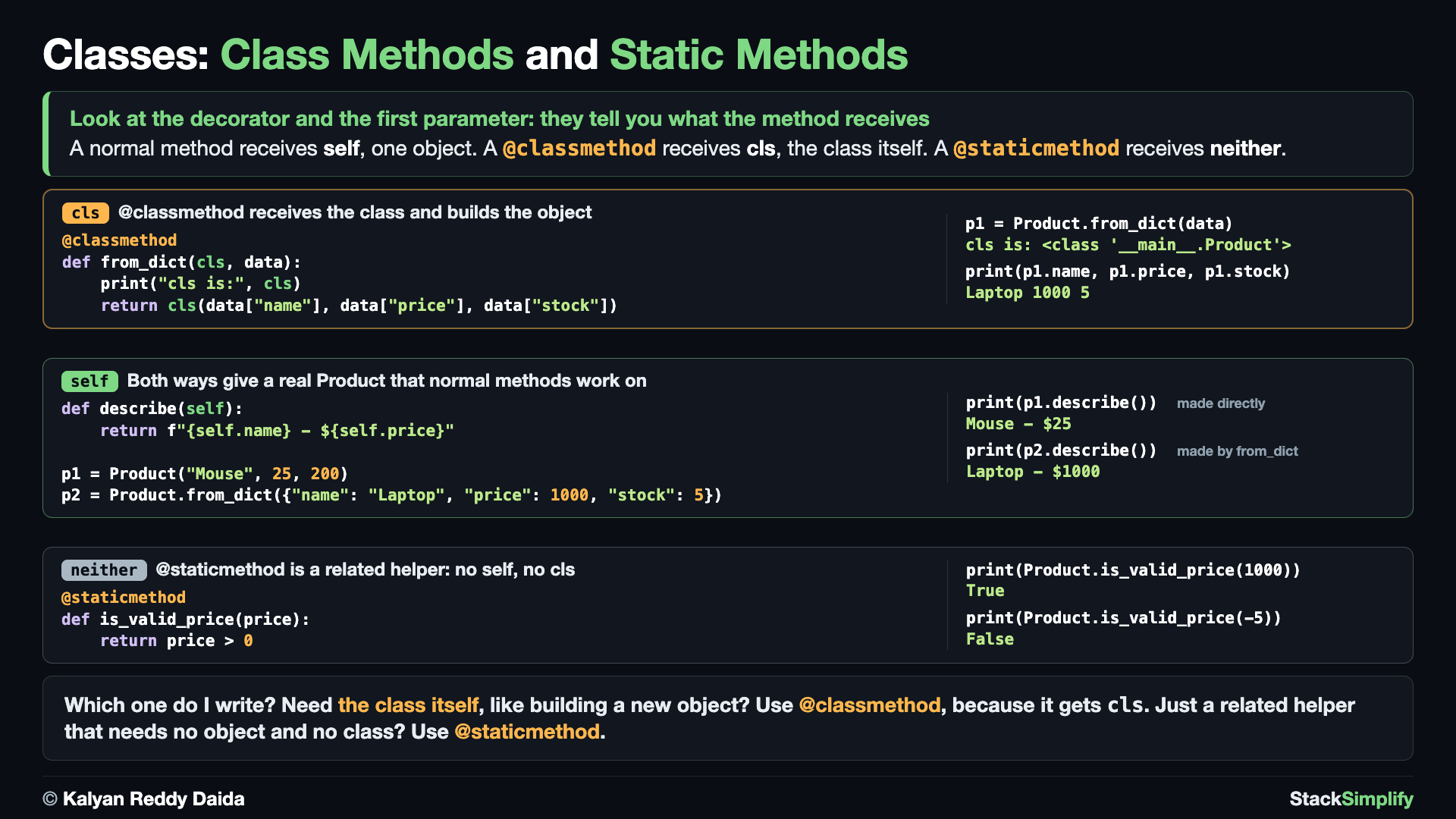
Concept 1: @classmethod receives the class (cls) and builds a new object
A @classmethod receives the CLASS itself as cls, not an object. Inside it, cls IS Product, so cls(...) runs __init__ and hands back a real Product. That makes from_dict an alternate constructor: before it, we unpack each dictionary by hand; after it, one call builds the object, and both ways give the same result.
# Concept-01: A @classmethod receives the CLASS itself (cls), so cls(...) builds and returns a brand-new object, which makes from_dict an alternate constructor
# Question: Our product data arrives as dictionaries, like data1 for the Laptop and data2 for the Mouse. How do we build a Product from each one without unpacking data1["name"], data1["price"] and data1["stock"] by hand every time? (write a @classmethod from_dict: it receives the class as cls and returns cls(...), a real Product, so Product.from_dict(data1) and Product.from_dict(data2) do it in one call)
# Define a class
class Product:
    # Defined a Init method / Function
    def __init__(self, name, price, stock):
        # Instance Attributes
        self.name = name
        self.price = price
        self.stock = stock

    # __str__ method
    def __str__(self):
        return f"{self.name} costs ${self.price} and {self.stock} in stock"

    # from_dict Method with @classmethod Dictionary
    @classmethod
    def from_dict(cls, data):
        return cls(data["name"], data["price"], data["stock"])

# Data in Dictionary Format
data1 = {
    "name": "Laptop",
    "price": 1000,
    "stock": 5
}

data2 = {
    "name": "Mouse",
    "price": 50,
    "stock": 200
}
# Create an object of a class
# Before from_dict method and @classmethod Decorator
p1 = Product(data1["name"], data1["price"], data1["stock"])
print(p1)
p2 = Product(data2["name"], data2["price"], data2["stock"])
print(p2)

# After from_dict method and @classmethod Decorator
p1 = Product.from_dict(data1)
print(p1)
p2 = Product.from_dict(data2)
print(p2)
Laptop costs $1000 and 5 in stock
Mouse costs $50 and 200 in stock
Laptop costs $1000 and 5 in stock
Mouse costs $50 and 200 in stock
Concept 2: @staticmethod takes neither self nor cls
A @staticmethod takes neither self nor cls. It is a related helper that belongs with the class but needs no object, like checking whether a price is valid.
# Concept-02: A @staticmethod takes neither self nor cls, so it is a related helper that lives on the class
# Question: Checking "is this price valid?" needs no product and no class data. Where should such a helper live? (make it a @staticmethod on Product: it belongs with products, but it needs no self and no cls)
# Define a class
class Product:
    # Defined a Init method / Function
    def __init__(self, name, price, stock):
        # Instance Attributes
        self.name = name
        self.price = price
        self.stock = stock

    # __str__ method
    def __str__(self):
        return f"{self.name} costs ${self.price} and {self.stock} in stock"

    # from_dict Method with @classmethod Dictionary
    @classmethod
    def from_dict(cls, data):
        return cls(data["name"], data["price"], data["stock"])

    # Static Method (which doesnt need cls or self)
    @staticmethod
    def is_valid_price(price):
        return price > 0

# Test static method
print(Product.is_valid_price(1000))
print(Product.is_valid_price(-5))
Concept 3: Which one do I write?
Put them together. The helper checks the price first, and only then does the class method build the object, which print() shows through __str__. Need the class itself, like building a new object? Write a @classmethod with cls. Just a related helper that needs no object and no class? Write a @staticmethod.
# Concept-03: classmethod = alternate constructor (uses cls); staticmethod = related helper (uses neither)
# Question: How do we choose between @classmethod and @staticmethod? (need the class itself, like building a new object -> @classmethod with cls; just a related helper that needs no object and no class -> @staticmethod)
# Define a class
class Product:
    # Defined a Init method / Function
    def __init__(self, name, price, stock):
        # Instance Attributes
        self.name = name
        self.price = price
        self.stock = stock

    # __str__ method
    def __str__(self):
        return f"{self.name} costs ${self.price} and {self.stock} in stock"

    # from_dict Method with @classmethod Dictionary
    @classmethod
    def from_dict(cls, data):
        return cls(data["name"], data["price"], data["stock"])

    # Static Method (which doesnt need cls or self)
    @staticmethod
    def is_valid_price(price):
        return price > 0

# Data in Dictionary Format
data = {
    "name": "Laptop",
    "price": 1000,
    "stock": 5
}

# Create an object of a class
# If our price is valid then only i will create the p1 object
if Product.is_valid_price(data["price"]):
    p1 = Product.from_dict(data)
    print("Price is valid, so p1 object friendly message is:", p1)
else:
    print("Price is not valid")
Pages for this step: Concept | Practice | Workshop
Python Files for this step: Concept | Practice | Practice Solutions | Workshop | Workshop Solutions
Practice and Workshop
Every step has a matching practice problem: try it yourself, then expand the solution to check. Every step also has an optional workshop problem (the same idea in a different scenario). The numbers line up with the steps, so if you get stuck on practice-03, re-read Concept Step-03.
| Step | Concept Name | Concept | Practice | Workshop |
|---|---|---|---|---|
| 01 | why objects and first class | concept | practice | workshop |
| 02 | give each object its own data | concept | practice | workshop |
| 03 | class vs instance attributes | concept | practice | workshop |
| 04 | adding behavior with methods | concept | practice | workshop |
| 05 | readable objects str and repr | concept | practice | workshop |
| 06 | class and static methods | concept | practice | workshop |
Open the full Practice page and Workshop page for this section: each problem has its statement, expected output, an optional hint, and an expandable solution.
What You Learned
- Objects exist because loose variables do not keep related data together; a class is the blueprint and an object (instance) is the thing you make from it.
__init__runs automatically when you create an object, andselfIS that object, which is how each one gets its own data (instance attributes).- A class attribute is shared by every object; an instance attribute belongs to one. When both share a name, the instance attribute wins.
- A method is a function inside the class that uses
self; call it with parentheses, becausep1.describewithout()gives you the method object, not the result. Methods can read AND change the object's data. - Dunder methods (double-underscore names Python calls for you) customize your object:
__str__gives a friendly printout and__repr__an exact one;print()uses__str__, and a list of objects uses__repr__. @classmethodreceives the class asclsand works as an alternate constructor (build aProductfrom a dict);@staticmethodtakes neitherselfnorcls, making it a related helper that lives on the class.
Next
That completes the Python foundation. Put everything together in the two milestone projects, Milestone Project 1: CLI Expense Tracker and Milestone Project 2: Persistent Expense Tracker, then continue into the Complete Python Bootcamp (C2). It opens with OOP Advanced (the four pillars, inheritance, polymorphism, and abstraction), picking up exactly where this section leaves off.
Prefer to learn by watching?
The full video course teaches every concept on screen and builds the projects with you, step by step.
Section 12: Virtual Environments and Packaging Next: Milestone Project 1: CLI Expense Tracker